Introduction
This manual provides detailed instructions for the assembly, operation, and maintenance of your Vetroo AL800 Mid Tower ATX PC Computer Case. Please read this manual thoroughly before beginning installation to ensure proper setup and optimal performance.

Figure 1: Vetroo AL800 Mid Tower ATX PC Computer Case (Black)
Коопсуздук маалыматы
- Компоненттерди орнотуудан же алып салуудан мурун ар дайым кубат менен жабдууну розеткадан ажыратыңыз.
- Электростатикалык разряддан улам зыян келтирбөө үчүн компоненттерди этияттык менен кармаңыз. Антистатикалык билек боону колдонууну карап көрүңүз.
- Keep the case and components away from liquids and excessive humidity.
- Ашыкча ысып кетүүнүн алдын алуу үчүн туура желдетүүнү камсыз кылыңыз.
- Корпусту же анын бөлүктөрүн өзгөртүүгө аракет кылбаңыз, анткени бул сиздин кепилдикти жокко чыгарып, коопсуздукка коркунуч келтириши мүмкүн.
Пакеттин мазмуну
Пакетте бардык буюмдар бар экенин текшериңиз:
- Vetroo AL800 Mid Tower ATX PC Computer Case
- Accessory Box (screws, standoffs, cable ties)
- Pre-installed 1x 120mm PWM/ARGB Fan (rear)
- Колдонуучунун Колдонмосу (бул документ)
Негизги өзгөчөлүктөрү
- ARGB LED Strip: Integrated LED lighting and ARGB case fans can be synchronized with compatible motherboards via a 5V 3-pin interface.
- Door Opening Design: Features a 4mm thick tempered glass side panel with a convenient door-opening mechanism for easy access to internal components.
- High Performance Airflow: A mesh front panel and strategically placed dust filters ensure optimal airflow and system cooling.
- Кеңири шайкештик: Supports ATX, M-ATX, and ITX motherboards. Accommodates GPUs up to 340mm in length and CPU coolers up to 165mm in height.
- Суюк муздатуу колдоо: Front panel supports up to a 360mm liquid cooling radiator.
- Күйөрмандардын колдоосу: Supports up to 8 x 120mm fans.
- Жөнөкөй кабелдик башкаруу: Includes two soft silicone cord grommets for organized cable routing.
- Powerful I/O Panel: Features 1x USB 3.2 Type-C port, 2x USB 3.0 ports, and a combined microphone/headphone jack.
Орнотуу жана орнотуу
1. Жалпы даярдык
- Корпусту тегиз, туруктуу бетке коюңуз.
- Open the tempered glass side panel by gently pulling it open. It is hinged for easy access.
- Remove the tempered glass panel if necessary for easier installation by lifting it off its hinges once open.

Figure 2: Tempered Glass Door Opening Design
2. Motherboard орнотуу
- Киргизүү/чыгаруу калканчын (эгер бар болсо) корпустун арткы тешигине орнотуңуз.
- Align your ATX, M-ATX, or ITX motherboard with the pre-installed standoffs.
- Secure the motherboard using the provided screws from the accessory box.
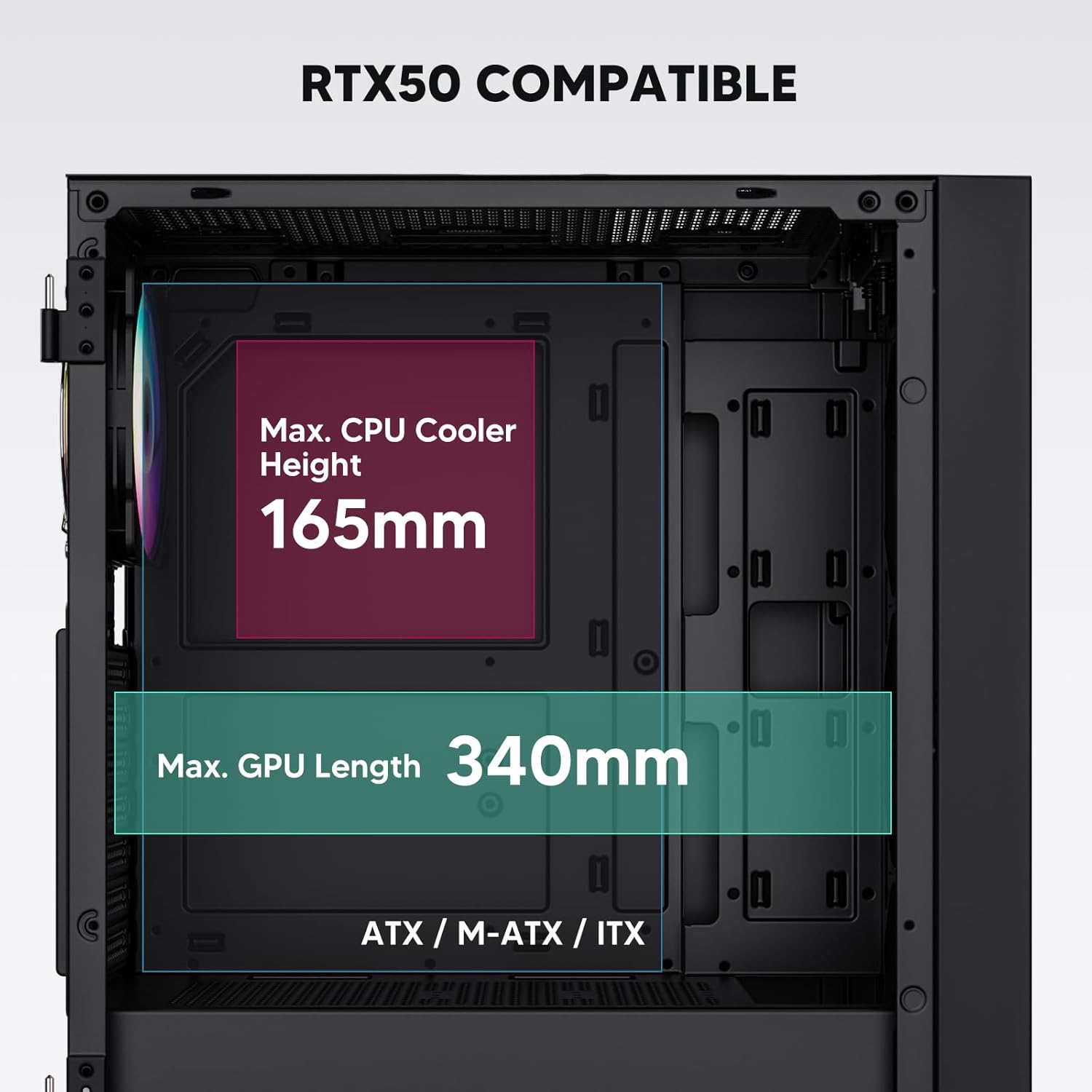
Figure 3: Motherboard and Component Clearance (Max CPU Cooler Height 165mm, Max GPU Length 340mm)
3. Storage Device Installation (HDD/SSD)
- Locate the dedicated mounting points for SSDs and HDDs.
- Install 2.5" SSDs onto the SSD trays or mounting brackets.
- Install 3.5" HDDs into the drive cage located at the bottom of the case.
- Secure all drives with the appropriate screws.

Figure 4: Internal Layout with Drive Bay Locations (SSD, HDD, Power Supply)
4. Электр энергиясы менен жабдууну орнотуу
- Mount your power supply unit (PSU) in the dedicated compartment at the bottom rear of the case.
- Ensure the PSU fan faces downwards (if the case has a bottom vent) or upwards, depending on your cooling preference.
- Secure the PSU with screws from the rear of the case. The case supports PSUs up to 200mm in length.
5. Кеңейтүү картасын (GPU) орнотуу
- Корпустун арткы жагынан керектүү PCI-E уячасынын капкактарын алып салыңыз.
- Insert your graphics card or other expansion cards into the motherboard's PCI-E slots.
- Карталарды бурамалар менен бекитиңиз. Иш 340 мм узундуктагы GPUларды колдойт.
6. Муздатуу системасын орнотуу (вентиляторлор/радиаторлор)
- The case comes with one pre-installed 120mm PWM/ARGB fan at the rear.
- Additional fans (120mm or 140mm) can be installed at the front, top, and bottom.
- Liquid cooling radiators up to 360mm can be installed at the front, and up to 240mm at the top.
- Refer to the diagram for supported fan and radiator configurations.

Figure 5: Fan and Liquid Radiator Support Diagram
7. Front Panel Connections
- Connect the front panel cables (Power, Reset, USB 3.0, USB Type-C, HD Audio) to the corresponding headers on your motherboard.
- Consult your motherboard manual for the exact pin layout of these headers.
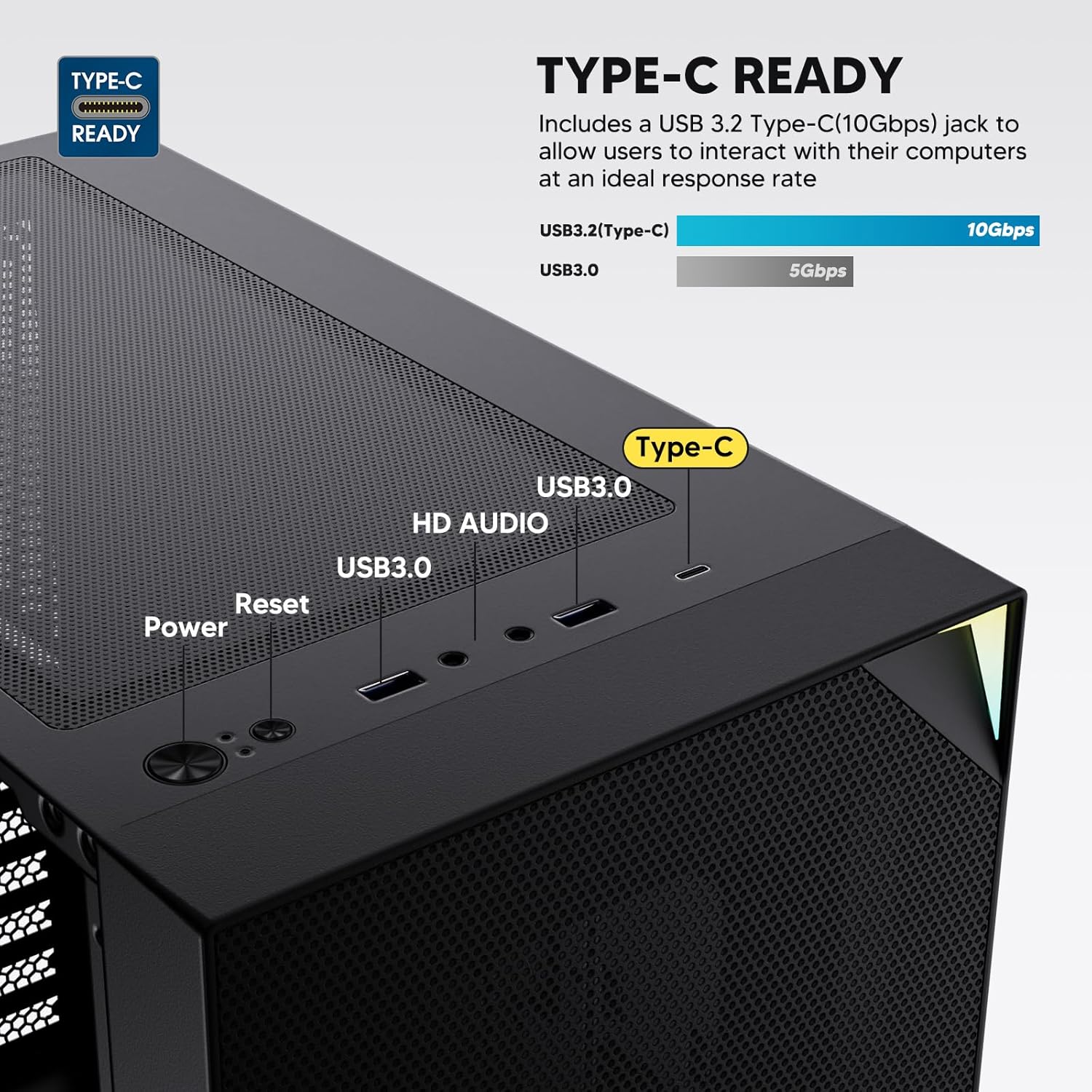
Figure 6: Top I/O Panel Connections
8. ARGB and PWM Connections
- The pre-installed fan and ARGB LED strip require connection to your motherboard.
- Connect the 4-pin PWM connector from the fan to a compatible fan header on your motherboard for speed control.
- Connect the 3-pin ARGB connector from the fan and LED strip to a 5V 3-pin ARGB header on your motherboard for lighting synchronization. 12V RGB колонкасына туташтырбаңыз, анткени бул светодиоддорго зыян келтирет.
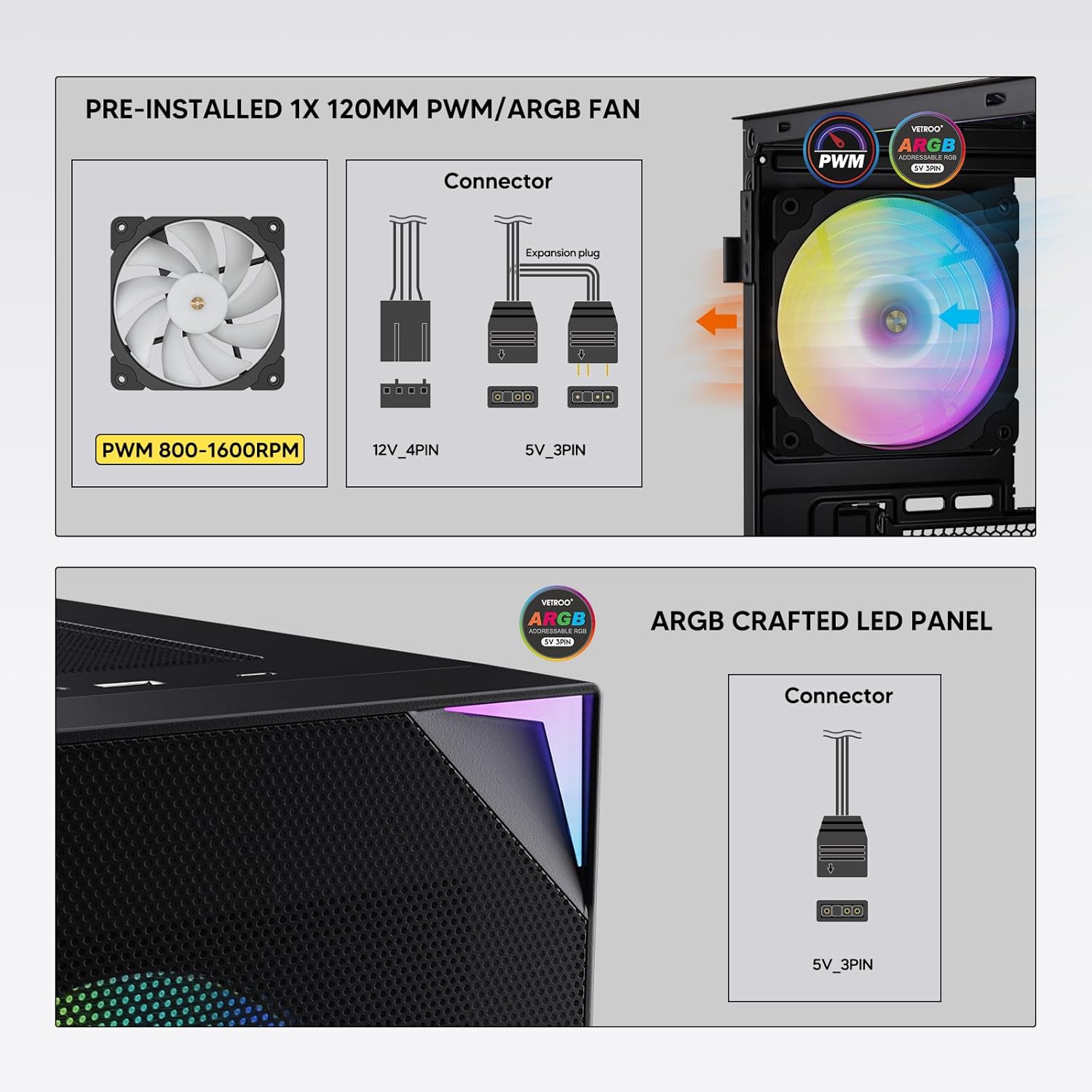
Figure 7: PWM and ARGB Connector Details
9. Кабелдик башкаруу
- Utilize the cable routing cutouts and tie-down points behind the motherboard tray to organize cables.
- The soft silicone grommets help protect cables and provide a clean look.
- Proper cable management improves airflow and aesthetics.
Операция
1. Баштапкы күйгүзүү
- After all components are securely installed and cables connected, close the tempered glass side panel.
- Мониторуңузду, клавиатураңызды, чычканыңызды жана кубат кабелиңизди компьютерге туташтырыңыз.
- Flip the power switch on your PSU to the 'ON' position.
- Press the power button on the top I/O panel of the case to start your system.
2. ARGB жарыкты башкаруу
- If connected to a compatible motherboard's 5V 3-pin ARGB header, the lighting of the pre-installed fan and LED strip can be controlled via your motherboard's RGB software (e.g., ASUS Aura Sync, MSI Mystic Light Sync, Gigabyte RGB Fusion, ASRock Polychrome Sync).
- Refer to your motherboard's manual for specific instructions on using its ARGB control software.
3. Аба агымын башкаруу
- The mesh front panel is designed for optimal air intake.
- Ensure that intake fans (typically front and bottom) and exhaust fans (typically rear and top) are configured to create positive or neutral air pressure for efficient cooling and dust prevention.

Figure 8: Airflow Diagram with Dust Filters
Техникалык тейлөө
1. Чаң чыпкасын тазалоо
- The case is equipped with dust filters on the top and bottom panels.
- Regularly check and clean these filters to maintain optimal airflow and prevent dust buildup inside the system.
- Gently remove the magnetic dust filters and clean them with compressed air or by rinsing with water (ensure they are completely dry before re-installation).
2. Tempered Glass Panel Care
- Clean the tempered glass panel with a soft, lint-free cloth and a non-abrasive glass cleaner.
- Avoid harsh chemicals or abrasive materials that could scratch or damage the glass.
Проблемаларды чечүү
- Система күйбөй жатат:
- Кубат кабелинин кубат булагына жана розеткага бекем туташтырылганын текшериңиз.
- PSU которгучу 'ON' абалында экенин текшериңиз.
- Алдыңкы панелдин кубат баскычынын кабели эне платасынын башына туура туташтырылганын текшериңиз.
- Confirm all power cables (24-pin ATX, CPU, GPU) are properly seated in the motherboard and components.
- Күйөрмандар айланбайт / ARGB күйбөйт:
- Check that the fan's PWM connector is securely plugged into a motherboard fan header.
- Verify the ARGB 3-pin connector is correctly attached to a 5V 3-pin ARGB header on the motherboard (not 12V RGB).
- Энелик платаңыздын ARGB программасы туура орнотулганын жана конфигурацияланганын текшериңиз.
- USB порттору иштебейт:
- Confirm the USB 3.0 and USB Type-C front panel cables are correctly connected to their respective motherboard headers.
- Туура колонкалардын жайгашкан жери үчүн энелик платаңыздын колдонмосун текшериңиз.
- For other component-specific issues, refer to the instruction manuals for your motherboard, CPU, GPU, and other installed hardware.
Техникалык шарттар
| Бренд | Vetroo |
| Модель аты | AL800 |
| Элемент моделинин номери | VT-CASE-AL800-BK (FBA) |
| Иштин түрү | Ара Tower |
| Motherboard шайкештиги | ATX, M-ATX, ITX |
| Түс | Кара |
| Материал | Металл, чыңдалган айнек |
| Элемент Салмагы | 12.37 фунт (болжол менен 5.61 кг) |
| Продукциянын өлчөмдөрү (LxWxH) | 18.4 x 8.6 x 17.9 дюйм (болжол менен 46.7 x 21.8 x 45.5 см) |
| Максималдуу GPU узундугу | 340 мм |
| CPU муздаткычтын максималдуу бийиктиги | 165 мм |
| Максималдуу PSU узундугу | 200 мм |
| Алдыңкы I / O порттору | 1x USB 3.2 Type-C, 2x USB 3.0, HD Audio (Mic/Headphone), Power, Reset |
| Күйөрмандардын колдоосу | Front: 3x 120mm or 2x 140mm; Top: 2x 120mm or 2x 140mm; Rear: 1x 120mm; Bottom: 2x 120mm |
| Радиатор колдоо | Front: 120/140/240/280/360mm; Top: 120/140/240mm; Rear: 120mm |
| Алдын ала орнотулган күйөрмандар | 1x 120mm PWM/ARGB (Rear) |
Кепилдик жана колдоо
For warranty information, technical support, or to inquire about replacement parts, please visit the official Vetroo webсайтка же түздөн-түз кардарларды тейлөөгө кайрылыңыз. Кепилдик дооматтар үчүн сатып алганыңыздын далилин сактаңыз.
Official Vetroo Store: Vetroo Amazon Store
Тектеш документтер - AL800
 |
Vetroo AL800 PC Case User Manual User manual for the Vetroo AL800 PC case, detailing installation steps for components like the motherboard, power supply, fans, liquid radiators, HDDs, SSDs, and graphics cards. Includes I/O panel connection guide and accessory list. |
 |
Vetroo AL800 Full Tower Gaming Case Instruction Manual Comprehensive instruction manual for the Vetroo AL800 Full Tower Gaming PC Case. Learn how to install your power supply, motherboard, storage drives (SSD/HDD), graphics card, and understand fan and radiator support options. Includes accessory list and detailed step-by-step guidance. |
 |
Vetroo MESH-7C AL SERIES PC Case User Manual Vetroo MESH-7C AL SERIES PC корпусу үчүн деталдаштырылган колдонуучу нускама, спецификацияларды, өлчөмдөрдү, аксессуарларды жана компьютериңизди куруу үчүн жабдык орнотуу кадамдарын камтыйт. |
 |
Vetroo M05 M-ATX PC Case Instruction Manual Detailed instruction manual for assembling the Vetroo M05 M-ATX PC Case, covering component installation, accessory usage, and I/O panel connections. |
 |
Vetroo AL900 ATX PC Case User Manual User manual for the Vetroo AL900 ATX PC Gaming Case, detailing assembly, installation of components like the power supply, and I/O panel connections. |
 |
Vetroo U6 CPU Cooler Колдонуучунун колдонмосу жана Орнотуу колдонмосу Intel LGA 1700/1200/115X жана AMD AM5/AM4/AM3(+)/AM2(+)/FM2(+)/FM1 розеткалары менен шайкештикти камтыган Vetroo U6 CPU Cooler үчүн толук колдонуучу колдонмосу жана орнотуу көрсөтмөсү. Бөлүктөр тизмеси жана этап-этабы менен монтаждоо көрсөтмөлөрүн камтыйт. |