1. Киришүү
The VIOFO A229 Pro 3 Channel Dash Cam is an advanced vehicle recording system designed to capture high-quality video footage from the front, interior, and rear of your vehicle. Equipped with dual Sony STARVIS 2 image sensors (IMX678 and IMX675), it provides 4K resolution for the front camera, 2K for the rear, and 1080P for the cabin camera, ensuring comprehensive coverage and clear details day and night.
Key features include HDR for all three channels, enhanced night vision, hands-free voice control, 5GHz Wi-Fi connectivity, precise GPS logging, and multiple parking modes for 24/7 protection. This manual provides detailed instructions for setting up, operating, maintaining, and troubleshooting your A229 Pro dash cam.

Figure 1.1: VIOFO A229 Pro 3 Channel Dash Cam System Overview.
2. Пакеттин мазмуну
Төмөндө тизмеленген нерселердин баары пакетиңизге камтылганын текшериңиз:
- 1x VIOFO A229 Pro Dash Camera (Front Camera)
- 1x Арткы камера
- 1x Interior Camera
- 1x CPL (Circular Polarizing Lens)
- 1x Car Charger (4m cable)
- 1x Rear Camera Cable (6m)
- 1x Interior Camera Cable (1m)
- 1x Static (Windshield) Sticker
- 1x Rear Mount
- 1x Trim Removal Tool
- 1x GPS Module with sticker
- 1x Түрү-С маалымат кабели
- Запастык жабышчаак төшөмөлөр
- User Manual

Figure 2.1: VIOFO A229 Pro Packing List.
3. Продукциянын компоненттери
The VIOFO A229 Pro system consists of a main front dash camera unit, a rear camera, and an interior cabin camera. Each component is designed for optimal performance and integration within your vehicle.
3.1 Front Dash Camera
The main unit houses the front-facing camera with a Sony STARVIS 2 IMX678 sensor, a 2.4-inch HD screen, control buttons, and ports for power, GPS, and camera connections. It features a rotatable lens for flexible positioning.
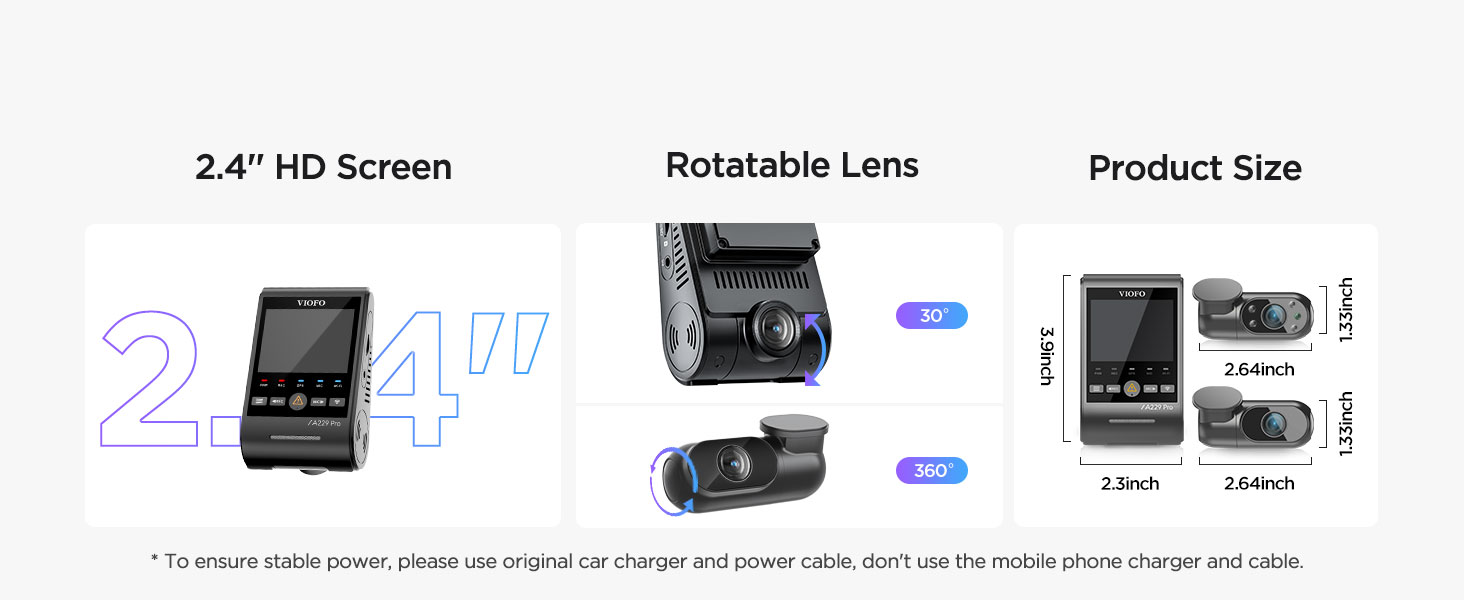
Figure 3.1: Front Dash Camera Features and Dimensions.
3.2 Арткы камера
The rear camera captures 2K resolution footage using a Sony STARVIS 2 IMX675 sensor, providing clear recordings of the road behind your vehicle. It connects to the main unit via the 6-meter rear cable.

Figure 3.2: Rear Camera 2K HDR Recording Capability.
3.3 Interior Camera
The interior camera records 1080P footage of the cabin, utilizing a Sony STARVIS sensor and HDR technology. It features four built-in infrared LED lights that activate in low-light conditions, ensuring clear black-and-white images even in complete darkness.
Figure 3.3: Interior Camera with Infrared Night Vision.
4. Орнотуу жана орнотуу
Туура орнотуу оптималдуу аткаруу жана коопсуздук үчүн өтө маанилүү болуп саналат. Бул кадамдарды кылдаттык менен аткарыңыз.
4.1 Preparing the MicroSD Card
The A229 Pro does not include a microSD card. A high endurance U1/U3 speed microSD card (64GB, 128GB, 256GB, or 512GB recommended) is required. Before first use, format the microSD card within the dash cam's settings to ensure compatibility and optimal performance.
4.2 Mounting the Cameras
- Алдыңкы камера: Clean the windshield area where the front camera will be mounted. Apply the static windshield sticker first, then attach the front camera's mount to the sticker. Position it centrally, ensuring it does not obstruct your view.
- Арткы камера: Арткы камераны арткы маңдайкы айнекке орнотуп, тазалыгын камсыз кылыңыз view. Use the provided static sticker and mount.
- Ички камера: Attach the interior camera to the main front unit or a suitable location within the cabin that provides a clear view ички иштер.
4.3 Зымдар жана электр туташтыруу
Connect the rear and interior cameras to the main front unit using their respective cables. Route the cables neatly along the vehicle's headliner and A-pillars using the trim removal tool to tuck them away. Connect the car charger to the main unit's Type-C power input and plug it into your vehicle's 12V power outlet.
Маанилүү: Always use the original VIOFO car charger and power cable to ensure stable power and prevent issues. Do not use mobile phone chargers or generic USB cables.
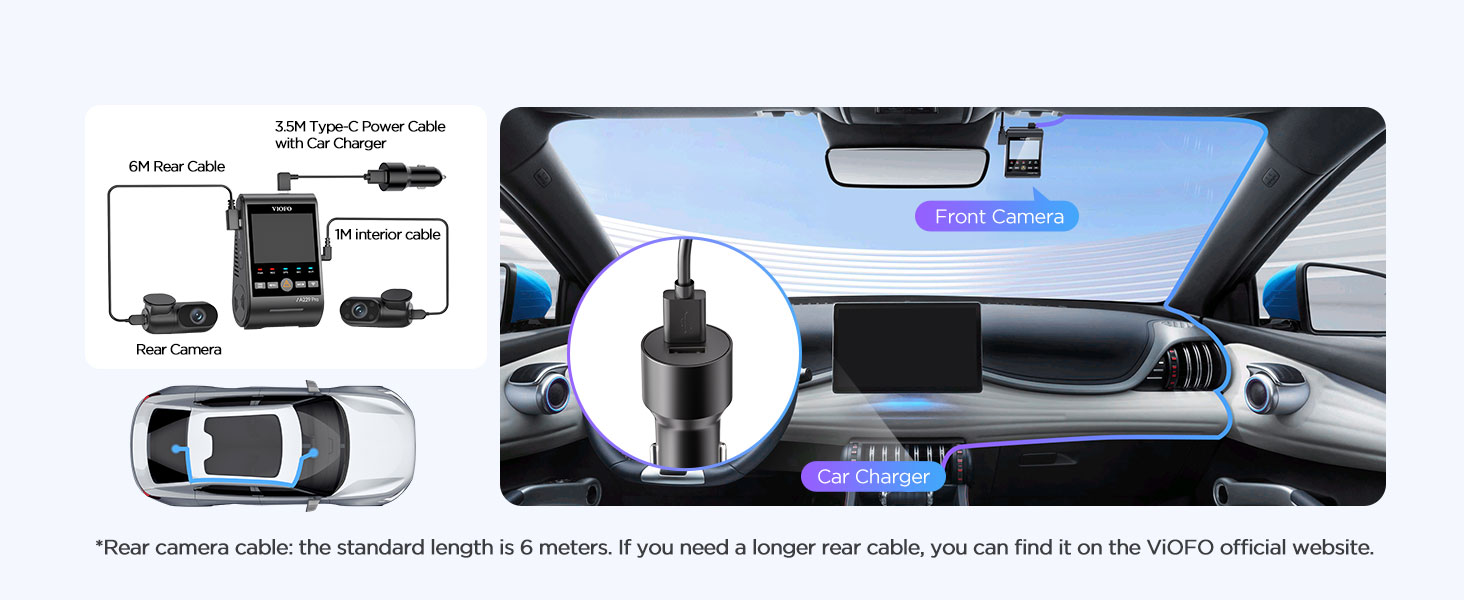
Figure 4.1: Dash Cam Wiring Diagram.
4.4 GPS модулун орнотуу
The GPS module is integrated into the front camera mount. Ensure the mount is securely attached to the windshield for optimal GPS signal reception. The GPS module provides vehicle location, speed, and timestamp data for your recordings.
5. Иштөө нускамалары
This section details the various functions and modes of your VIOFO A229 Pro dash cam.
5.1 Негизги жаздыруу
Once powered on, the dash cam will automatically begin recording. The front, rear, and interior cameras will record simultaneously. The recording indicator light on the main unit will confirm active recording.

Figure 5.1: 3-Channel Recording in Action.
5.2 Voice Control & Notification
The A229 Pro supports hands-free voice commands for common operations. This allows you to manage the dash cam without diverting your attention from the road. The device also provides clear voice notifications for settings adjustments and memory card issues.
- Example Commands:
Тектеш документтер - A229 Pro 3CH

VIOFO A229 Pro Dash Cam User Manual
Comprehensive user manual for the VIOFO A229 Pro dash cam, covering installation, operation, settings, and features.
VIOFO A119 MINI 2 Колдонуучунун колдонмосу
Comprehensive user manual for the VIOFO A119 MINI 2 dash cam, detailing installation, operation, system settings, and features for optimal use.
VIOFO A229 Dash Cam Gebruiksaanwijzing en Installatiegids
Gedetailleerde gebruiks- en installatiehandleiding voor de VIOFO A229 dashcam, inclusief functies, instellingen, aansluitingen en klantenservice-informatie.
VIOFO VS1 Dash Камера Колдонуучунун колдонмосу жана Орнотуу боюнча колдонмо
VIOFO VS1 сызык камерасын орнотуу, жөндөө жана колдонуу боюнча комплекстүү колдонмо, анын ичинде VIOFO APP жана HK4 аппараттык комплектинин чоо-жайы.
VIOFO A129 Duo Dash Cam User Manual and Guide
Comprehensive user manual for the VIOFO A129 Duo dual-channel dash cam. Learn about installation, operation, system settings, features like GPS, Wi-Fi, and parking mode.
VIOFO A129 Plus Duo User Manual - Installation, Operation, and Settings Guide
Comprehensive user manual for the VIOFO A129 Plus Duo dash cam. Learn how to install, operate, and configure your dual-channel dash cam, covering features like Wi-Fi control, parking mode, and firmware updates. Visit VIOFO support for assistance.