1. Киришүү
Thank you for choosing the Defender Enjoy S200 Portable Bluetooth Speaker. This manual provides essential information for setting up, operating, and maintaining your speaker to ensure optimal performance and longevity. Please read this manual thoroughly before use.
The Defender Enjoy S200 is a versatile portable speaker featuring Bluetooth 5.3 connectivity, True Wireless Stereo (TWS) pairing, an integrated FM radio, and MP3 playback capabilities via USB flash drive or microSD card. It also includes an LED light and supports hands-free calling. Designed for portability, it offers up to 9 hours of playback on a single charge and convenient USB Type-C charging.
2. Продукт бүтүп калдыview
2.1 Негизги өзгөчөлүктөрү
- Bluetooth 5.3: For stable and efficient wireless audio streaming.
- Чыныгы зымсыз стерео (TWS): Connect two Enjoy S200 speakers for a stereo sound experience.
- Бир нече ойнотуу режимдери: Bluetooth, FM Radio, USB Flash Drive, MicroSD Card (up to 32GB).
- Интегралдык LED жарык: Provides visual ambiance.
- Hands Free Чалуу: Телефон чалуулары үчүн орнотулган микрофон.
- Батареянын узак иштөө мөөнөтү: Up to 9 hours of continuous music playback.
- USB Type-C заряддоо: Заманбап жана ыңгайлуу заряддоо порту.
- Портативдик дизайн: Compact and lightweight with a carrying strap.
2.2 Пакеттин мазмуну
- Defender Enjoy S200 Portable Bluetooth Speaker
- C түрүндөгү кубаттоочу кабель
- Quick Start Guide
- Ташуу боосу

Image: The Defender Enjoy S200 Portable Bluetooth Speaker, showcasing its compact design and front grille with an illuminated LED ring.

Image: An infographic highlighting key features such as multi-colored LED lighting, True Wireless Stereo (TWS) pairing, Bluetooth 5.3, MP3 player, FM receiver, and hands-free calling.
3. Орнотуу
3.1 Динамикти заряддоо
- Locate the Type-C charging port on the back of the speaker.
- Connect the provided Type-C charging cable to the speaker and the other end to a USB power adapter (not included) or a computer's USB port.
- LED индикатору кубаттоо абалын көрсөтөт. Толук кубаттоо, адатта, болжол менен 3-4 саатты талап кылат.
- Толук заряддалгандан кийин кабелди ажыратыңыз.
3.2 Күйгүзүү/өчүрүү
- To power on, slide the ON/OFF switch located on the back of the speaker to the 'ON' position.
- To power off, slide the ON/OFF switch to the 'OFF' position.
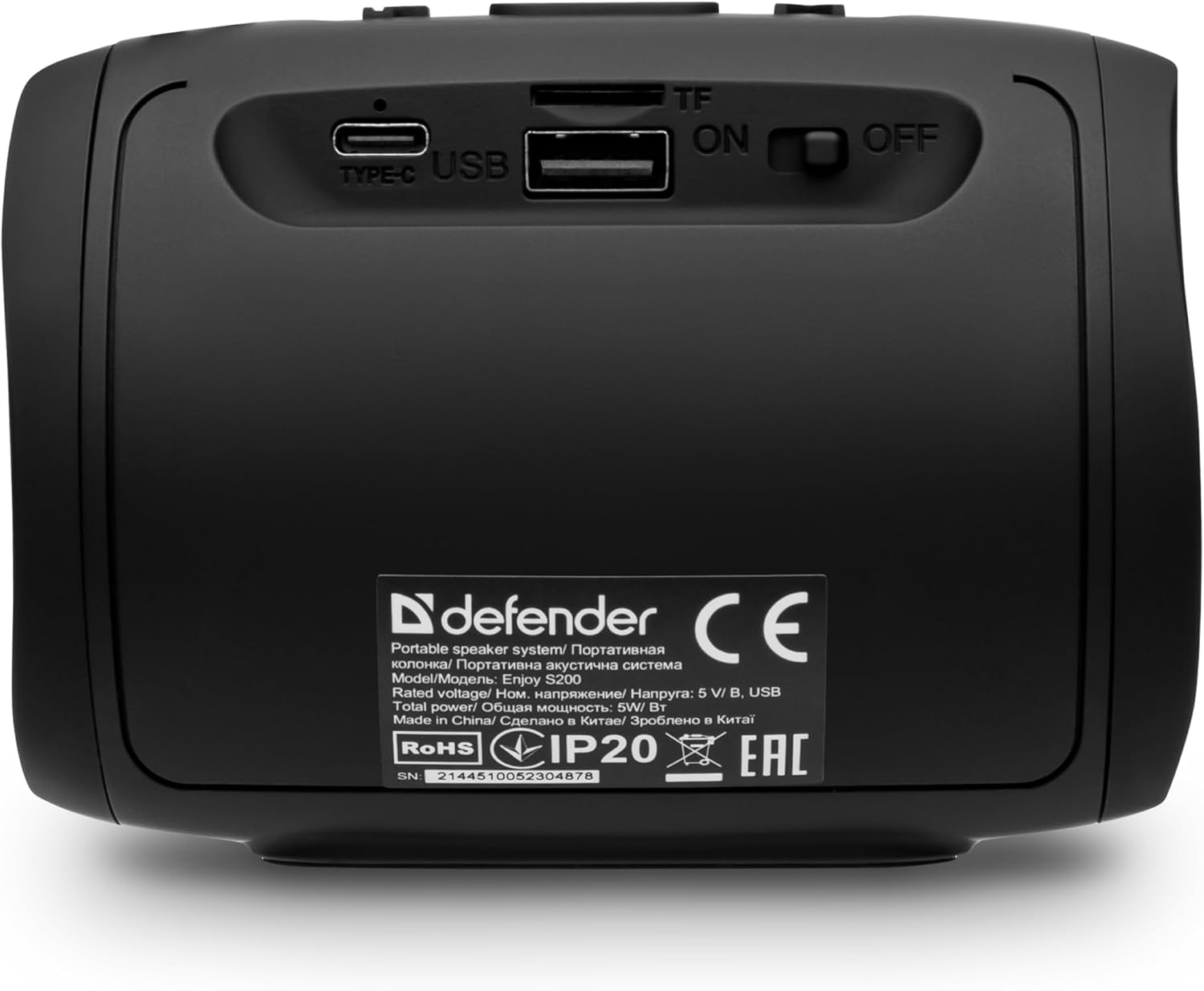
Сүрөт: Арткы view of the Defender Enjoy S200 speaker, showing the Type-C charging port, USB port, TF (microSD) card slot, and the ON/OFF power switch.
3.3 Bluetooth жупташтыруу
- Динамик күйгүзүлгөнүн жана Bluetooth жупташтыруу режиминде экенин текшериңиз (жаркылдаган LED менен көрсөтүлгөн).
- Түзмөгүңүздө (смартфон, планшет ж.б.) Bluetooth иштетиңиз жана жеткиликтүү түзмөктөрдү издеңиз.
- Select "Defender Enjoy S200" from the list of devices.
- Once paired, the speaker will emit a confirmation sound, and the LED will stop flashing.
3.4 Чыныгы зымсыз стерео (TWS) жупташтыруу
To pair two Defender Enjoy S200 speakers for stereo sound:
- Эки динамик тең күйгүзүлгөнүн жана эч кандай Bluetooth түзмөгүнө туташкан эмес экенин текшериңиз.
- On one speaker (this will be the primary speaker), press and hold the TWS button (often indicated by a double-arrow icon) until you hear a pairing tone.
- The two speakers will automatically search and connect to each other. A confirmation tone will sound once connected.
- Эми, түзмөгүңүздү 3.3-бөлүмдө сүрөттөлгөндөй Bluetooth аркылуу негизги динамикке туташтырыңыз. Аудио эки динамик аркылуу тең стерео режиминде ойнотулат.

Image: A visual representation of two Defender Enjoy S200 speakers pairing wirelessly to create a True Wireless Stereo system, alongside icons for Bluetooth 5.3, MP3 player, FM receiver, and hands-free calling.
4. Иштөө нускамалары
4.1 Button Functions (Refer to top panel controls)
- Кубат баскычы: Long press to power on/off. Short press to play/pause in music mode, or answer/end calls.
- Үнүн жогорулатуу (+): Short press to increase volume. Long press for next track/station.
- Үнүн төмөндөтүү (-): Short press to decrease volume. Long press for previous track/station.
- Режим (M) баскычы: Short press to switch between Bluetooth, FM Radio, USB, and MicroSD modes.
- LED жарык баскычы: Short press to cycle through LED light modes or turn off the LED.
4.2 Bluetooth ойнотуу
After successful Bluetooth pairing (Section 3.3), open your music application on your device and begin playback. Use the speaker's volume buttons or your device's volume controls to adjust the audio level.
4.3 FM радио режими
- Press the 'M' (Mode) button until you hear the FM radio prompt.
- Жеткиликтүү FM станцияларын автоматтык түрдө сканерлөө жана сактоо үчүн "Ойнотуу/Тынытуу" баскычын көпкө басып туруңуз.
- Use the Volume Up (+) and Volume Down (-) buttons (long press) to navigate between saved stations.
4.4 USB/MicroSD Playback
- Insert a USB flash drive or a microSD card (up to 32GB) containing MP3 audio fileдинамиктин арткы жагындагы тиешелүү портко киргизиңиз.
- Press the 'M' (Mode) button until the speaker automatically switches to USB or MicroSD mode and begins playback.
- Use the speaker's control buttons for play/pause, next track, and previous track.
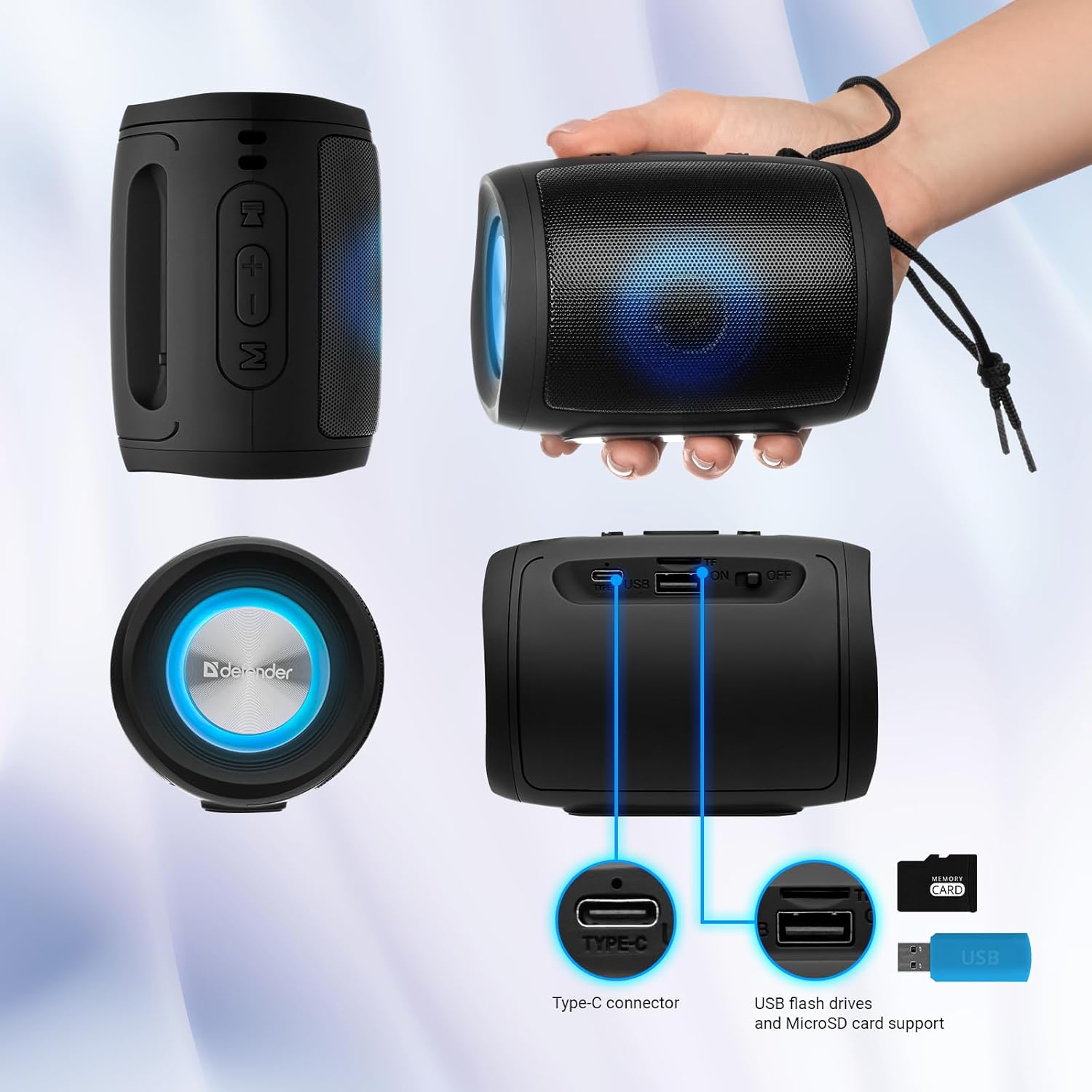
Image: A detailed diagram illustrating the Type-C connector, USB flash drive port, and MicroSD card slot on the Defender Enjoy S200 speaker.
4.5 Hands-Free чалуу
When connected to your smartphone via Bluetooth, the speaker's built-in microphone allows for hands-free calls.
- Чакырууга жооп берүү: Play/Pause баскычын кыска басыңыз.
- Чакырууну аяктоо: Play/Pause баскычын кыска басыңыз.
- Чакырууну четке кагуу: Play/Pause баскычын көпкө басыңыз.
5. Техникалык тейлөө
- Тазалоо: Динамиктин бетин тазалоо үчүн жумшак, кургак чүпүрөктү колдонуңуз. Абразивдүү тазалагычтарды же эриткичтерди колдонбоңуз.
- Сактагыч: Динамикти түз күн нурунан жана өтө температурадан алыс салкын, кургак жерде сактаңыз.
- Суу каршылык: The speaker has an IP20 rating, meaning it is protected against solid objects larger than 12.5mm but has no protection against water. Avoid exposure to rain, splashes, or immersion in water.
- Батареяга кам көрүү: Батареянын иштөө мөөнөтүн узартуу үчүн, динамикти биринчи жолу колдонуудан мурун толук заряддаңыз жана үзгүлтүксүз колдонулбаса, жок дегенде үч айда бир жолу заряддаңыз.
6. Кыйынчылыктарды
- Кубат жок: Ensure the speaker is charged. Connect the Type-C cable and allow it to charge for a few minutes before attempting to power on again.
- Үн жок: Check the volume levels on both the speaker and your connected device. Ensure the speaker is in the correct mode (Bluetooth, FM, USB, MicroSD).
- Bluetooth жупташтыруу маселелери: Ensure the speaker is in pairing mode. Turn off Bluetooth on your device and turn it back on. Try unpairing and re-pairing the speaker. Move closer to the speaker to ensure you are within the 10-meter range.
- FM Radio Reception Poor: Ensure you are in an area with good signal. The charging cable can sometimes act as an antenna; try connecting it for improved reception.
- USB/MicroSD Not Playing: аудиону камсыз кылуу files are in a compatible format (e.g., MP3). Check that the USB drive or microSD card is inserted correctly and is not corrupted.
7. Техникалык шарттар
| Модель аты | S200ден ырахат алыңыз |
| Элемент моделинин номери | 65200 |
| Бренд | коргоочу |
| Байланыш технологиясы | Bluetooth 5.3, USB |
| Зымсыз байланыш технологиясы | Bluetooth, Radio Frequency |
| Динамик түрү | Мультимедиа |
| Динамик өлчөмү | 2 дюйм |
| Power Output | 5 Ватт |
| Аудио чыгаруу режими | Стерео |
| Power Source | Батарея менен иштейт (1 литий-иондук батарейка камтылган) |
| Өзгөчөлүктөр | Integrated Microphone, USB Port, Portable Bluetooth, LED Light, FM Radio, MicroSD Card Support, TWS |
| Продукциянын өлчөмдөрү (L x W x Y) | 8 x 11 x 8 см |
| Салмагы | 330 грамм |
| Максималдуу диапазон | 10 метр |
| IP рейтинги | IP20 |
8. Кепилдик жана колдоо
8.1 Кепилдик маалыматы
Кепилдиктин конкреттүү чоо-жайы адатта сиздин сатып алуу документтериңизде же өндүрүүчүнүн расмий өкүлүндө берилет website. Please refer to these resources for information regarding warranty coverage and duration.
8.2 Кардарларды колдоо
For technical assistance, troubleshooting beyond this manual, or inquiries about your Defender Enjoy S200 speaker, please contact Defender Global customer support. Contact information can usually be found on the product packaging, the manufacturer's webсайты же сатып алуу дүмүрчөгү.


