1. Киришүү
This manual provides detailed instructions for the safe and effective operation of your Owon OWM5500 Digital Smart Anemometer. This device is a versatile handheld instrument designed for precise measurement of various environmental parameters, including wind speed, air volume, temperature, and humidity. Please read this manual thoroughly before using the device to ensure optimal performance and longevity.

Figure 1: Owon OWM5500 Digital Smart Anemometer (Front View)
This image displays the front of the Owon OWM5500 anemometer, highlighting its digital screen which shows wind speed, maximum, average, and minimum readings, along with battery status. Below the screen are navigation and function buttons, and the wind impeller is visible at the top.
2. Коопсуздук маалыматы
To ensure safe operation and to prevent damage to the device, please observe the following safety precautions:
- Do not attempt to open the device casing or replace the battery without first powering off the unit.
- Аппаратты суудан жана ашыкча нымдан алыс кармаңыз.
- Аппаратты экстремалдык температурага же түз күн нуруна узак убакытка калтыруудан сактаңыз.
- Handle the wind impeller carefully to prevent damage.
- Белгиленген кубаттоо кабелин жана кубат булагын гана колдонуңуз.
- Колдонулбай турган учурда түзмөктү таза, кургак чөйрөдө сактаңыз.

Figure 2: Owon OWM5500 Digital Smart Anemometer (Back View)
This image shows the back of the Owon OWM5500 anemometer. A warning label is visible, advising to power off the device before replacing the battery or opening the case. The battery compartment and regulatory marks (UKCA, CE) are also displayed.
3. Пакеттин мазмуну
Таңгактан чыгаргандан кийин, төмөндө көрсөтүлгөн нерселердин бардыгы бар экенин жана жакшы абалда экендигин текшериңиз:
- Owon OWM5500 Anemometer
- User Manual
- USB Type-C кубаттоочу кабель
- Lanyard
- Таңгактоочу куту
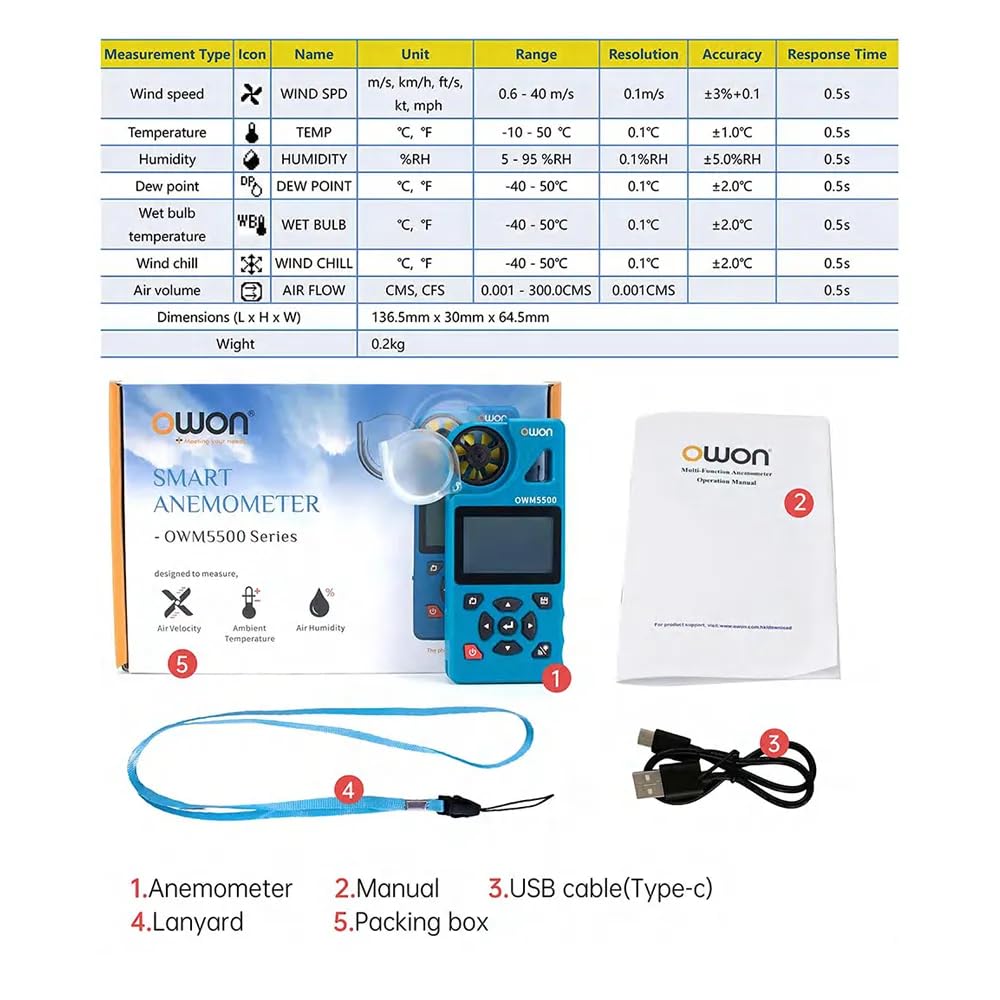
3-сүрөт: Пакеттин мазмуну
This image illustrates the items included in the Owon OWM5500 package. It shows the anemometer itself, a printed user manual, a USB Type-C charging cable, and a lanyard, all laid out next to the product's packaging.
4. Продукт бүтүп калдыview жана өзгөчөлүктөрү
The Owon OWM5500 is designed for comprehensive environmental monitoring with a range of advanced features:
- Multi-Measurement Capability: Measures 7 types of parameters: wind speed, air volume, temperature, humidity, dew point, wet bulb temperature, and wind chill. Supports Beaufort scale wind rating.
- Маалымат визуализациясы: Features a charts display mode for analyzing trends and performing statistical analysis on collected data.
- Extensive Data Storage: Built-in memory for 8000 sets of data, supporting both automatic and manual storage, with a one-click data clearing function.
- Энергияны башкаруу: Multi-gear setting for automatic power-off to conserve energy.
- Кайра заряддалуучу батарея: Integrated lithium battery, rechargeable via USB Type-C interface for extended use.
- Акылдуу туташуу: Supports remote control via a dedicated mobile application (APP).
- Компьютердик программалык камсыздоону колдоо: Data graph mode allows for exporting data for further analysis using PC software.
- High Precision Design: Features a 7-blade airfoil fan for accurate data collection and a replaceable airfoil wheel for long-term accuracy.
- Колдонуучуга ыңгайлуу дисплей: Allows for simultaneous display of up to three measurement values on one screen for quick data interpretation.
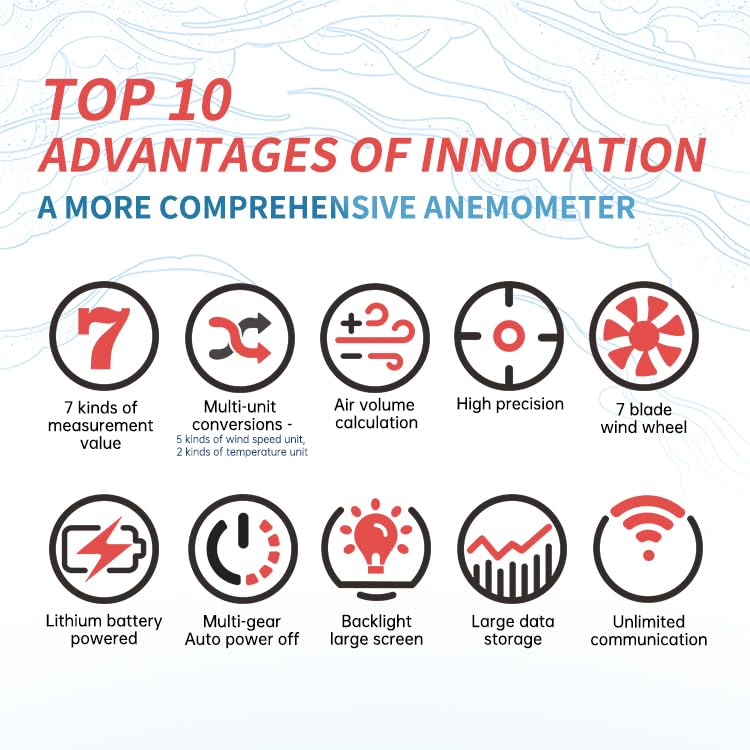
4-сүрөт: Негизги өзгөчөлүктөр бүттүview
This infographic visually summarizes the key advantages of the Owon OWM5500 anemometer. Icons represent features such as 7 measurement types, multi-unit conversions, air volume calculation, high precision, a 7-blade wind wheel, lithium battery power, multi-gear auto power off, a backlit large screen, large data storage, and unlimited communication capabilities.
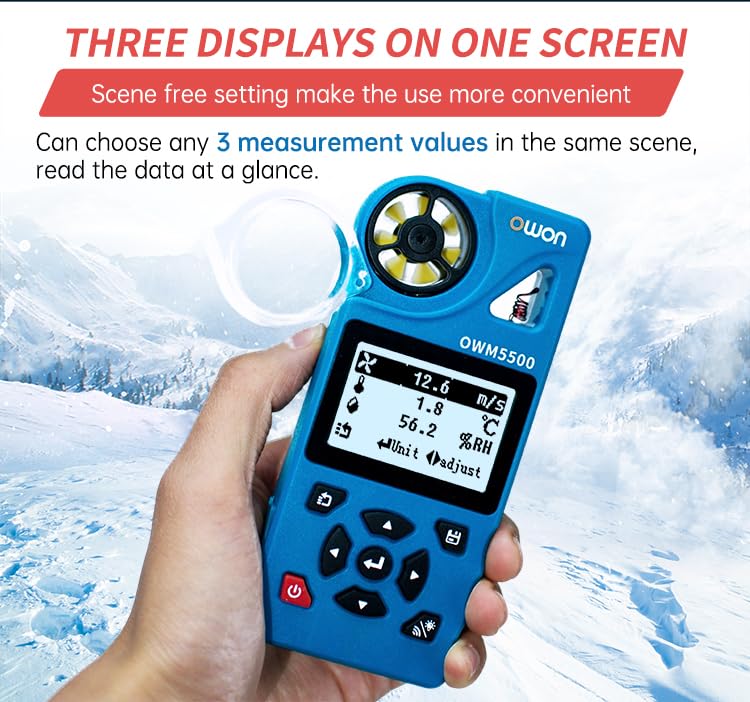
Figure 5: Three Displays on One Screen
This image shows the Owon OWM5500 anemometer held in a hand, with its screen displaying three different measurement values concurrently: wind speed (12.6 m/s), temperature (1.8 °C), and relative humidity (56.2 %RH). This illustrates the device's ability to present multiple data points at a glance.

Figure 6: 7-Blade Airfoil Fan Design
Бул сүрөт майда-чүйдөсүнө чейин камсыз кылат view of the Owon OWM5500's 7-blade airfoil fan, designed for accurate data collection. It also shows a separate, replaceable fan wheel, emphasizing the device's maintainability and long-term measurement accuracy.
5. Орнотуу
5.1 Батареяны заряддоо
The OWM5500 comes with a built-in rechargeable lithium battery. Before first use, or when the battery indicator shows low power, charge the device using the provided USB Type-C cable.
- Connect the USB Type-C cable to the charging port on the device.
- USB кабелинин экинчи учун стандарттуу USB кубат адаптерине (кошумча эмес) же компьютердин USB портуна туташтырыңыз.
- The charging indicator on the device will show the charging status. Once fully charged, disconnect the cable.
5.2 Ланярды бекитүү
For secure handling and to prevent accidental drops, attach the provided lanyard to the designated loop on the anemometer.
6. Иштөө нускамалары
6.1 Күйгүзүү/өчүрүү
- Күйгүзүү: Кубат баскычын басып, кармап туруңуз (⑂) for a few seconds until the screen illuminates.
- Өчүрүү: Кубат баскычын басып, кармап туруңуз (⑂) again until the screen turns off. The device also features an automatic power-off function, which can be configured in the settings.
6.2 Өлчөө режимдери
The OWM5500 supports various measurement types. Use the navigation buttons to cycle through and select the desired measurement mode.

Figure 7: Full Functional Measurement Displays
This image presents a collage of screenshots from the Owon OWM5500's display, showcasing its full range of measurement capabilities. It includes readings for Wind Speed (with Beaufort scale), Wind Volume (Air Flow), Temperature, Humidity, Wet Bulb Temperature, Dew Point, Wind Chill Temperature, and the Date/Time setting interface. Each display shows the unit of measurement and current value.
- Шамалдын ылдамдыгы: Measures current wind velocity. Units include m/s, km/h, ft/s, kt, mph.
- Air Volume (Air Flow): Measures the volume of air passing through. Units include CMS, CFS. Requires input of area.
- Температура: Measures ambient temperature. Units include °C, °F.
- Нымдуулук: Measures relative humidity. Unit: %RH.
- шүүдүрүм чекити: Calculates the dew point temperature. Units include °C, °F.
- Нымдуу лампочканын температурасы: Calculates the wet bulb temperature. Units include °C, °F.
- Wind Chill Temperature: Calculates the wind chill factor. Units include °C, °F.
To change units within a measurement mode, refer to the on-screen prompts or the detailed instructions in the full user manual.
6.3 Маалыматтарды каттоо жана сактоо
The OWM5500 can store up to 8000 sets of measurement data.
- Автоматтык сактоо: Configure the logging rate (e.g., every 2 seconds to 12 hours) in the settings menu to enable automatic data recording.
- Кол менен сактоо: Press the designated button (refer to device interface) to manually save the current measurement data.
- Data Review: Access stored data through the device's menu.
- Маалыматтарды экспорттоо: Connect the device to a PC via the USB Type-C cable and use the dedicated PC software to export data for further analysis and charting.
- Маалыматтарды тазалоо: The device supports one-click data zero clearing. Exercise caution when using this function as it will permanently delete all stored data.

Figure 8: Built-in Mass Data Storage
This image illustrates the data storage capabilities of the Owon OWM5500. The device's screen shows settings for data logging, including 'Log Num' (log number), 'Log Rate' (logging interval), and 'Auto Log On/Off'. Below, a graphical representation of historical data trends is displayed, demonstrating the device's ability to store and visualize extensive measurement data.
6.4 APP алыстан башкаруу
The OWM5500 supports remote control via a mobile application. Download the official Owon APP from your smartphone's app store. Follow the in-app instructions to pair your device and access remote monitoring and control features.
7. Техникалык тейлөө
7.1 Тазалоо
Wipe the device with a soft, dry cloth. Do not use abrasive cleaners or solvents. Ensure the wind impeller is free from dust and debris for accurate readings.
7.2 Батареяга кам көрүү
Батареянын иштөө мөөнөтүн узартуу үчүн, батареянын тез-тез толук зарядын жоготуп алуудан алыс болуңуз. Түзмөктү үзгүлтүксүз заряддап туруңуз, айрыкча, ал узак убакытка сактала турган болсо.
7.3 Impeller Replacement
If the wind impeller becomes damaged or its accuracy degrades over time, it can be replaced. Refer to Figure 6 for an illustration of the replaceable impeller. Contact Owon customer support for replacement parts and detailed instructions.
7.4 Сактоо
Store the anemometer in a cool, dry place, away from direct sunlight and extreme temperatures. Use the original packing box or a protective case for storage.
8. Кыйынчылыктарды
If you encounter issues with your OWM5500, refer to the following common problems and solutions:
| Көйгөй | Мүмкүн себеп | Чечим |
|---|---|---|
| Түзмөк күйбөйт. | Батареянын аздыгы; аппараттын бузулушу. | Charge the battery fully. If the issue persists, contact customer support. |
| Туура эмес окуулар. | Blocked impeller; sensor dirty; incorrect unit setting. | Ensure impeller is clear and spinning freely. Clean sensors. Verify unit settings. |
| Cannot connect to APP. | Bluetooth/wireless off; APP not updated; device not in pairing mode. | Ensure device and phone Bluetooth are on. Update APP. Refer to APP instructions for pairing. |
| Data not saving. | Storage full; auto-log off; manual save not performed. | Clear old data. Check auto-log settings. Ensure manual save button is pressed correctly. |
9. Техникалык шарттар
| Параметр | Нарк |
|---|---|
| Модель номери | OWM5500 |
| Бренд | Owon |
| Батареялар | 1 литий-иондук батарейка (кошулган) |
| Продукциянын өлчөмдөрү (L x W x Y) | 22 x 15 x 12 см (8.66 x 5.91 x 4.72 дюйм) |
| Элемент Салмагы | 0.5 килограмм (1.1 фунт) |
| Келип чыккан өлкө | Кытай |
| Маалыматтарды сактоо | 8000 комплект |
| Байланыш | USB Type-C, APP Remote Control |
| ЕБ запастык бөлүктөрүнүн болушунун узактыгы | 1 жыл |
Эскертүү: Техникалык мүнөздөмөлөр алдын ала эскертүүсүз өзгөртүлүшү мүмкүн.
10. Кепилдик жана колдоо
Owon products are manufactured to high-quality standards. For warranty information and technical support, please refer to the warranty card included with your product or visit the official Owon webсайт. Сатып алуу квитанциясын кепилдик дооматтары үчүн сатып алуунун далили катары сактаңыз.
For assistance, please contact Owon customer service through their official channels.


