Маанилүү коопсуздук нускамалары
Please read these instructions carefully before using the Goldair GIWF-26A Wall Fan and retain them for future reference. Failure to follow these instructions may result in electric shock, fire, or serious injury.
- электр менен жабдууну камсыз кылуу voltage желдеткичтеги баалоо этикеткасына дал келет.
- Желдеткичти шнур же сайгыч бузулган менен иштетпеңиз. Эгерде шнур бузулса, коркунучту болтурбоо үчүн аны өндүрүүчү, анын тейлөө агенти же ушул сыяктуу квалификациялуу адамдар алмаштырышы керек.
- Unplug the fan from the power outlet before cleaning, servicing, or moving.
- Вентилятор иштеп жатканда манжаларыңызды же башка буюмдарды торчого киргизбеңиз.
- Желдеткичти суудан жана нымдан алыс кармаңыз. Ванна бөлмөсүндө же башка нымдуу чөйрөдө колдонбоңуз.
- Ensure the fan is mounted securely to a solid wall structure capable of supporting its weight.
- Бул шайман физикалык, сезүү же акыл-эс жөндөмү начар же тажрыйбасы жана билими жок адамдар (анын ичинде балдар) үчүн, эгерде алардын коопсуздугуна жооптуу адам тарабынан көзөмөлсүз же шайманды колдонуу боюнча көрсөтмө болбосо, колдонууга арналбайт.
- Балдар шайман менен ойнобошу үчүн аларды көзөмөлгө алуу керек.
Продукт бүттүview
The Goldair GIWF-26A is a high-power 26-inch wall-mounted fan designed for efficient air circulation. Its robust construction and multiple speed settings provide optimal cooling performance.
Пакеттин мазмуну
- Goldair GIWF-26A Wall Fan Unit
- Кронштейн орнотуу
- Монтаждоочу жабдуулар (буроолор, дубал анкерлери)
- Колдонуучунун Колдонмосу (бул документ)
Негизги өзгөчөлүктөрү
- 3 Speed settings for varied airflow control.
- Automatic oscillation for wide area coverage.
- Modern design suitable for various environments.
- High quality aluminum blades for durability and efficient air movement.
- Lightweight construction for easier installation.
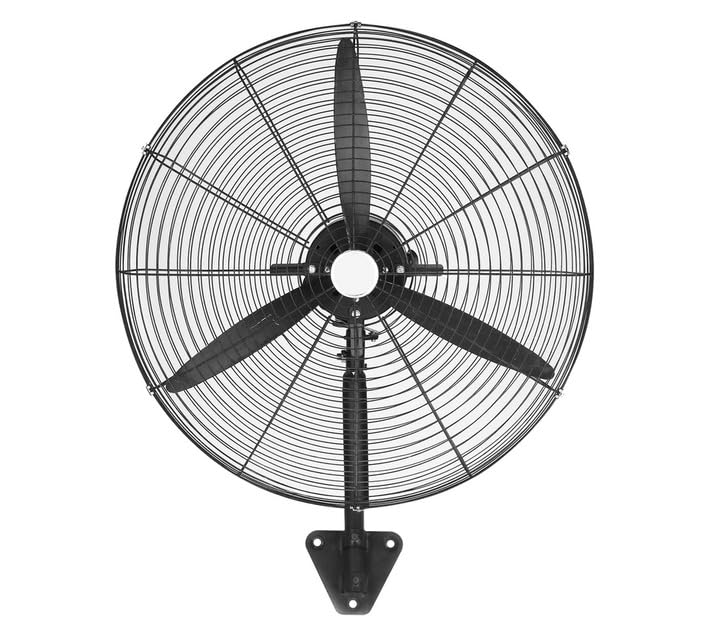
Image: Goldair GIWF-26A High Power 26-Inch Wall Fan, showcasing its black finish and robust design. This image illustrates the overall appearance of the fan unit.
Жайгашуу
Желдеткичти орнотуу
The Goldair GIWF-26A Wall Fan must be securely mounted to a sturdy wall surface. Choose a location that allows for optimal airflow and is away from obstructions.
- Монтаждоо ордун тандоо: Identify a suitable wall location, ensuring it is structurally sound and can support the fan's weight (approximately 10.8 kg).
- Бургулоо пункттарын белгилөө: Hold the mounting bracket against the wall at the desired height and use a pencil to mark the positions for drilling holes.
- Бургулоо тешиктери: Drill pilot holes at the marked positions using an appropriate drill bit for your wall type. Insert wall anchors if necessary.
- Монтаждык кронштейнди тиркөө: Securely fasten the mounting bracket to the wall using the provided screws. Ensure it is level and firmly attached.
- Желдеткичти орнотуу: Carefully lift the fan unit and align its mounting points with the bracket. Secure the fan to the bracket according to the specific design (e.g., sliding into place and tightening screws).
Электр байланышы
Before connecting the fan to power, ensure all mounting steps are complete and the fan is stable.
- Ensure your hands are dry before handling the power cord or plug.
- Plug the fan's power cord into a standard 230 Volt AC electrical outlet.
- Avoid using extension cords if possible. If an extension cord is necessary, ensure it is rated for the fan's power requirements (200 watts) and is in good condition.
Иштөө нускамалары
Башкаруу панели
The Goldair GIWF-26A Wall Fan is operated via a button control panel located on the fan unit. This panel typically includes buttons for power, speed selection, and oscillation control.
Күйгүзүү/өчүрүү
- Вентиляторду айландыруу үчүн ON, press the Power button once.
- Вентиляторду айландыруу үчүн ӨЧҮРҮҮ, press the Power button again.
Ылдамдык орнотуулары
The fan offers three distinct speed settings to adjust airflow intensity:
- Ылдамдык 1 (төмөн): Provides a gentle breeze for quiet operation and minimal air movement.
- Ылдамдык 2 (Орто): Offers moderate airflow for general cooling.
- Ылдамдык 3 (Жогорку): Delivers maximum airflow for rapid cooling or larger spaces.
To change the speed, press the Speed button repeatedly until the desired setting is reached.
Автоматтык термелүү
The oscillation feature allows the fan head to sweep from side to side, distributing air across a wider area.
- To activate oscillation, press the Oscillation button.
- To stop oscillation, press the Oscillation button again. The fan head will stop in its current position.
Техникалык тейлөө
Regular maintenance ensures the longevity and efficient operation of your Goldair GIWF-26A Wall Fan. Always unplug the fan before performing any maintenance.
Тазалоо
- Тышкы тазалоо: Желдеткичтин сырткы беттерин жумшак, г менен сүртүңүзamp кездеме. Абразивдүү тазалагычтарды же эриткичтерди колдонбоңуз, анткени алар финишке зыян келтириши мүмкүн.
- Бычакты тазалоо: Periodically, dust may accumulate on the fan blades. To clean, carefully remove the front grille (refer to assembly instructions if needed) and gently wipe the blades with a soft, dry or slightly damp cloth. Ensure blades are completely dry before reassembling the grille.
- Желдеткичти сууга батырбаңыз же мотор корпусуна суу тамчылап жибербеңиз.
Сактагыч
Вентилятор көпкө чейин колдонулбаган учурда, аны чаңдан жана бузулуудан коргоо үчүн салкын, кургак жерде, мүмкүн болсо, баштапкы таңгагында сактаңыз.
Проблемаларды чечүү
If you encounter issues with your Goldair GIWF-26A Wall Fan, please consult the following table before contacting customer support.
| Көйгөй | Мүмкүн себеп | Чечим |
|---|---|---|
| Желдеткич күйбөйт. | Электр энергиясы жок. Кубат баскычы басылган жок. | Check if the fan is plugged into a live outlet. Кубат баскычын бекем басыңыз. |
| Алсыз аба агымы. | Төмөн ылдамдыкты жөндөө. Чаңдын бычактарда топтолушу. | Ылдамдык жөндөөсүн жогорулатыңыз. Clean the fan blades and grille as per maintenance instructions. |
| Желдетүүчү ызы-чуу. | Бош бөлүктөр. Fan not mounted securely. | Бош бурамалар же компоненттер бар-жогун текшерип, аларды бекемдеңиз. Ensure the fan is securely mounted to the wall bracket. |
| Термелүү иштебейт. | Термелүү баскычы иштетилген эмес. тоскоолдук. | Термелүү баскычын басыңыз. Ensure there are no obstructions preventing the fan head from moving. |
Техникалык шарттар
Technical specifications for the Goldair GIWF-26A High Power 26-Inch Wall Fan:
| Бренд | Goldair |
| Модель номери | GIWF-26A |
| Түс | Кара |
| Power / Wattage | 200 ватт |
| Тtage | 230 вольт |
| Материал | Алюминий |
| Элемент Салмагы | 10.8 кг |
| Продукциянын өлчөмдөрү | 72D x 19W x 96H сантиметр |
| Blades саны | 3 |
| Монтаж түрү | Дубалга орнотуу |
| Controller Type | Control Button |
Кепилдик жана колдоо
Goldair products are manufactured to high-quality standards. For information regarding warranty coverage, please refer to the warranty card included with your purchase or visit the official Goldair webсайт.
If you require technical assistance, troubleshooting beyond this manual, or spare parts, please contact Goldair customer support. Contact details can typically be found on the product packaging or the official Goldair webсайт.
Please have your model number (GIWF-26A) and purchase date available when contacting support.