1. Киришүү
Сатып алганыңыз үчүн рахматasing the Goldair GRPF-1632 Rechargeable Pedestal Fan. This manual provides essential information for the safe and efficient operation, assembly, maintenance, and troubleshooting of your fan. Please read these instructions thoroughly before use and retain them for future reference.
2. Маанилүү коопсуздук нускамалары
- Желдеткичтин оодарылып кетпеши үчүн, аны ар дайым туруктуу, тегиз жерге коюңуз.
- Do not insert fingers or any objects through the fan grille when the fan is operating.
- Keep the fan away from water or other liquids. Do not use in wet environments.
- Unplug the fan from the power source before cleaning, maintenance, or when not in use.
- Зымы же сайгычы бузулган учурда желдеткичти иштетпеңиз. Оңдоо үчүн квалификациялуу тейлөө кызматына кайрылыңыз.
- Бул шайман физикалык, сезүү же акыл-эс жөндөмү начар же тажрыйбасы жана билими жок адамдар (анын ичинде балдар) үчүн, эгерде алардын коопсуздугуна жооптуу адам тарабынан көзөмөлсүз же шайманды колдонуу боюнча көрсөтмө болбосо, колдонууга арналбайт.
- Балдар шайман менен ойнобошу үчүн аларды көзөмөлгө алуу керек.
- Use only the charging adapter supplied with the fan.
- Аба тешиктерин жаап албаңыз.
3. Продукт бүтүп калдыview
The Goldair GRPF-1632 is a 16-inch rechargeable pedestal fan designed for versatile cooling. It features a robust construction, multiple speed settings, and an adjustable head for directional airflow. Its rechargeable battery provides cordless operation, enhancing portability.
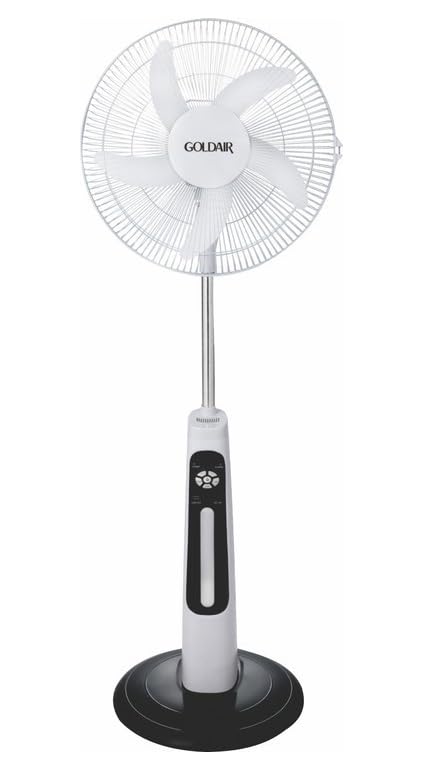
This image displays the complete Goldair Rechargeable Pedestal Fan. It features a white fan head with a protective grille and five blades, an adjustable silver-colored pole, a white and black control panel housing the fan's functions, and a stable black round base.
4. Пакеттин мазмуну
- Fan Head Assembly (including blades and grilles)
- Жөнгө салынуучу пьедестал мамы
- Тегерек база
- Негизги бекитүүчү винт
- Кубат адаптери/заряддагыч
- User Manual
5. Орнотуу жана чогултуу
Follow these steps to assemble your Goldair Pedestal Fan:
- Базаны тиркөө: Place the pedestal pole onto the round base. Align the holes and secure the pole to the base using the provided fixing screw from underneath the base. Tighten securely.
- Вентилятор башын орнотуу: Carefully slide the fan head assembly onto the top of the pedestal pole. Ensure it clicks into place or is secured according to the specific design (some models may have a screw or locking mechanism).
- Туруктуулукту текшерүү: Once assembled, gently test the fan's stability on a flat surface.
6. Иштөө нускамалары
Familiarize yourself with the control panel on the fan body:
- Кубат баскычы: Желдеткичти КҮЙГҮЗҮҮ же ӨЧҮРҮҮ үчүн басыңыз.
- Ылдамдык жөндөөлөрү: Press the speed button repeatedly to cycle through different fan speeds (e.g., Low, Medium, High). Indicator lights will show the current speed.
- Термелүү баскычы: Желдеткичтин башын бир капталдан экинчи капталга серпүүгө мүмкүндүк берген термелүү функциясын иштетүү же өчүрүү үчүн басыңыз.
- Таймер баскычы: If available, press to set a timer for automatic shutdown (e.g., 1 hour, 2 hours, 4 hours).
- Эңкейүүнү тууралоо: Manually adjust the angle of the fan head up or down to direct airflow as desired. Hold the fan head firmly and tilt it to the desired position.
7. Батареяны заряддоо
The Goldair GRPF-1632 fan is equipped with a rechargeable battery for cordless operation. To charge the fan:
- Ensure the fan is turned OFF.
- Connect the power adapter to the charging port on the fan body.
- Адаптерди стандарттуу электр розеткасына сайыңыз.
- The charging indicator light will illuminate (e.g., red for charging, green for fully charged).
- Allow the fan to charge completely before its first cordless use. Charging time may vary.
The fan can also operate while connected to the power adapter.
8. Техникалык тейлөө жана тазалоо
Regular cleaning ensures optimal performance and extends the life of your fan.
- Тазалоодон мурун: Always unplug the fan from the power outlet and ensure it is turned off.
- Тышкы тазалоо: Желдеткичтин сырткы беттерин жумшак, г менен сүртүңүзamp кездеме. Абразивдүү тазалагычтарды, эриткичтерди же катуу химиялык заттарды колдонбоңуз, анткени алар финишке зыян келтириши мүмкүн.
- Тор жана бычактар: To clean dust from the fan blades and inside the grilles, you may need to carefully remove the front grille. Refer to the assembly instructions in reverse for safe removal. Use a soft brush or vacuum cleaner with a brush attachment to remove accumulated dust. Ensure all parts are dry before reassembling.
- Сактагыч: Вентилятор көпкө чейин колдонулбаган учурда, аны чаңдан жана бузулуудан коргоо үчүн салкын, кургак жерде, мүмкүн болсо, баштапкы таңгагында сактаңыз.
9. Кыйынчылыктарды
Эгер сиз күйөрманыңызда көйгөйлөргө туш болсоңуз, жалпы көйгөйлөр жана чечүү жолдору үчүн төмөнкү таблицага кайрылыңыз:
| Көйгөй | Мүмкүн себеп | Чечим |
|---|---|---|
| Желдеткич күйбөйт. | Электр менен камсыздоо жок же батареясы аз. | Ensure the power adapter is securely plugged in and the outlet is functional. Charge the fan battery if operating wirelessly. |
| Алсыз аба агымы. | Желдеткичтин ылдамдыгы өтө төмөн же торчолор бүтөлүп калган. | Increase the fan speed setting. Clean any dust or debris from the front and rear grilles and blades. |
| Желдетүүчү ызы-чуу. | Loose parts or dust accumulation. | Ensure all assembly screws are tightened. Clean the fan blades and grilles to remove any dust buildup. |
| Термелүү иштебейт. | Термелүү функциясы иштетилген эмес. | Press the oscillation button to activate the function. |
10. Техникалык шарттар
- Бренд: Goldair
- Модель номери: GRPF-1632
- Электр желдеткич дизайны: Кабат желдеткичи
- Бышактын узундугу: 16 дюйм
- Бычактардын саны: 3
- Материал: Алюминий
- Контроллердин түрү: Control Button
- Элемент Салмагы: 4 кг
- Продукциянын өлчөмдөрү: 62.8D x 13W x 56.5H сантиметр
- Түсү: Multicolor (as per product specifications)
11. Кепилдик жана Кардарларды колдоо
Goldair products are manufactured to high standards and are warranted against defects in materials and workmanship. For specific warranty terms and conditions, please refer to the warranty card included with your purchase or visit the official Goldair website. For technical support, spare parts, or service inquiries, please contact Goldair customer support through their official channels.


