Introduction
This manual provides instructions for the VINABTY AA81-00243A TM930 Service Remote Controller. This remote is specifically designed for accessing service menus and performing service-related functions on compatible Samsung televisions and monitors. It is not intended for general daily operation.
Жайгашуу
1. Батареяны орнотуу
The remote controller requires two (2) AAA batteries for operation. Follow these steps to install the batteries:
- Пульттун артындагы батарея бөлүкчөсүнүн капкагын табыңыз.
- Капкакты ылдый жылдырыңыз же аны ачуу үчүн бекиткичти басыңыз.
- Оң (+) жана терс (-) терминалдары бөлүмдүн ичиндеги белгилер менен туура дал келишин камсыз кылып, эки AAA батарейкасын салыңыз.
- Батарея бөлүкчөсүнүн капкагын бекем чыккыча ордуна коюңуз.

Сүрөт: алдыңкы view of the VINABTY AA81-00243A TM930 Service Remote Controller, showing all buttons and the "ONLY FOR SERVICE" label.
Иштөө нускамалары
This remote is designed for specific service functions. Its primary use is to access the service menu on compatible Samsung displays.
Accessing the Service Menu
- Ensure the television or monitor is powered on.
- Point the remote control directly at the display's IR receiver.
- басыңыз INFO button (labeled 'i' below the '7' button).
- Immediately after pressing INFO, press the ЗАВОД баскычы.
- The service menu should now appear on the screen.
Эскертүү: The service menu contains advanced settings. Exercise caution when making adjustments, as incorrect changes can affect display performance or functionality. It is recommended that only qualified technicians use these functions.
Баскыч функциялары
- МЕНЮ: Accesses the standard user menu.
- БУЛАК: Changes input source.
- КУРАЛДАР: Жалпы функцияларга тез жетүүнү камсыз кылат.
- ЧЫГУУ: Учурдагы менюдан же функциядан чыгат.
- Directional Pad (Up/Down/Left/Right) & Enter: Менюларды багыттоо жана тандоолорду ырастоо.
- МАМБА: Used in conjunction with INFO to access the service menu.
- МААЛЫМАТ (i): Displays information or used for service menu access.
- Сан баскычтары (0-9): For direct channel input or numerical selections within menus.
- PRE-CH: Мурункуга кайтат viewed каналы.
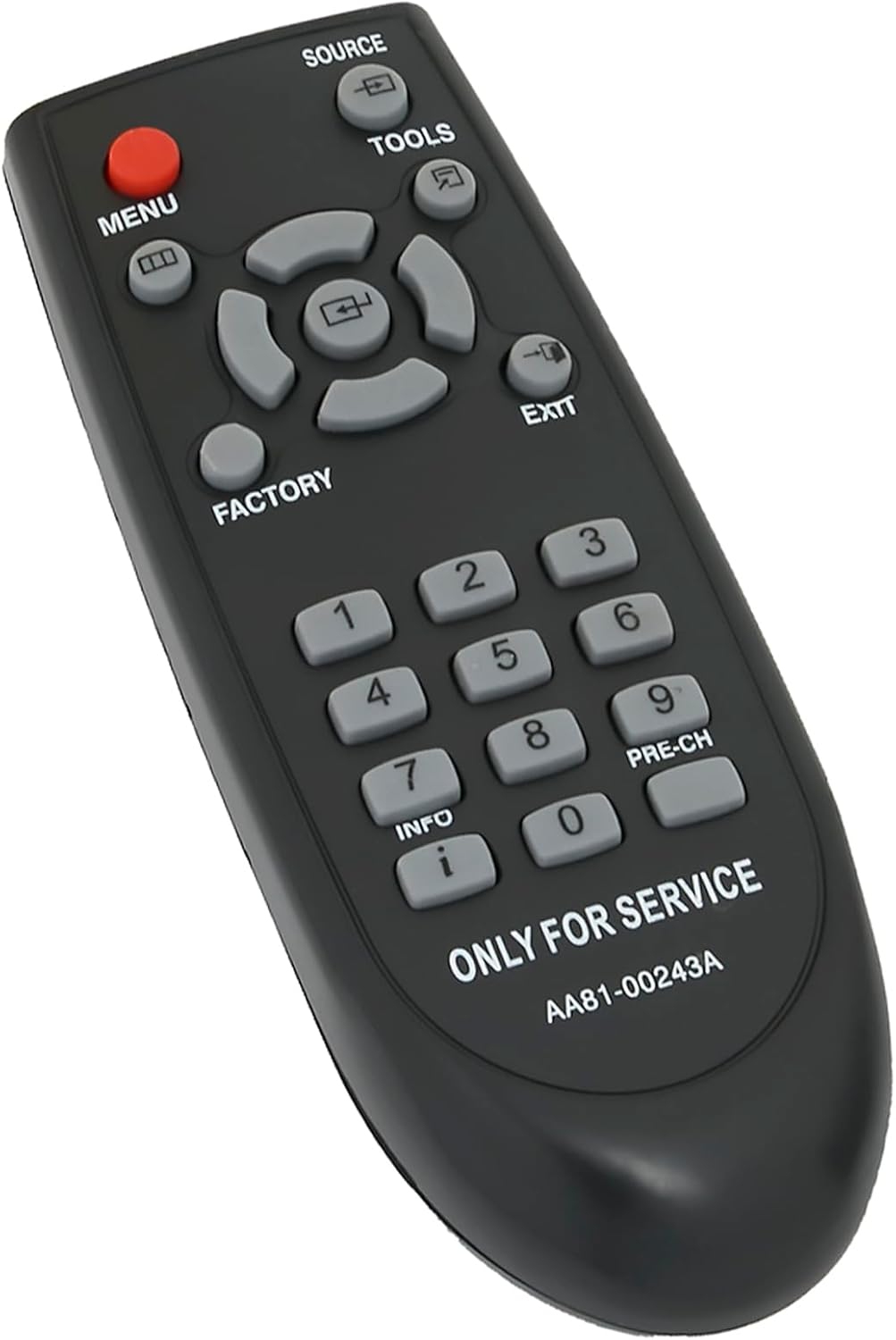
Сүрөт: бурчтуу view of the remote control, highlighting the ergonomic design and button layout.
Шайкештик
The VINABTY AA81-00243A TM930 Service Remote Controller is compatible with a range of Samsung TV and monitor models. This list is not exhaustive but includes commonly supported models:
- Samsung TV models: S90D, QN95B, Q80R, UN55KS8500FXZA, UE43AU8000, KS8000 4K SUHD TV, D376997
- Samsung Monitor models: M80 Display, Odyssey OLED G8 Ultrawide
- Samsung Hospitality TV models: HG32NF690GFXZA, HG40NF690GFXZA, HG43NF690GFXZA, HG43NF690UFXZA, HG49NF690GFXZA, HG50NF690UFXZA, HG55NF690UFXZA, HG65NF690UFXZA, HG75NF690UFXZA

Image: The service remote positioned next to a modern Samsung television, visually representing its intended use and compatibility with various Samsung displays.
Техникалык тейлөө
Батареяны алмаштыруу
Replace batteries when the remote's response becomes inconsistent or stops working. Always replace both AAA batteries simultaneously with new ones. Do not mix old and new batteries, or different types of batteries.
Тазалоо
Пультту тазалоо үчүн анын бетин жумшак, кургак чүпүрөк менен акырын сүртүңүз. өжөр кир үчүн, бир аз гampчүпүрөктү суу менен. Катуу химиялык заттарды, абразивдүү тазалагычтарды же ашыкча нымдуулукту колдонуудан качыңыз, анткени алар пульттун электроникасына зыян келтириши мүмкүн.
Сактагыч
Пультту салкын, кургак, күндүн түз тийген нурунан жана өтө жогорку температурадан алыс жерде сактаңыз. Эгерде пульт көпкө колдонулбаса, агып кетүүнүн алдын алуу үчүн батарейкаларды алып салуу сунушталат.
Проблемаларды чечүү
- Пульт жооп бербей жатат:
- Батареялардын туура полярдуулукта жана туура орнотулганын текшериңиз.
- Батареяларды жаңы AAA батарейкалары менен алмаштырыңыз.
- Ensure there are no obstructions between the remote control and the display's IR receiver.
- Confirm you are within the effective range of the remote control.
- Service menu not appearing:
- Verify that the display is powered on and functioning correctly.
- Ensure the correct button sequence is followed: press INFO анан дароо ЗАВОД.
- Confirm the display model is listed as compatible.
Техникалык шарттар
| Модель номери | AA81-00243A |
| Продукциянын өлчөмдөрү | 5.9 x 2 x 0.7 дюйм |
| Элемент Салмагы | 1.76 унция |
| Батарея түрү | 2 x AAA батарейкалар (киргизилген эмес) |
| Бренд | VINABTY |
| Өндүрүүчү | XINHAO |
| Түс | Кара |
| Өзгөчө өзгөчөлүк | Эргономикалык дизайн |
| Шайкеш түзмөктөр | Samsung Televisions and Monitors (specific models listed in Compatibility section) |

Сүрөт: жогорудан төмөнгө view of the remote control, illustrating its physical dimensions (length and width).
Кепилдик жана колдоо
For warranty information or technical support regarding your VINABTY AA81-00243A TM930 Service Remote Controller, please refer to the purchase documentation or contact the retailer from whom the product was purchased. Specific warranty terms may vary by region and seller.

