1. Киришүү
This manual provides detailed instructions for the installation, operation, and maintenance of your ENERMAX LIQMAXFLO 360mm A-RGB All-In-One (AIO) CPU Liquid Cooler. Designed for high-performance computing, this cooler features a robust pump, a thick radiator, and pressure-optimized fans to ensure efficient heat dissipation and stable system operation. Please read this manual thoroughly before installation to ensure proper setup and optimal performance.
2. Продукт бүтүп калдыview
The ENERMAX LIQMAXFLO 360mm A-RGB AIO CPU Liquid Cooler is engineered to provide superior cooling for modern CPUs. Key features include:
- High Performance Pump: Operates up to 3000 RPM for efficient coolant circulation.
- 38mm Thick Radiator: Offers increased surface area for enhanced heat exchange compared to standard radiators.
- 60mm VRM Fan: Integrated fan on the pump block to cool Voltage Regulator Modules (VRMs) and surrounding motherboard components.
- Pressure-Optimized Silent 120mm FDB PWM Fans: Designed with 5-blade scoop-design for focused airflow and high static pressure, ensuring quiet and effective cooling.
- Magnetic Detachable Pump Cover: Allows for 90° rotation for easy logo orientation customization.
- Толтурулган дизайн: The radiator features a refill port for easy coolant top-off, extending product lifespan. A 100ml bottle of coolant is included.
- Daisy-Chained Cables: Simplifies cable management and installation.
- Pre-Applied Thermal Grease: Premium Dow Corning TC-5888 thermal grease is pre-applied to the cold plate, with an extra tube included.
- A-RGB Synchronization: Compatible with supported RGB software and motherboard synchronization for customizable lighting effects.

Figure 2.1: ашыкview of the ENERMAX LIQMAXFLO 360mm A-RGB AIO CPU Liquid Cooler.

Figure 2.2: Thermal imaging demonstrating the effectiveness of the integrated VRM fan in reducing temperatures of surrounding components.

Сүрөт 2.3: Жакын пландан view of the 38mm thick radiator and the accessible refill port for coolant maintenance.
3. Орнотуу жана орнотуу
Before beginning installation, ensure your system is powered off and disconnected from the power source. Refer to your motherboard and PC case manuals for specific component placement and clearances.
3.1. Шайкештик
This cooler is compatible with a wide range of Intel and AMD sockets:
- Intel розеткалары: LGA 1700, 1200, 115X, 2066, 2011, 2011-3, 1366
- AMD розеткалары: AM5, AM4, AM3+, FM2+, FM1

Figure 3.1: Included mounting brackets for Intel and AMD CPU sockets.
3.2. Орнотуу кадамдары (Жалпы)
- Motherboard даярдоо: Install the appropriate backplate and standoffs for your CPU socket type (Intel or AMD).
- Радиатор тоосу: Secure the radiator and fans to your PC case. Ensure proper airflow direction (intake or exhaust) based on your case's design. The daisy-chained fan cables simplify connecting the fans to each other and then to the radiator.
- Насос блогун орнотуу: Carefully place the pump block onto the CPU. The premium Dow Corning TC-5888 thermal grease is pre-applied. If re-installing or if the pre-applied paste is disturbed, apply a thin, even layer of the included extra thermal paste. Secure the pump block with the provided mounting screws.
- Кабелдерди туташтыруу: Connect the pump's 4-pin PWM cable to your motherboard's CPU_FAN or AIO_PUMP header. Connect the A-RGB cable to a compatible 3-pin 5V A-RGB header on your motherboard.
- Кабелдик башкаруу: Utilize the included 3 tube clips to organize the coolant tubes and fan cables for a neat and tidy build.
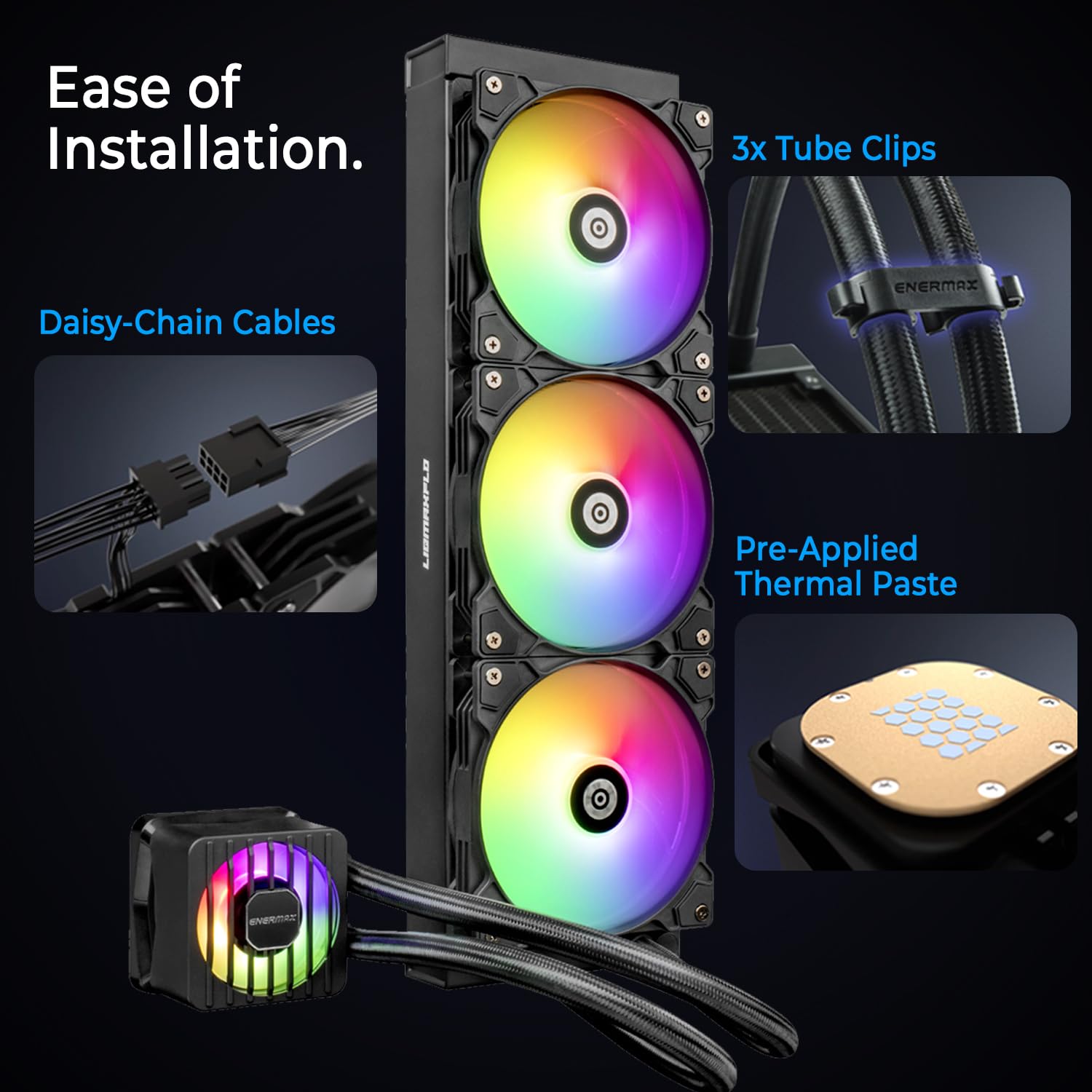
Figure 3.2: Features designed for ease of installation, including daisy-chained cables, tube clips, and pre-applied thermal paste.
4. Иштөө нускамалары
Once installed, the ENERMAX LIQMAXFLO cooler operates automatically based on your system's thermal demands.
- PWM башкаруу: The pump and fans are PWM-controlled, allowing your motherboard to automatically adjust their speed based on CPU temperature, optimizing for both cooling performance and noise levels.
- A-RGB жарыктандыруу: Connect the A-RGB cable to a compatible motherboard header and use your motherboard's RGB software (e.g., ASUS Aura Sync, MSI Mystic Light Sync, GIGABYTE RGB Fusion, ASRock Polychrome Sync) to customize lighting effects and synchronize them with other A-RGB components.
5. Техникалык тейлөө
Үзгүлтүксүз тейлөө сиздин суюк муздаткычыңыздын узак иштөөсүн жана оптималдуу иштешин камсыз кылууга жардам берет.
- Чаңды тазалоо: Кысылган аба же жумшак щетка менен радиатордун сүзгүчтөрүнүн жана желдеткичтеринин чаңын мезгил-мезгили менен тазалап туруңуз. Тазалоо учурунда желдеткичтер айланбагандыгын текшериңиз.
- Coolant Top-Off: The LIQMAXFLO features a refillable design. If you notice a decrease in cooling performance over time, or if the coolant level appears low (visible through the refill port), you can top off the coolant using the included 100ml bottle or a compatible AIO coolant. Refer to the refill port on the radiator (Figure 2.3).
- Түтүктөрдү текшерүү: Occasionally inspect the coolant tubes for any signs of kinks, leaks, or damage.
6. Кыйынчылыктарды
If you encounter issues with your ENERMAX LIQMAXFLO cooler, consider the following:
- No Fan/Pump Operation: Ensure all power cables (4-pin PWM for pump/fans) are securely connected to the motherboard headers. Check BIOS settings to confirm fan headers are enabled and configured correctly.
- Жогорку CPU температурасы: Verify the pump block is securely mounted to the CPU and making good contact. Ensure thermal paste application is adequate. Check that fans are spinning and oriented correctly for airflow. Consider if your case has sufficient airflow.
- A-RGB Not Working: Confirm the 3-pin 5V A-RGB cable is correctly connected to the motherboard's A-RGB header. Check your motherboard's RGB software for lighting control and synchronization settings.
- адаттан тыш үндөр: Check for any obstructions to the fan blades. Ensure the pump is not running dry (though unlikely with a sealed AIO, the refillable design allows for top-off if needed).
If problems persist, consult the Enermax support webсайтка же кардарларды тейлөөгө кайрылыңыз.
7. Техникалык шарттар
| Өзгөчөлүк | Спецификация |
|---|---|
| Модель номери | ELC-LMF360T-ARGB |
| Радиатордун өлчөмү | 360мм |
| Радиатордун калыңдыгы | 38мм |
| Fan Size | 120мм |
| VRM Fan Size | 60мм |
| Maximum Rotational Speed (Pump) | 3000 RPM |
| Ызы-чуу деңгээли | 23.46 дБ (күйөрмандар) |
| Муздатуу ыкмасы | Желдетүүчү, суу |
| Кубат туташтыргычынын түрү | 4-Pin (Сеул) |
| Тtage | 12 вольт (ток) |
| Материал | Металл |
| Шайкеш түзмөктөр | Radiator, CPU Sockets (Intel LGA 1700/1200/115X/2066/2011/2011-3/1366, AMD AM5/AM4/AM3+/FM2+/FM1) |
| Пакеттин өлчөмдөрү | 17.64 x 8.19 x 5.39 дюйм |
| Салмагы | 6.28 фунт |
| UPC | 819315027837 |
8. Кепилдик жана колдоо
For warranty information, technical support, or further assistance, please visit the official Enermax webсайтка же кардарларды тейлөө бөлүмүнө кайрылыңыз. Кепилдик дооматтар үчүн сатып алганыңыздын далилин сактаңыз.
Enermax USA: www.enermaxusa.com


