Продукт бүттүview
The RHYTHM 8RZ235MS38 is a digital radio-controlled alarm clock featuring 3D figures of Snoopy and Woodstock. It offers a clear LCD screen with comic-style numbers and unique footprint colon indicators. This clock provides essential functions including time display, calendar, temperature, and humidity readings, designed for ease of use and daily convenience.

Сүрөт 1: Алдыңкы view of the RHYTHM 8RZ235MS38 Snoopy Digital Radio Alarm Clock, displaying time, date, temperature, and humidity.
Негизги өзгөчөлүктөрү
- Radio-Controlled Time Synchronization: Тактык үчүн убакытты автоматтык түрдө тууралайт.
- Digital LCD дисплей: Clear display with comic-style numbers and Snoopy footprint colon.
- 3D Snoopy & Woodstock Figures: Integrated into the design, with Snoopy serving as the snooze button.
- Ойготкуч функциясы: Features electronic sound alarm with snooze capability.
- Интегралдык сенсорлор: Displays current temperature and humidity.
- Календар дисплейи: Shows date, day, and year.
- Selectable Time Format: Choose between 12-hour (AM/PM) or 24-hour display.
- Арткы жарык функциясы: Includes an afterglow light for visibility in low light conditions.

Figure 2: ашыкview of the clock's main features, including radio control, 12/24 hour display, temperature/humidity, calendar, and backlight.

Figure 3: Close-up of the Snoopy and Woodstock figures, highlighting Snoopy's role as the snooze button.
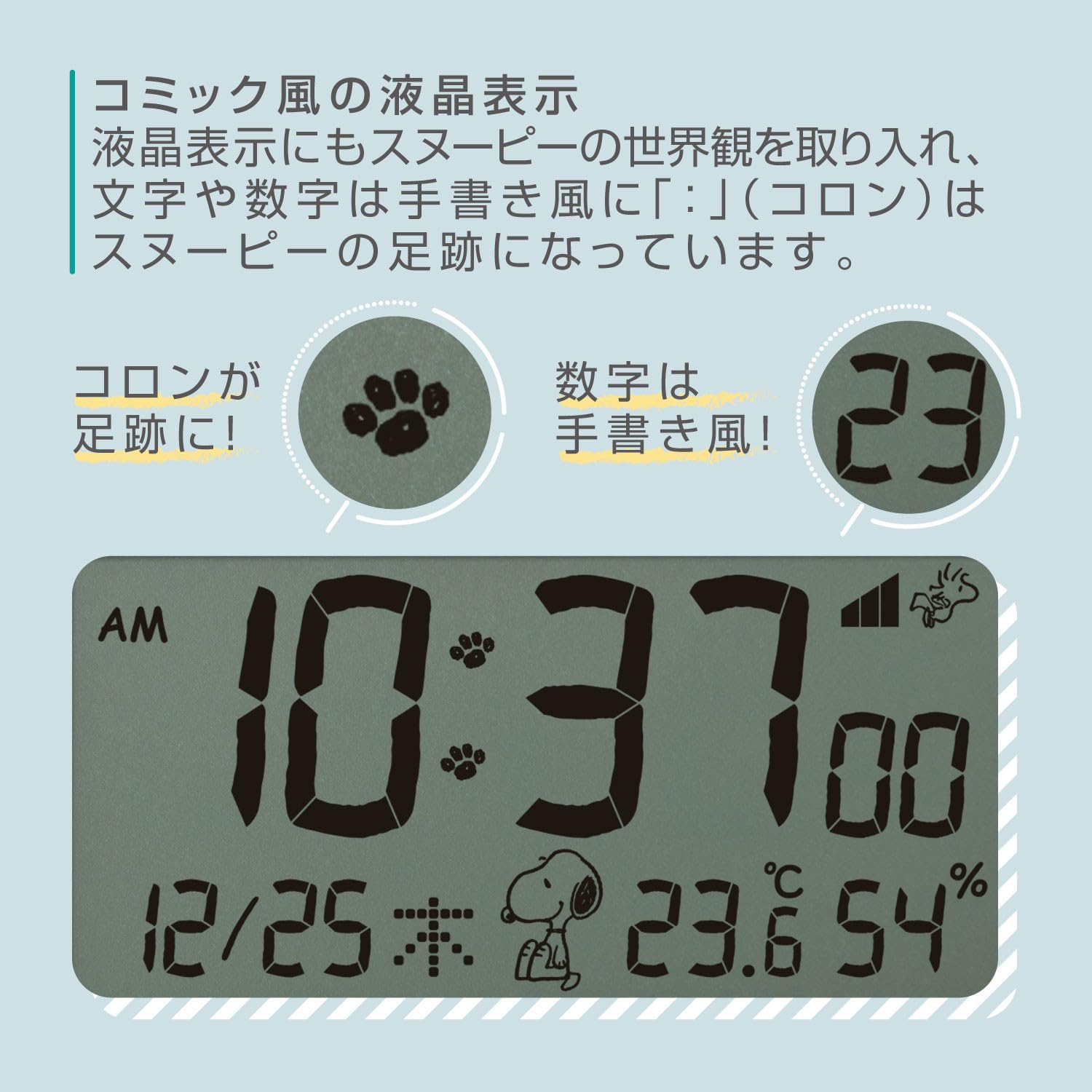
4-сүрөт: Детальдуу view of the LCD display, showcasing the unique comic-style numbers and Snoopy's footprints used as the colon separator.
Жайгашуу
1. Power Connection
Connect the provided AC adapter to the clock and plug it into a standard wall outlet. The clock will power on and the display will activate.
2. Initial Time Synchronization
As a radio-controlled clock, the unit will automatically attempt to synchronize with the atomic time signal upon initial power-up. This process may take several minutes. Ensure the clock is placed in an area with good signal reception, away from large metal objects or electronic interference.
3. Setting Time Zone (if necessary)
If the automatic synchronization does not set the correct time zone for your region, you may need to adjust it manually. Refer to the 'Operating' section for manual time and date setting instructions.
Иштөө нускамалары
1. Time and Date Display
The main LCD screen continuously displays the current time, date (month/day), day of the week, temperature, and humidity.
2. Ойготкучту орнотуу
- басыңыз Сигналды орнотуу button (location on the front panel) to enter alarm setting mode. The alarm time will flash.
- колдонуу UP жана ылдый саатты тууралоо үчүн баскычтар.
- Басыңыз Сигналды орнотуу again to adjust the minutes. Use UP жана ылдый баскычтар.
- Басыңыз Сигналды орнотуу once more to confirm the alarm time.
- Ойготкучту иштетүү же өчүрүү үчүн, баскычын басыңыз КҮЙГҮЗҮҮ / КҮЧҮРҮҮ button. An alarm icon will appear on the display when activated.
3. Тындырма функциясы
When the alarm sounds, press the 3D Snoopy figure on top of the clock to activate the snooze function. The alarm will pause for approximately 5-10 minutes (check specific model details for exact duration) before sounding again.
4. Температура жана нымдуулук дисплей
The clock automatically measures and displays the ambient temperature (in Celsius or Fahrenheit) and relative humidity. No manual adjustment is typically required for these readings.
5. Арткы жарыкты башкаруу
The display features an afterglow backlight. The intensity or activation method may vary by model. Typically, a dedicated ЖАРЫК or СОЮЗ button press will activate the backlight for a few seconds.
6. 12/24 Hour Format Toggle
To switch between 12-hour (AM/PM) and 24-hour time formats, locate the 12/24H button (refer to the clock's physical buttons) and press it. The display will change accordingly.
Техникалык тейлөө
- Тазалоо: Use a soft, dry cloth to clean the clock's surface. Do not use abrasive cleaners or solvents.
- Жайгашкан жери: Place the clock on a stable, flat surface. Avoid direct sunlight, extreme temperatures, or high humidity.
- Battery Backup (if applicable): If your model includes a battery backup, replace batteries annually to ensure settings are retained during power outages.
Проблемаларды чечүү
- Дисплей бош: Ensure the AC adapter is securely plugged into both the clock and a working power outlet. Check if the power outlet is functional.
- Убакыт туура эмес: Verify the clock is receiving a clear radio signal. Try repositioning the clock. If manual setting was used, re-check the steps in the 'Operating' section.
- Сигнал чыкпай жатат: Ensure the alarm is activated (alarm icon visible on display) and the volume is set appropriately. Check that the alarm time is correctly set.
- Температура/нымдуулук көрсөткүчтөрү так эмес окшойт: Allow the clock to acclimate to its environment for at least 30 minutes. Ensure it is not placed near heat sources, vents, or in direct sunlight.
Техникалык шарттар
- Модел: 8RZ235MS38
- Бренд: РИТМ
- Түрү: Санариптик радио ойготкуч саат
- Өлчөмдөрү (болжол менен): 4.0 x 4.7 x 2.1 дюйм (10.2 x 12 x 5.4 см)
- Салмагы (болжол менен): 210г
- Дисплей: LCD with comic-style numbers
- Өзгөчөлүктөрү: Radio-controlled time, Alarm with Snooze, Thermometer, Hygrometer, Calendar, Backlight.

Figure 5: Visual representation of the clock's dimensions (10.2 x 12 x 5.4 cm) and weight (210g), shown in comparison to a 500ml bottle.
Кепилдик жана колдоо
This product is covered by a standard manufacturer's warranty. For detailed warranty information, product support, or service inquiries, please refer to the warranty card included in your product packaging or visit the official RHYTHM webсайт.
Сураныч, кепилдик дооматтар үчүн сатып алуунун далили катары сатып алуу дүмүрчөгүңүздү сактап коюңуз.


