1. Киришүү
Thank you for choosing the DreamSky AM FM Shortwave Portable Radio, Model DS6226. This manual provides essential information for the safe and efficient operation of your radio. Please read it thoroughly before use and retain it for future reference.
1.1 Негизги өзгөчөлүктөрү
- Large speaker for clear, loud sound.
- Strong reception across AM, FM, and SW bands with a long transistor antenna.
- High and low tone selection for varied audio enjoyment.
- Large, smooth analog dials for easy tuning and volume control.
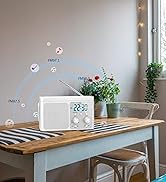
- Digital LCD display with backlight showing time and station frequency.
- 12-hour and 24-hour time format options.
- Dual power sources: AC adapter (included) or 4 AA batteries (not included).
- Жеке угуу үчүн 3.5 мм наушник уячасы.
1.2 Кутуда эмне бар
- DreamSky AM FM Shortwave Radio (Model DS6226)
- AC адаптери (110-120V)
- User Manual

2. Орнотуу нускамалары
2.1 Радиону кубаттоо
Your DreamSky radio can be powered by either the included AC adapter or four AA batteries.
- AC кубаттуулугу: Connect the provided AC adapter to the DC IN jack on the radio and plug the adapter into a standard 110-120V wall outlet.
- Батарея кубаттуулугу: Open the battery compartment on the back of the radio. Insert four (4) AA alkaline batteries (not included), ensuring correct polarity (+/-). Close the battery compartment securely.
When using AC power, batteries are automatically bypassed. Remove batteries if the radio will not be used for an extended period to prevent leakage.

3. Иштөө нускамалары
3.1 Күйгүзүү/өчүрүү жана үндү башкаруу
айлантыңыз VOLUME knob clockwise to turn the radio ON and increase the volume. Rotate counter-clockwise to decrease volume and turn OFF the radio.
3.2 Станцияларды жөндөө
- Extend the telescopic antenna for optimal FM and SW reception. For AM reception, the internal antenna is generally sufficient, but rotating the radio may improve signal.
- Select the desired band (AM, FM, or SW) using the AM/FM/SW которуу.
- айлантыңыз TUNING knob to scan for stations. The digital display will show the frequency.
- тууралаңыз TUNING knob until the desired station is clearly received.

3.3 Тондорду башкаруу
колдонуу ООН switch to select between 'LOW' and 'HIGH' audio tones, adjusting the sound output to your preference.

3.4 Digital Time Display and Backlight
The radio features a digital LCD display that shows the current time and selected radio frequency. The screen backlight activates for clear visibility in low-light conditions.
- Орнотуу убактысы: басып, кармап туруңуз УБАКЫТТЫ ОРНОТУУ button. Use the '+' and '-' buttons to adjust the hour and minute. Press УБАКЫТТЫ ОРНОТУУ ырастоо үчүн дагы.
- 12/24 саат форматы: баскычын кыскача басыңыз УБАКЫТТЫ ОРНОТУУ 12 сааттык (AM/PM) жана 24 сааттык (аскердик) убакыт форматтарынын ортосунда которулуу үчүн баскычты басыңыз.


3.5 Наушниктерди колдонуу
For private listening, plug any standard 3.5mm stereo headphones (not included) into the ГУШУК jack located on the side of the radio. The internal speaker will automatically mute when headphones are connected.

4. Техникалык тейлөө
- Тазалоо: Радиону жумшак, кургак чүпүрөк менен сүртүңүз. Абразивдүү тазалагычтарды же эриткичтерди колдонбоңуз.
- Батареяга кам көрүү: Remove batteries if the radio is not used for extended periods to prevent corrosion.
- Сактагыч: Радиону салкын, кургак жерде, түз күндүн нурунан жана экстремалдык температурадан алыс сактаңыз.
- Антеннага кам көрүү: Ийилип же сынбаш үчүн телескоптук антеннаны акырын кармаңыз.
5. Кыйынчылыктарды
| Көйгөй | Мүмкүн себеп | Чечим |
|---|---|---|
| Күч жок | Batteries are dead or incorrectly inserted; AC adapter not properly connected. | Replace batteries, check polarity; ensure AC adapter is securely plugged in. |
| Начар кабыл алуу/Статикалык | Antenna not extended; weak signal; interference from other electronics. | Extend antenna fully; reposition radio; move away from other electronic devices. |
| Үн жок | Volume too low; headphones connected; radio not tuned to a station. | Increase volume; disconnect headphones; tune to an active station. |
| Санарип дисплей иштебейт | Электр энергиясы маселеси; ички күнөө. | Check power source; if problem persists, contact customer support. |
6. Техникалык шарттар
- Модель номери: DS6226
- Продукциянын өлчөмдөрү: 7.8 x 2.15 x 4.45 дюйм (L x W x H)
- Элемент Салмагы: 1.92 фунт
- Байланыш технологиясы: AM, FM, SW
- Кубат булагы: AC Adapter (110-120V) or 4 x AA Batteries (not included)
- Өзгөчөлүктөр: Large speaker, strong reception, large analog dial, digital LCD display with backlight, headphone jack, 12/24Hr time display.

7. Кепилдик жана колдоо
DreamSky products are designed for reliability and performance. For warranty information or technical support, please refer to the contact details provided on the product packaging or visit the official DreamSky website. Please have your model number (DS6226) and purchase information ready when contacting support.


