Introduction
Thank you for choosing the R-MUSIC KARADUO Complete Karaoke Pack. This manual provides detailed instructions for the safe and efficient use of your new karaoke system, which includes a portable RGB speaker and two wireless microphones. Please read this manual thoroughly before operation and retain it for future reference.
Пакеттин мазмуну
Таңгактан чыгарууда бардык буюмдардын бар экенин жана жакшы абалда экендигин текшериңиз:
- 1 x R-MUSIC KARADUO Portable RGB Speaker
- 2 x зымсыз микрофондор
- 1 х USB-C кубаттоо кабели
- 1 х Колдонуучунун колдонмосу (бул документ)

Image: The R-MUSIC KARADUO portable RGB speaker and two wireless microphones, as included in the package.
Продукт бүттүview
Динамиктин компоненттери жана башкаруу элементтери

Сүрөт: Жогорку view of the R-MUSIC KARADUO speaker, showing the control buttons.
- LED Animation Button: Press to cycle through 5 different LED light animations.
- Volume + / Next Song Button: Short press to increase volume. Long press to skip to the next song.
- ON / OFF / Pause / Play Button: Long press to power the speaker on or off. Short press to play or pause music.
- Volume - / Previous Song Button: Short press to decrease volume. Long press to go to the previous song.
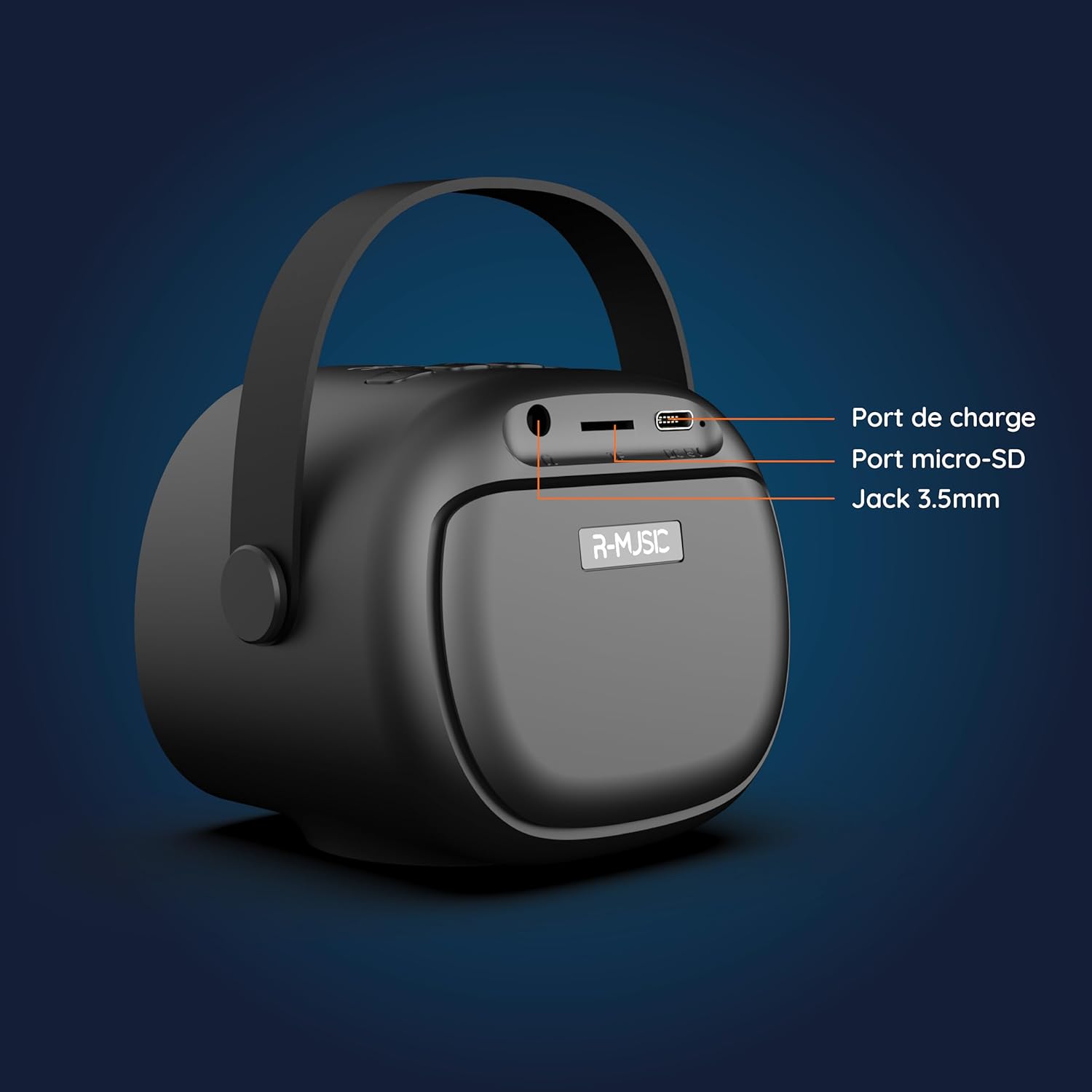
Сүрөт: Артка view of the R-MUSIC KARADUO speaker, highlighting the charging port, Micro-SD card slot, and 3.5mm Jack port.
- Заряддоо порту (USB-C): Connect the provided USB-C cable for charging.
- Micro-SD карта слоту: Музыканы түз ойнотуу үчүн Micro-SD картаны салыңыз.
- 3.5 мм AUX порту: Тышкы аудио түзмөктөрдү 3.5 мм аудио кабелин (кошулбаган) колдонуп туташтырыңыз.
Микрофонду башкаруу

Image: Close-up of the R-MUSIC wireless microphones, illustrating the power, volume, and mode buttons.
- Кубат баскычы: Long press to power the microphone on or off.
- Көлөм + баскычы: Микрофондун үнүн жогорулатуу.
- Үндүн көлөмү - баскычы: Микрофондун үнүн азайтыңыз.
- Режим баскычы (M): Short press to cycle through 5 voice deformation effects and 3 karaoke modes.
Жайгашуу
1. Charging the Speaker and Microphones
Before first use, fully charge the speaker and both microphones.
- Баяндамачы: Connect the provided USB-C charging cable to the speaker's charging port and a compatible USB power adapter (not included). The charging indicator will show the charging status.
- Микрофондор: Each microphone has its own charging port (usually Micro-USB, check the microphone itself). Connect them to a USB power source using appropriate cables (not included, or check if included with microphones).
A full charge provides approximately 14 hours of speaker playback without LED lights, or 7 hours with LED lights activated.
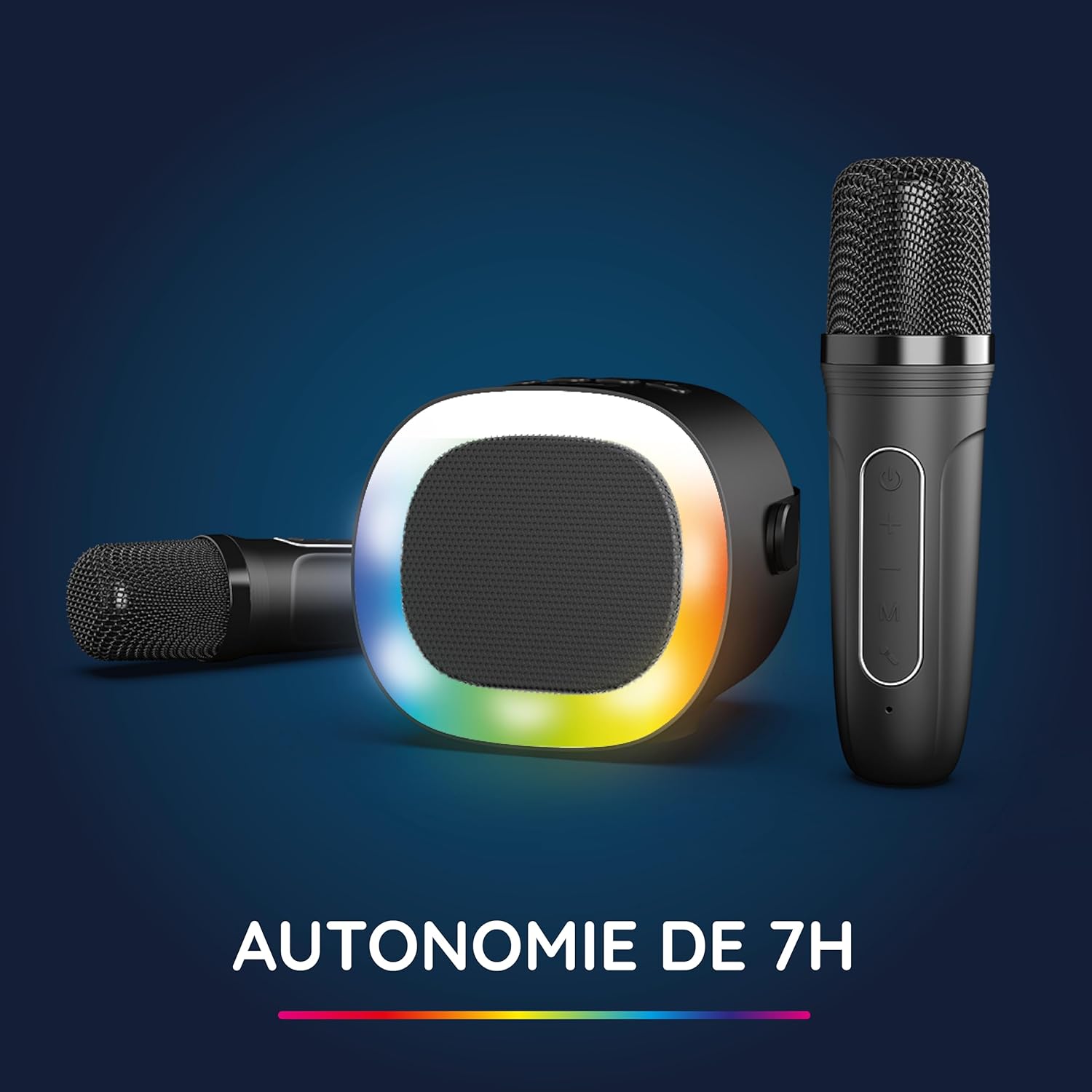
Image: The R-MUSIC speaker and microphones, illustrating the battery life with LED lights active.
2. Powering On and Pairing Microphones
- Күйгүзүлгөн динамик: Long press the ON/OFF button on the speaker until it powers on.
- Микрофондорду күйгүзүү: Long press the Power button on each microphone until they power on.
- The microphones should automatically pair with the speaker. If not, ensure they are within close proximity and try powering them off and on again.
Иштөө нускамалары
1. Аудио булактарына туташуу
The KARADUO speaker offers multiple connectivity options:
- Bluetooth 5.0:
- Динамик күйгүзүлгөнүн текшериңиз.
- Activate Bluetooth on your smartphone, tablet, PC, or other compatible device.
- Издөө "KARADUO" in your device's Bluetooth settings and select it to pair. A confirmation sound will indicate a successful connection.
- The Bluetooth 5.0 technology ensures optimal sound quality and a stable connection up to 10 meters.
- AUX киргизүү:
- Connect a 3.5mm audio cable (not included) from your audio device's headphone jack to the speaker's 3.5mm AUX port.
- Динамик автоматтык түрдө AUX режимине өтөт.
- Micro-SD Card Playback:
- Insert a Micro-SD card containing MP3 audio files into the Micro-SD card slot on the back of the speaker.
- Динамик картаны автоматтык түрдө аныктап, музыка ойной баштайт.
2. Динамиктин иштеши
- Ойнотуу/тындыруу: Short press the ON/OFF/Pause/Play button.
- Үндү тууралоо: Short press the Volume + or Volume - buttons.
- Кийинки / Мурунку трек: Long press the Volume + (next) or Volume - (previous) buttons.
- LED жарык режимдери: Press the LED Animation button to cycle through 5 different LED light animations.

Image: The R-MUSIC speaker showcasing its dynamic LED light animations.
3. Microphone Operation
- Микрофондун үнү: Use the Volume + and Volume - buttons on the microphone to adjust your vocal volume.
- Voice Deformation Effects: Short press the 'M' (Mode) button on the microphone to cycle through 5 different voice deformation effects.
- Караоке режимдери: Continue pressing the 'M' button to cycle through 3 distinct karaoke modes.
Техникалык тейлөө
To ensure the longevity and optimal performance of your R-MUSIC KARADUO system, follow these maintenance guidelines:
- Тазалоо: Use a soft, dry cloth to clean the speaker and microphones. Do not use abrasive cleaners, solvents, or harsh chemicals.
- Сактагыч: Аппаратты колдонбогондо түз күн тийбеген жана өтө температурадан алыс салкын, кургак жерде сактаңыз.
- Суу таасири: Бул продукт суу өткөрбөйт. Сууга же ашыкча нымдуулукка дуушар кылбаңыз.
- Заряддоо: Only use the provided charging cable and a compatible USB power adapter. Do not overcharge the device.
Проблемаларды чечүү
If you encounter issues with your KARADUO system, please refer to the following common problems and solutions:
| Көйгөй | Мүмкүн себеп | Чечим |
|---|---|---|
| Күч жок | Батареянын заряды аз же түзмөк өчүк. | Charge the speaker/microphones. Long press the power button to turn on. |
| Динамиктен үн жок | Үнү өтө төмөн, киргизүү режими туура эмес же түзмөк туташкан эмес. | Increase speaker volume. Ensure correct input (Bluetooth, AUX, Micro-SD). Reconnect Bluetooth or check AUX cable. |
| Микрофондор иштебейт | Микрофондор өчүк, батареясы аз же жупташтырылган эмес. | Ensure microphones are charged and powered on. They should automatically pair with the speaker. If not, power cycle them. |
| Bluetooth ажыратылды | Device out of range, interference, or low battery. | Move the connected device closer to the speaker (within 10m). Ensure no major obstacles. Recharge the speaker. |
If the problem persists after trying these solutions, please contact R-MUSIC customer support.
Техникалык шарттар
| Өзгөчөлүк | Деталь |
|---|---|
| Бренд | R-MUSIC |
| Модель номери | RM484437 |
| Түс | Кара |
| Байланыш технологиясы | Bluetooth 5.0 |
| Туташуу порттору | 3.5mm Jack, USB Type-C (charging), Micro-SD Card Slot |
| Өзгөчөлүктөр | 2 Wireless Microphones, Universal Connectivity, 5 Voice Deformation Effects, LED Lights |
| Шайкеш түзмөктөр | PC, Smartphone, Tablet, TV (via AUX) |
| Power Source | Батарея менен иштейт |
| Speaker Battery Life | Up to 14 hours (without LED), 7 hours (with LED) |
| Bluetooth диапазону | 10 метрге чейин |

Image: Technical dimensions of the R-MUSIC KARADUO speaker, showing its height, width, and depth.
Кепилдик жана колдоо
Information regarding specific warranty terms and conditions for the R-MUSIC KARADUO Complete Karaoke Pack is not available in this document. Please refer to the product packaging or the retailer's webкепилдик маалымат үчүн сайт.
For technical support or further assistance, please contact R-MUSIC customer service through their official webсайт же сатып алуу менен камсыз болгон байланыш маалыматы.


