Introduction
The Sonim XP5 Plus is a rugged, purpose-built communication device designed for demanding environments. It combines cellular and radio-like capabilities, making it ideal for critical communications. This manual provides essential information for setting up, operating, maintaining, and troubleshooting your Sonim XP5 Plus.
Пакеттин мазмуну
Продукцияңыздын таңгагында бардык элементтер бар экенин текшериңиз:
- Sonim XP5 Plus XP5900 Rugged Phone
- Кубаттуу адаптер
- Литий-иондук батарейка
- USB-C Cable
- Документтер (Ыкчам баштоо колдонмосу, коопсуздук маалыматы)
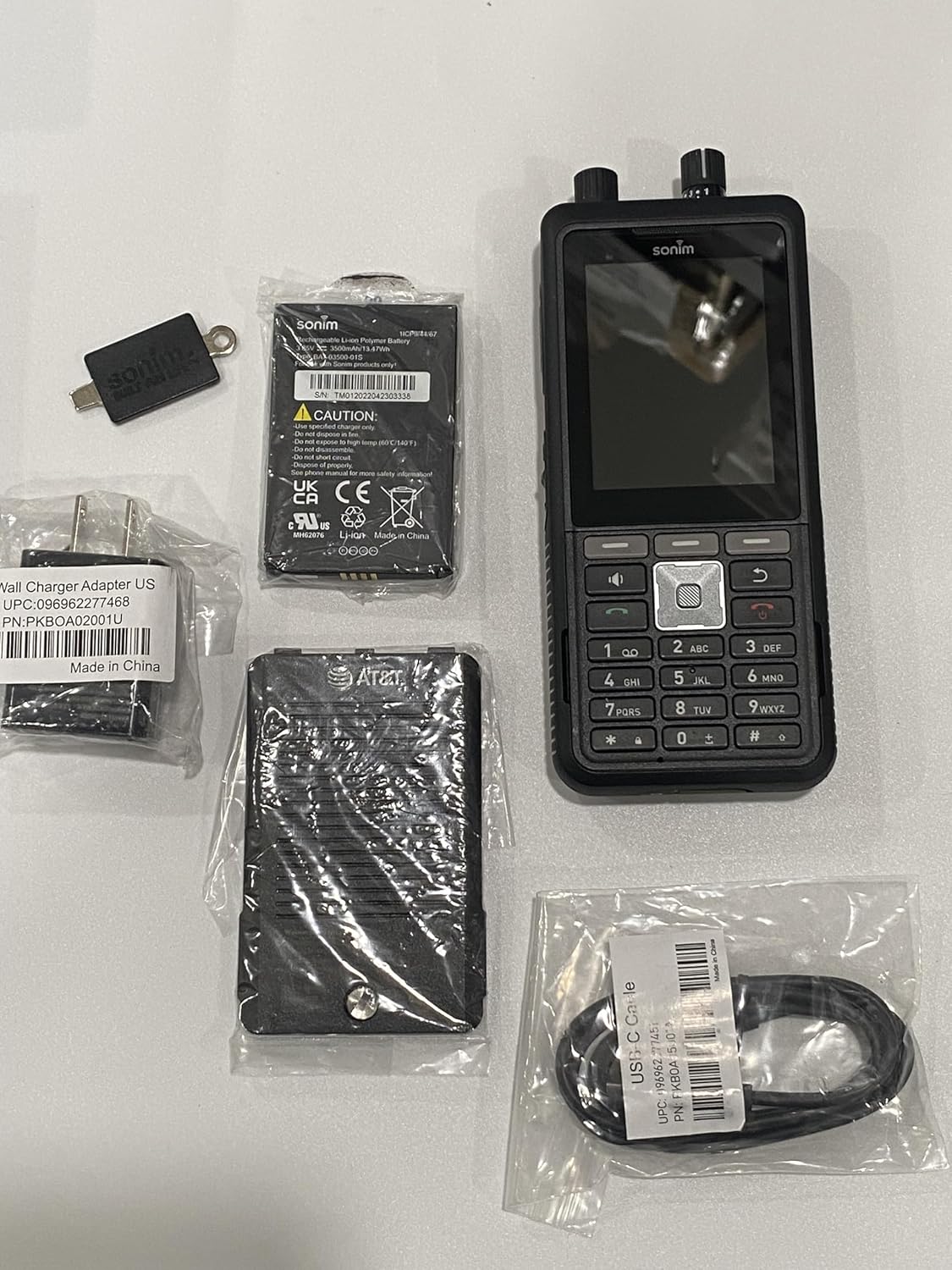
Image: The Sonim XP5 Plus phone, along with its included accessories: a battery, a wall charger adapter, and a USB-C cable. All components are individually packaged.
Продукт бүттүview
Familiarize yourself with the physical features and components of your Sonim XP5 Plus.

Сүрөт: Бир нече views of the Sonim XP5 Plus phone. The front view shows the display and keypad, the back view shows the camera and speaker, and side views highlight the rugged design and side buttons.
Негизги компоненттер:
- Дисплей: 2.8-inch screen for clear visibility.
- Баскычтоп: Physical buttons for dialing and navigation.
- Push-to-Talk (PTT) баскычы: Large, dedicated button for instant communication.
- Үндү башкаруу баскычтары: Top-mounted for easy adjustment.
- Камера: Rear-facing camera for capturing images.
- Баяндамачылар: Dual 100db+ speakers with noise cancellation for clear audio.
- Sonim SecureAudio Connector: For secure accessory connections.
- USB-C порту: Заряддоо жана маалыматтарды өткөрүү үчүн.
Жайгашуу
1. Батареяны орнотуу
- Телефондун артындагы батарея бөлүкчөсүнүн капкагын табыңыз.
- Этияттык менен капкакты алып салыңыз.
- Insert the Lithium Ion battery, aligning the gold contacts with the terminals in the phone.
- Replace the battery compartment cover, ensuring it is securely latched to maintain waterproofing.
2. SIM карта жана MicroSD карта орнотуу
- With the battery removed, locate the SIM card slot(s) and microSD card slot. The phone supports Dual 4FF Nano SIM cards and up to 512GB microSD.
- Insert your Nano SIM card(s) into the designated slot(s) with the gold contacts facing down.
- If using, insert a microSD card into its slot until it clicks into place.
- Батареяны жана батареянын капкагын кайра орнотуңуз.
3. Баштапкы заряддоо
- USB-C кабелин телефондун кубаттоо портуна туташтырыңыз.
- Connect the other end of the USB-C cable to the provided Power Adapter.
- Кубат адаптерин розеткага сайыңыз.
- Allow the phone to charge completely before first use. A full charge takes approximately 2 hours.
Иштөө нускамалары
Күйгүзүү/өчүрүү
- Күйгүзүү үчүн: Sonim логотиби пайда болгонго чейин Кубат баскычын басып, кармап туруңуз.
- Өчүрүү үчүн: Кубат баскычын басып, кармап туруңуз, андан кийин экрандагы параметрлерден "Өчүрүү" дегенди тандаңыз.
Чалууларды жасоо
- From the home screen, use the keypad to dial the desired number.
- Press the green Call button to initiate the call.
- To end a call, press the red End Call button.
Push-to-Talk (PTT) Functionality
The Sonim XP5 Plus features enhanced PTT capabilities for instant communication.
- Dedicated PTT Button: Press and hold the large PTT button on the side of the device to transmit your voice. Release to listen.
- Channel Select Knob: Use the top-mounted knob to quickly switch between communication channels without looking at the screen.
- Үндү көзөмөлдөө баскычы: Adjust the speaker volume using the other top-mounted knob.

Сүрөт: Жакын пландагы фронт view of the Sonim XP5 Plus, highlighting the screen interface, the physical keypad, and the two rotary knobs located at the top of the device for channel and volume control.
Кабарлашуу
Тексттик билдирүүлөрдү жөнөтүү жана алуу үчүн:
- Navigate to the Messaging application from the main menu.
- Select "New Message" and enter the recipient's number or select from contacts.
- Ариптакта аркылуу билдирүүңүздү териңиз.
- Press the Send button.
Техникалык тейлөө
Аппаратыңызды тазалоо
- жумшак колдонуу, damp cloth to wipe down the exterior of the phone.
- Катуу химиялык заттарды же абразивдүү тазалагычтарды колдонуудан алыс болуңуз.
- Ensure all ports and covers are securely closed before cleaning with moisture.
Гидроизоляцияга кам көрүү
The Sonim XP5 Plus is designed to be waterproof. To maintain its integrity:
- Always ensure the battery cover and all port covers (e.g., USB-C port) are firmly sealed before exposing the phone to water or dust.
- Do not submerge the phone in water deeper or for longer than specified in the product specifications.
- If the phone has been exposed to saltwater, rinse it thoroughly with fresh water and dry it completely before charging or opening any covers.
Батареяга кам көрүү
- Use only Sonim-approved chargers and batteries.
- Батареяны экстремалдуу температурага тийгизүүдөн сактаңыз.
- Батареяны тешип, ажыратпаңыз же кыска туташууларга жол бербеңиз.
Проблемаларды чечүү
| Көйгөй | Мүмкүн болгон себеп / Чечим |
|---|---|
| Телефон күйбөйт. | Battery may be depleted. Charge the phone for at least 30 minutes. Ensure battery is correctly installed. |
| Чалууларды кабыл алуу же жасоо мүмкүн эмес. | Check network signal strength. Ensure SIM card is properly inserted and activated. Contact your service provider. |
| Чалуулар учурунда үн сапаты начар. | Check volume settings. Ensure speakers/microphone are not obstructed. Move to an area with better network coverage. |
| Телефон жооп бербей жатат. | Perform a soft reset by removing and reinserting the battery. If issue persists, contact support. |
| Батарея бат эле түгөнөт. | Экран жарыктыгын азайтыңыз. Колдонулбаган колдонмолорду жабуу. Фондук дайындарды колдонууну чектөө. |
Техникалык шарттар
| Өзгөчөлүк | Деталь |
|---|---|
| Модель аты | XP5plus (XP5900) |
| Бренд | Sonim |
| Операция системасы | Proprietary (optimized for rugged use) |
| Дисплей өлчөмү | 2.8 дюйм |
| Резолюция | 240 x 320 |
| RAM эс тутуму | 2 ГБ |
| Эстутум сактоо сыйымдуулугу | 512 ГБ (microSD аркылуу кеңейтүүгө болот) |
| Батарея сыйымдуулугу | 3500 миллионamp Саат |
| Talk Time | 30 саат |
| Заряддоо убактысы | 2 саат |
| Зымсыз технологиялар | Cellular (5G), Wireless |
| SIM түрү | Dual 4FF Nano SIM |
| Өзгөчөлүктөр | Push to Talk, Military Grade Ruggedness (MIL-STD-810H), Non-Incendive Class I, II and III Div 2 ratings, 100db+ speakers with Goodix Echo and Noise Cancellation Technology, Sonim SecureAudio Connector |
| Өлчөмдөрү (пакет) | 7.5 x 3.5 x 2 дюйм |
| Элемент Салмагы | 10 унция |
| Түс | Кара |
Кепилдик жана колдоо
For detailed warranty information, please refer to the warranty card included with your product or visit the official Sonim website. For technical support, product registration, or service inquiries, please contact Sonim customer service through their official channels.
Онлайн колдоо: www.sonimtech.com/support


