1. Коопсуздук нускамалары
Сураныч, орнотуу жана колдонуу алдында бардык нускамаларды кылдат окуп чыгыңыз. Бул колдонмону келечектеги маалымат үчүн сактаңыз.
1.1 Электр коопсуздугу
- Орнотуудан же тейлөөдөн мурун дайыма өчүргүчтөн электр кубатын өчүрүңүз.
- Installation must be performed by a qualified electrician or a person with electrical experience.
- Бардык зымдарды туташтыруу коопсуз жана жергиликтүү жана улуттук электр коддоруна ылайык экенин текшериңиз.
- Do not install the fan in a location where blades could strike objects or people.
1.2 Жалпы коопсуздук
- Use only Kviflon-approved replacement parts.
- Do not bend the fan blades during installation or cleaning.
- Ensure the mounting structure can support the fan's weight (approximately 9 pounds).
- Иштеп жатканда балдарды желдеткичтен алыс кармаңыз.
2. Пакеттин мазмуну
Орнотууну баштоодон мурун, бардык компоненттердин бар экендигин текшериңиз:
- Вентилятордун мотору
- Чатыр
- Screw Bag (Mounting Hardware)
- Вентилятор бычактары (5 даана)
- Lampкөлөкө
- Алуучу
- Алыстан башкаруу (2 AAA батарейкасы камтылган)
- Орнотуу боюнча нускамалар (бул колдонмо)

3. Техникалык шарттар
| Өзгөчөлүк | Спецификация |
|---|---|
| Бренд | Kviflon |
| Модель аты | 8217-RGB |
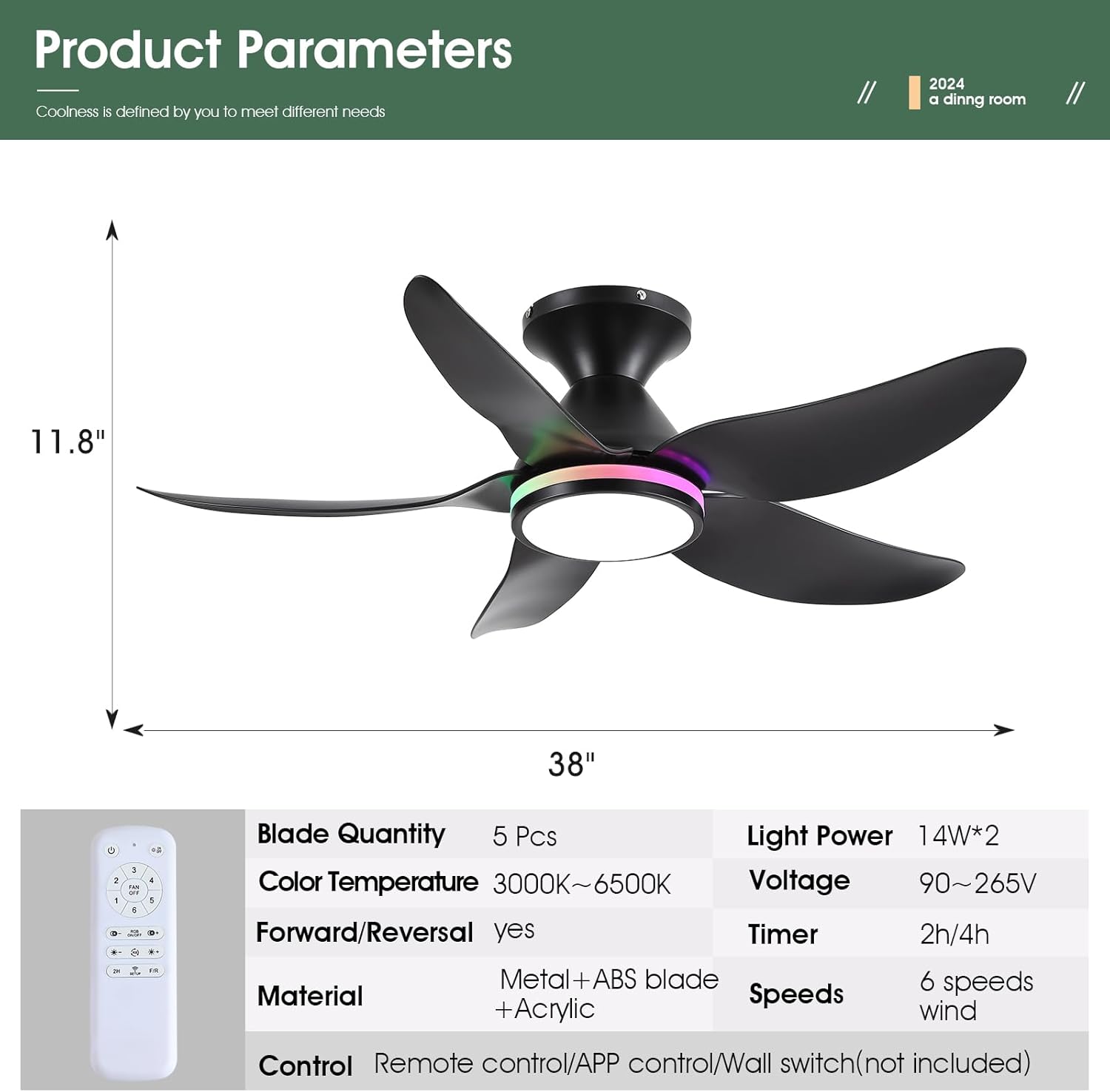
| Продукциянын өлчөмдөрү | 38"D x 38"W x 11.8"H |
| Blades саны | 5 |
| Мотор түрү | DC Motor |
| Күйөрмандардын ылдамдыгы | 6 |
| Жарыктандыруу | Dimmable White (3000K-6500K) + RGB Ring Light |
| Башкаруу ыкмасы | Remote Control, Mobile APP |
| Өзгөчөлүктөр | Reversible, Timer (2/4 hours), Night Light Mode |
| Ызы-чуу деңгээли | 30 дБден аз |
| Элемент Салмагы | 9 фунт |

4. Орнотуу боюнча колдонмо
Follow these steps for a safe and successful installation. A safety hook is included for ease of installation by one person.
4.1 Алдын ала орнотуу
- Автоматтык өчүргүчтөн электр кубатын өчүрүңүз.
- Орнотуу орду структуралык жактан бекем экенин жана желдеткичтин салмагын көтөрө алаарын текшериңиз.
4.2 Монтаждык кронштейнди орнотуу
- Берилген бурамаларды колдонуп, бекитүүчү кронштейнди шыптын туташтыруучу кутусуна бекитиңиз. Анын бекем бекитилгенин текшериңиз.
4.3 Электр зымдары
- Connect the fan's wiring to the household wiring according to the wiring diagram in the manual. Match neutral (white), live (black), and ground wires.
- Connect the receiver module to the fan and household wiring as instructed.
4.4 Blade and Light Kit Assembly
- Attach the 5 fan blades to the motor assembly using the provided screws. Ensure they are firmly secured.
- Connect the LED light module to the fan's wiring.
- lampshade to the fan body.
4.5 Жыйынтыктоочу Ассамблея
- Carefully lift the fan assembly and hang it on the safety hook of the mounting bracket.
- Connect the remaining wires (if any) and tuck them neatly into the junction box.
- Secure the canopy to the mounting bracket with the screws.


5. Иштөө нускамалары
5.1 Алыстан башкаруу функциялары
The included remote control provides full functionality for the fan and lights:
- Баары өчүк: Turns off both fan and lights.
- Жарык күйгүзүү/өчүрүү: Toggles the main light.
- Желдетүүчү өчүрүү: Желдеткичти өчүрөт.
- 6 Ылдамдыкты көзөмөлдөө: Adjusts fan speed from 1 (low) to 6 (high).
- RGB күйгүзүү/өчүрүү: Toggles the RGB ring light.
- Түс температурасы +/-: Adjusts white light color temperature (3000K Warm, 4500K Natural, 6500K Cool).
- Жарыктык +/-: Dims or brightens the main white light.
- RGB Changing: Cycles through RGB colors.
- 2H/4H Таймер: Sets the fan to turn off automatically after 2 or 4 hours.
- F/R (Forward/Reverse): Changes fan blade direction for summer (downdraft) or winter (updraft) modes.
- Code Matching (Setup): Алыстан башкаруу пультун желдеткич менен жупташтыруу үчүн колдонулат.


5.2 Колдонмону башкарууну орнотуу
To control the fan via your smartphone, download the companion app:
- Scan the QR code provided in the manual or product images to download the 'FanLamp Pro' app.
- Жаңы түзмөктү кошуу үчүн колдонмону ачып, экрандагы нускамаларды аткарыңыз.
- Ensure the fan is powered on. Within 5 seconds of powering on, press the pairing button in the app to connect. The fan lights will flash to indicate successful connection.
5.3 Fan Speed and Direction
The fan offers 6 speeds to suit various needs:
- Ылдамдык 1-2: Gentle airflow, suitable for sleeping.
- Ылдамдык 3-4: Natural wind, ideal for general comfort.
- Ылдамдык 5-6: Strong wind, for maximum cooling.
Use the F/R button on the remote or the app to switch between summer (downdraft) and winter (updraft) modes.


5.4 Жарык режимдери
The fan features versatile lighting options:
- Dimmable White Lights: Adjust brightness from 0% to 100% and choose between 3 color temperatures (Cool White 6500K, Natural Light 4500K, Warm Light 3000K).
- Independent RGB Ring Lights: The side RGB aperture can be controlled independently, offering various colors and modes.
- Түнкү жарык режими: A dedicated setting for low-level illumination.


6. Техникалык тейлөө
Үзгүлтүксүз тейлөө сиздин шыптын желдеткичиңиздин оптималдуу иштешин жана узак иштөөсүн камсыз кылат.
- Тазалоо: жумшак колдонуу, damp cloth to clean the fan blades and light cover. Do not use abrasive cleaners or solvents.
- Катуу бурамалар: Periodically check and tighten all screws on the fan blades and mounting hardware to prevent wobbling and noise.
- Чаңды тазалоо: Dust the fan motor housing and blades regularly to prevent accumulation, which can affect performance and cause overheating.
7. Кыйынчылыктарды
Эгер көйгөйлөргө туш болсоңуз, төмөнкү жалпы көйгөйлөрдү жана чечимдерди караңыз:
| Көйгөй | Мүмкүн себеп | Чечим |
|---|---|---|
| Күйөрман иштебейт | No power, loose wiring, remote not paired | Check circuit breaker, ensure connections are secure, re-pair remote/app. |
| Жарыктар иштебейт | Loose wiring, LED module failure | Check light wiring connections, contact support if LED module is faulty. |
| Күйөрман солкулдайт | Loose blades, uneven installation | Tighten all blade screws, ensure mounting bracket is level and secure. |
| Remote/App not responding | Low batteries, pairing issue, signal interference | Replace remote batteries, re-pair the remote/app, reduce interference sources. |
| Желдетүүчү ызы-чуу чыгарат | Loose screws, motor issue | Check and tighten all screws, ensure blades are clean and balanced. |
8. Кепилдик жана колдоо
Kviflon provides technical support for its products. If you encounter any problems not covered in this manual, please contact Kviflon customer service for assistance. Refer to your purchase documentation for specific warranty details.


