Introduction
This user manual provides comprehensive instructions for the setup, operation, maintenance, and troubleshooting of your Fanvil W610W Portable WiFi Phone. Please read this manual carefully before using the device to ensure proper functionality and to avoid damage.
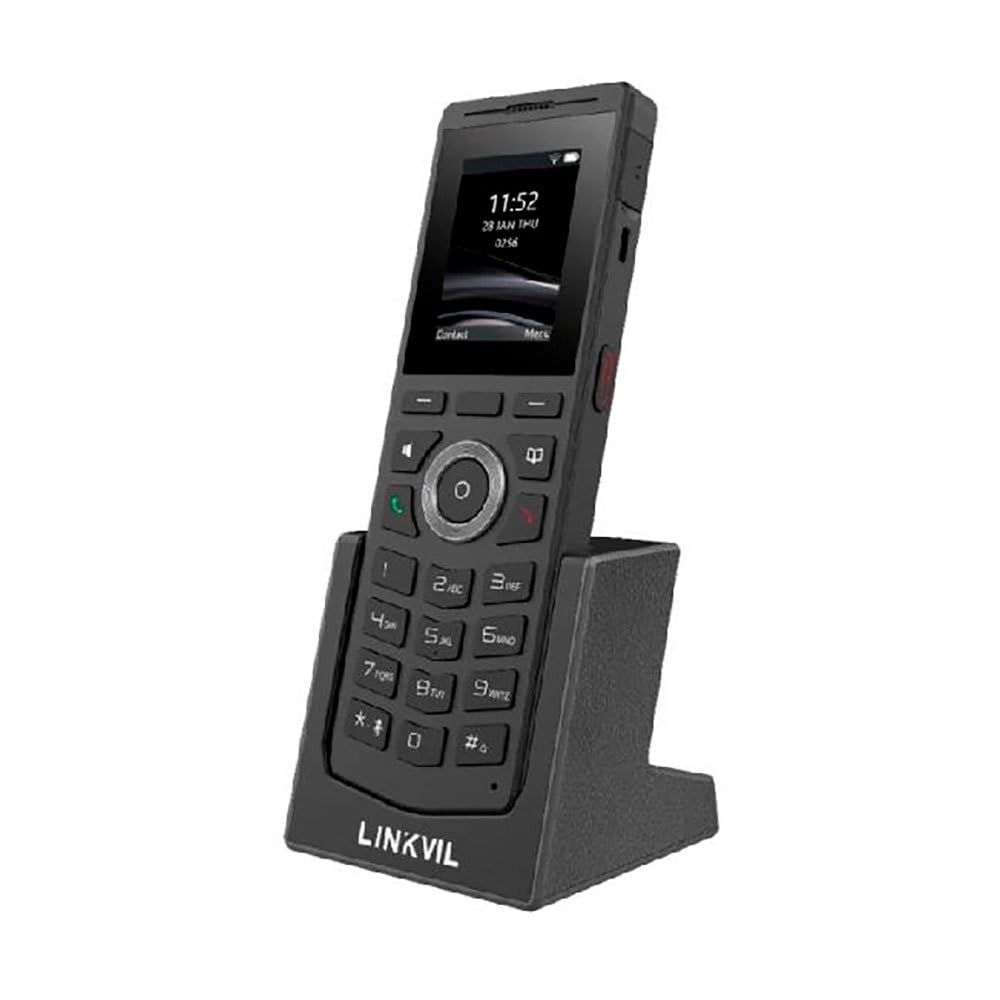
Figure 1: Fanvil W610W Portable WiFi Phone with charging cradle.
The image displays the Fanvil W610W phone, a sleek black device with a color screen showing the time (11:52) and date (23 JAN THU). Below the screen is a standard phone keypad with numerical buttons and navigation keys. The phone is seated in a matching black charging cradle, which has "LINKVIL" embossed on its front base.
The Fanvil W610W is a robust and portable WiFi phone designed for professional environments, offering reliable communication with advanced features such as dual-band Wi-Fi, Bluetooth 5.0, and support for multiple SIP lines.
Пакеттин мазмуну
- Fanvil W610W Portable WiFi Phone
- Заряддоо бешиги
- Кубаттуу адаптер
- Rechargeable Battery (may be pre-installed)
- Ыкчам баштоо колдонмосу (эгер бар болсо)
Жайгашуу
1. Батареяны орнотуу жана заряддоо
- Телефондун арткы бетиндеги батарея бөлүмүн табыңыз.
- Insert the provided 1900mAh rechargeable battery, ensuring correct polarity.
- Батарея уясынын капкагын бекем жабыңыз.
- Place the phone into the charging cradle.
- Connect the power adapter to the charging cradle and then to a power outlet.
- Allow the phone to charge fully before first use (approximately 4 hours). The battery indicator on the screen will show charging status.
2. Баштапкы күйгүзүү
Press and hold the Power button (usually on the side or top) until the screen illuminates.
3. Тармак конфигурациясы (Wi-Fi)
- багыттоо Орнотуулар > Network > Wi-Fi.
- Enable Wi-Fi. The phone will scan for available networks.
- Select your desired 2.4GHz or 5GHz Wi-Fi network from the list.
- Суралган болсо, Wi-Fi сырсөзүн киргизиңиз.
- Confirm connection. The Wi-Fi icon will appear on the status bar.
4. SIP каттоо эсеби
The Fanvil W610W supports up to 4 SIP lines. Configuration typically requires details from your VoIP service provider or PBX administrator.
- багыттоо Орнотуулар > Эсептер > SIP каттоо эсеби.
- Жеткиликтүү эсеп уячасын тандаңыз.
- Enter the following information provided by your administrator:
- Каттоо эсебинин аты
- SIP сервердин дареги
- SIP Колдонуучунун ID
- Authentication Username
- Аутентификация Сырсөзү
- Save the settings. The account status icon should indicate successful registration.
Иштөө нускамалары
Чалууларды жасоо
- Терүү: Телефон номерин баскычтопту колдонуп киргизип, баскычты басыңыз Чалуу баскычы.
- Байланыштардан: багыттоо Байланыштар, байланышты тандап, басыңыз Чалуу баскычы.
- Кайра терүү: басыңыз Чалуу button to access the call history and select a number to redial.
Чалууларды кабыл алуу
Кирүүчү чалуу шыңгыраганда, баскычын басыңыз Чалуу button to answer. To reject, press the Чакырууну аяктоо баскычы.
Чакыруу өзгөчөлүктөрү
- Кармап туруу: Чалуу учурунда, басыңыз кармап туруңуз жумшак ачкыч.
- өткөрүүсү: Чалуу учурунда, басыңыз Transfer жумшак баскычын, жаңы номерди терип, басыңыз Transfer кайра.
- Конференция: Чалуу учурунда, басыңыз Conf soft key, dial the second party, and then press Conf кайра бардык партияларга кошулууга.
- Үнсүз: басыңыз Үнсүз button to mute your microphone during a call.
- Push-to-Talk (PTT): Utilize the dedicated PTT button for one-key calling in supported environments.
Bluetooth гарнитураны жупташтыруу
The W610W supports Bluetooth 5.0 for wireless headsets.
- багыттоо Орнотуулар > Bluetooth.
- Bluetooth иштетүү.
- Bluetooth гарнитураңызды жупташтыруу режимине коюңуз.
- Select your headset from the list of available devices and confirm pairing.
Техникалык тейлөө
Тазалоо
- Use a soft, dry, lint-free cloth to clean the phone and screen.
- Суюк тазалоочу каражаттарды, аэрозолдорду же абразивдүү материалдарды колдонбоңуз.
Батареяга кам көрүү
- Оптималдуу иштеши үчүн батареяны дайыма заряддап туруңуз.
- Батареянын иштөө мөөнөтүн кыскартышы мүмкүн болгон өтө жогорку температурадан алыс болуңуз.
- If the phone will not be used for an extended period, charge it to about 50% and store it in a cool, dry place.
Орнотулган программаны жаңыртуу
Periodically check for firmware updates to ensure your phone has the latest features and security enhancements. Updates can typically be performed via the phone's web interface or through your system administrator.
Проблемаларды чечүү
| Көйгөй | Мүмкүн себеп | Чечим |
|---|---|---|
| Телефон күйбөйт. | Low or depleted battery; faulty battery; power adapter issue. | Ensure battery is charged. Check power adapter connection. Try a different power outlet. |
| Wi-Fi'га туташпай жатат. | Incorrect password; out of range; Wi-Fi network issues. | Verify Wi-Fi password. Move closer to the access point. Restart router/access point. |
| Чалууларды кабыл алуу же жасоо мүмкүн эмес. | SIP account not registered; network connectivity issues; incorrect SIP settings. | Check SIP account status (should be registered). Verify network connection. Re-enter SIP account details. Contact your VoIP administrator. |
| Чалуу сапаты начар (жаңырык, статикалык). | Weak Wi-Fi signal; network congestion; headset issues. | Improve Wi-Fi signal strength. Reduce network traffic. Test with a different headset or without one. |
Техникалык шарттар
- Модел: W610W
- Өлчөмдөрү: 5.91 x 5.91 x 3.15 дюйм
- Салмагы: 15.1 унция (0.43 килограмм)
- Дисплей: 2" Color Screen
- Байланыш: Dual-Band Wi-Fi (2.4GHz/5GHz), Bluetooth 5.0
- SIP линиялары: Supports 4 SIP lines
- Батарея: 1900mAh кайра заряддалуучу батарея
- Сүйлөшүү убактысы: 9 саатка чейин
- Күтүү убактысы: 200 саатка чейин
- Drop Safe: From 1.8 meters
- Өзгөчөлүктөрү: 16 DSS keys, PTT one-key calling, Roaming protocols (802.11k/v/r), HD voice, Multilingual UI, Voicemail, Enhanced call features.
- Кубат булагы: Батарея менен иштейт
- Түсү: Кара
- Өндүрүүчү: Fanvil
- Биринчи жеткиликтүү: 26-октябрь, 2023-жыл
Кепилдик маалымат
Fanvil products typically come with a standard manufacturer's warranty. For specific warranty terms and conditions, please refer to the warranty card included with your product or visit the official Fanvil webсайт. Сатып алуу квитанциясын кепилдик дооматтары үчүн сатып алуунун далили катары сактаңыз.
Колдоо
For technical assistance, troubleshooting beyond this manual, or warranty inquiries, please contact your product vendor or Fanvil customer support. You may find contact information on the Fanvil official webсайтында же продуктунун таңгагында.
Онлайн ресурстар:
- Фанвилдин расмий өкүлү Webсайт: www.fanvil.com (Чыгampшилтеме, чыныгы шилтеме ар кандай болушу мүмкүн)
- Product Support Pages: Refer to the support section on the Fanvil website for firmware, FAQs, and additional documentation.


