1. Introduction and Overview
The Reality Leuchten Francy LED Desk Lamp (Model R52691102) is designed to provide versatile illumination and practical features for your workspace. This lamp integrates a digital display that shows the current time, date, day of the week, and room temperature. It features a 4-step touch dimmer for adjustable brightness and a flexible lamp arm to direct light precisely where needed. Equipped with modern LED technology, the Francy lamp offers high light quality, energy efficiency, and a long lifespan. Additionally, it includes a convenient alarm function.

Image 1.1: The Francy LED Desk Lamp, showcasing анын саркеч дизайн жана интеграцияланган санарип дисплей.

Image 1.2: Icons representing key features: 4-step touch dimmer, 5000K color temperature, adjustable brightness, alarm function, temperature display, and date display.
2. Коопсуздук нускамалары
- л колдонуудан мурун бардык көрсөтмөлөрдү кунт коюп окуп чыгыңызamp.
- l-ди ажыратууга же өзгөртүүгө болбойтamp. There are no user-serviceable parts inside, and tampering may void the warranty and pose a safety risk.
- This product contains an integrated LED light source that is not replaceable. Do not attempt to replace the LEDs.
- Use only the power adapter supplied with the lamp. Using an incorrect adapter may damage the lamp or cause a fire hazard.
- l сактаңызamp away from water, moisture, and high temperatures.
- l камсыз кылууamp чөгүп кетпеши үчүн туруктуу, жалпак бетке коюлат.
- Узак убакыт бою диоддук жарык булагын түз карабаңыз, анткени ал көздүн чыңалуусуна алып келиши мүмкүн.
- lamp тазалоодон мурун же узак убакыт бою колдонулбай турган болсо, аны розеткадан сууруп алыңыз.
3. Пакеттин мазмуну
Бардык буюмдардын бар экенин жана бузулбаганын текшерүү үчүн таңгактан чыгарганда таңгактын ичиндегисин текшериңиз:
- Francy LED Desk Lamp (Model R52691102)
- Кубаттуу адаптер
- Колдонуучунун Колдонмосу (бул документ)
4. Орнотуу
- Пакеттен чыгаруу: кылдаттык менен алып салуу лamp and all components from the packaging. Retain the packaging for future storage or transport.
- Жайгашкан жери: l коюңузamp on a stable, flat, and dry surface, such as a desk or table. Ensure there is adequate space around the lamp for ventilation and adjustment of the flexible arm.
- Туташуу кубаты: Insert the small plug of the power adapter into the DC input port located at the back or base of the lamp. Then, plug the power adapter into a standard electrical outlet.
- Баштапкы күйгүзүү: Once connected to power, the digital display should illuminate. The lamp азыр колдонууга даяр.
- Install Backup Battery (Optional/If applicable): лamp's digital display may require a CR2032 button cell battery (not always included, but often pre-installed or required for memory retention during power outages). Locate the battery compartment, typically on the underside or back of the lamp's base. Insert a CR2032 battery with the positive (+) side facing up. This battery helps maintain time and date settings when the lamp ажыратылган.

Image 4.1: The Francy LED Desk Lamp positioned on a desk, ready for use.
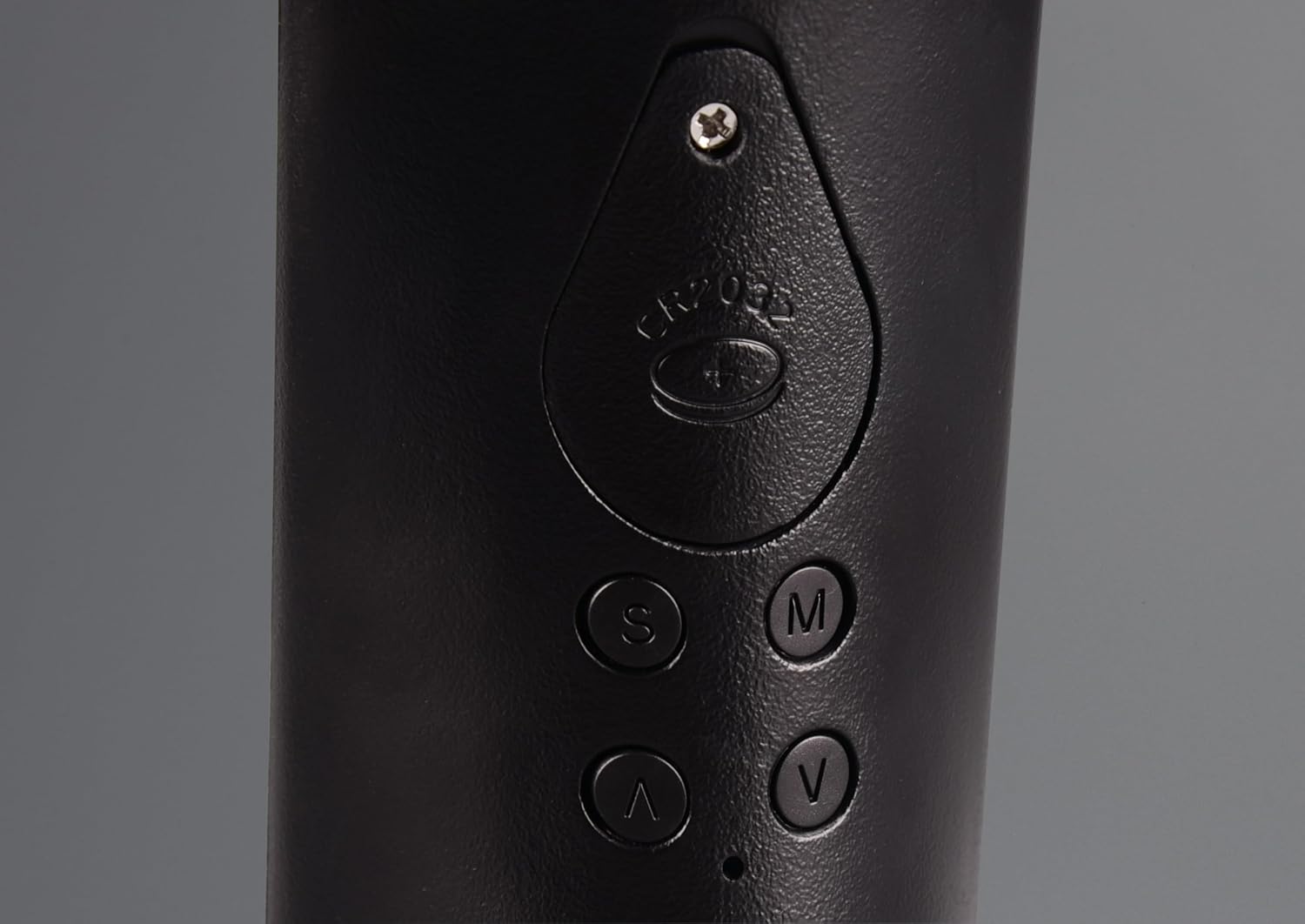
Image 4.2: Detail of the lamp's base showing the CR2032 battery compartment and control buttons (S, M, V, ^).
5. Иштөө нускамалары
5.1. Күйгүзүү/өчүрүү жана жарыктыкты жөндөө
лamp features a touch-sensitive power button and a 4-step dimmer integrated into its base.
- Күйгүзүү: Lightly touch the power symbol (⏻) боюнча лampнын базасы. лamp will turn on at the lowest brightness setting.
- Жарыктыкты жөндөө: Continue to touch the power symbol repeatedly to cycle through the 4 brightness levels. Each touch will increase the brightness.
- Өчүрүү: After the highest brightness level, touching the power symbol one more time will turn the lamp өчүрүү.
5.2. Flexible Arm Adjustment
лamp head is connected to the base via a flexible arm, allowing you to direct the light as needed.
- Gently bend the flexible arm to position the light source. Avoid excessive force or bending the arm beyond its natural range of motion to prevent damage.

Image 5.2.1: The flexible arm of the Francy lamp allows for various lighting angles.
5.3. Digital Display Functions
The integrated digital display shows time, date, day of the week, and room temperature.

Сүрөт 5.3.1: деталдуу view of the digital display, showing temperature, time, date, and day of the week.
The control buttons (S, M, V, ^) located on the back or side of the lamp's base are used to set these functions.
- S (Set): Enters setting mode and confirms selections.
- M (режим): Switches between display modes or setting parameters.
- V (Down/Decrease): Decreases values or navigates down.
- ^ (Up/Increase): Increases values or navigates up.
5.3.1. Убакыт жана дата орнотуу
- басыңыз S Убакытты орнотуу режимине өтүү үчүн баскычты бир жолу басыңыз. Сааттын сандары күйүп-өчүп турат.
- колдонуу ^ or V саатты тууралоо үчүн баскычтар.
- Басыңыз S мүнөт жөндөөсүнө өтүү үчүн дагы. Колдонуу ^ or V мүнөт тууралоо үчүн.
- Басууну улантыңыз S to cycle through setting the year, month, and day. Use ^ or V ар бир маанини тууралоо үчүн.
- Күндү койгондон кийин, баскычын басыңыз S one last time to exit setting mode and save your changes.
5.3.2. Ойготкуч функциясы
лamp includes an alarm clock feature.
- басыңыз M button repeatedly until the alarm time is displayed (often indicated by an alarm icon).
- басыңыз S Ойготкучту орнотуу режимине өтүү үчүн баскычын басыңыз. Ойготкуч саатынын сандары күйүп-өчүп турат.
- колдонуу ^ or V ойготкуч саатын тууралоо үчүн баскычтар.
- Басыңыз S again to move to the alarm minute setting. Use ^ or V мүнөт тууралоо үчүн.
- Басыңыз S one more time to confirm the alarm time and exit setting mode.
- Ойготкучту жандыруу/өчүрүү үчүн басыңыз ^ button while the alarm time is displayed (not in setting mode). An alarm icon will appear/disappear on the display.
- Чырым Function: When the alarm sounds, touch the power symbol on the lamp's base to activate snooze. The alarm will sound again after a few minutes (typically 5-10 minutes).
- Сигналды токтотуу: To turn off the alarm completely, press any of the S, M, V, or ^ buttons (not the power symbol) when the alarm is sounding.
5.3.3. Температураны чагылдыруу
лamp displays the ambient room temperature. This feature is automatic and does not require manual setting.
- The temperature is typically shown in Celsius (°C). There might be an option to switch to Fahrenheit (°F) by pressing a specific button (e.g., V or ^) while in time display mode, but this varies by model. Refer to the display for any indicators.
6. Техникалык тейлөө
- Тазалоо: Тазалоодон мурун, lamp розеткадан суурулган. Жумшак, кургак чүпүрөк менен аарчыңызamp's surface. Do not use abrasive cleaners, solvents, or harsh chemicals, as these can damage the finish.
- LED Жарык Source: Бул лдагы LED жарык булагыamp is integrated and cannot be replaced. If the LEDs fail, the entire lamp unit may need to be replaced.
- Батареяны алмаштыруу: If the time and date settings are lost when the lamp is unplugged, the CR2032 backup battery may need replacement. Follow the instructions in Section 4. Setup for battery installation.
7. Кыйынчылыктарды
| Көйгөй | Мүмкүн себеп | Чечим |
|---|---|---|
| Lamp күйбөйт. | Not plugged in; power outlet not working; faulty adapter. | Кубат адаптери l экөөнө тең бекем сайылганын текшериңизamp жана иштеген электр розетка. Розетканы башка аспап менен текшериңиз. |
| Санариптик дисплей бош же жыпылыктап турат. | Power issue; backup battery low/missing. | Check power connection. If the lamp is plugged in but the display is off, replace the CR2032 backup battery. |
| Time/Date resets when unplugged. | Backup battery is dead or missing. | Install or replace the CR2032 backup battery (see Section 4. Setup). |
| Ойготкуч угулбайт. | Alarm not activated; volume too low (if adjustable). | Ensure the alarm function is activated (alarm icon visible on display). Check if there's a volume setting (though typically not on these lampс). |
8. Техникалык шарттар
- Модель номери: R52691102
- Бренд: RL ЖАРЫГЫҢЫЗ МЕНЕН ЖАШАҢЫЗ
- Продукциянын өлчөмдөрү: 7D x 24W x 35H cm (7 x 24 x 35 cm; 625 g)
- Негизги материал: Пластик
- Көлөкө материалы: Пластик
- Түсү: Black (with leather-look elements)
- Бүткөн түрү: Brushed
- Жарык булагы: Интегралдык LED
- Энергияны керектөө: 4.8 Ватт
- Жарык агымы: Max 430 Lumen
- Түс температурасы: 5000 Кельвин (Муздак Ак)
- Орточо жашоо узактыгы: 25,000 саат
- алсыздатуу: 4-step touch dimmer
- Которуу түрү: тийүү
- Өзгөчөлүктөр: Dimmable, Energy-Efficient, Flexible Arm, Digital Display (Time, Date, Day, Temperature), Alarm Function
- Кубат булагы: Электр зымдары
- Батареялар талап кылынат: No (for main operation), CR2032 button cell for display memory (not always included/pre-installed)

Image 8.1: Technical drawing illustrating the dimensions and components of the Francy LED Desk Lamp.
9. Кепилдик жана колдоо
This product is covered by a manufacturer's warranty. For specific warranty terms and conditions, please refer to the warranty card included with your purchase or contact the retailer where you purchased the product.
For technical support, troubleshooting assistance beyond what is provided in this manual, or inquiries regarding parts and service, please contact RL LIVE YOUR LIGHT customer service or your local distributor. Contact information can typically be found on the product packaging or the brand's official webсайт.
Please have your product model number (R52691102) and purchase date ready when contacting support.


