1. Киришүү
Thank you for choosing the Baseus AeQur G10 TWS Earphones. This manual provides detailed instructions on how to set up, operate, maintain, and troubleshoot your new earphones. Please read this manual thoroughly before using the product to ensure optimal performance and longevity.
2. Пакеттин мазмуну
Carefully unpack the box and ensure all items listed below are present and in good condition. If any items are missing or damaged, please contact your retailer.
- Baseus AeQur G10 TWS Earphones (Left and Right)
- Заряддоо кутусу
- USB-A/USB-C Wireless Dongle
- USB-C заряддоо кабели
- Кулак учтарынын бир нече өлчөмү
- Колдонуучунун Колдонмосу (бул документ)

Image 2.1: Complete package contents of the Baseus AeQur G10 TWS Earphones.
3. Продукт бүтүп калдыview
Familiarize yourself with the components of your Baseus AeQur G10 TWS Earphones.
3.1 Наушник
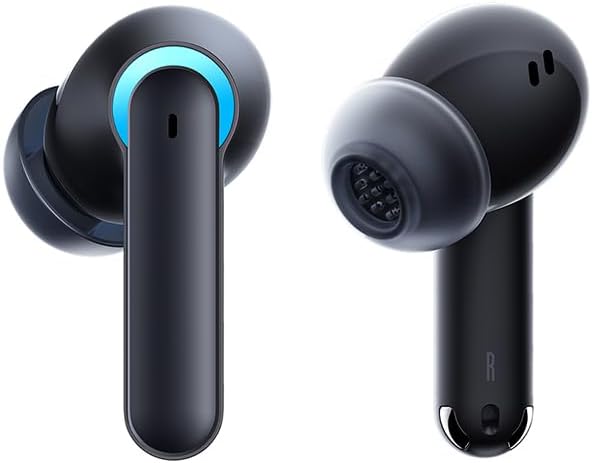
Image 3.1: Left and Right Baseus AeQur G10 Earphones. Each earphone features a touch control area, microphone, and charging contacts.
3.2 Заряддоо кутусу

Image 3.2: Baseus AeQur G10 Earphones in their charging case with the lid open. The case has charging slots for each earphone and an LED indicator for battery status.
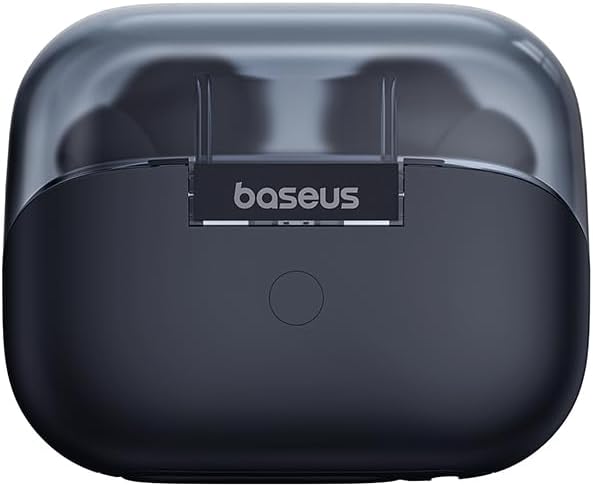
Сүрөт 3.3: Арткы view of the Baseus AeQur G10 charging case, displaying the Baseus brand logo and a USB-C charging port (not explicitly visible but implied by common design).
3.3 USB-A/USB-C Wireless Dongle
The included wireless dongle allows for low-latency connection to various devices, including PCs, laptops, gaming consoles, and mobile devices.

Image 3.4: Compatibility diagram for the Baseus AeQur G10, illustrating connections to Type-C Androids & Tablets, Type-C/USB-A PCs & Laptops, PS5/PS4/Switch, Steam Deck, and VR devices.
4. Орнотуу
4.1 Алгачкы заряддоо
- Эки наушникти тең заряддоо кутусуна салыңыз.
- Connect the USB-C charging cable to the charging port on the case and the other end to a USB power source (e.g., computer USB port, wall adapter).
- The LED indicator on the case will show charging status. A full charge typically takes approximately 1.5 hours for the earphones and 2 hours for the case.
4.2 Bluetooth түзмөктөрү менен жупташтыруу
- Ensure the earphones are in the charging case and the case has sufficient charge.
- Open the charging case lid. The earphones will automatically enter pairing mode (indicated by a flashing LED on the earphones or case).
- Түзмөгүңүздө (смартфон, планшет, ноутбук) Bluetooth иштетип, жаңы түзмөктөрдү издеңиз.
- Select "Baseus AeQur G10" from the list of available devices.
- Туташтырылгандан кийин, LED индикатору күйүп-өчүүнү токтотот жана сиз ырастоо сигналын угасыз.
4.3 Connecting via USB Wireless Dongle
- Insert the USB-A or USB-C end of the wireless dongle into the corresponding port on your device (PC, laptop, gaming console).
- Кулакчындардын кубаттоочу кутучада экенин жана капкагы ачык экенин текшериңиз.
- The earphones will automatically attempt to connect to the dongle. The dongle's LED indicator will show connection status.
- Once connected, the LED on the dongle will become solid, and you will hear a confirmation tone from the earphones.
5. Иштөө нускамалары
5.1 Күйгүзүү/өчүрүү
- Күйгүзүү: Заряддоо кутусунун капкагын ачыңыз же наушникти кутудан чыгарыңыз. Алар автоматтык түрдө күйөт.
- Өчүрүү: Place the earphones back into the charging case and close the lid. They will power off automatically and begin charging.
5.2 Наушник тагынуу
- Identify the 'L' (left) and 'R' (right) markings on each earphone.
- Кулакчындарды кулак каналдарыңызга акырын киргизиңиз.
- Rotate them slightly to find a comfortable and secure fit. Choose the appropriate ear tip size for optimal sound quality and comfort.
5.3 Сенсордук башкаруу
The Baseus AeQur G10 earphones feature touch-sensitive controls on each earbud. The specific functions may vary slightly depending on the device and application.
| Акция | Функция |
|---|---|
| Бир таптоо (сол/оң) | Музыканы ойнотуу/тындыруу, Чалууга жооп берүү/Аяктоо |
| Эки жолу таптаңыз (L) | Мурунку трек |
| Эки жолу таптаңыз (R) | Кийинки трек |
| Үч жолу таптоо (сол/оң) | Үн жардамчысын жандырыңыз |
| Long Press (L/R, 2s) | Чакырууну четке кагуу |
| Long Press (L/R, 3s) | Toggle Gaming/Music Mode (if applicable) |
6. Техникалык тейлөө
6.1 Тазалоо
- Use a soft, dry, lint-free cloth to clean the earphones and charging case.
- For earwax or debris in the ear tips, gently remove the ear tips and clean them with a cotton swab lightly dampened with rubbing alcohol. Ensure they are completely dry before reattaching.
- Абразивдүү тазалагычтарды, эриткичтерди же аэрозолдук спрейлерди колдонбоңуз.
6.2 Сактоо
- Кулакчындарды колдонбогон учурда коргоо жана кубаттоодо кармап туруу үчүн ар дайым кубаттоочу кутучасында сактаңыз.
- Салкын, кургак жерде, экстремалдык температурадан жана түз күндүн нурунан алыс сактаңыз.
6.3 Батареяга кам көрүү
- Charge the earphones and case regularly, even if not used frequently, to maintain battery health.
- Батареяларды узак убакыт бою толугу менен зарядсыздандырбаңыз.
7. Кыйынчылыктарды
If you encounter issues with your Baseus AeQur G10 earphones, refer to the following common solutions:
7.1 Үн жок же үзгүлтүксүз туташуу
- Ensure earphones are charged and properly connected to your device (Bluetooth or dongle).
- Check the volume level on both the earphones and your connected device.
- Move closer to your device to avoid interference or range issues.
- Try disconnecting and re-connecting the earphones.
- For Bluetooth, forget the device on your phone and re-pair.
- For dongle, unplug and re-plug the dongle.
7.2 Наушник заряддалбай жатат
- Заряддоо кабели корпуска да, кубат булагына да бекем туташтырылганын текшериңиз.
- Кубат булагы активдүү экенин текшериңиз.
- Кулакчындардын жана корпустун ичиндеги заряддоочу контакттарды кургак кебез таякча менен тазалаңыз.
- Башка заряддоо кабелин же кубат адаптерин колдонуп көрүңүз.
7.3 Only One Earphone Working
- Place both earphones back into the charging case, close the lid, wait a few seconds, then open the lid and take them out again.
- Эки кулакчындын тең кубатталганын текшериңиз.
- Кулакчындарды баштапкы абалга келтирип көрүңүз (өндүрүүчүнүн көрсөтмөсүн караңыз) webзарыл болсо, конкреттүү калыбына келтирүү нускамалары үчүн сайт).
8. Техникалык шарттар
Key technical specifications for the Baseus AeQur G10 TWS Earphones:
| Өзгөчөлүк | Спецификация |
|---|---|
| Модель аты | A00055400111-00 |
| Бренд | Baseus |
| Түс | Кара |
| Кулак жайгаштыруу | Кулакта |
| Форма фактору | Кулакта |
| Байланыш технологиясы | Зымсыз (Bluetooth) |
| Зымсыз байланыш технологиясы | Bluetooth |
| Батареялар | 1 литий-иондук батарейкалар талап кылынат (кошулган) |
| Продукциянын өлчөмдөрү | 10 x 5 x 1.27 см |
| Элемент Салмагы | 220 г |
| Өндүрүүчү | Baseus |
| Өзгөчө колдонуулар | Саякат |
9. Кепилдик жана колдоо
Baseus products are designed and manufactured to the highest quality standards. For information regarding warranty coverage, technical support, or service, please refer to the warranty card included with your product or visit the official Baseus webсайт. Кепилдик дооматтар үчүн сатып алганыңыздын далилин сактаңыз.
For further assistance, you may contact Baseus customer support through their official channels.


