Продукт бүттүview
The R-Volution Player ONE 8k is an advanced media player and server designed to deliver a revolutionary home cinema experience. It supports impressive image quality with Dolby Vision and HDR10+, powered by a robust Realtek RTD1619DR chipset. This device allows streaming content to other R_volution devices within your network using the exclusive R_share Advanced Streaming Protocol.
Негизги өзгөчөлүктөр төмөнкүлөрдү камтыйт:
- Support for Dolby Vision and HDR10+ for superior image quality.
- Internal storage capacity for up to 32 TB (expandable via USB).
- Two HDMI outputs for versatile connectivity.
- UHD 4K content support and upscaling to 4K Ultra HD (3840 x 2160).
- Automatic volume leveling.
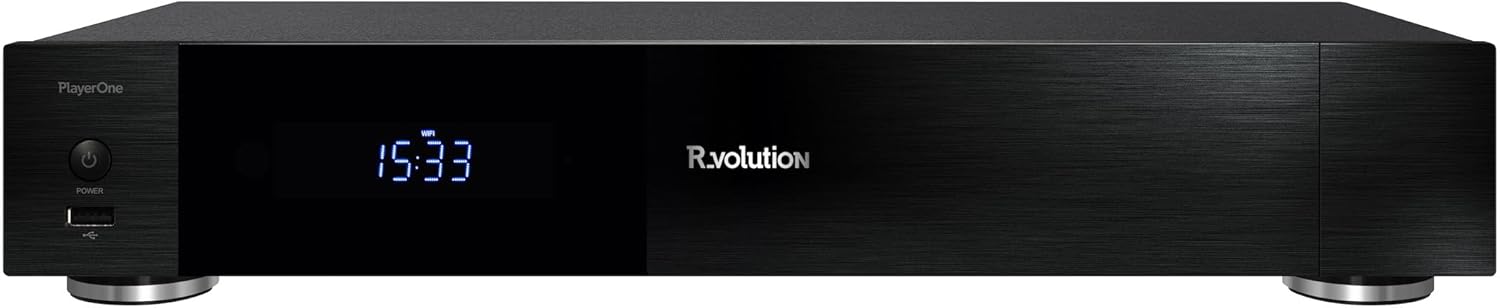
Сүрөт 1: Алдыңкы view of the R-Volution Player ONE 8k. This image displays the sleek black design of the media player, featuring a power button on the left, a front USB port, and a central digital display showing the time.
Жайгашуу
Connecting Your Player ONE 8k
Before operating your R-Volution Player ONE 8k, ensure all necessary connections are made. Refer to the rear panel diagram for port identification.

Figure 2: Rear panel connections of the R-Volution Player ONE 8k. This image shows the comprehensive array of ports on the back of the device, including HDMI outputs, USB ports, Ethernet, optical, coaxial, and analog audio outputs, along with Wi-Fi and Bluetooth antennas.
Порт сүрөттөмөлөрү:
- HDMI OUT (Audio Only): Connects to an audio receiver for dedicated audio output.
- HDMI OUT (Main): Connects to your TV, monitor, or projector for video and audio.
- USB 3.0 порттору: For connecting external storage devices or other USB peripherals.
- USB Type-C: Additional high-speed connectivity.
- Ethernet (LAN): Зымдуу тармак туташуусу үчүн.
- Wi-Fi антенналары: Зымсыз тармак туташуусу үчүн.
- Bluetooth антеннасы: For connecting Bluetooth devices.
- Optical (SPDIF) & Coaxial Audio Outputs: For digital audio connections to compatible audio systems.
- RCA Audio Outputs (L/R): For analog stereo audio connections.
- AC IN: Түзмөк үчүн кубат киргизүү.
Баштапкы туташуу кадамдары:
- Connect the Player ONE 8k to your display (TV, monitor, or projector) using an HDMI cable from the HDMI OUT (Негизги) порт.
- If using a separate audio receiver, connect it via the HDMI OUT (Аудио гана) port or digital/analog audio outputs.
- For network access, connect an Ethernet cable to the LAN port or ensure Wi-Fi antennas are attached for wireless setup.
- кубат кабелин туташтырыңыз AC IN port and plug it into a power outlet.
- Press the power button on the front panel or the remote control to turn on the device.
Иштөө нускамалары
Алыстан башкаруу функциялары
The included remote control provides full command over your Player ONE 8k. Familiarize yourself with its layout and button functions.

Figure 3: Remote control for the R-Volution Player ONE 8k. This image displays the ergonomic design of the remote, with clearly labeled buttons for power, volume, navigation, media playback controls, and dedicated R.video and Explorer buttons.
Key Remote Buttons:
- Кубат баскычы: Аппаратты күйгүзөт же өчүрөт.
- Навигация тактасы (өйдө/төмөн/сол/оң/ОК): Менюда навигация жана тандоо үчүн.
- Көлөм +/-: Аудионун үнүн тууралайт.
- Ойнотууну башкаруу элементтери (ойнотуу, тындыруу, токтотуу, алдыга тез түрүү, артка түрүү, өткөрүп жиберүү): Standard media playback functions.
- R.video: Accesses the R.video media library interface.
- Изилдөөчү: Кирүү мүмкүнчүлүгү file browser for local or network storage.
- Сандык баскычтоп: Түз киргизүү же белгилүү бир функциялар үчүн.
Media Playback and Interface
The Player ONE 8k features an intuitive interface for managing and playing your media content. The R.video application provides a rich visual experience for your movie and TV show collection.

Figure 4: R.video user interface in action. This image illustrates the Player ONE 8k connected to a display, showcasing the R.video media management system with movie details, cover art, and playback options.
To play media:
- Сиздин медианы камсыз кылуу files are accessible, either on an internal hard drive, connected USB storage, or a network share.
- дегенге өтүңүз R.video application for an organized library view, or use Explorer карап чыгуу fileтүздөн-түз с.
- Select your desired movie, TV show, or music file жана басыңыз OK ойнотууну баштоо үчүн.
- Utilize the playback controls on the remote for pause, fast forward, rewind, and chapter navigation.
Advanced Features
- Dolby Vision жана HDR10+: The Player ONE 8k supports these advanced HDR formats, providing deeper blacks, brighter highlights, and a wider color gamut. Ensure your display is compatible to fully experience these features. The player supports direct playback of Blu-ray Disc Images in Dolby Vision and various other formats.
- 4K Ultra HD Upscaling: Even if your content is not native 4K, the player can upscale videos to a resolution of 4K Ultra HD (3840 x 2160) for enhanced visual clarity on compatible displays.
- Ички сактагыч: The device accommodates an internal hard drive of up to 32 TB, allowing for a vast local media library. Additional storage can be connected via USB.
- R_share Advanced Streaming Protocol: Stream content seamlessly to other R_volution devices within your home network.
Техникалык тейлөө
To ensure the longevity and optimal performance of your R-Volution Player ONE 8k, follow these maintenance guidelines:
- Тазалоо: Аппараттын сыртын тазалоо үчүн жумшак, кургак чүпүрөктү колдонуңуз. Суюк тазалагычтарды же абразивдүү материалдарды колдонуудан алыс болуңуз.
- Вентиляция: Ensure the player is placed in a well-ventilated area. Do not block any ventilation openings.
- Курчап турган чөйрө: Аппаратты түз күн нурунан, жылуулук булактарынан жана ашыкча нымдуулуктан алыс кармаңыз.
- Программалык камсыздоонун жаңыртуулары: Periodically check for firmware updates from the R_volution official webакыркы функцияларды жана каталарды оңдоону камсыз кылуу үчүн сайт.
Проблемаларды чечүү
If you encounter issues with your Player ONE 8k, refer to the following common troubleshooting steps:
| Көйгөй | Мүмкүн болгон себеп / Чечим |
|---|---|
| Кубат жок / Түзмөк күйбөйт. |
|
| Видео чыгаруу жок. |
|
| Аудио чыгышы жок. |
|
| Алыстан башкаруу жооп бербей жатат. |
|
| Тармакка туташуу көйгөйлөрү. |
|
Техникалык шарттар
| Өзгөчөлүк | Деталь |
|---|---|
| Модель аты | Player ONE 8k |
| Бренд | R_volution |
| ASIN | B0CM2JRBR6 |
| Продукциянын өлчөмдөрү | 16L x 43B x 8H cm (16 x 43 x 8 cm) |
| Түс | Шварц (Кара) |
| Байланыш технологиясы | Bluetooth, USB, HDMI, WLAN (Wi-Fi) |
| Туташтыргыч түрү | HDMI |
| Резолюция | 3840 x 2160 (4K Ultra HD) |
| Өзгөчө өзгөчөлүк | Automatische Volumennivellierung (Automatic Volume Leveling) |
| Медиа түрүн колдоо | DVD, Blu-Ray-Disc (playback of images/files) |
| Аудио чыгаруу режими | Stereo (supports various multi-channel formats via HDMI passthrough) |
| Ички сактагыч | Supports up to 32 TB internal hard drive (not included) |
Кепилдик жана колдоо
For warranty information and technical support, please refer to the official R_volution webсайтка же түздөн-түз кардарларды тейлөөгө кайрылыңыз. Сатып алуу квитанциясын кепилдик дооматтары үчүн сатып алуунун далили катары сактаңыз.
Note: Specific warranty terms and support channels may vary by region.


