1. Бүттүview
The Snapmaker Ray is a high-performance laser engraver and cutter designed for precision and versatility. Featuring a powerful 40,000mW output laser and a large work area, it is capable of handling a wide range of materials for both cutting and engraving tasks. Its robust construction and smart features ensure efficient and safe operation for all your creative projects.

Image: The Snapmaker Ray Laser Engraver and Cutter, showcasing its components and examples of intricate projects created with the machine.
2. Эмнелер камтылган
Your Snapmaker Ray package includes all necessary components for assembly and immediate use. Please verify all items are present upon unboxing.
- Snapmaker Ray Laser Engraver and Cutter main frame components
- 40,000mW Laser Module
- Air Assist Pump and tubing
- 50mm Cylindrical Feet (8x) for height adjustment
- Laser Safety Goggles (1x)
- Laser Engraving and Cutting Platform
- Электр менен жабдуу жана кабелдер
- USB Cable and MicroSD Card
- Quick-swap Toolhead Bracket and various connectors
- Calibration Card and Basswood Plywood sample
- Cotton Swabs and Laser Lens Protector
- Safety Key and various screws

Image: A comprehensive layout of all parts and accessories included in the Snapmaker Ray package, neatly organized.
3. Орнотуу
Follow these general steps to set up your Snapmaker Ray. Refer to the detailed assembly guide provided in your package for specific instructions.
- Unpack all components and verify against the included list.
- Assemble the main frame of the laser engraver, ensuring all connections are secure.
- Install the 40,000mW Laser Module onto the gantry.
- Connect the Air Assist Pump to the laser module and power supply.
- Place the Laser Engraving and Cutting Platform onto the work area.
- Connect the machine to a power source and your computer.
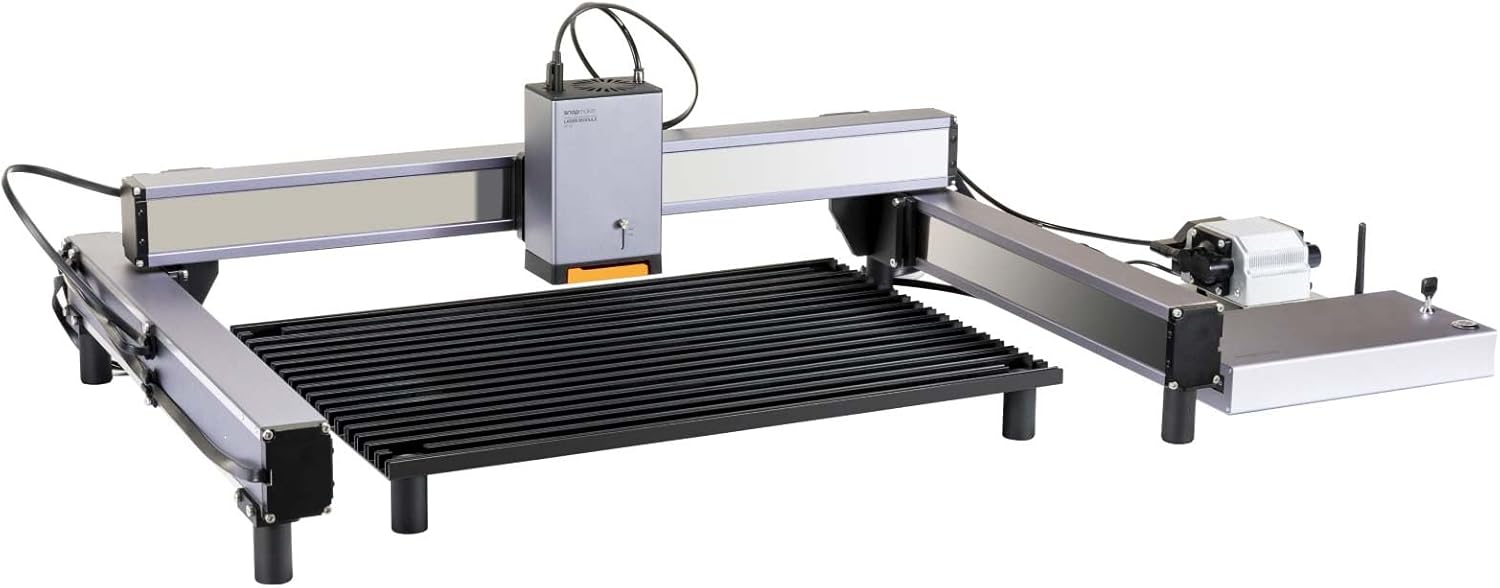
Image: The fully assembled Snapmaker Ray machine, ready for operation.
3.1 Кутудан чыгаруу жана баштапкы орнотуу
Видео: Бүттүview of the Snapmaker Ray Laser Engraving Machine, including its components and initial setup process.
4. Иштөө нускамалары
4.1 Laser Cutting
The Snapmaker Ray's 40,000mW laser module delivers exceptional cutting performance, capable of cutting through various materials with precision. It utilizes cutting-edge laser beam splitter and beam shaping optics for optimal results.
- Can cut 20mm Pinewood in one pass.
- Can cut 15mm Basswood Plywood in one pass.
- Suitable for cutting wood, metal, fabric, leather, and acrylic.

Сүрөт: Жакын план view of the Snapmaker Ray laser module cutting through a 20mm piece of pinewood.

Сүрөт: ички view illustrating the cutting-edge laser beam combining technology within the 40W Laser Module.
4.1.1 Cutting Function Demonstration
Video: A demonstration of the Snapmaker Ray's cutting capabilities on various materials like stainless steel, walnut wood, basswood plywood, pinewood, and leather.
4.2 Лазердик оюу
The Snapmaker Ray excels at detailed engraving on a variety of surfaces, offering high precision for intricate designs.
- Engraves on materials such as wood, metal, fabric, leather, acrylic, glass, and plastic.
- Achieves high precision engraving with industrial-grade linear rails supporting speeds up to 500mm/s.
4.2.1 Engraving Function Demonstration
Video: A demonstration of the Snapmaker Ray's engraving capabilities on materials such as stainless steel, ceramic, cement, slate, anodized aluminum, basswood, walnut, leather, and cork.
4.2.2 Laser Engraving Machine Overview
Видео: Бүттүview of the Snapmaker Ray Laser Engraving Machine, highlighting its features like 40W laser power, material support, 1000+ design templates, high precision engraving, and modular design.
4.3 Аба жардамчы системасы
The integrated Smart Air Assist system significantly improves cutting and engraving quality.
- Blows away fumes and debris, preventing charring.
- Keeps the laser lens clean, ensuring consistent performance.
- Can be controlled via Snapmaker Luban software, allowing activation only on cutting layers for efficiency.

Image: A visual representation of the Smart Air Assist system preventing charring and keeping the laser lens clean during operation.
4.3.1 Air Assist Demonstration
Video: A detailed look at the Snapmaker Ray Laser Engraver with Air Assist, demonstrating its smart air assist feature, software compatibility, and flexible Z-height adjustment.
4.4 Программанын шайкештиги
The Snapmaker Ray is compatible with leading laser software for design and control.
- Snapmaker Luban: Free software with over 1000 built-in laser vectors for immediate use.
- LightBurn: Fully compatible for advanced users and complex projects.
5. Коопсуздук боюнча көрсөтмөлөр
Your safety is paramount when operating laser equipment. The Snapmaker Ray is designed with Class 1 safety features, but adherence to guidelines is crucial.
- Laser Class 1 Safety: The machine is designed to be safe under normal operating conditions.
- Enclosure (Optional): Panels made with brown acrylic are designed to shield from laser hazards.
- Door-Detection Sensor: Automatically stops the laser job if the enclosure door is opened.
- Always wear the provided laser safety goggles during operation.
- Ensure proper ventilation or use an air purifier to filter harmful chemicals.

Image: The Snapmaker Ray machine shown with an optional enclosure, which enhances laser safety.
6. Техникалык тейлөө
Regular maintenance ensures the longevity and optimal performance of your Snapmaker Ray.
- Keep the work area and linear rails clean from dust and debris.
- Regularly inspect and clean the laser lens using the provided cotton swabs and lens protector.
- Ensure the Air Assist system is free from blockages.
7. Кыйынчылыктарды
Көйгөйгө туш болсоңуз, көйгөйлөрдү чечүүнүн төмөнкү жалпы кадамдарын карап көрүңүз:
- Машина жооп бербейт: Check all power and data cable connections. Ensure the safety key is inserted and turned.
- Гравюра/кесүү сапаты начар: Verify material settings in Luban/LightBurn. Ensure the laser focus is correctly set. Clean the laser lens. Check Air Assist function.
- Программалык камсыздоого туташуу маселелери: Restart the software and machine. Check USB connection.
For persistent issues, refer to the comprehensive troubleshooting guide in your product manual or contact Snapmaker customer support.
8. Техникалык шарттар
| Өзгөчөлүк | Спецификация |
|---|---|
| Модел | Snapmaker Ray |
| Лазердик чыгаруу күчү | 40,000мВт (40Вт) |
| Жумуш аймагы | 400мм × 600мм |
| Max. Work Speed | 500мм/сек чейин |
| Linear Rails | Өнөр жайлык |
| Продукциянын өлчөмдөрү | 33.43 x 11.93 x 23.62 дюйм |
| Элемент Салмагы | 41.9 фунт |
| Коопсуздук классы | Лазердик класс 1 |
9. Кепилдик жана колдоо
For warranty information and technical support, please refer to the official Snapmaker webсайтка же түздөн-түз кардарларды тейлөөгө кайрылыңыз. Кепилдик дооматтар үчүн сатып алуу дүмүрчөгүңүздү сактаңыз.


