1. Киришүү
Thank you for choosing the Genesis 80GMVS Multi-Functional Vacuum Sealer. This appliance is designed to preserve food, liquids, and dry goods efficiently, making it suitable for food preservation, meal preparation, and sous vide cooking. Please read this manual thoroughly before operating the device to ensure safe and optimal performance.
Маанилүү коопсуздук нускамалары
- Колдонуудан мурун бардык нускамаларды окуп чыгыңыз.
- Шайманды, электр шнурун же сууга же башка суюктуктарды розеткага салбаңыз.
- Балдар жетпеген жерде сактаңыз. Бул шайманды физикалык, сезүү же акыл-эс мүмкүнчүлүктөрү чектелүү адамдар көзөмөлсүз колдонушу үчүн арналган эмес.
- Колдонбогондо жана тазалоодон мурун розеткадан ажыратыңыз.
- Эч кандай шайманды зымы же сайы бузулган, же шайман иштебей калгандан кийин же кандайдыр бир түрдө бузулгандан кийин иштетпеңиз.
- Өндүрүүчү сунуштаган тиркемелерди гана колдонуңуз.
- Сыртта колдонбоңуз.
- Шайманды ар дайым туруктуу, жалпак, ысыкка чыдамдуу бетке коюңуз.
- кыймылдуу бөлүктөргө тийбегиле.
- Do not use for purposes other than its intended use.
2. Продукциянын компоненттери
Familiarize yourself with the main parts of your Genesis 80GMVS Vacuum Sealer:
- Башкаруу панели: Buttons for various sealing modes (Normal, Soft, Seal, External) and Stop.
- Мөөр тилкеси: Heats to create a strong seal on vacuum bags.
- Vacuum Channel: Баштыктан аба сорулуп алынган жер.
- Lid Latch: Secures the lid during operation.
- Аксессуар порт: For connecting an external vacuum hose (not included) for containers.
- Электр кабели: Агрегатты электр розеткасына туташтырат.
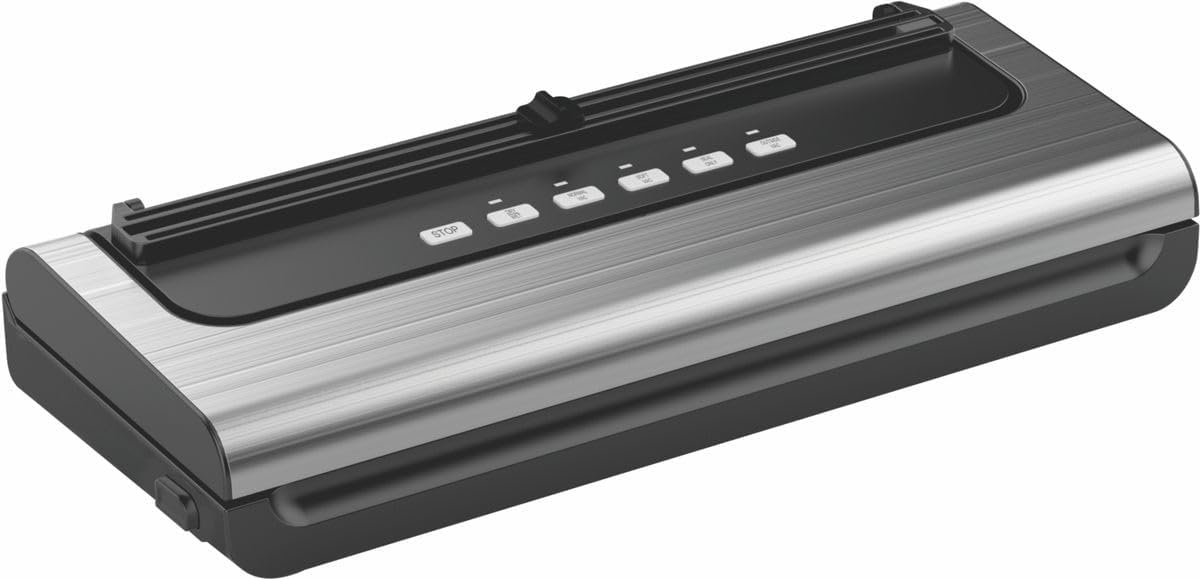
Figure 2.1: ашыкview of the Genesis 80GMVS Multi-Functional Vacuum Sealer. This image displays the top view of the vacuum sealer, highlighting its sleek design and the control panel with various function buttons.
3. Орнотуу
- Таңылганын ачуу: Carefully remove the vacuum sealer from its packaging. Retain packaging for future storage or transport.
- Текшерүү: Шаймандын бузулган белгилерин текшериңиз. Бузулган болсо колдонбоңуз.
- Жайгашкан жери: Place the vacuum sealer on a dry, flat, and stable surface, ensuring adequate space around the unit for ventilation.
- Кубат туташуу: Plug the power cord into a standard electrical outlet. The indicator light may illuminate, indicating the unit is ready.
4. Иштөө нускамалары
This section details how to use your vacuum sealer for various food types and sealing methods.
4.1 Preparing Bags and Food
- Use only vacuum sealer bags designed for this appliance.
- Ensure the bag is clean and dry inside the sealing area.
- Leave at least 7-10 cm of space between the food and the top of the bag for proper sealing.
- For moist foods, pre-freeze or place a paper towel inside the bag to absorb excess moisture.
4.2 Vacuum Sealing (Dry Mode)
- Place the open end of the bag into the vacuum channel. Ensure it lies flat and smooth over the sealing strip.
- Close the lid firmly until the latches click into place.
- басыңыз НОРМАЛЬ button for standard vacuum and seal. The appliance will automatically vacuum the air and then seal the bag.
- Once the process is complete, the indicator light will turn off. Press the lid release buttons (if present) or gently lift the lid to open.
- Remove the sealed bag.
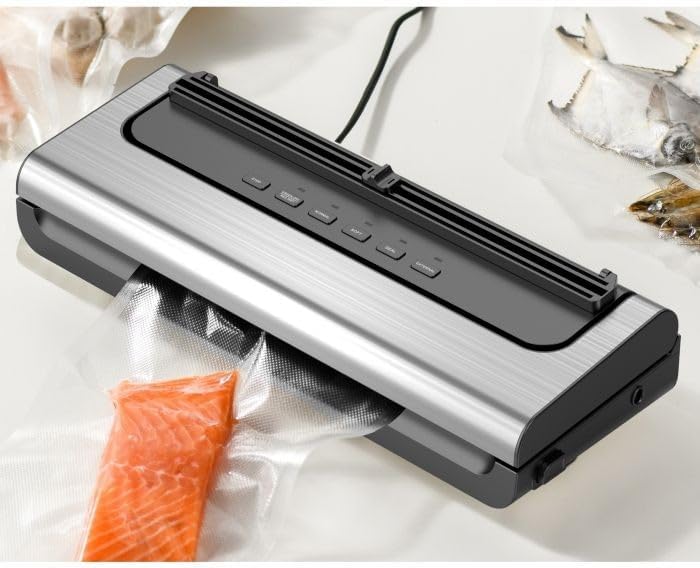
Figure 4.1: The Genesis 80GMVS vacuum sealer in operation, sealing a bag containing salmon. This image demonstrates the appliance actively extracting air from a bag, preparing it for preservation.
4.3 Vacuum Sealing (Wet/Moist Mode)
For foods with moisture, use the НЫМ setting (often combined with Normal/Soft depending on model, or indicated by a specific button if available). This mode adjusts the vacuum pressure and sealing time to accommodate liquids, preventing them from being drawn into the vacuum pump.
- Follow steps 1 and 2 from "Vacuum Sealing (Dry Mode)".
- басыңыз НЫМ button (if available) or select the appropriate setting for moist food.
- The appliance will proceed with vacuuming and sealing.
- Бүткөндөн кийин, капкакты ачып, жабык баштыкты алып салыңыз.
4.4 Soft Vacuum Mode
For delicate items like bread, chips, or pastries, use the ЖУМшак mode to prevent crushing. This mode reduces the vacuum pressure.
- Follow steps 1 and 2 from "Vacuum Sealing (Dry Mode)".
- басыңыз ЖУМшак баскычы.
- Monitor the vacuum process. When the desired air removal is achieved, press the SEAL button immediately to stop vacuuming and initiate sealing.
- Бүткөндөн кийин, капкакты ачып, жабык баштыкты алып салыңыз.

Сүрөт 4.2: Жакын пландан view of the Genesis 80GMVS control panel and the sealing area with meat inside a bag. This image highlights the various control buttons, including 'STOP', 'NORMAL', 'SOFT', 'SEAL', and 'EXTERNAL', providing a clear view of the user interface during operation.
4.5 Seal Only Function
колдонуу SEAL button to create a seal without vacuuming. This is useful for making custom-sized bags from a roll or for resealing bags of snacks.
- Place the open end of the bag over the sealing strip.
- Капкагын бекем жабыңыз.
- басыңыз SEAL button. The sealing indicator light will illuminate.
- Once the light turns off, the seal is complete. Open the lid and remove the bag.
4.6 External Vacuum Function
The ТЫШКЫ function is used with an external vacuum hose (sold separately) to vacuum seal canisters, jars, or wine stoppers.
- Connect one end of the external vacuum hose to the accessory port on the vacuum sealer.
- Connect the other end of the hose to the port on your vacuum-sealable container.
- басыңыз ТЫШКЫ button. The appliance will begin to extract air.
- The vacuuming will stop automatically or when you press ТОКТОТ.
- Remove the hose from the container and the appliance.

4.3-сүрөт: Мисamples of various food items, including sliced meat, fish, and dried goods, successfully vacuum-sealed in transparent bags. This image illustrates the effectiveness of the vacuum sealer in preserving different types of food.
5. Техникалык тейлөө жана тазалоо
Regular cleaning and maintenance will extend the life of your vacuum sealer.
- Тазалоодон мурун: Ар дайым шайманды розеткадан сууруп туруңуз.
- Сырткы: Жарнак менен блоктун сыртын сүртүңүзamp cloth and mild soap. Do not use abrasive cleaners or immerse the unit in water.
- Vacuum Channel: Clean any food residue or liquids from the vacuum channel using a damp cloth. Ensure it is completely dry before next use.
- Мөөр тилкеси: Gently wipe the sealing strip with a soft, dry cloth. Do not scratch or damage the strip, as this can affect sealing performance.
- Сактагыч: Store the appliance in a clean, dry place with the lid unlatched to prevent compression of the sealing gaskets, which can lead to poor seals over time.
6. Кыйынчылыктарды
Вакуумдук пломбаңыз менен көйгөйлөргө туш болсоңуз, төмөнкү жалпы көйгөйлөрдү жана чечимдерди караңыз:
| Көйгөй | Мүмкүн себеп | Чечим |
|---|---|---|
| Шайман күйбөйт. | розеткага кошулбаган; электр розеткасынын бузулушу. | Электр шнурунун иштеген розеткага бекем сайылганын текшериңиз. |
| Баштык туура эмес сордурбайт. | Lid not properly closed; bag not positioned correctly; bag is damaged; moisture in vacuum channel. | Ensure lid is latched; reposition bag so opening is flat in vacuum channel; check bag for holes; clean and dry vacuum channel. |
| Сумка жабылбайт. | Sealing strip is dirty or damaged; bag is wrinkled; too much moisture. | Clean sealing strip; ensure bag is flat; pre-freeze moist foods or use paper towel. |
| Мөөр басылгандан кийин баштыкка аба агып кетет. | Improper seal; sharp objects in bag; bag material defect. | Re-seal the bag; ensure no sharp edges on food; use high-quality vacuum bags. |
7. Техникалык шарттар
| Өзгөчөлүк | Деталь |
|---|---|
| Бренд | Башталыш |
| Модель номери | 80GMVS |
| Материал | Пластик |
| Иштөө режими | Manual |
| Продукциянын өлчөмдөрү | 44L x 18.5W x 10.5H сантиметр |
| Элемент Салмагы | 1.4 кг |
| Түс | Көп түстүү |
8. Кепилдик жана колдоо
For warranty information and customer support, please refer to the documentation provided with your purchase or contact Genesis customer service. Keep your proof of purchase for warranty claims.
Өндүрүүчү: Башталыш


