1. Киришүү
Thank you for choosing the EZVIZ RE4 Plus Robot Vacuum and Mop. This device is designed to provide an efficient and automated cleaning experience for your home, combining powerful vacuuming with effective mopping. Featuring advanced LiDAR navigation and an automatic dust emptying station, the RE4 Plus minimizes manual intervention, allowing you to enjoy a cleaner home with ease. Please read this manual thoroughly before using the product to ensure proper operation and maintenance.
2. Коопсуздук маалыматы
Always follow basic safety precautions when using electrical appliances to reduce the risk of fire, electric shock, and personal injury. This appliance is not intended for use by persons (including children) with reduced physical, sensory, or mental capabilities, or lack of experience and knowledge, unless they have been given supervision or instruction concerning use of the appliance by a person responsible for their safety.
- Роботту нымдуу чөйрөдө же суунун жанында иштетпеңиз.
- Чачты, кенен кийимдерди, манжаларды жана дененин бардык бөлүктөрүн тешиктерден жана кыймылдуу бөлүктөрдөн алыс кармаңыз.
- Роботту чоң буюмдарды, курч буюмдарды же күйүп жаткан/түтөп жаткан материалдарды алуу үчүн колдонбоңуз.
- Ensure the charging station is placed on a level surface against a wall, with adequate clear space around it.
- Only use the original power adapter and charging station provided by EZVIZ.
3. Продукт бүтүп калдыview
Негизги өзгөчөлүктөрү
- Чаңды автоматтык түрдө тазалоо: The robot automatically empties its dustbin into the 4-liter collection bag in the station, providing up to 90 days of hands-free cleaning.
- 2-бирде-1 чаң соргуч жана швабра: Equipped with both vacuuming and mopping capabilities, featuring 4000 Pa suction power and a 300 ml water tank for thorough cleaning.
- LiDAR навигациясы: Advanced LDS LiDAR technology and infrared sensors enable precise mapping, obstacle avoidance, and efficient route planning.
- Smart App Control: Customize cleaning plans, set no-go zones, and manage floor maps via the EZVIZ app.
- Батареянын узак иштөө мөөнөтү: A 4930 mAh Li-ion battery provides up to 240 minutes of cleaning in silent mode, covering approximately 300 m².
- Килемди аныктоо: Automatically increases suction power when detecting carpets for deeper cleaning.
- Smart Home интеграциясы: Compatible with third-party voice assistants like Amazon Alexa and Google Assistant.

Figure 3.1: ашыкview of EZVIZ RE4 Plus features and components.
Компоненттер камтылган
- EZVIZ RE4 Plus Robot Vacuum and Mop
- Чаңды автоматтык түрдө тазалоочу станция
- Side Brush
- Фильтр
- Instruction Guide
- Кубаттуу адаптер
4. Орнотуу
4.1 Пакеттен чыгаруу жана жайгаштыруу
- Бардык компоненттерди таңгактан кылдаттык менен алып салыңыз.
- Choose a suitable location for the automatic dust emptying station. It should be placed against a wall on a hard, level surface, with at least 0.5 meters of clear space on both sides and 1.5 meters in front. Ensure there are no obstacles that could block the robot's return path.
- Plug the power adapter into the station and connect it to a power outlet. Ensure the station is powered on.
4.2 Алгачкы заряддоо
Place the robot onto the charging contacts of the station. The robot will automatically align and begin charging. For first-time use, fully charge the robot before operation. The indicator light on the robot will show charging status.
4.3 Колдонмо туташуусу
- Download the EZVIZ app from your smartphone's app store (iOS or Android).
- EZVIZ аккаунтун түзүңүз же эгер сизде мурунтан эле бар болсо, кириңиз.
- Жаңы түзмөк кошуу үчүн колдонмодогу "+" сүрөтчөсүн таптаңыз.
- Scan the QR code located on the robot or the instruction manual.
- Роботту үйүңүздөгү Wi-Fi тармагына туташтыруу үчүн колдонмодогу экрандагы нускамаларды аткарыңыз.
5. Иштөө нускамалары
5.1 First-Time Mapping
After initial setup, the robot will perform a quick scan of your home to create a map. Ensure all doors are open to allow the robot to access all areas you wish to clean. This map will be saved in the EZVIZ app for future use and customization.

Figure 5.1: The robot utilizing its integrated LDS LiDAR for obstacle avoidance and mapping.
5.2 Тазалоо режимдери
The RE4 Plus offers various cleaning modes accessible via the EZVIZ app:
- Автоматтык тазалоо: Робот картага түшүрүлгөн аймакты акылдуу түрдө тазалайт.
- Таза аймак: Робот тазалоо үчүн картадан белгилүү жерлерди тандаңыз.
- Таза так: Роботту кичинекей, топтолгон аймакты тазалоого багыттаңыз.
- Вакуум гана: кургак калдыктарды жок кылуу үчүн.
- Швабра гана: Нымдуу тазалоо үчүн (суу куюлган бактын толтурулганын текшериңиз).
- Чаң соргуч: Бир убакта чаң соргуч жана сүртүү.

Figure 5.2: The 2-in-1 vacuum and mop system of the RE4 Plus.

Figure 5.3: Detailed cleaning actions including powerful suction, consistent mopping, and carpet boost.
5.3 Customizing Cleaning Plans
Using the EZVIZ app, you can:
- Edit Maps: Divide, merge, or rename rooms.
- Барууга тыюу салынган аймактарды коюу: Draw virtual boundaries or no-mop zones to restrict the robot from certain areas.
- Тазалоо графиги: Set specific times for the robot to clean selected areas or the entire home.
- Adjust Suction/Water Level: Customize cleaning intensity for different rooms or floor types.

Figure 5.4: Customizing your floor plan and cleaning tasks via the EZVIZ app.
5.4 Үн менен башкаруу
The RE4 Plus supports voice control through Amazon Alexa and Google Assistant. Link your EZVIZ account to your smart home assistant app and use commands like "Alexa, turn on the RE5 Plus" to start cleaning.

Figure 5.5: Integrating the RE4 Plus with smart home voice assistants.
6. Техникалык тейлөө
Regular maintenance ensures optimal performance and extends the lifespan of your robot vacuum. Always power off the robot before performing any maintenance.
6.1 Automatic Dust Emptying Station
The station's 4-liter dust bag typically needs replacement every 90 days, depending on usage. The app will notify you when the bag is full.
- Open the lid of the dust emptying station.
- Carefully remove the full dust bag. The self-sealing design prevents dust leakage.
- Dispose of the old bag and insert a new EZVIZ replacement dust bag.
- Капкакты бекем жабыңыз.
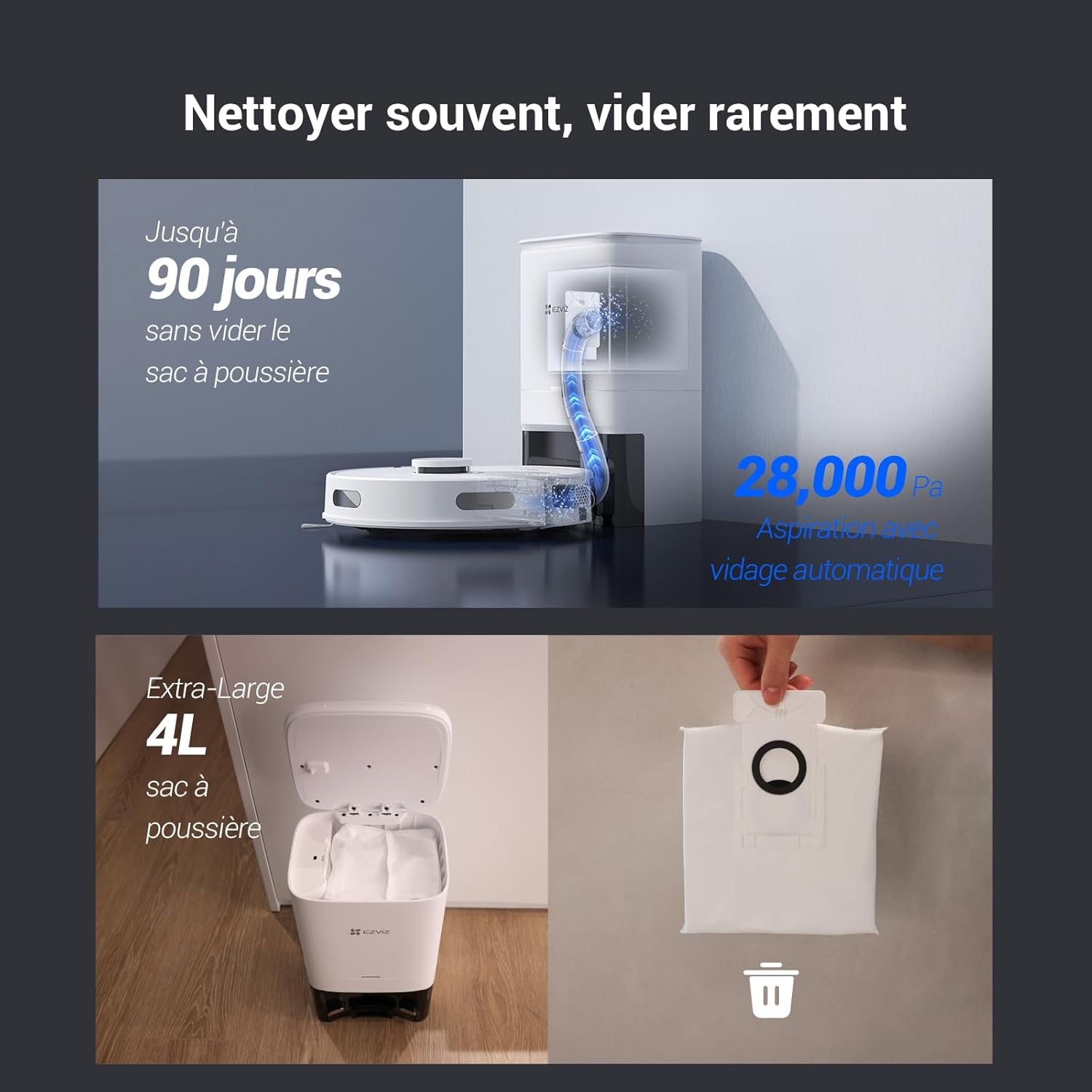
Figure 6.1: Automatic dust emptying process and replacement of the 4-liter dust bag.
6.2 Робот чаңы жана чыпкасы
Although the robot automatically empties its internal dustbin, it's recommended to periodically check and clean it, along with the filter.
- Роботтон таштанды челектерин алып салыңыз.
- Калган калдыктарды бошотуңуз.
- Remove the filter and tap it gently to dislodge dust. Rinse the filter with water if necessary, but ensure it is completely dry before reinserting.
- Reassemble the dustbin and filter, then place it back into the robot.
6.3 Суу багы жана сүртүүчү аянтча
For optimal mopping performance:
- After each mopping session, remove the water tank and empty any remaining water.
- Detach the mopping pad, rinse it thoroughly, and allow it to air dry.
- Periodically clean the water tank to prevent mold or blockages.
6.4 Щеткалар жана сенсорлор
- Негизги щетка: Remove the main brush cover and clean any tangled hair or debris from the brush and its bearings. Use the cleaning tool provided.
- Каптал щеткалар: Check side brushes for wear or damage. Replace if necessary. Remove any hair or debris.
- Сенсорлор: Роботтогу жана станциядагы жар сенсорлорун, дубал сенсорлорун жана заряддоо контакттарын таза, кургак чүпүрөк менен сүртүңүз.
7. Кыйынчылыктарды
If you encounter issues with your EZVIZ RE4 Plus, refer to the following common problems and solutions:
| Көйгөй | Мүмкүн себеп | Чечим |
|---|---|---|
| Робот күйбөйт | Батарея аз; Кубат баскычы басылган жок; Робот тыгылып калды. | Charge the robot; Press and hold the power button; Check for obstructions. |
| Робот заряддай албайт | Charging contacts dirty; Charging station unplugged; Robot not properly docked. | Clean charging contacts; Ensure station is powered; Re-dock the robot. |
| Начар тазалоо көрсөткүчү | Dustbin full; Filter clogged; Brushes tangled; Water tank empty (for mopping). | Empty dustbin/replace bag; Clean/replace filter; Clean brushes; Fill water tank. |
| Робот бат-баттан тыгылып калат | Too many obstacles; Cliff sensors dirty; Robot on dark-colored carpet. | Clear obstacles; Clean sensors; Use no-go zones for problematic areas. |
| Колдонмого туташуу маселелери | Incorrect Wi-Fi password; Robot too far from router; Router issues. | Verify Wi-Fi credentials; Move robot closer to router; Restart router/robot. |
If the problem persists, please contact EZVIZ customer support.
8. Техникалык шарттар
| Өзгөчөлүк | Деталь |
|---|---|
| Бренд | ЭЗВИЗ |
| Модель аты | RE4 Plus |
| Модель номери | CS-RE4P |
| Түс | Re4p (White) |
| Сыйымдуулугу (чаң баштыгы) | 4 литр |
| Тtage | 14.76 вольт |
| Батареянын иштөө мөөнөтү | 240 мүнөткө чейин (4 саат) |
| Элемент Салмагы | 9.81 килограмм |
| Батарея түрү | 1 Литий-ион (кошулган) |
| Өндүрүүчү | ЭЗВИЗ |
| Surface Recommendation | Килем, катуу полдор |
| Продукциянын өлчөмдөрү | 18L x 38W x 22H сантиметр |
| Controller Type | Колдонмо башкаруу |
| Чыпка түрү | көбүк |
| Өзгөчөлүктөр | 90-day hands-free dust emptying, LDS LiDAR navigation, 4000 Pa suction, Auto-return & charging, App control & route customization, Automatic dustbin emptying, Obstacle avoidance, Fall detection, Carpet detection, Google Assistant & Amazon Alexa integration |
9. Кепилдик жана колдоо
For warranty information, please refer to the warranty card included in your product packaging or visit the official EZVIZ website. For technical support, troubleshooting assistance, or to purchase replacement parts, please contact EZVIZ customer service through their official channels. Spare parts availability information is not provided in this manual; please check the EZVIZ website or contact support for details.