Introduction
Thank you for choosing the ODK L-Shaped Desk. This manual provides detailed instructions for assembly, operation, maintenance, and safety to ensure optimal use of your new desk. Please read this manual thoroughly before beginning assembly or use.
Коопсуздук маалыматы
ЭСКЕРТҮҮ: To prevent injury or damage, always adhere to the following safety guidelines:
- Do not use the desk near water or in excessively humid environments.
- Unplug the desk from the power source when not in use or during cleaning.
- Do not overload the power outlets or USB ports. Ensure connected devices do not exceed the specified electrical ratings.
- Keep the desk away from direct heat sources, open flames, or flammable materials.
- Always follow the manufacturer's instructions for assembly and proper use.
- Кубатты колдонуудан мурун бардык туташуулар коопсуз экенин текшериңиз.
- Кичинекей бөлүктөрүн жана таңгактоочу материалдарды муунуп калуу коркунучун болтурбоо үчүн балдардан алыс кармаңыз.
Пакеттин мазмуну
Before assembly, verify that all components are present and undamaged. Refer to the included parts list in your physical package for exact quantities. Common components include:
- Desk panels (main desktop, L-extension, monitor shelf)
- Металл рамка компоненттери (буттар, колдоо устундары)
- 4 кездеме тартмалары
- Power strip with 2 AC outlets and 2 USB ports
- LED light strip with controller
- Сактоочу баштык
- Assembly hardware (screws, bolts, nuts, Allen wrench, screwdriver)
- Колдонмо
Сүрөт: Detailed diagram illustrating the dimensions and various components of the ODK L-shaped desk, including the main desktop, L-extension, monitor shelf, and storage units.
Орнотуу жана монтаждоо нускамалары
The ODK L-shaped desk is designed for straightforward assembly. All parts are clearly labeled. Follow the step-by-step instructions provided in your package. A screwdriver and Allen wrench are included.
- аймакты даярдоо: Clear a spacious area for assembly. Lay down a blanket or cardboard to protect the floor and desk components.
- Компоненттерди аныктоо: Unpack all parts and match them with the labels in the instruction manual.
- Рамканы чогултуу: Begin by assembling the metal frame according to the diagrams. Ensure all screws are tightened securely but do not overtighten until the entire frame is assembled.
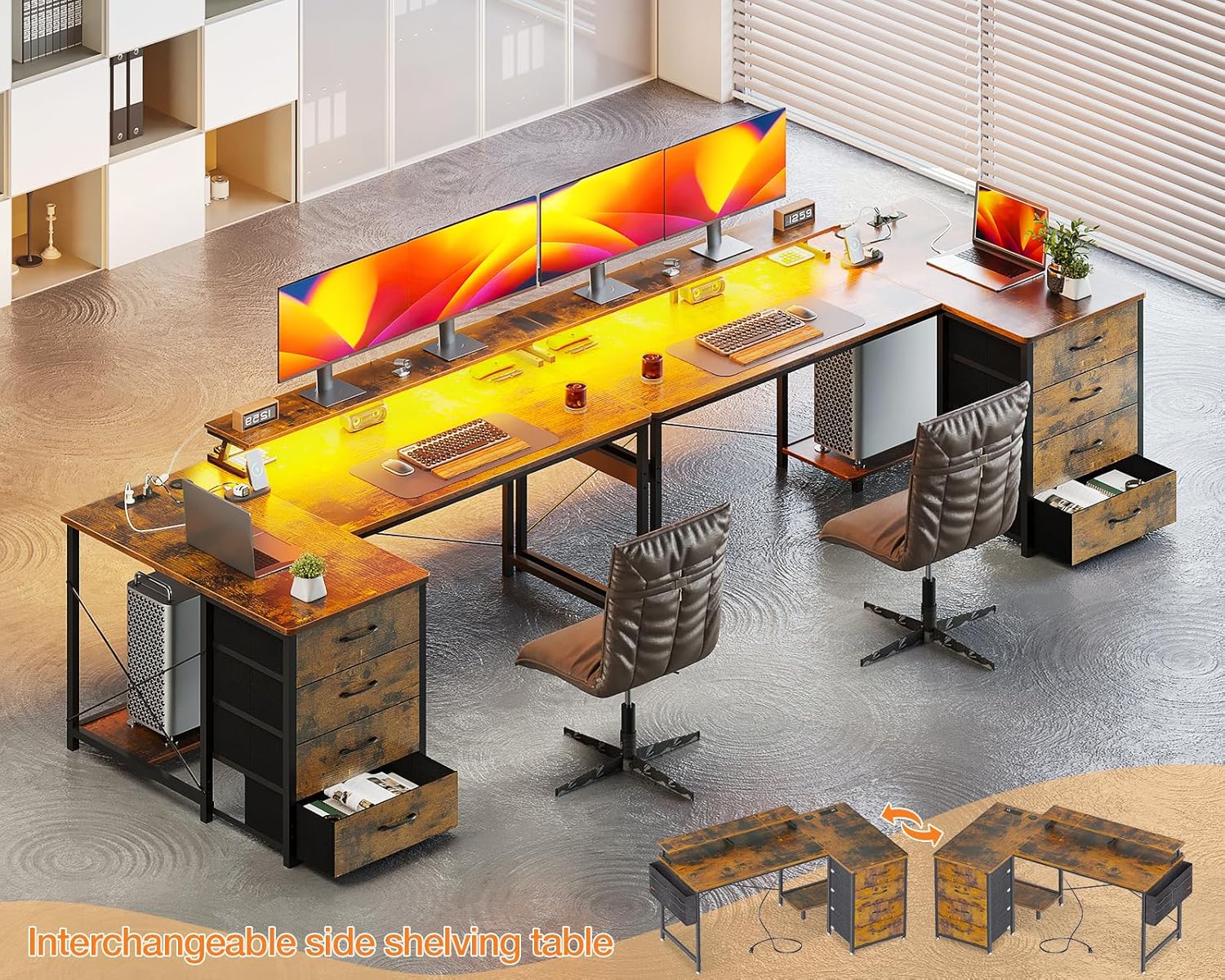
- Үстөл панелдерин тиркөө: Secure the main desktop and the L-extension panels to the assembled frame. The L-extension is reversible, allowing you to mount the drawer side on either the left or right, depending on your preference and room layout.
- Монитор текчесин орнотуу: Attach the monitor shelf to the designated area on the desktop.
- Салгычтарды салуу: Assemble the four fabric drawers and slide them into their respective compartments.
- Power Strip орнотуу: Place the power strip with USB ports and AC outlets into its recessed slot on the desktop. Ensure the power cable is routed safely.
- LED тилкесин тиркөө: Adhere the LED light strip to the underside of the monitor shelf or desired location. Connect it to the power source.
- Акыркы бекемдөө: Once all components are in place, go back and fully tighten all screws and bolts.

Сүрөт: Үстүбүздөгү чыгым view of the fully assembled ODK L-shaped desk, showcasing its spacious design, monitor shelf, and integrated power strip, ready for a complete computer setup.

Сүрөт: A visual representation demonstrating the reversible design of the desk's storage unit, allowing it to be configured on either the left or right side of the L-shape.
Иштөө нускамалары
Электр розеткалары жана USB порттору
The desk is equipped with a built-in power strip featuring 2 standard AC outlets (220-250V/16A) and 2 USB charging ports (5V-2A). These are designed for convenient charging of electronic devices such as smartphones, tablets, and other peripherals.
- Plug the desk's main power cable into a wall outlet.
- Insert device power adapters into the AC outlets.
- Connect USB charging cables to the USB ports for charging compatible devices.
- Розеткалар үчүн максималдуу электр жүгүнөн ашпаңыз.

Сүрөт: А деталдуу view of the integrated power strip, highlighting the two AC outlets and two USB charging ports, along with their electrical specifications.
LED жарык берүү тутуму
The desk includes an LED light strip with a remote control for customizable ambient lighting. This feature can help reduce eye strain and enhance focus.
- Күйгүзүү/өчүрүү: Use the "On/Off" button on the controller to activate or deactivate the LED lights.
- Түс тандоо: Cycle through 10 static colors using the designated color buttons or mode button.
- Жарыктыкты жөндөө: Adjust the light intensity with 6 levels of brightness control.
- Динамикалык режимдер: Ар кандай эффекттер үчүн 10 динамикалык жарыктандыруу режимдеринен тандаңыз.
- Эстутум функциясы: The LED system retains the last selected setting when powered off and on.

Сүрөт: A close-up shot of the LED light strip installed under the monitor shelf, along with its control unit, illustrating the various color and mode options.
Техникалык тейлөө
Regular maintenance will prolong the life and appearance of your ODK L-shaped desk.
- Тазалоо: Үстөлдүн беттерин жумшак менен сүртүңүз, гamp кездеме. Финишке зыян келтирүүчү катаал химиялык заттардан же абразивдүү тазалагычтардан алыс болуңуз.
- Төгүлүүлөр: Төгүлгөн жерлерди дароо аарчып, булганып калбаш үчүн же сууга зыян келтириңиз.
- Аппараттык камсыздоо: Мезгил-мезгили менен бардык бурамалар менен болтторду текшерип туруңуз, алар бекем бойдон калууда. Керек болсо кайра тартыңыз.
- Тарткычтар: Кездеме салынган тартмаларды жумшак жуугуч каражат менен так тазалоого болотamp кездеме. Толугу менен кургатыңыз.
- Электр компоненттери: Электр тилкесинин жана LED чырактарынын кургак бойдон сакталганын текшериңиз. Электр компоненттерин өз алдынча оңдоого аракет кылбаңыз.
Проблемаларды чечүү
Эгерде сиз столуңузда көйгөйлөргө туш болсоңуз, төмөнкү жалпы көйгөйлөрдү чечүү кадамдарын караңыз:
| Көйгөй | Мүмкүн себеп | Чечим |
|---|---|---|
| Стол солкулдап турат. | Бошогон бурамалар же тегиз эмес пол. | Check and tighten all assembly screws. Adjust the leveling feet on the desk legs if your floor is uneven. |
| Электр розеткалары/USB порттору иштебей жатат. | Desk not plugged in, power strip switch off, or overloaded circuit. | Ensure the desk's power cable is securely plugged into a functional wall outlet. Check if the power strip has an on/off switch and it's in the "on" position. Reduce the number of devices connected if overloaded. |
| LED жарыктары күйбөйт. | LED strip not connected, power issue, or remote control battery dead. | Verify the LED strip is properly connected to its power source. Ensure the main desk power is on. Check the remote control battery and replace if necessary. |
| Тарткычтар жылмакай жылбайт. | Туура эмес чогултуу же тоскоолдук. | Recheck drawer assembly. Ensure nothing is obstructing the drawer's path. |
Эгер көйгөйлөр чечилбесе, кардарларды колдоо кызматына кайрылыңыз.
Техникалык шарттар
| Өзгөчөлүк | Деталь |
|---|---|
| Модель номери | SNKLFZDE-01 |
| Өлчөмдөрү (L x W x Y) | 160 x 80 x 84.7 см (63 x 31.5 x 33.3 дюйм) |
| Салмагы | 22.3 кг (49.16 фунт) |
| Түс | Күрөң |
| Материал | Инженердик жыгач, металл каркас |
| Электр розеткалары | 2 x AC (220-250V/16A) |
| USB порттору | 2 x USB (5V-2A) |
| LED жарыктандыруу | 10 static colors, 6 brightness levels, 10 dynamic modes, memory function |
| Сактагыч | 4 fabric drawers, 1 storage bag |
| Өзгөчөлүктөрү | Reversible L-shape, Ergonomic monitor shelf |
Кепилдик жана колдоо
ODK is committed to providing high-quality products. If your ODK desk arrives damaged, has missing parts, or is scratched, please contact our professional customer support team. We aim to resolve issues within 24 hours.
For support, please refer to the contact information provided in your product packaging or visit the official ODK webсайт.


