1. Продукт бүтүп калдыview
The ODK Reversible L-Shaped Gaming Desk is designed for versatility and functionality, suitable for both gaming and home office environments. It features integrated LED lighting, convenient USB charging ports, and power outlets. The desk also includes four storage drawers and a monitor stand to enhance organization and ergonomics.

Image 1.1: The ODK L-Shaped Gaming Desk in a typical setup, highlighting its LED lighting and spacious design.
2. Коопсуздук эскертүүлөрү
- It is recommended to carefully follow the assembly instructions provided and regularly check the stability of the desk.
- Do not exceed the maximum recommended load capacity to avoid any risk of tipping or damage to the desk.
- When using the desk, ensure it is properly adjusted to provide an ergonomic and comfortable sitting position.
- Бардык электр компоненттерин суюктуктардан алыс кармаңыз.
- Ensure all cables are routed safely to prevent tripping hazards.
3. Орнотуу жана чогултуу
Assembly of the ODK L-Shaped Gaming Desk is required. Please follow the detailed step-by-step instructions included in the product packaging. All necessary tools, such as a wrench and screwdriver, are provided.
- Компоненттерди таңгактан чыгаруу: Carefully remove all parts from the packaging. Verify that all components listed in the instruction manual are present and undamaged.
- Бөлүктөрдү аныктоо: All pieces are labeled with letters and numbers for easy identification.
- Рамканы чогултуу: Диаграммаларга ылайык металл каркас компоненттерин чогултуудан баштаңыз. Башында бардык бурамалардын манжалар менен бекем бекитилгенин текшериңиз.
- Иш такта панелдерин тиркөө: Secure the desktop panels to the frame. Note that the L-shape is reversible, allowing you to configure the longer side to either the left or right based on your room layout.
- Install Drawers and Monitor Stand: Follow the instructions to install the four storage drawers and the elevated monitor stand.
- Электр компоненттерин туташтыруу: Install the LED strip and the integrated power strip. Connect the LED strip to its power source and plug the desk's main power cord into a wall outlet.
- Акыркы бекемдөө: Once all parts are in place, securely tighten all screws and bolts. Ensure the desk is stable and level.
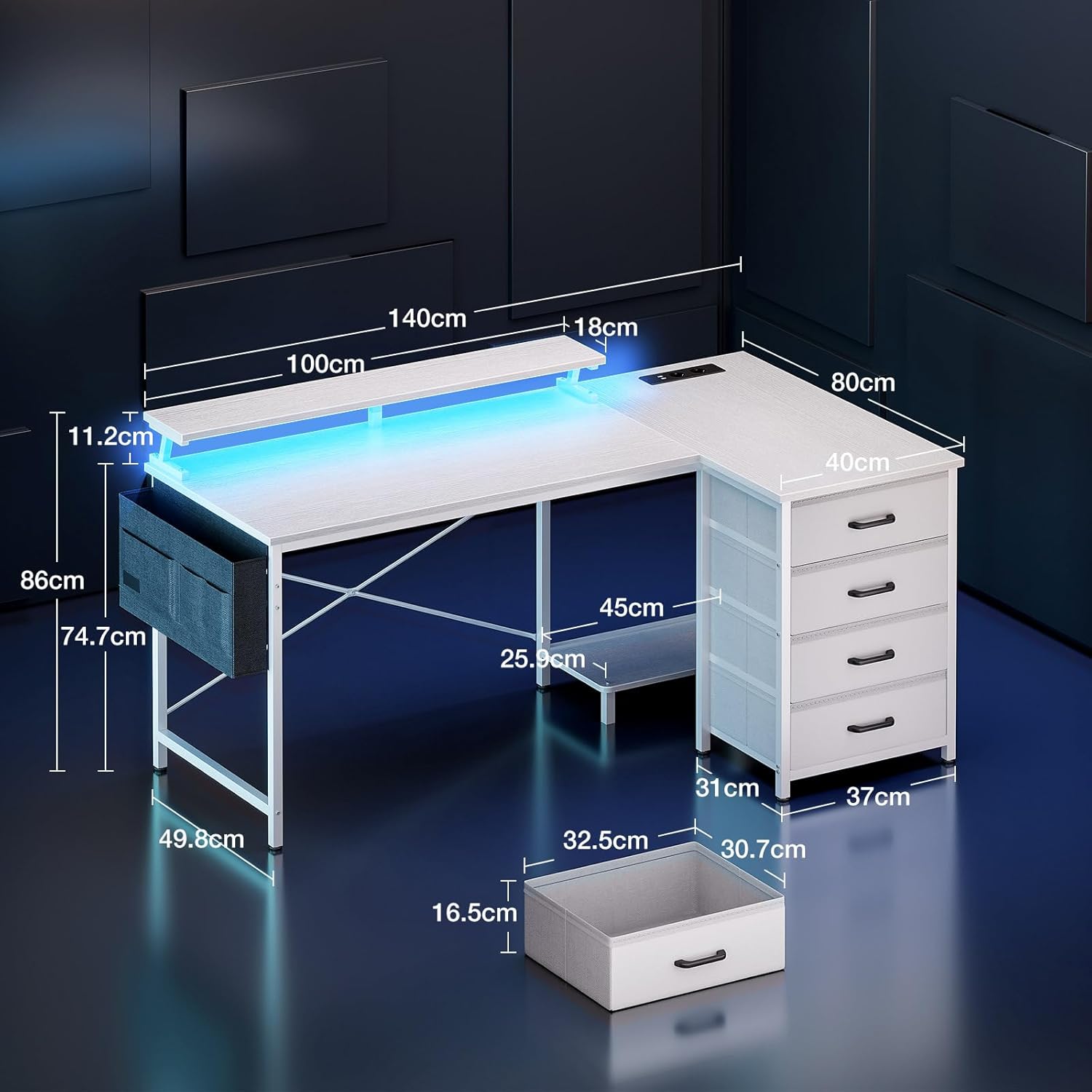
Image 3.1: Desk dimensions for planning your setup space.

Image 3.2: Illustration of flexible PC tower placement options.
4. Иштөө нускамалары
4.1 LED жарыктандыруу
The integrated LED strip offers customizable lighting to enhance your environment. Once connected to power, use the control switch to manage the lighting effects.
- Статикалык түстөр: Choose from 10 different static color options.
- Жарыктык деңгээли: Жарыктуулуктун 6 деңгээли менен интенсивдүүлүктү тууралаңыз.
- Динамикалык режимдер: Ар кандай эффекттер үчүн 10 динамикалык жарыктандыруу режимдеринен тандаңыз.
- Эстутум функциясы: The LED system retains your last selected setting when powered off and on.
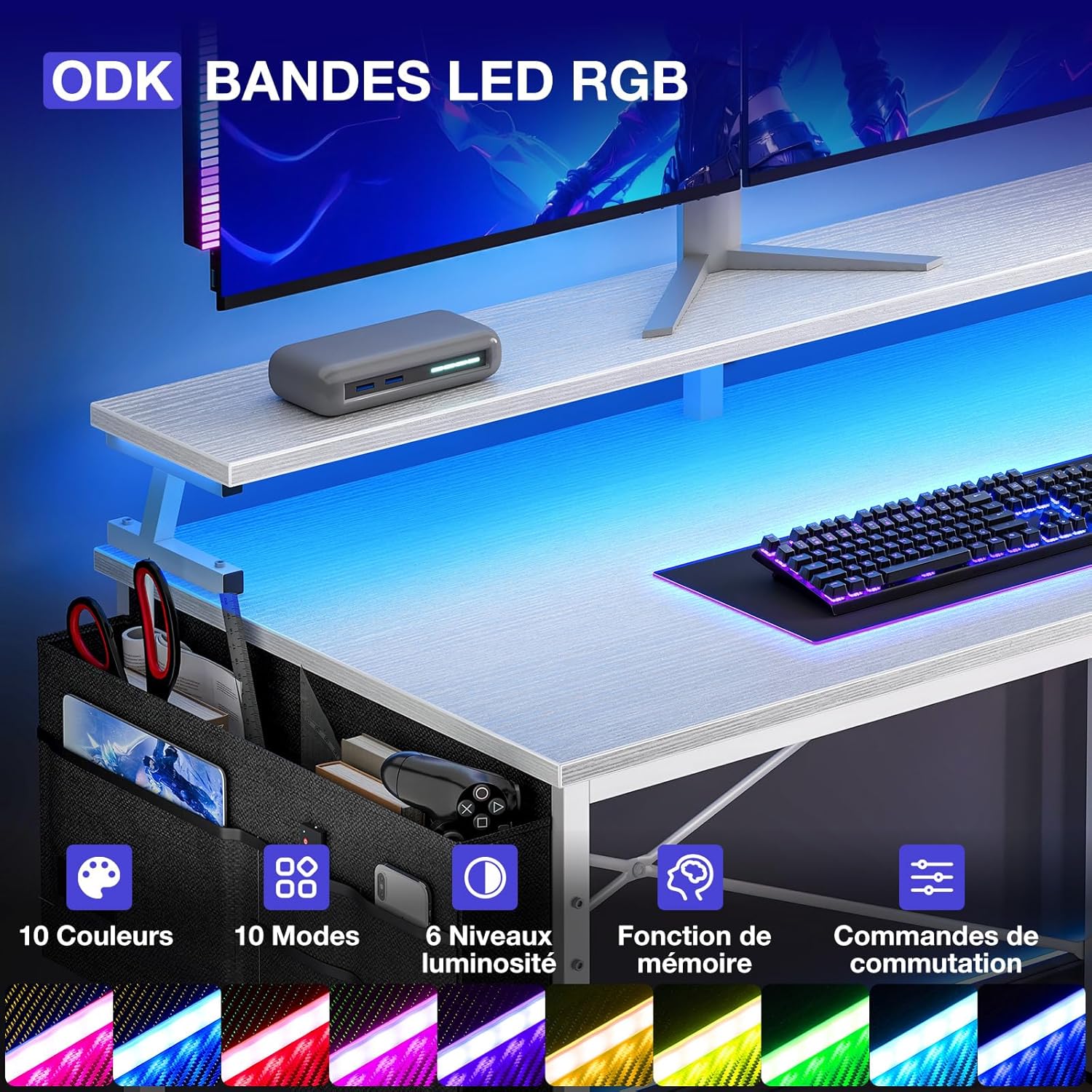
Image 4.1: Detail of the LED strip and its control interface.
4.2 Интеграцияланган кубат розеткалары жана USB порттору
The desk is equipped with a built-in power strip for convenient access to power and charging.
- AC розеткалары: Two (2) 220-250V/16A AC outlets are available for powering devices such as monitors, computers, or lamps.
- USB порттору: Two (2) 5V-2A USB ports are provided for charging smartphones, tablets, gaming controllers, and other USB-powered devices.

Image 4.2: The integrated power strip for charging and powering devices.
4.3 Сактоо өзгөчөлүктөрү
The desk includes multiple storage options to keep your workspace tidy.
- Төрт тартма: Utilize the four drawers for storing documents, office supplies, or personal items.
- Сактоочу баштык: An additional storage bag is provided for smaller accessories, keeping them within easy reach.
- Монитор стенд: The elevated monitor stand provides space underneath for keyboards, mice, or other peripherals when not in use.

Image 4.3: The four storage drawers for efficient organization.
5. Техникалык тейлөө
- Тазалоо: Бардык беттерди жумшак, d менен сүртүңүзamp кездеме. Абразивдүү тазалагычтарды же финишке зыян келтирүүчү катаал химиялык заттарды колдонуудан алыс болуңуз.
- Туруктуулукту текшерүү: Periodically inspect all screws and bolts. Re-tighten any loose fasteners to ensure the desk remains stable and secure.
- Электр компоненттери: Ensure the power cord and LED connections are free from damage. Do not attempt to repair electrical components yourself; contact qualified personnel if issues arise.
6. Кыйынчылыктарды
- LED жарыктары иштебейт:
- Check if the LED strip is properly connected to its power source.
- Үстөлдүн негизги кубат шнуру дубалдагы розеткага бекем сайылганын текшериңиз.
- Ensure the LED control switch is not set to 'off' or minimum brightness.
- Розеткалар/USB порттору иштебей жатат:
- Confirm the desk's main power cord is securely plugged into a live wall outlet.
- Розетканын иштеп жатканын текшерүү үчүн аны башка түзмөк менен текшериңиз.
- Check for any tripped circuit breakers in your home or office.
- Үстөл солкулдап же өзүн туруксуз сезет:
- Бардык монтаждоочу бурамаларды жана болтторду кайра бекемдеңиз.
- Үстел тегиз, тегиз бетке коюлганын текшериңиз.
- Missing Parts Upon Delivery:
- If any parts are missing or damaged upon unboxing, please contact ODK customer support immediately for assistance.
7. Техникалык шарттар
| Бренд | ODK |
| Модель номери | SNKLFZDE-01 |
| Түс | Ак |
| Материал | Инженердик жыгач |
| Өлчөмдөрү (L x W x Y) | 140 см х 80 см х 84.7 см |
| Салмагы | 21.5 килограмм |
| Integrated AC Outlets | 2 (220-250V/16A) |
| Интегралдык USB порттору | 2 (5V-2A) |
| Өзгөчөлүктөр | Reversible L-shape, LED Lighting, Integrated USB/Power, Monitor Stand, 4 Storage Drawers |
8. Кепилдик жана колдоо
For warranty information, product support, or to order replacement parts, please refer to the documentation included with your purchase or visit the official ODK website. If you encounter any issues not covered in this manual, please contact ODK customer service for assistance.


