1. Киришүү
Сатып алганыңыз үчүн рахматasing the Zenwire A10 Mini Portable Projector. This device is designed to provide a versatile and convenient projection experience, allowing you to display content from various sources, including smartphones, tablets, and computers. Please read this manual carefully before using the projector to ensure proper operation and to maximize its lifespan.
2. Маанилүү коопсуздук нускамалары
- l болгондо проектордун объективине тике карабаamp күйүк.
- Проектордун ысып кетишине жол бербөө үчүн анын айланасында жакшы желдетүүнү камсыз кылыңыз. Желдетүүчү тешиктерди жаппаңыз.
- Проектор менен келген кубат адаптерин гана колдонуңуз.
- Проекторду суудан, нымдуулуктан жана тез күйүүчү материалдардан алыс кармаңыз.
- Проекторду өз алдынча бөлүктөргө бөлүүгө же оңдоого аракет кылбаңыз. Жардам алуу үчүн квалификациялуу тейлөө кызматкерлерине кайрылыңыз.
- Проекторду туруктуу, тегиз жерге коюңуз.
- Чагылган бороондордо же көпкө колдонулбаганда проекторду электр розеткасынан ажыратыңыз.
3. Пакеттин мазмуну
Сураныч, кутудан чыкканда пакеттин мазмунун текшериңиз. Эгерде кандайдыр бир буюмдар жок же бузулуп калса, сатуучуга кайрылыңыз.
- Zenwire A10 Mini Portable Projector
- Алыстан башкаруу
- Кубаттуу адаптер
- User Manual
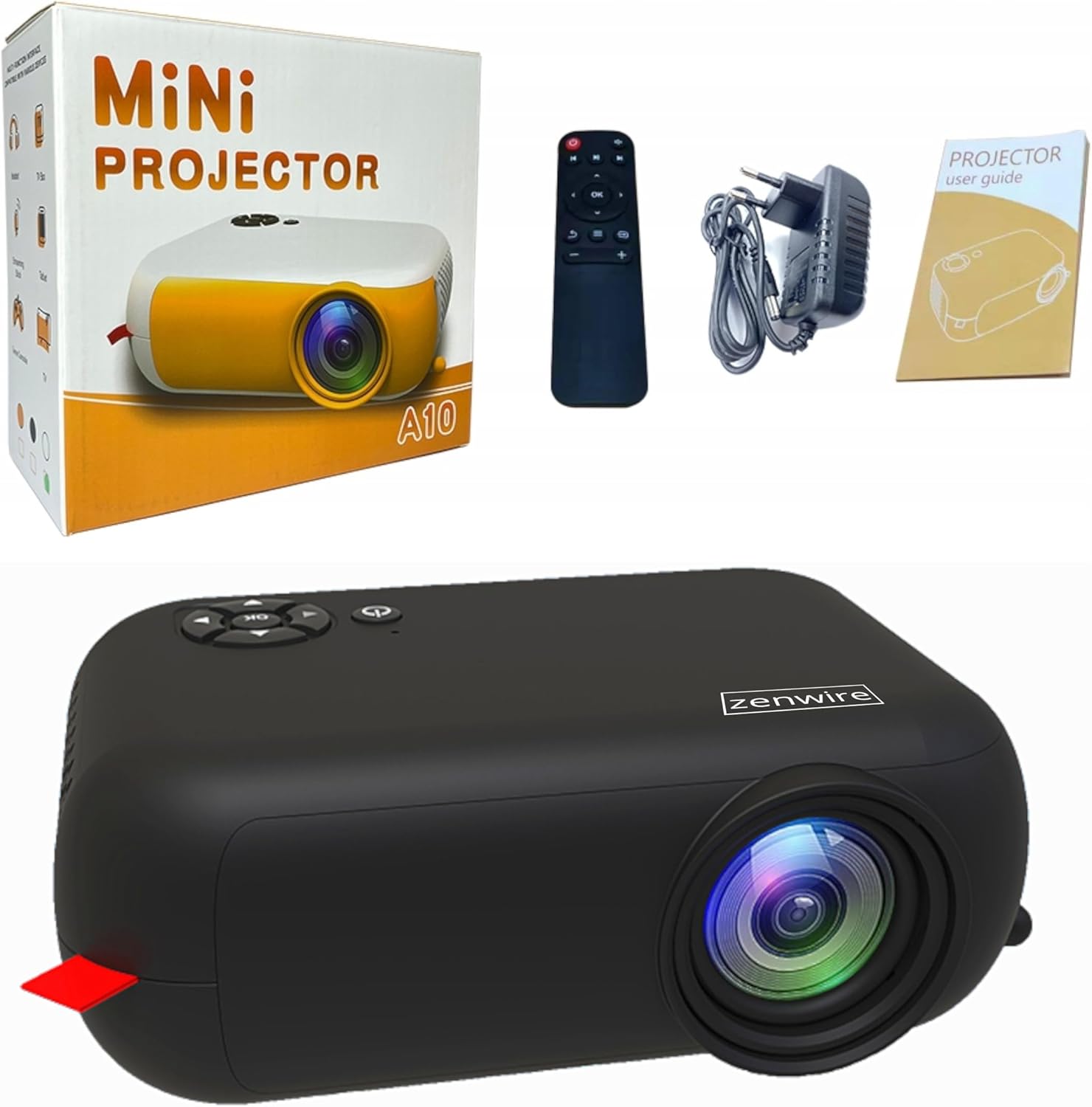
Image: Contents of the Zenwire A10 Mini Projector package, including the projector, remote control, power adapter, and user manual.
4. Продукт бүтүп калдыview
4.1 Projector Dimensions and Design
The Zenwire A10 is designed for portability, featuring a compact and lightweight form factor. Its dimensions are approximately 14cm x 10cm x 5.5cm, making it easy to carry and set up in various locations.

Image: The Zenwire A10 Mini Projector held in a hand, illustrating its compact size and portability.
4.2 Порттор жана башкаруу каражаттары
The projector features a range of input and output ports for versatile connectivity, along with intuitive controls.

Image: Rear panel of the Zenwire A10 Mini Projector, showing the 5V-IN DC power input, IR receiver, USB port, 3.5mm audio jack, HDMI port, and SD card slot.
- 5V-IN DC: Проектор үчүн кубат булагы.
- IR: Алыстан башкаруу үчүн инфракызыл кабылдагыч.
- USB: Медиа ойнотуу үчүн USB сактагыч түзмөктөрдү туташтырыңыз.
- Наушник уячасы (3.5 мм): Тышкы динамиктерди же гарнитураны туташтырыңыз.
- HDMI: Connect devices such as laptops, gaming consoles, or streaming sticks.
- SD: Insert Micro SD cards for media playback.
- Фокус дөңгөлөк: Adjust image sharpness (located on the side).
- Башкаруу панели: Buttons on top for navigation and selection.
5. Орнотуу
5.1 Кубат туташтыруу
- Берилген кубат адаптерин туташтырыңыз 5V-IN DC проектордогу порт.
- Кубат адаптерин розеткага сайыңыз.
- Аны күйгүзүү үчүн проектордун же пульттун кубат баскычын басыңыз.
5.2 Placement and Focus Adjustment
- Place the projector on a stable surface or mount it according to your preference. Ensure the projector lens is facing the projection surface (wall or screen).
- Adjust the distance between the projector and the screen to achieve your desired image size. The projector supports screen sizes up to 100 inches.
- Rotate the focus wheel (typically located near the lens) until the projected image appears clear and sharp.

Image: Diagram illustrating the Zenwire A10 Mini Projector's capability to project various screen sizes, from 13 inches up to 100 inches, depending on the projection distance.
6. Проекторду иштетүү
6.1 Wireless Connection (Miracast & Airplay)
The Zenwire A10 supports wireless screen mirroring via 2.4/5GHz WiFi, compatible with Android (Miracast) and iOS (Airplay) devices.
- Проекторуңуз жана мобилдик түзмөгүңүз бир Wi-Fi тармагына туташкандыгын текшериңиз.
- On the projector's main menu, select the 'Screen Mirroring' or 'Wireless Display' option.
- Android үчүн: On your Android phone/tablet, enable 'Wireless Display', 'Screen Mirroring', 'Smart View', or similar function (names may vary by device). Select the projector from the list of available devices.
- iOS үчүн: On your iPhone/iPad, open Control Center and tap 'Screen Mirroring'. Select the projector from the list of available devices.
- The content from your mobile device should now be mirrored on the projector screen.
6.2 Зымдуу байланыштар
The projector offers multiple wired input options for various devices.

Image: The Zenwire A10 Mini Projector connected to various devices such as smartphones, tablets, laptops, desktop computers, gaming consoles, and media players, highlighting its versatile connectivity.
- HDMI: Connect a laptop, PC, gaming console (e.g., Xbox, PlayStation), or streaming device (e.g., Amazon Fire TV Stick, Google Chromecast) using an HDMI cable. Select the HDMI input source on the projector.
- USB: Insert a USB flash drive or external hard drive into the USB port. The projector's media player will allow you to browse and play supported video, audio, and image files.
- Микро SD: Insert a Micro SD card into the SD card slot. Similar to USB, you can access media files through the projector's interface.
- Аудио чыгышы (3.5 мм уяча): Connect external speakers or headphones to enhance the audio experience.
6.3 Меню Навигациясы
Use the remote control or the buttons on the projector to navigate through the on-screen menu. Select input sources, adjust picture settings (brightness, contrast, color), sound settings, and other system preferences.
7. Техникалык тейлөө
- Линзаны тазалоо: Проектордун линзасын акырын сүртүү үчүн оптикалык линзалар үчүн атайын иштелип чыккан жумшак, мамыксыз чүпүрөктү колдонуңуз. Абразивдүү тазалоочу каражаттарды же ашыкча күч колдонуудан алыс болуңуз.
- Чаңды тазалоо: Regularly clean the projector's exterior with a soft, dry cloth. Use a small brush or compressed air to clear dust from the ventilation openings to ensure proper airflow.
- Сактагыч: When not in use, store the projector in a cool, dry place, away from direct sunlight and extreme temperatures. Use the original packaging or a protective case to prevent dust accumulation and damage.
8. Кыйынчылыктарды
If you encounter issues with your Zenwire A10 projector, refer to the following common problems and solutions:
| Көйгөй | Мүмкүн себеп | Чечим |
|---|---|---|
| Экранда сүрөт жок | Power not connected; Incorrect input source; Device not connected properly. | Check power cable; Select correct input source (HDMI, USB, etc.); Reconnect source device. |
| Сүрөт бүдөмүк | Фокус туураланган эмес; проектор экранга өтө жакын/алыс. | Adjust the focus wheel; Adjust projection distance. |
| Үн жок | Үнү өтө төмөн; Үнсүз; Тышкы аудио түзмөк туташкан эмес/тандалган эмес. | Increase volume; Unmute; Check external speaker connection or select internal speaker. |
| Зымсыз байланыш көйгөйлөрү | Not on same Wi-Fi network; Device not compatible; Interference. | Ensure both devices are on the same Wi-Fi; Verify device compatibility; Try moving closer to Wi-Fi router. |
9. Техникалык шарттар
| Өзгөчөлүк | Деталь |
|---|---|
| Бренд | Zenwire |
| Модель номери | A10 |
| Продукт түрү | Compact and Portable Projector |
| Native Resolution | 480 x 360p |
| Дисплейдин максималдуу чечилиши | 1920 x 1080 (Full HD) |
| Жарыктык | 1800lm / 60 ANSI |
| Контраст катышы | 2000:1 |
| Дисплей түрү | LED |
| Байланыш технологиясы | Wi-Fi (2.4/5GHz), HDMI, USB, Micro SD, 3.5mm Audio Jack |
| Зымсыз өзгөчөлүктөрү | Miracast, Airplay |
| Шайкеш түзмөктөр | Smartphones (Android, iOS), Tablets, Laptops, PCs, Gaming Consoles |
| Сунушталган Колдонуулар | Үй кинотеатры |
| Өлчөмдөрү (болжол менен) | 14cm x 10cm x 5.5cm |
10. Кепилдик жана колдоо
The Zenwire A10 Mini Portable Projector comes with a standard manufacturer's warranty. For specific warranty terms and conditions, please refer to the documentation provided at the time of purchase or contact your retailer. For technical support or service inquiries, please reach out to Zenwire customer service through their official webсайтты же продуктуңуз менен берилген байланыш маалыматын.


