User Manual
AXIS M5000-G 5 Megapixel Network Camera
Model: M5000-G | Brand: AXIS
1. Киришүү
This manual provides comprehensive instructions for the installation, operation, and maintenance of the AXIS M5000-G 5 Megapixel Network Camera. Please read this manual thoroughly before using the product to ensure proper functionality and safety.
The AXIS M5000-G is a high-performance network camera designed for surveillance applications, offering 5-megapixel resolution and PTZ capabilities for enhanced monitoring.
2. Коопсуздук маалыматы
Observe the following safety precautions to prevent damage to the product or injury to yourself:
- Ensure the power source matches the camera's requirements.
- Камераны өтө жогорку температурага же нымдуулукка дуушар кылбаңыз.
- Avoid direct exposure to strong light sources, which may damage the image sensor.
- Орнотуу жергиликтүү электр эрежелерине ылайык квалификациялуу кызматкерлер тарабынан аткарылышы керек.
- Тазалоодон же тейлөөдөн мурун электр кубатын ажыратыңыз.
3. Пакеттин мазмуну
Пакетте бардык буюмдар бар экенин текшериңиз:
- AXIS M5000-G Network Camera Unit
- Mounting Kit (screws, anchors)
- Installation Guide (Quick Start)
- Кубат адаптери (эгер камтылган болсо)
Note: Specific components may vary based on region or package version.
4. Продукт бүтүп калдыview
The AXIS M5000-G is a dome-style network camera designed for discreet and effective surveillance. It features a robust housing suitable for outdoor use and a PTZ (Pan-Tilt-Zoom) mechanism for flexible viewбурчтар.

4.1-сүрөт: Фронт view of the AXIS M5000-G Network Camera. This image shows the camera's dome shape, with the lens visible through the dark transparent cover. The main body is white.
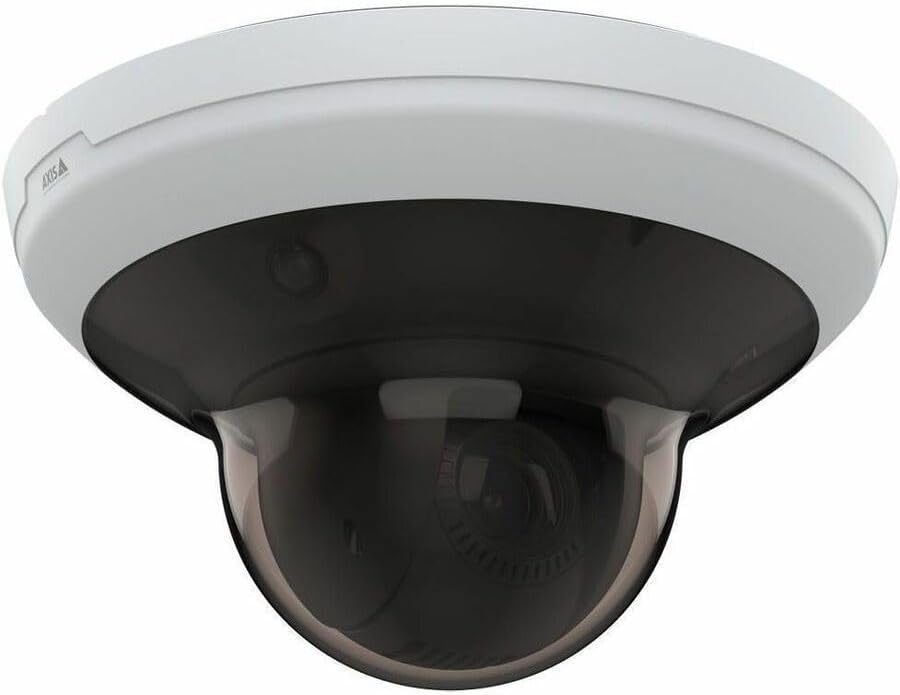
4.2-сүрөт: Бурчтуу view of the AXIS M5000-G Network Camera. This perspective highlights the camera's compact design and the subtle AXIS logo on the side of the white base.

4.3-сүрөт: Дагы бир бурч view of the AXIS M5000-G Network Camera. Similar to Figure 4.2, this image provides a slightly different angle, emphasizing the smooth contours of the camera's housing.
5. Орнотуу жана орнотуу
The AXIS M5000-G is designed for wall mount installation and requires a wired connection for network and power.
5.1 Камераны орнотуу
- Жайгашкан жерди тандаңыз: Select an outdoor location that provides the desired field of view and is within reach of a power source and network connection. Ensure the mounting surface is sturdy enough to support the camera's weight (approximately 5.7 pounds).
- Бургулоо пункттарын белгилөө: Use the provided mounting template (if applicable) or the camera base to mark the drilling points on the wall.
- Бургулоо тешиктери: Белгиленген жерлерде тешиктерди бургулаңыз. Зарыл болсо, дубалга бекиткичтерди орнотуңуз.
- Базаны коргоо: Attach the camera's mounting base to the wall using the provided screws.
- Attach Camera Unit: Secure the main camera unit to the mounted base, ensuring it clicks into place or is fastened according to the quick start guide.
5.2 Кубат менен тармакты туташтыруу
- Кубат туташуу: Connect the provided power adapter to the camera's power input and then to a suitable electrical outlet. The camera operates on corded electric power.
- Тармак туташуусу: Connect an Ethernet cable from your network router or switch to the camera's network port. The camera uses wired connectivity technology.
- Баштапкы жүктөө: Allow the camera a few minutes to power on and establish a network connection.
6. Камераны иштетүү
The AXIS M5000-G camera is controlled primarily through a dedicated application or network video recorder (NVR) software.
6.1 Баштапкы конфигурация
- Камераны табуу: Use the AXIS IP Utility or your network's device discovery tools to find the camera's IP address on your network.
- Мүмкүнчүлүк Web Интерфейс: ачуу а web браузерге кирип, камерага кирүү үчүн анын IP дарегин киргизиңиз web интерфейс.
- Кирүү: Enter the default username and password (refer to the quick start guide or manufacturer's documentation for default credentials). Change default credentials immediately for security.
- Тармак орнотуулары: Configure network settings (e.g., static IP, DHCP) as required by your network environment.
- Дата жана убакыт: Set the correct date and time for accurate video timestamps.
6.2 Live View жана PTZ Control
- Live View: Түз эфирдеги видео түрмөгүнө төмөнкү аркылуу кириңиз web interface or a compatible surveillance application. The camera provides 1080p video capture resolution and 5 MP effective still resolution.
- Pan, Tilt, Zoom (PTZ): Utilize the PTZ controls within the application to adjust the camera's viewing angle and zoom level. This feature allows for dynamic monitoring of large areas.
- Алдын ала коюлган позициялар: Configure and save specific PTZ positions for quick navigation to frequently monitored areas.
6.3 Кыймылды аныктоо жана эскертүүлөр
- Кыймыл гана жөнүндө эскертүүнүн түрү: Configure motion detection zones and sensitivity settings within the camera's interface.
- Alert Actions: Set up actions to be triggered upon motion detection, such as recording video, sending email notifications, or uploading images to an FTP server.
7. Техникалык тейлөө
Regular maintenance ensures optimal performance and longevity of your AXIS M5000-G camera.
- Линзаны тазалоо: Gently wipe the camera lens and dome cover with a soft, clean, lint-free cloth. For stubborn dirt, use a mild lens cleaning solution applied to the cloth, not directly to the lens.
- Программалык камсыздоонун жаңыртуулары: Periodically check the AXIS website for firmware updates. Keeping the firmware updated ensures access to the latest features and security patches.
- Кабелдик текшерүү: Regularly inspect all cables (power and network) for any signs of wear, damage, or corrosion, especially in outdoor installations.
- Экологиялык текшерүүлөр: Ensure the camera's environment remains within its specified operating temperature and humidity ranges.
8. Кыйынчылыктарды
This section addresses common issues you might encounter with the AXIS M5000-G camera.
| Көйгөй | Мүмкүн себеп | Чечим |
|---|---|---|
| Видео түрмөгү жок | Power disconnected, network issue, incorrect IP address. | Check power connection. Verify network cable is securely connected. Confirm camera's IP address and network settings. Restart camera. |
| Сүрөттүн сапаты начар | Dirty lens, low light, incorrect resolution settings. | Clean the lens. Ensure adequate lighting. Adjust video resolution settings in the camera's web интерфейс. |
| PTZ controls unresponsive | Network latency, software issue, camera malfunction. | Check network connection stability. Restart the camera and the control application. If issue persists, contact support. |
| Кыймылды аныктоо иштебей жатат | Туура эмес сезгичтик жөндөөлөрү, аныктоо зоналары конфигурацияланган эмес. | Review and adjust motion detection sensitivity. Ensure detection zones are properly defined in the camera's settings. |
9. Техникалык шарттар
| Өзгөчөлүк | Деталь |
|---|---|
| Модель аты | M5000-G Network Camera |
| Бренд | AXIS |
| Ички/тышкы колдонуу | Сыртта |
| Power Source | Электр зымдары |
| Байланыш технологиясы | Зымдуу |
| Видео тартуунун резолюциясы | 1080p |
| Натыйжалуу дагы эле чечим | 5 депутат |
| Монтаж түрү | Дубалга орнотуу |
| Эскертүү түрү | Кыймыл гана |
| Элементтин өлчөмдөрү (L x W x Y) | 11.9 x 12 x 8.4 дюйм |
| Элемент Салмагы | 5.7 фунт |
| Өндүрүүчү | AXIS БАЙЛАНЫШ ИНК |
10. Кепилдик жана колдоо
For warranty information, please refer to the documentation included with your purchase or visit the official AXIS website. AXIS provides support resources, including FAQs, troubleshooting guides, and contact information for technical assistance.
You can typically find more information and support on the AXIS Store on Amazon же өндүрүүчүнүн расмий адамы webсайт.


