Introduction
Thank you for choosing the Rohnson Genius 16 Dehumidifier. This appliance is designed to efficiently remove excess moisture from your indoor environment, improve air quality, and create a healthier living space. With its advanced features, including Wi-Fi control, a powerful dehumidification capacity of up to 16 liters per day, and an ultra-quiet operation, the Genius 16 is an ideal solution for rooms up to 100 square meters. Please read this manual thoroughly before operating the unit to ensure safe and optimal performance.
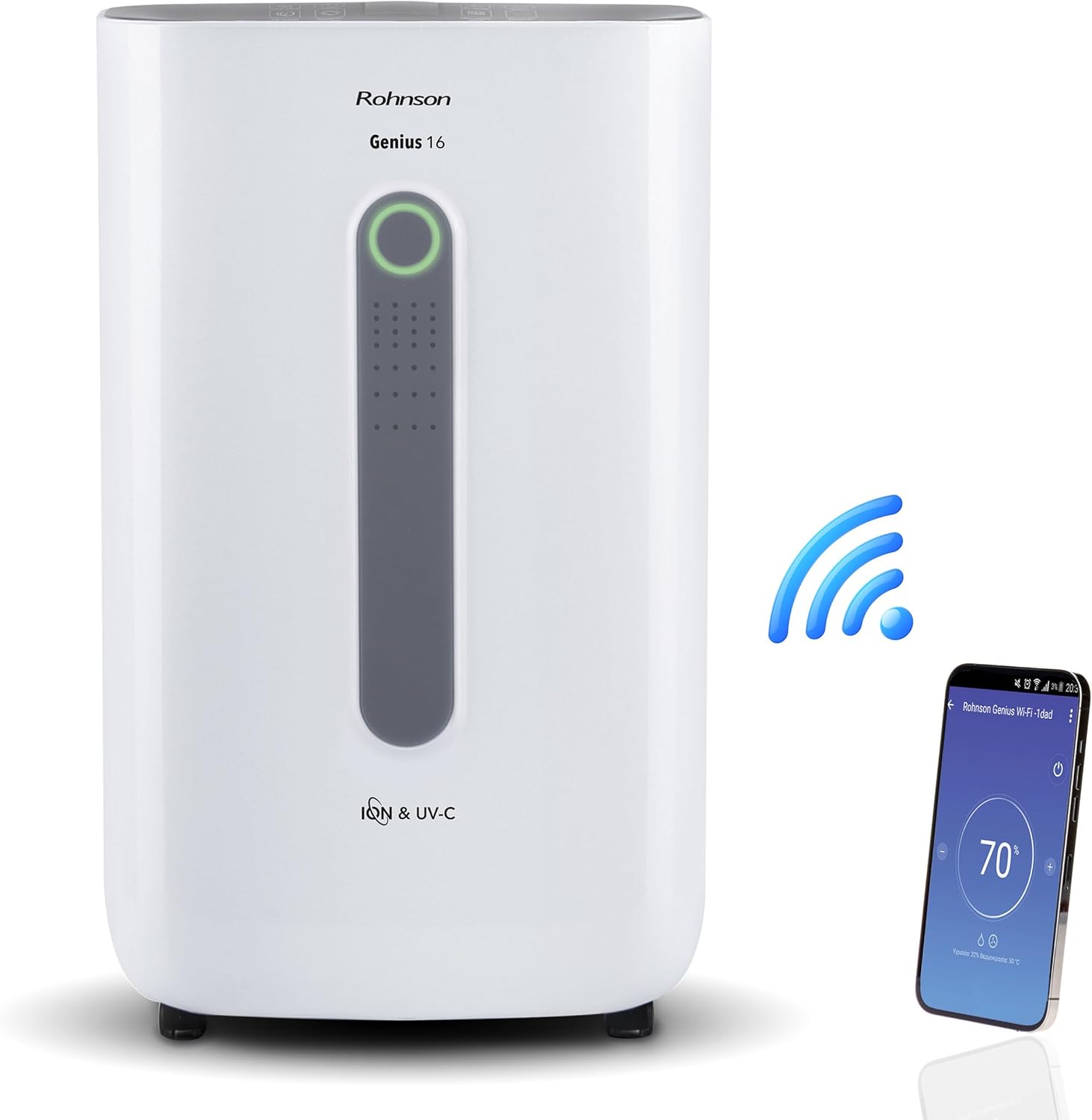
Image: The Rohnson Genius 16 Dehumidifier, a white rectangular unit with a central display, shown alongside a Wi-Fi symbol and a smartphone displaying the control app. This illustrates the unit's smart connectivity.
Коопсуздук нускамалары
Өрт, электр шок жана жаракат алуу коркунучун азайтуу үчүн электр шаймандарын колдонууда ар дайым негизги коопсуздук чараларын сактаңыз.
- кубат менен камсыз кылуу Voltage бирдиктин рейтинг белгисинде көрсөтүлгөн.
- Аппаратты бузулган шнур же сайгыч менен иштетпеңиз.
- Аппаратты жылуулук булактарынан жана түз күн нурунан алыс кармаңыз.
- Аба кирүүчү же чыгуучу жерлерди жаап албаңыз.
- Тазалоодон же техникалык тейлөөдөн мурун ар дайым розеткадан ажыратыңыз.
- Балдар жетпеген жерде сактаңыз.
Продукт бүттүview
The Rohnson Genius 16 Dehumidifier is equipped with several features to enhance your indoor air quality and comfort.
- Натыйжалуу нымсыздандыруу: Removes up to 16 liters of moisture per day, suitable for areas up to 100 m².
- Өркүндөтүлгөн аба тазалоо: Features UV-C light and a dual ionizer to eliminate bacteria and odors. An optional HEPA 13 + Activated Carbon filter can remove 99.7% of particles, smoke, chemicals, and allergens.
- Ультра-тынч иштөө: Operates at a low noise level of 36 dB(A) in low fan mode, ideal for bedrooms and living areas.
- Smart Control: Wi-Fi enabled for remote control via the Rohnson App (Android and iOS compatible). Includes a touch control panel, 1-24 hour timer, and automatic restart after power failure.
- Энергияны үнөмдөөчү дизайн: Powerful yet energy-efficient with only 240W power consumption. Features a Turbo-Boost mode for fast clothes drying and automatic shut-off when the water tank is full.
- Digital Humidity Display: A color indicator (Blue, Green, Red) shows current humidity levels for easy monitoring.

Image: The Rohnson Genius 16 Dehumidifier positioned in a living room, illustrating its compact size. Key features are overlaid, including its 16L/day dehumidification capacity, anti-frost system, digital humidity display, smart Wi-Fi control, UV-C light and ionizer, silent 36dB operation, and 6.5L water tank.
Жайгашуу
1. таңгактан чыгаруу
Carefully remove the dehumidifier from its packaging. Inspect the unit for any signs of damage. Retain the packaging for future storage or transport.
2. Жайгаштыруу
Place the dehumidifier on a firm, level surface in the area where dehumidification is desired. For optimal performance, ensure there is at least 20 cm (8 inches) of space around all sides of the unit to allow for proper airflow. The unit is effective for rooms up to 100 m². For best air circulation, consider placing it centrally within the room.

Image: A diagram illustrating the optimal placement of the dehumidifier in different household areas such as a laundry room, bedroom, living room, office, and basement, emphasizing central positioning for maximum effectiveness in rooms up to 100 m².
3. Power Connection
Plug the power cord into a grounded electrical outlet. Ensure the outlet meets the electrical requirements of the unit (230 Volts AC).
4. Filter Installation (Optional HEPA 13 + Activated Carbon Filter)
The Rohnson Genius 16 comes with an optional HEPA 13 + Activated Carbon filter for enhanced air purification.
- Чыпка бөлүмүн, адатта, блоктун арткы же каптал жагынан табыңыз.
- Чыпка капкагын ачыңыз.
- Insert the HEPA 13 + Activated Carbon filter, ensuring it is correctly oriented.
- Фильтр капкагын бекем жабыңыз.
5. Суу дренаждык параметрлери
The unit offers two drainage methods:
- Суу багы: The unit has a 6.5-liter water tank. When the tank is full, the unit will automatically shut off and an indicator will light up. Empty the tank and reinsert it to resume operation.
- Үзгүлтүксүз дренаж: For continuous operation without needing to empty the tank, connect a drainage hose (not included) to the continuous drainage port on the unit. Route the hose to a suitable drain or larger container.
Иштөө нускамалары
1. Башкаруу панели
The Rohnson Genius 16 features an intuitive touch control panel and a digital display.
- Кубат баскычы: Агрегатты күйгүзөт же өчүрөт.
- Режим тандоо: Cycle through different operating modes (e.g., Dehumidification, Turbo-Boost, Night Mode).
- желдеткич ылдамдыгы: Adjust fan speed (low, medium, high).
- Нымдуулук жөндөөсү: Set your desired humidity level. The unit will operate until this level is reached.
- Таймер баскычы: Set a timer for automatic shut-off (1-24 hours).
- UV-C/Ionizer Button: Activates or deactivates the UV-C light and dual ionizer.
- Санариптик дисплей: Shows current humidity, temperature, and selected settings.

Image: A visual representation of the digital humidity control feature, showing the dehumidifier and its color-coded humidity indicators. Blue indicates humidity below 55%, Green for 55-70%, and Red for above 70%, providing an easy visual cue for air moisture levels.
2. Wi-Fi тиркемесин башкаруу
Control your Rohnson Genius 16 from anywhere using the Rohnson App.
- Download the "Rohnson" app from the App Store (iOS) or Google Play Store (Android).
- Каттоо эсебин жана кирүү.
- Follow the in-app instructions to add your Rohnson Genius 16 dehumidifier. This typically involves putting the unit into pairing mode and connecting it to your home Wi-Fi network.
- Once connected, you can remotely monitor humidity, adjust settings, set schedules (hourly, daily, weekly), and control all functions of the dehumidifier.

Image: A banner illustrating the smart connectivity of the dehumidifier, showing the unit and a smartphone displaying the Rohnson app. This highlights the ability to control the room climate remotely, schedule operations, and monitor humidity via a smartphone, compatible with both Android and iOS.
3. Атайын режимдер
- Turbo-Boost Mode (Laundry Drying): This mode provides a powerful airflow to quickly dry clothes indoors. Position the unit near the laundry for efficient drying.
- Түнкү режим: Reduces fan speed and dims display lights for quiet operation during sleep.

Image: The Rohnson Genius 16 Dehumidifier positioned in a room with a clothes drying rack, illustrating its effectiveness in drying laundry indoors, especially useful during rainy weather or in apartments without balconies.
Техникалык тейлөө
Regular maintenance ensures the longevity and efficient operation of your dehumidifier. Always unplug the unit before cleaning.
1. Сырты тазалоо
Агрегаттын сыртын жумшак менен сүртүңүз, гamp кездеме. Катуу химиялык заттарды, абразивдерди же эриткичтерди колдонбоңуз, анткени алар бетке зыян келтириши мүмкүн.
2. Чыпкаларды тазалоо/алмаштыруу
The air filter should be cleaned regularly (e.g., every two weeks or as needed) to maintain optimal performance. If using the optional HEPA 13 + Activated Carbon filter, refer to its specific replacement schedule.
- Нымдандыргычты өчүрүп, сууруп алыңыз.
- Remove the filter cover and carefully take out the filter(s).
- For washable filters, rinse with lukewarm water and mild detergent. Allow to air dry completely before reinserting.
- For HEPA/Activated Carbon filters, these are typically not washable and should be replaced according to manufacturer recommendations or when visibly dirty.
- Reinsert the clean/new filter(s) and close the cover.
3. Суу резервуарын бошотуу
Суу куюлган бак толуп калганда, агрегат иштебей калат.
- Суу куюлган бакты аппараттан акырын чыгарып алыңыз.
- Чогултулган сууну этияттык менен төгүңүз.
- Clean the tank with mild soap and water if necessary, then rinse thoroughly.
- Reinsert the empty tank firmly into the unit until it clicks into place. The unit will resume operation.
Проблемаларды чечүү
Кардарларды колдоо кызматына кайрылуудан мурун, төмөнкү жалпы маселелерди жана чечимдерди караңыз.
| Көйгөй | Мүмкүн себеп | Чечим |
|---|---|---|
| Түзмөк күйбөйт. | Электр кубаты жок, кубат шнуру бошоп калган, суу багы толуп калган же туура эмес киргизилген. | Check power connection. Empty and reinsert water tank securely. |
| No water collected / Low dehumidification. | Room humidity too low, air filter clogged, temperature too low, unit size too small for room. | Check current humidity setting. Clean or replace air filter. Ensure room temperature is above 5°C (41°F). |
| Агрегат ызы-чуу. | Unit not on a level surface, fan obstruction, dirty filter. | Place unit on a flat, stable surface. Check for obstructions in fan area. Clean filter. |
| Wi-Fi туташуу маселелери. | Incorrect Wi-Fi password, unit too far from router, app not updated. | Ensure correct Wi-Fi password. Move unit closer to router. Update Rohnson App. Refer to app's troubleshooting guide. |
Техникалык шарттар
| Өзгөчөлүк | Деталь |
|---|---|
| Бренд | Ронсон |
| Модель номери | R-9916W |
| нымдуулуктун күч жөндөмдүүлүгү | Up to 16 liters/day |
| Сунушталган бөлмө аянты | 100 м² чейин |
| Суу резервуарынын сыйымдуулугу | 6.5 литр |
| Ызы-чуу деңгээли | 36 dB(A) (low fan mode) |
| Энергияны керектөө | 240 Вт |
| Тtage | 230 вольт (AC) |
| Продукциянын өлчөмдөрү (L x W x Y) | 28 x 38 x 64 см |
| Элемент Салмагы | 16 килограмм |
| Өзгөчөлүктөр | Digital Display, Wi-Fi Control, UV-C Light, Dual Ionizer, Optional HEPA 13 Filter, Turbo-Boost Mode, Auto Shut-off, Auto Restart |
| Түс | Ак |
Кепилдик жана колдоо
For information regarding warranty coverage and customer support, please refer to the warranty card included with your product or visit the official Rohnson webсайт. Сатып алганыңыздын далили катары сатып алуу дүмүрчөгүңүздү сактаңыз.
If you encounter issues not covered in this manual, please contact Rohnson customer service for assistance.


