Insta360 GPS алдын алаview Remote User Manual
Model: CINSAAVG
1. Бүттүview
Insta360 GPS алдын алаview Remote is designed to enhance your camera control and video recording experience. It features a new touchscreen for remote adjustment of shooting settings and real-time image transmission for shot preview. This remote is compatible with Insta360 Ace and Ace Pro cameras, with future compatibility for other camera models expected via updates. It utilizes various GNSS systems (GPS, BeiDou, Galileo, GLONASS) to improve data quality and accuracy, allowing you to add precise dashboard data to your videos using the Insta360 app or Studio software.
The remote offers a maximum control range of 20 meters and a preview range of up to 8 meters. It comes with two adjustable straps for versatile mounting options.

Image: The Insta360 GPS Preview Remote displaying a live camera feed from a cyclist's perspective, showing recording status and GPS signal.
2. Пакеттин мазмуну
Сиздин пакетте төмөнкү нерселердин бардыгы камтылганын текшериңиз:
- GPS Preview Алыстан x1
- Билек боосу x1
- Universal Strap x1
- Кубаттоо кабели x1
- Disposable Double-sided Stickers x4

Сүрөт: арткы view of the Insta360 GPS Preview Remote, displaying regulatory marks and the model number CINSAAVG.
3. Орнотуу
3.1 Charging the Remote
Before first use, fully charge the GPS Preview Remote using the provided charging cable. Connect the charging cable to the remote's charging port and a compatible USB power source. The charging environment should be between 0°C and 40°C.
3.2 Attaching the Straps
The remote comes with two types of straps for different uses:
- Билек боосу: For wearing the remote on your wrist like a watch. The diameter range is 14cm to 21cm.
- Universal Strap: For mounting the remote on handlebars, selfie sticks, or other objects. The diameter range is 2cm to 3.5cm.
To attach a strap, slide it into the designated slots on the remote until it clicks securely into place. Ensure the strap is firmly attached before use.

Image: The Insta360 GPS Preview Remote shown with the universal strap attached, ready for mounting on a handlebar or similar object.

Image: The Insta360 GPS Preview Remote shown with the wrist strap attached, suitable for wearing on the wrist.
4. Пультту иштетүү
4.1 Күйгүзүү/өчүрүү жана жупташтыруу
Press and hold the power button to turn the remote on or off. Once powered on, the remote will automatically attempt to pair with a compatible Insta360 camera via Bluetooth 5.0. Ensure your camera's Bluetooth is enabled.
4.2 Real-time Preview жана Control
The remote's vibrant LCD touchscreen allows you to easily control camera settings and preview your shots in real-time. Simply swipe on the screen to navigate through 360-degree views (for 360 cameras). A single tap can activate the camera and start recording.

Image: The Insta360 GPS Preview Remote displaying a live preview from a camera mounted on a motorcycle, with speed and other data overlays.
4.3 GPS Data Integration
The built-in GPS, BeiDou, Galileo, and GLONASS systems work together to accurately record your location, route, and speed. This data can be added as dashboard overlays to your videos using the Insta360 app or Studio software for enhanced visual storytelling.
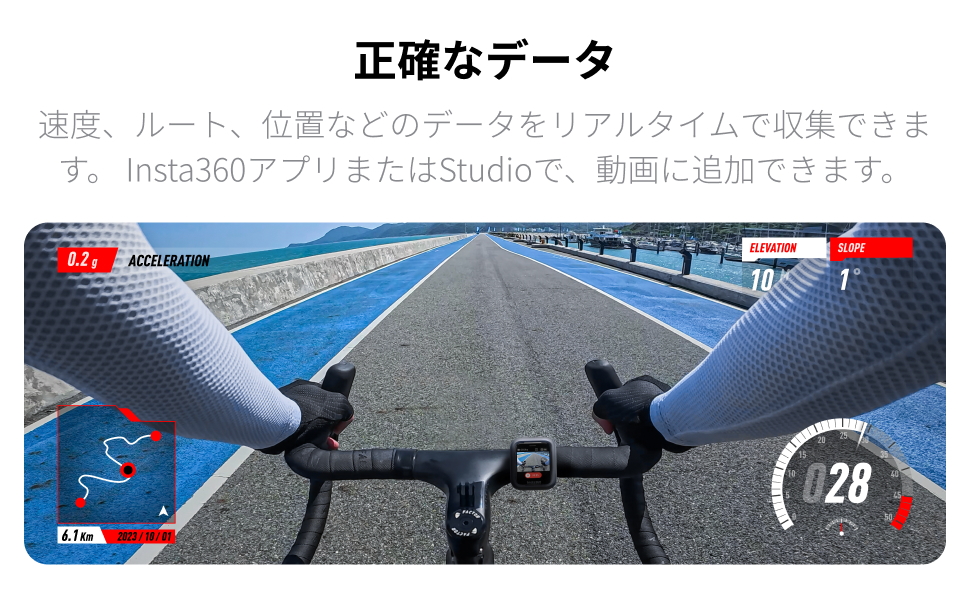
Image: A video frame with real-time GPS data overlays, including speed, elevation, and a map of the route, as captured with the Insta360 GPS Preview Алыстан.
5. Шайкештик
Insta360 GPS алдын алаview Remote is currently compatible with the following camera models:
- Insta360 Ace Pro
- Insta360 Ace
Future firmware updates may extend compatibility to other Insta360 camera models. Please check the official Insta360 webакыркы шайкештик маалыматы үчүн сайт.
6. Техникалык тейлөө
- After contact with water, wipe the product dry as soon as possible.
- Do not wear the remote during swimming or diving.
- Do not use liquid detergents to clean the main body.
- Do not wipe the remote's charging terminals with liquid detergents, as this may cause corrosion or rust.
- Wipe the product with a dry, soft cloth.
7. Кыйынчылыктарды
7.1 Байланыш маселелери
If the remote frequently loses connection with the camera, ensure both devices are within the 20m operating range and there are no significant obstructions. Make sure the camera's firmware is updated to the latest version for optimal performance.
7.2 Батареяны төгүү
If the product is not used for a long period (e.g., two months or more), the battery may drain. Fully charge the remote before powering it on after extended storage.
7.3 Алдын алаview Көрсөтүлбөйт
Ensure the remote is properly paired with the camera. Live preview is possible up to 8 meters. If the camera is a 360-degree model, ensure the correct settings are applied for preview.
8. Техникалык шарттар
| Өзгөчөлүк | Спецификация |
|---|---|
| Модель номери | CINSAAVG |
| Wrist Strap Diameter | 14см – 21см |
| Universal Strap Diameter | 2см – 3.5см |
| Иштеп жаткан чөйрөнүн температурасы | -20°C – 40°C |
| Заряддоо чөйрөнүн температурасы | 0°C – 40°C |
| Суу каршылык | IP68 (up to 4.9ft / 1.5m for 1.5 hours) |
| Батарея сыйымдуулугу | 950mAh |
| Байланыш | Bluetooth 5.0 |
| Иштөө жыштыгы | 2402-2480 МГц |
| Чыгуу күчү (EIRP) | < 10 дБм |
| Продукциянын өлчөмдөрү | 15.24 x 15.24 x 7.62 см |
| Продукт Салмагы | 272.16 г |
9. Маанилүү эскертүүлөр жана эскертүүлөр
- This product contains magnets. To avoid interference, keep it away from medical devices such as pacemakers.
- Use this product only in environments with temperatures between -20°C and 40°C.
- Do not drop, disassemble, crush, insert foreign objects into, or place heavy objects on the remote.
- Do not leave the product near heat sources such as fireplaces, heaters, inside cars, or in direct sunlight.
- Before using this product underwater, attach the dry disposable double-sided stickers to the back of the remote and secure it to a strap for enhanced safety.
10. Кепилдик жана колдоо
Кепилдик маалыматы, техникалык колдоо же тейлөө боюнча суроолор үчүн расмий Insta360 сайтына кириңиз webсайтка же кардарларды тейлөөгө кайрылыңыз. Сатып алуу квитанциясын кепилдик дооматтары үчүн сатып алуунун далили катары сактаңыз.


