1. Киришүү
This manual provides essential information for the installation, operation, and maintenance of the PHOENIX CONTACT FL WLAN 4321 Wireless Ethernet Bridge, model 1194423. This pre-paired wireless bridge system is designed to extend Ethernet networks wirelessly over distances up to 2 miles, offering a reliable 300 Mbps connection. It utilizes Passive POE for simplified power and data transmission.
2. Продукт бүтүп калдыview
The FL WLAN 4321 system consists of two pre-configured wireless Ethernet bridge units, enabling a point-to-point wireless connection. These units are ideal for applications requiring robust and long-range network extension without the need for complex cabling. The Passive POE capability allows for flexible installation by delivering power and data over a single Ethernet cable.
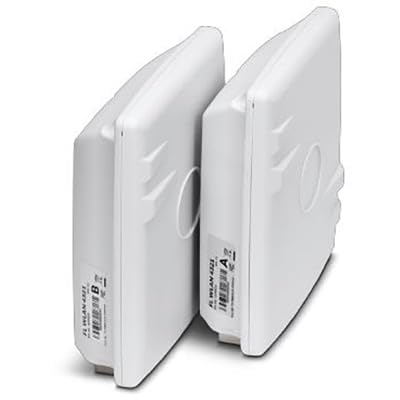
Figure 2.1: The PHOENIX CONTACT FL WLAN 4321 Wireless Ethernet Bridge units. The image displays two identical white rectangular devices, positioned vertically next to each other. Each unit has a label on its side, indicating "FL WLAN 4321" and a letter (A or B) for identification.
3. Пакеттин мазмуну
Таңгактан чыгаргандан кийин бардык буюмдар бар экенин жана жакшы абалда экендигин текшериңиз:
- 2 x PHOENIX CONTACT FL WLAN 4321 Wireless Ethernet Bridge Units (Pre-paired)
- 2 x Passive Power over Ethernet (POE) Injectors
- 2 x Power Cords for POE Injectors
- 1 x Quick Start Guide
4. Коопсуздук маалыматы
Түзмөктүн бузулушун же персоналдын жаракат алышын алдын алуу үчүн төмөнкү коопсуздук чараларын сактаңыз:
- Бардык электр байланыштары үчүн туура жерге туташтырууну камсыз кылыңыз.
- Аппаратты экстремалдык температурага, нымдуулукка же түз күн нуруна калтырбаңыз.
- Аппаратты күчтүү электромагниттик талаалардын жанына коюудан алыс болуңуз.
- Only use the provided power adapters and cables.
- Орнотуу жергиликтүү электр эрежелерине ылайык квалификациялуу кызматкерлер тарабынан аткарылышы керек.
5. Орнотуу
The FL WLAN 4321 units are pre-paired for ease of installation. Follow these steps for initial setup:
- Identify Units: Unpack both bridge units. They are typically labeled 'A' and 'B' or similar for easy identification of the master and client roles, though they are pre-paired to function together.
- Монтаждоо: Choose suitable mounting locations for each unit. For optimal performance, ensure a clear line of sight between the two units. Mount them securely using appropriate hardware (not included).
- Ethernet кабелдерин туташтыруу:
- Connect one end of an Ethernet cable from your network device (e.g., router, switch) to the "LAN" port on the Passive POE Injector.
- Connect the other end of the Ethernet cable from the "POE" port on the Passive POE Injector to the Ethernet port on the Wireless Ethernet Bridge unit.
- Туташуу кубаты: Plug the power cord into the Passive POE Injector and then into a suitable power outlet. The bridge unit will power on via the Ethernet cable.
- Байланышты текшерүү: Once both units are powered on and connected, observe the LED indicators. A solid link LED on both units typically indicates a successful wireless connection between them. Refer to the "Operating Instructions" section for LED status meanings.
- Тармак конфигурациясы: Ensure your network devices connected to the bridges are configured correctly (e.g., IP addresses, subnet masks) to communicate across the wireless link.
6. Иштөө нускамалары
Once installed and powered, the FL WLAN 4321 units operate automatically as a transparent wireless Ethernet bridge. Data transmitted on one side of the bridge will be wirelessly relayed to the other side.
LED көрсөткүчтөрү:
| LED аты | Статус | Description |
|---|---|---|
| Power LED | Катуу жашыл | Түзмөк күйгүзүлгөн. |
| LAN LED | Катуу жашыл | Ethernet шилтемеси орнотулду. |
| LAN LED | Жаркылдаган жашыл | Ethernet портундагы маалыматтардын активдүүлүгү. |
| WLAN LED | Катуу жашыл | Wireless link established between units. |
| WLAN LED | Жаркылдаган жашыл | Data activity over wireless link. |
7. Техникалык тейлөө
Regular maintenance helps ensure the longevity and optimal performance of your wireless Ethernet bridge.
- Тазалоо: Gently wipe the exterior of the units with a soft, dry cloth. Do not use liquid cleaners or aerosols.
- Программалык камсыздоонун жаңыртуулары: Periodically check the PHOENIX CONTACT website for available firmware updates. Applying updates can improve performance, add features, or address security vulnerabilities. Follow the instructions provided with the firmware update package carefully.
- Экологиялык текшерүү: Ensure the operating environment remains within specified temperature and humidity ranges. Keep the area around the units clear to allow for proper ventilation.
8. Кыйынчылыктарды
If you encounter issues with your FL WLAN 4321 system, refer to the following common problems and solutions:
| Көйгөй | Мүмкүн себеп | Чечим |
|---|---|---|
| Кубат жок (Күч LED өчүк) | No power from POE injector or power outlet. | Check power cord connection to POE injector and wall outlet. Ensure the POE injector is functioning. Verify Ethernet cable from POE injector to bridge unit is securely connected. |
| No Wireless Link (WLAN LED Off) | No line of sight, excessive distance, interference, or unit malfunction. | Ensure clear line of sight between units. Reduce distance if possible. Check for sources of interference (e.g., large metal objects, other wireless devices). Power cycle both units. |
| No Ethernet Link (LAN LED Off) | Faulty Ethernet cable or connected device. | Verify Ethernet cable connection to the bridge unit and the connected network device. Try a different Ethernet cable. Test the connected network device. |
| Байланыш ылдамдыгы жай | Interference, signal degradation, or network congestion. | Optimize unit placement for better signal strength. Minimize sources of interference. Check for network congestion on your wired network. |
9. Техникалык шарттар
| Атрибут | Деталь |
|---|---|
| Модель номери | 1194423 |
| Бренд | PHOENIX CONTACT |
| Type | Wireless Ethernet Bridge (Pre-paired) |
| Байланыш | Зымсыз, Ethernet |
| Күч ыкмасы | Пассивдүү POE |
| Max Data Rate | 300 Мбит/сек |
| Макс диапазон | 2 miles (approx. 3.2 km) |
| ASIN | B0CMZCD3W6 |
| Өндүрүүчү | Phoenix Contact |
| Биринчи жеткиликтүү күн | 8-ноябрь, 2023-жыл |
10. Кепилдик маалыматы
PHOENIX CONTACT products are manufactured to the highest quality standards. This product is covered by the manufacturer's standard warranty. For detailed information regarding warranty terms, conditions, and duration, please refer to the official PHOENIX CONTACT webсайтка же түздөн-түз кардарларды колдоо менен байланышыңыз. Кепилдик дооматтар үчүн сатып алганыңыздын далилин сактаңыз.
11. Колдоо маалыматы
For technical assistance, product inquiries, or further support, please contact PHOENIX CONTACT through their official channels:
- Webсайт: Visit the official PHOENIX CONTACT webпродукт документтери, көп берилүүчү суроолор жана колдоо ресурстары үчүн сайт. www.phoenixcontact.com
- Кардарларды тейлөө: Refer to the contact section on their webтелефон номерлери же электрондук почта колдоо сайты.


