Introduction
Welcome to the KAIWEETS Stud Finder Wall Scanner user manual. This 4-in-1 electronic detector is designed to accurately locate studs, metal, and live AC wires hidden behind walls, floors, and ceilings. Please read this manual thoroughly before use to ensure safe and effective operation.
Пакеттин мазмуну
- 1x KAIWEETS Stud Finder
- 1x 9V Battery
- 1x Dustproof Bag
- 1x Колдонуучунун колдонмосу

The KAIWEETS KES01-GRAY Stud Finder, shown alongside the included 9V battery, ready for use.
Негизги өзгөчөлүктөрү
- Tricolor Backlight: Clear direction and accurate location with green (no target), orange (edge), and red (center) indicators.
- Accurate Detection: Intelligent microprocessor chip for precise location of metal, wood, studs, joists, pipes, or live AC wires.
- 4-in-1 Multi-functional Modes: Includes 3/4" and 1-1/2" stud scan modes, metal scan mode, and AC scan mode.
- Биринчи коопсуздук: Indicates live AC wires in all modes to prevent drilling into electrical wires.

This diagram illustrates the four distinct scanning modes of the KAIWEETS stud finder, detailing their respective detection depths for wood studs (3/4 inch and 1 1/2 inch), metal objects (up to 2.36 inches), and live AC wires (up to 2 inches.
Продукт бүттүview
Familiarize yourself with the components of your KAIWEETS Stud Finder.

A detailed diagram of the KAIWEETS KES01 stud finder, highlighting key components such as the display screen, power/mode button, calibration button, and indicators for stud mode, metal mode, AC mode, AC wire warning, battery, and stud center/edge.
Жайгашуу
Батарея орнотуу
The KAIWEETS Stud Finder requires one 9V battery (included).
- Аппараттын артындагы батарея бөлүкчөсүнүн капкагын ачыңыз.
- 9V батареяны туура полярдуулукту (+/-) камсыз кылып, салыңыз.
- Батарея уясынын капкагын бекем жабыңыз.
Баштапкы күйгүзүү
Press the "MODE" button to power on the device. The LCD screen will light up.
Иштөө нускамалары
Жалпы иштетүү кеңештери
- Ensure the device is calibrated correctly before each scan.
- Hold the device flat against the wall surface.
- Move the device slowly and steadily across the surface.
- Pay attention to the visual indicators on the LCD and the audio alarm.
Stud Mode Operation
The stud finder offers 3/4" and 1-1/2" stud scan modes to locate the center and edge of wood, metal, beams, or joists.
- Режимди тандоо: Press the "MODE" button to select the desired stud mode (3/4" or 1-1/2"). To minimize false readings, always start your scan in 3/4in. Mode first.
- Калибрлөө: Place the device flat against a blank section of the wall where you are certain there are no studs or objects. Press and hold the calibration button (side button) until the calibration is complete (usually indicated by a beep and a stable display).
- Скандоо: Slowly slide the device horizontally across the surface.
- Аныктоо:
- Кызгылт сары түстөгү арткы жарык: Indicates the detection of a stud edge. An arrow on the screen will point towards the center.
- Red Backlight & Audio Alarm: Indicates the detection of the stud center. The buzzer will sound an alarm.
This video provides a visual guide on how to operate the KAIWEETS Stud Finder, showcasing the process of calibration and scanning in stud mode, and how the device indicates the edge and center of a stud.
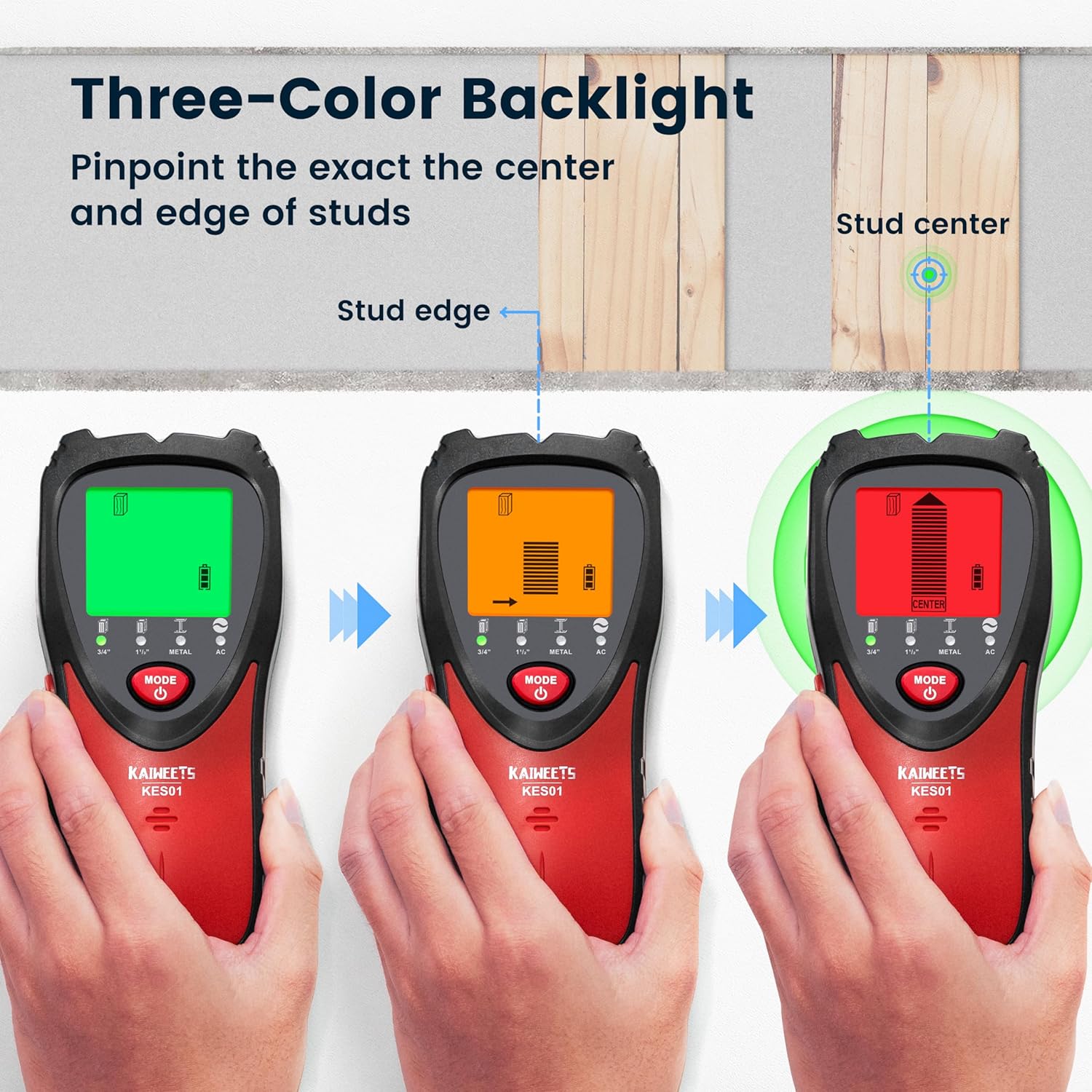
This image sequence demonstrates the stud finder's tri-color backlight system: green when no target is detected, orange when an edge is found, and red when the center of a stud is located, accompanied by an audible alarm.
Metal Mode Operation
The metal scan mode detects metal (Ferrous and Non-Ferrous Metal) up to 2.36'' deep.
- Initial Scan (Optional but Recommended): Before using the metal mode, use stud 3/4in. mode or stud 1½in. mode to quickly locate the center and edges of the target. This helps differentiate between wood and metal objects.
- Режимди тандоо: Press the "MODE" button to select Metal Mode.
- Калибрлөө: Calibrate the device against a blank wall section.
- Scanning & Detection: Slowly slide the device across the surface. The device will indicate the presence of metal with visual and audio cues. If the metal mode can scan the target again, the target is a metal object, otherwise it is wood.

This image highlights the accurate detection capabilities of the stud finder, showing it identifying rebar within a wall. Inset images further illustrate its ability to find metal pipes, AC live wires, wooden beams, and rebars.
AC Scan Mode Operation
The AC scan mode detects live unshielded AC wires up to 2'' deep.
- Режимди тандоо: Press the "MODE" button to select AC Mode.
- Калибрлөө: Calibrate in the air. Keep a distance from the detection surface and keep your hands away from the back of the device.
- Scanning & Detection: Slowly slide the device across the surface. The device will indicate the presence of live AC wires with visual and audio cues.

This image emphasizes the safety feature of the KAIWEETS stud finder, which indicates the presence of live AC wires in all modes, helping users avoid accidental drilling into electrical lines.
Техникалык тейлөө
- Аппаратты жумшак, кургак чүпүрөк менен тазалаңыз. Абразивдүү тазалагычтарды же эриткичтерди колдонбоңуз.
- Store the device in the dustproof bag provided when not in use.
- Эгерде түзмөк көпкө чейин колдонулбаса, агып кетүүнүн алдын алуу үчүн батарейканы чыгарып коюңуз.
- Аппаратты экстремалдык температуранын же нымдуулуктун таасиринен сактаңыз.
Проблемаларды чечүү
Жалпы маселелер жана чечимдер
| Көйгөй | Мүмкүн себеп | Чечим |
|---|---|---|
| Inaccurate readings / False positives | Improper calibration or presence of moisture in the wall. | Re-calibrate the device on a blank section of the wall. Ensure the wall is dry. |
| Түзмөк күйбөй жатат | Өлүк же туура эмес орнотулган батарея. | Батареянын полярдуулугун текшериңиз. Жаңы 9V батарея менен алмаштырыңыз. |
| Difficulty detecting AC wires | Wires are shielded or too deep. | Ensure AC mode is selected and calibrate in the air. Move slowly. Note that shielded wires may not be detected. |
| Аппарат үзгүлтүксүз сигнал берет | Device is detecting an object or needs re-calibration. | Move the device to a different section of the wall and re-calibrate. |
Техникалык шарттар
| Өзгөчөлүк | Деталь |
|---|---|
| Бренд | KAIWEETS |
| Модель номери | KES01-GRAY |
| Түс | Боз |
| Power Source | Батарея менен иштейт |
| Батарея түрү | 9V Alkaline (included) |
| Элемент Салмагы | 0.18 килограмм (6.3 унция) |
| Продукциянын өлчөмдөрү | 2.9 x 1.4 x 6.69 дюйм |
| Stud Scan Depth | 1.5 дюймга чейин (38 мм) |
| Металл сканерлөө тереңдиги | 2.36 дюймга чейин (60 мм) |
| AC зымдарынын сканерлөө тереңдиги | 2 дюймга чейин (51 мм) |
| Дисплей | Tricolor Backlight LCD |
| Ойготкуч | Аудио Ойготкуч |
Кепилдик жана колдоо
KAIWEETS products are designed for reliability and performance. For warranty information, technical support, or service inquiries, please refer to the contact details provided on the product packaging or visit the official KAIWEETS webсайт.
Official KAIWEETS Store: Visit KAIWEETS Store on Amazon


