1. Киришүү
Welcome to the user manual for your HyperGear Wireless Audio Essentials Duo. This innovative product combines the functionality of over-ear Bluetooth headphones with a portable HD stereo sound speaker, featuring vibrant LED lighting. Designed for versatility and superior audio quality, it allows you to enjoy your music privately or share it with others.
Эмне камтылган:
- Зымсыз кулакчындар
- Micro USB Charging Cables
- 3.5mm Aux Cord with In-Line Microphone

Image: The HyperGear Wireless Audio Essentials Duo headphones in beige, showcasing their sleek design and integrated LED lighting on the earcups.

Сүрөт: An overview of the Wireless Audio Essentials Duo, highlighting both the headphones and the portable speaker, emphasizing their HD sound, dynamic bass, and colorful LED lighting.
2. Орнотуу
2.1 Аппаратты заряддоо
Before first use, fully charge your HyperGear Wireless Audio Essentials Duo. Use the provided Micro USB Charging Cables to connect the headphones and speaker to a compatible USB power source.
- Наушник: Толук зарядда 10 саатка чейин ойноо.
- Баяндамачы: Толук зарядда 2 саатка чейин ойноо.
- Тез кайра заряддоо: Толук кубаттоо үчүн болжол менен 1.5 саат.

Image: Visual representation of the battery life for both headphone and speaker modes, along with the rapid recharge time.
2.2 Bluetooth жупташтыруу
To connect your device wirelessly:
- Ensure the headphones/speaker are powered off.
- Жупташуу режимин көрсөткөн LED индикатору өчүп калганга чейин Кубат баскычын басып, кармап туруңуз.
- On your device (smartphone, tablet, computer), enable Bluetooth and search for "HyperGear Audio Duo" (or similar name).
- Select the device to pair. Once connected, the LED indicator will show a solid light.
- The device will automatically reconnect to the last paired device when powered on, if within range (up to 33 feet).

Image: Diagram illustrating the wireless Bluetooth connectivity, showing the headphones, speaker, and a smartphone with a 33ft range and universal compatibility.
3. Иштөө нускамалары
3.1 Гарнитураны башкаруу
All physical buttons for controlling the headphones are conveniently located on the right ear cup.
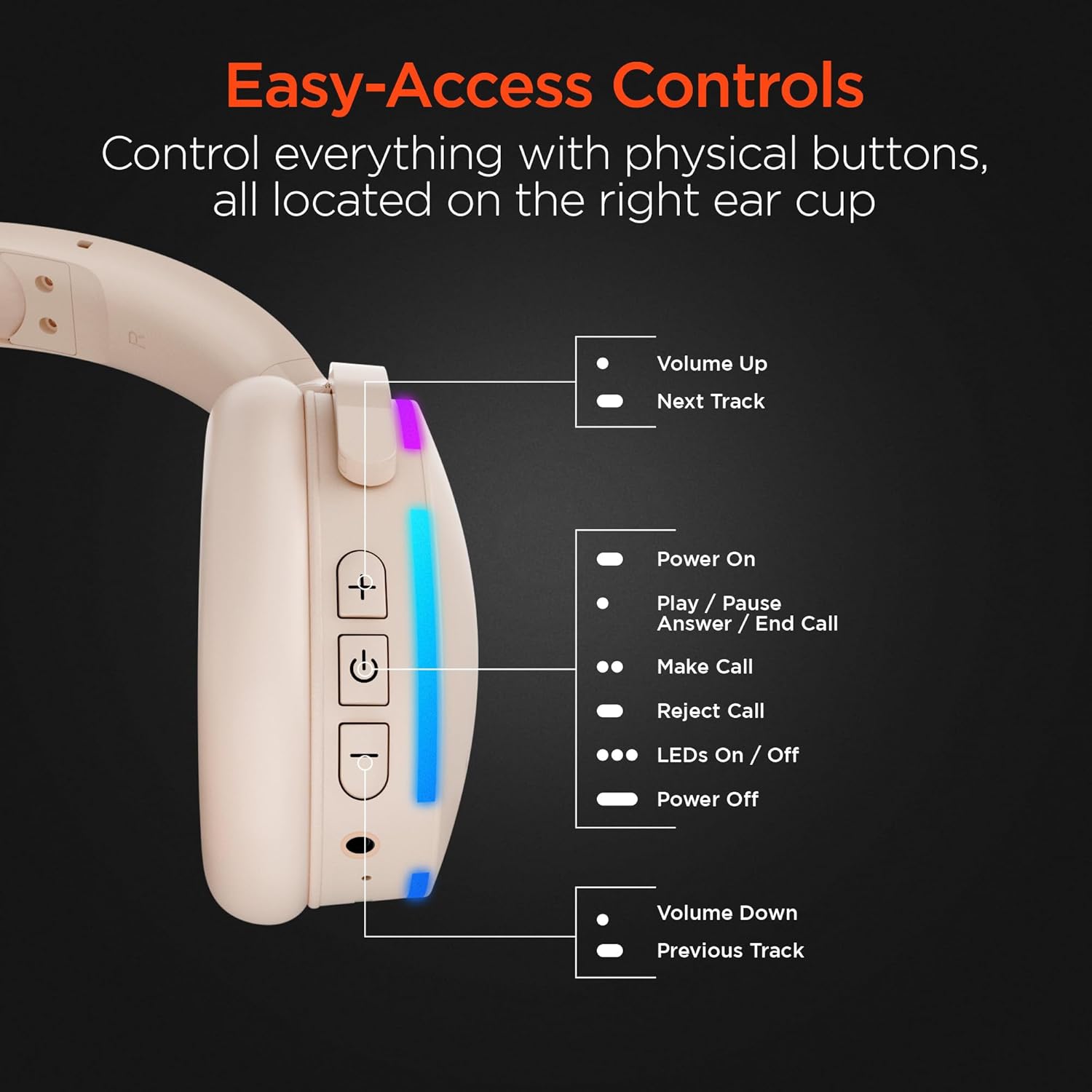
Сүрөт: деталдуу view of the right earcup, pointing out the functions of each button for easy access and control.
| Баскыч/Аракет | Функция |
|---|---|
| + баскыч | Volume Up / Next Track (Long Press) |
| Кубат баскычы | Power On / Play / Pause / Answer / End Call |
| LEDs On/Off Button | Toggle LED lights on/off |
| - баскыч | Volume Down / Previous Track (Long Press) |
| Камтылган микрофон | Колсуз чалуулар жана үн буйруктары үчүн. |
3.2 Speaker Mode
The headphones can transform into a portable speaker for shared listening. Simply fold the earcups inwards to activate the speaker mode. The speaker features a full-range dynamic driver and 5W powerful audio, making it suitable for indoor and outdoor use. It also has a durable fabric carrying strap and is splashproof (IPX4).

Image: The ultra-compact and portable wireless speaker, shown with its durable fabric carrying strap, highlighting its 5W powerful audio, 52mm full-range dynamic driver, wireless control, and IPX4 splashproof rating.
3.3 Чалууларды кабыл алуу жана кабыл алуу
With the built-in microphone, you can easily manage calls:
- Чалууга жооп берүү/аяктоо: Кубат баскычын бир жолу басыңыз.
- Чакырууну четке кагуу: Кубат баскычын көпкө басып туруңуз.
- Чалуу жасоо: Use your connected device to dial, and the audio will route through the headphones/speaker.
4. Техникалык тейлөө
To ensure the longevity and optimal performance of your HyperGear Wireless Audio Essentials Duo, follow these maintenance guidelines:
- Тазалоо: Use a soft, dry cloth to clean the surfaces of the headphones and speaker. Do not use abrasive cleaners or solvents.
- Сактагыч: Аппаратты түз күн нурунан жана экстремалдык температурадан алыс салкын, кургак жерде сактаңыз.
- Суу таасири: While the speaker is splashproof (IPX4), avoid submerging it in water. Keep both the headphones and speaker away from excessive moisture.
- Заряддоо: Always use the provided charging cables. Do not attempt to charge the device with damaged cables or chargers.
- Колдонуу: Түзмөктү түшүрүп алуудан же катуу соккуга кабылтуудан алыс болуңуз, анткени бул ички компоненттерге зыян келтириши мүмкүн.
5. Кыйынчылыктарды
If you encounter any issues with your HyperGear Wireless Audio Essentials Duo, please refer to the following common solutions:
| Көйгөй | Мүмкүн чечим |
|---|---|
| Түзмөк күйбөйт. | Түзмөктүн толук заряддалганын текшериңиз. Кубат булагына туташтырып, кайра аракет кылыңыз. |
| Bluetooth аркылуу жупташтыруу мүмкүн эмес. |
|
| Үн жок же үнү төмөн. |
|
| Микрофон иштебей жатат. |
|
| LED жарыктары иштебейт. | Press the dedicated LED On/Off button on the right earcup. |
6. Техникалык шарттар
| Өзгөчөлүк | Деталь |
|---|---|
| Модель аты | Wireless Audio Essentials Duo |
| Элемент моделинин номери | 15861 |
| Бренд | HyperGear |
| Түс | Беж |
| Материал | Пластик |
| Байланыш технологиясы | Зымсыз (Bluetooth) |
| Bluetooth версиясы | 4.0 |
| Зымсыз диапазон | 33 фут (10 метр) чейин |
| Наушник уясы | 3.5 мм Джек |
| Наушник формасы | Кулак үстүндө |
| Форма фактору | Кулак үстүндө |
| Noise Control | Үн изоляциясы |
| Аудио драйвер түрү | Динамикалык драйвер |
| Жыштык диапазону | 20 Гц - 20 000 Гц |
| Башкаруу түрү | Медиа башкаруу (сенсордук) |
| Наушник ойнотуу убактысы | 10 саатка чейин |
| Спикердин ойноо убактысы | 2 саатка чейин |
| Убакытты толтуруу | Болжол менен 1.5 саат |
| Динамиктин кубаттуулугу | 5W |
| Динамиктин айдоочусунун өлчөмү | 52мм |
| Speaker Water Resistance | IPX4 Splashproof |
| Камтылган компоненттер | Wireless Headphones, Micro USB Charging Cables, 3.5mm Aux Cord with In-Line Microphone |
| Шайкеш түзмөктөр | Ноутбуктар, Үстөл компьютерлери, Оюн консолдору, Планшеттер, Телефондор, Акылдуу динамиктер, Телевизорлор, Уюлдук телефондор |
| Жаш аралыгы | Teen to Adult |
| UPC | 633755158629 |
7. Кепилдик жана колдоо
For warranty information, technical support, or any inquiries regarding your HyperGear Wireless Audio Essentials Duo, please visit the official HyperGear website or contact their customer service. Details regarding product registration and warranty claims can typically be found on the manufacturer's support page.
You can also refer to the product's detail page on Amazon for additional information and potential protection plan options.
Расмий продукт Video:
Video: An official product video titled "HyperGear Wireless Audio Essentials Duo" from Amazon Videos, showcasing the key features and design of the headphones and speaker. This video provides a visual overview of the product's capabilities and versatility.


