1. Киришүү
This manual provides detailed instructions for the installation, configuration, and operation of your NICGIGA 6-Port 2.5G Web Smart Managed Ethernet Switch, model S25-0501-M. This device is designed to enhance your network with high-speed connectivity and advanced management features.
The switch features five 100/1000/2500Mbps RJ45 Ethernet ports and one 10G SFP+ uplink port, offering a total switching capacity of 60Gbps. It supports various Layer 2 management functions including VLAN, QoS, Multicast, MAC address management, and Link Aggregation (LAG).
2. Пакеттин мазмуну
Пакетте бардык буюмдар бар экенин текшериңиз:
- NICGIGA S25-0501-M 6-Port 2.5G Web Smart Managed Ethernet Switch
- Кубаттуу адаптер
- Quick Start Guide
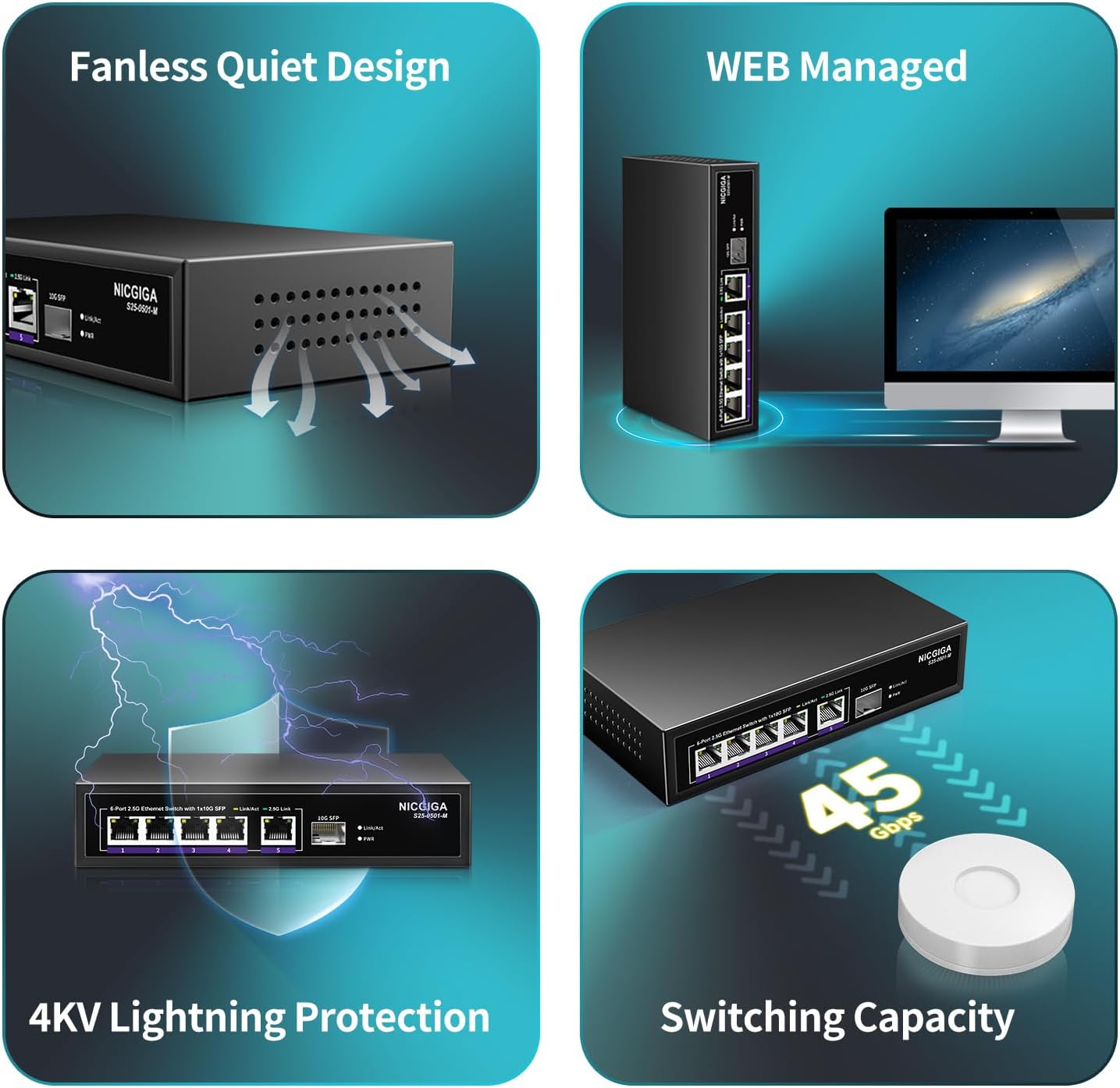
Image: The package contents, showing the S25-0501-M switch, power adapter, and quick start guide.
3. Продукт бүтүп калдыview
3.1 алдыңкы панели

Image: Front panel of the NICGIGA S25-0501-M switch.
The front panel features five 2.5 Gigabit Ethernet ports (RJ45) and one 10 Gigabit SFP+ port. Each RJ45 port includes Link/Act indicators:
- Сары LED: Indicates 10/100/1000Mbps link/activity.
- Жашыл LED: Indicates 2.5Gbps link/activity.
The SFP+ port also has a Link/Act indicator. A Power LED indicates the device's operational status.
3.2 Арткы панель

Image: Rear panel of the NICGIGA S25-0501-M switch.
The rear panel includes the DC power input (12V 1A) and a reset button. The reset button can be used to restore factory default settings.
3.3 Негизги өзгөчөлүктөрү
- Жогорку ылдамдыктагы туташуу: Five 2.5Gbps RJ45 ports and one 10Gbps SFP+ uplink port for high-bandwidth applications.
- Web Smart Management: Provides Layer 2 management features including VLAN, QoS, Multicast (IGMP), MAC address management, Static Aggregation (LAG), and port mirroring.
- Автоматтык сүйлөшүүлөр: Automatically detects and adjusts link speed (100Mb/1G/2.5G) for optimal performance and compatibility.
- желдеткичсиз дизайн: Ensures quiet operation, suitable for various environments.
- 4 кВ чагылгандан коргоо: Enhances device durability and reliability.

Image: Visual representation of the switch's fanless design, web management, lightning protection, and switching capacity.
4. Орнотуу жана орнотуу
4.1 Физикалык орнотуу
- Кубат туташуу: Connect the provided power adapter to the DC input port on the rear panel of the switch, then plug the adapter into a power outlet. The Power LED on the front panel will illuminate.
- Тармактык байланыштар: Connect your network devices (e.g., PCs, NAS, WiFi 6 routers, wireless APs) to the RJ45 ports (1-5) using Ethernet cables. For high-speed backbone connections, use the 10G SFP+ port with a compatible SFP+ module (not included).
- Дубалга орнотуу (кошумча): The switch features two wall-hanging holes on the bottom for flexible placement. Securely mount the switch using appropriate screws (not included) if desired.
Image: Wall mount design and dimensions of the switch.
4.2 Баштапкы Web Interface Access
кирүү үчүн web конфигурациялоо үчүн башкаруу интерфейси:
- Connect Directly: Connect a computer directly to one of the switch's RJ45 ports using an Ethernet cable.
- IP дарегин конфигурациялоо: Ensure your computer's IP address is on the same subnet as the switch's default IP address. The default IP address for the NICGIGA S25-0501-M switch is typically 192.168.1.199. You may need to manually set your computer's IP address (e.g., 192.168.1.100) and subnet mask (255.255.255.0).
- Мүмкүнчүлүк Web Браузер: ачуу а web browser and enter the switch's default IP address (
http://192.168.1.199/) дарек тилкесине. - Кирүү: Enter the default username and password (refer to the Quick Start Guide or product documentation for default credentials, often 'admin'/'admin' or similar).
Note: If you cannot access the web interface, ensure your computer's network settings are compatible with the switch's default IP range. If the IP address has been changed, you may need to perform a factory reset to revert to default settings.
5. Которгучту иштетүү
киргенден кийин web management interface, you can configure various network settings. The interface provides options for:
- VLAN (Virtual Local Area Network): Жакшыртылган коопсуздук жана майнаптуулук үчүн тармагыңызды сегменттерге бөлүңүз.
- QoS (Кызматтын сапаты): Маанилүү тиркемелер үчүн тармактык трафикке артыкчылык бериңиз.
- Мультикаст (IGMP аңдуу): Көп каналдуу трафикти жеткирүүнү оптималдаштыруу.
- Link Aggregation (LAG/Trunk): Өткөрүү жөндөмдүүлүгүн жана ашыкчаны көбөйтүү үчүн бир нече физикалык шилтемелерди бир логикалык шилтемеге бириктириңиз.
- Порт чагылдыруу: Бир порттон экинчи портко пакеттердин көчүрмөсүн жөнөтүү менен тармак трафигин көзөмөлдөңүз.
- MAC дарегин башкаруу: MAC даректерине негизделген кирүүнү башкаруу.

Сүрөт: бүттүview of supported web башкаруу функциялары.
Refer to the detailed online documentation or the full user manual (if available from NICGIGA's website) for specific configuration steps for each feature.
6. Техникалык тейлөө
6.1 Жалпы кам көрүү
- Коммутаторду салкын, кургак жерде, күн нуру түз тийген жерден жана жылуулук булактарынан алыс кармаңыз.
- Аппараттын айланасында туура желдетүүнү камсыз кылыңыз.
- Clean the exterior with a soft, dry cloth. Avoid using liquid cleaners.
6.2 Микропрограмма жаңыртуулары
Periodically check the NICGIGA official webсайт (www.nicgiga.com) for firmware updates. Firmware updates can provide new features, performance improvements, and security enhancements.
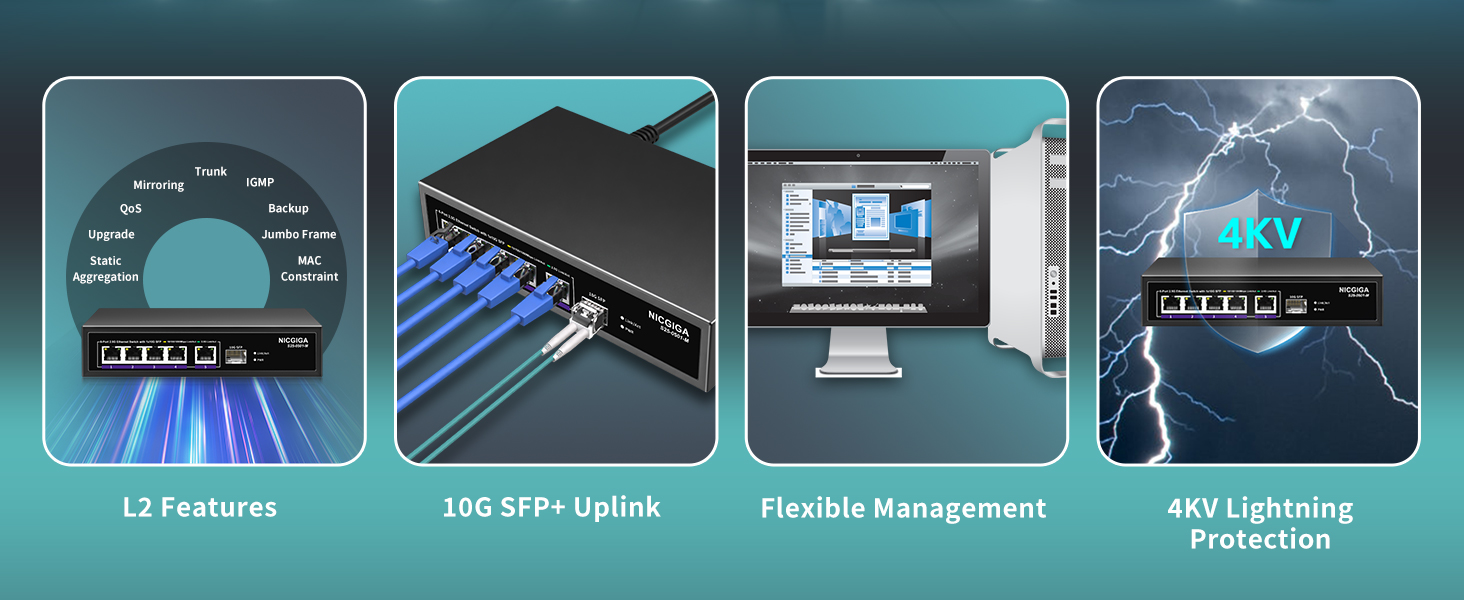
Image: Illustration of checking for firmware updates on the NICGIGA webсайт.
7. Кыйынчылыктарды
7.1 Кирүү мүмкүн эмес Web Интерфейс
- IP дарегин текшерүү: Ensure your computer's IP address is on the same subnet as the switch (default: 192.168.1.199).
- Физикалык байланышты текшерүү: Confirm that the Ethernet cable is securely connected between your computer and the switch.
- Power Cycle: Disconnect and reconnect the power to the switch.
- Заводдун баштапкы абалга келтирүү: If the IP address was changed and forgotten, perform a factory reset by pressing and holding the reset button on the rear panel for approximately 5-10 seconds while the device is powered on. This will revert all settings to their defaults, including the IP address.
- Browser Issues: Башкасын байкап көрүңүз web браузер же браузериңиздин кэшин тазалаңыз.
7.2 «Үзгүлтүксүз». Web Interface Responsiveness
Some users have reported that the web interface may become unresponsive after extended periods of operation, even if network traffic continues to pass through the switch. If this occurs:
- Reboot the Switch: Perform a power cycle (disconnect and reconnect power) to restore access to the web интерфейс.
7.3 Low Network Speed
- Кабель сапатын текшерүү: Ensure you are using Cat5e or Cat6 Ethernet cables for 2.5G connections, and Cat6a or higher for 10G SFP+ connections (with appropriate SFP+ modules).
- Түзмөктүн шайкештиги: Verify that connected devices (NICs, routers) support 2.5G or 10G speeds.
- Порт индикаторлору: Observe the Link/Act LEDs. A green LED indicates a 2.5Gbps connection on RJ45 ports.
8. Техникалык шарттар
| Өзгөчөлүк | Деталь |
|---|---|
| Модель номери | S25-0501-M |
| Interface Type | 5x 100/1000/2500Mbps RJ45, 1x 10Gbps SFP+ |
| Switching Capacity | 60Gbps |
| Маалыматтарды өткөрүү ылдамдыгы | 10 Gigabits Per Second (max) |
| Башкаруу | Web Smart Managed (L2 features: VLAN, QoS, IGMP, LAG, etc.) |
| Автоматтык сүйлөшүүлөр | Supported (100Mb/1G/2.5G) |
| Иштин материалы | Металл |
| Муздатуу | Күйөрмансыз |
| Lightning Protection | 4КВ |
| Продукциянын өлчөмдөрү | 9.84 x 7.87 x 3.15 дюйм |
| Элемент Салмагы | 1.21 фунт |
| Power Input | DC 12V 1A (Adapter Input: AC 110-240V) |
| Шайкеш түзмөктөр | Desktop, Laptop, Wireless Access Point, NAS |
9. Кепилдик жана колдоо
NICGIGA provides a one-year warranty for this product, covering manufacturing defects and malfunctions under normal use. Additionally, lifetime technical support is available to assist you with any questions or issues you may encounter.
For technical assistance, warranty claims, or further inquiries, please contact NICGIGA support through their official webсайтты же Ыкчам баштоо колдонмоңузда берилген байланыш маалыматын.


