Introduction
Thank you for choosing the MINIX Portable Monitor. This 16-inch Full HD 1200P IPS touch screen display is designed for enhanced productivity and entertainment on the go. Its ultra-slim design and versatile connectivity make it an ideal companion for laptops, PCs, gaming consoles, and mobile devices. This manual provides essential information for setting up, operating, maintaining, and troubleshooting your new portable monitor.
Коопсуздук маалыматы
- Do not expose the monitor to rain or moisture to prevent fire or electric shock hazards.
- Мониторду күн тийген жерге же жылуулук булактарынын жанына коюудан алыс болуңуз.
- Use only the power adapter and cables provided or recommended by MINIX.
- Мониторду өзүңүз чечүүгө же оңдоого аракет кылбаңыз. Бардык тейлөөлөрдү квалификациялуу кызматкерлерге тапшырыңыз.
- Мониторду күчтүү магнит талаасынан алыс кармаңыз.
- Clean the screen with a soft, lint-free cloth. Do not use liquid cleaners or aerosol sprays directly on the screen.
Кутуда эмне бар
Пакетиңизде бардык буюмдар бар экенин текшериңиз:
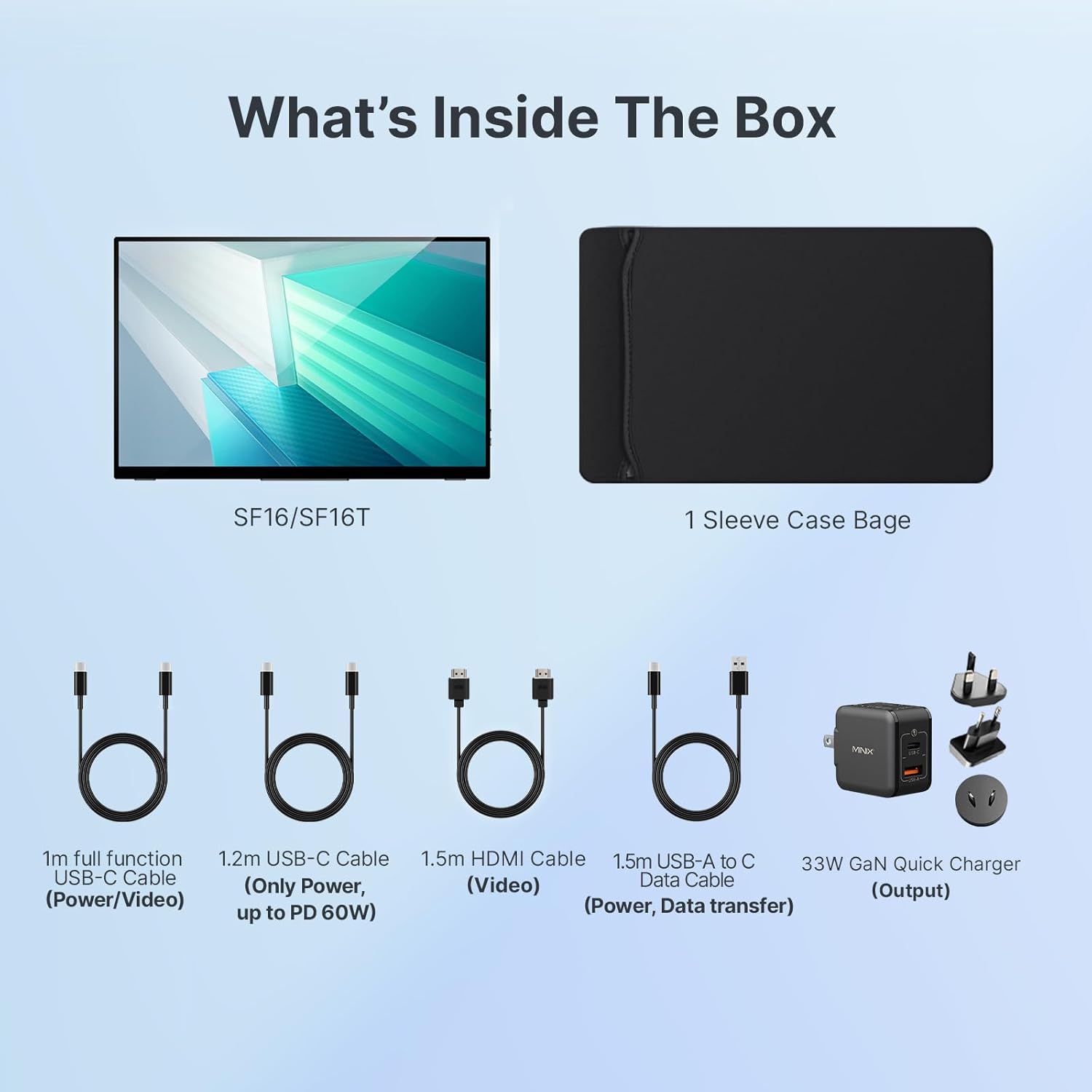
1-сүрөт: Пакеттин мазмуну
- MINIX Portable Monitor (SF16/SF16T)
- Жең баштык
- 1m Full Function USB-C to USB-C Cable (Power/Video)
- 1.2m USB-C to USB-C Cable (Power, up to PD 60W)
- 1.5m HDMI to HDMI Cable (Video)
- 1.5m USB-A to C Data Cable (Power, Support Touch for SF16T)
- 33W GaN Quick Charger (Output)
Продукт бүттүview
Familiarize yourself with the ports and controls on your MINIX Portable Monitor.

2-сүрөт: Монитордун порттору жана башкаруу элементтери
- USB 2.0 порт: Connects to a keyboard or mouse.
- Кубат баскычы: Мониторду күйгүзөт/өчүрөт.
- Brightness/Up Key: Adjusts screen brightness or navigates menu up.
- Volume/Down Key: Adjusts volume or navigates menu down.
- Standard HDMI Port: Connects to devices via HDMI for video input.
- 3.5 мм аудио уячасы: Наушниктерди же тышкы динамиктерди туташтыруу үчүн.
- Type-C (Full Function) Ports: Two full-featured USB-C ports for power, video, and touch data transfer.

Figure 3: Ultra-Slim Design
Жайгашуу
Баштапкы туташуу
The MINIX Portable Monitor offers flexible connectivity options. Ensure your device supports USB 3.1 Type C DP Alt-Mode for full functionality via a single USB-C cable.
- Электр камсыздоо: Connect the provided 33W GaN Quick Charger to one of the monitor's USB-C ports (or use a power bank with sufficient output).
- Video & Data Connection:
- USB-C (Single Cable Solution): If your laptop or device has a full-featured USB-C port (supporting DisplayPort Alternate Mode and Power Delivery), connect it to one of the monitor's full-function USB-C ports using the 1m full function USB-C cable. This single cable can provide power, video, and touch functionality.
- HDMI + USB-C (for Power/Touch): If your device only has an HDMI output, connect the monitor via the HDMI port using the 1.5m HDMI cable for video. Then, connect a USB-C port on the monitor to a USB-A or USB-C port on your device using the 1.5m USB-A to C data cable for power and touch functionality (if applicable).
- Күйгүзүү: Press the Power Button on the monitor to turn it on.

Figure 4: Connectivity Diagram
Using the Built-in Stand
The monitor features a built-in kickstand for easy adjustment of viewing angles. Simply extend the stand from the back of the monitor and adjust it to your desired angle between -10° and -35°.
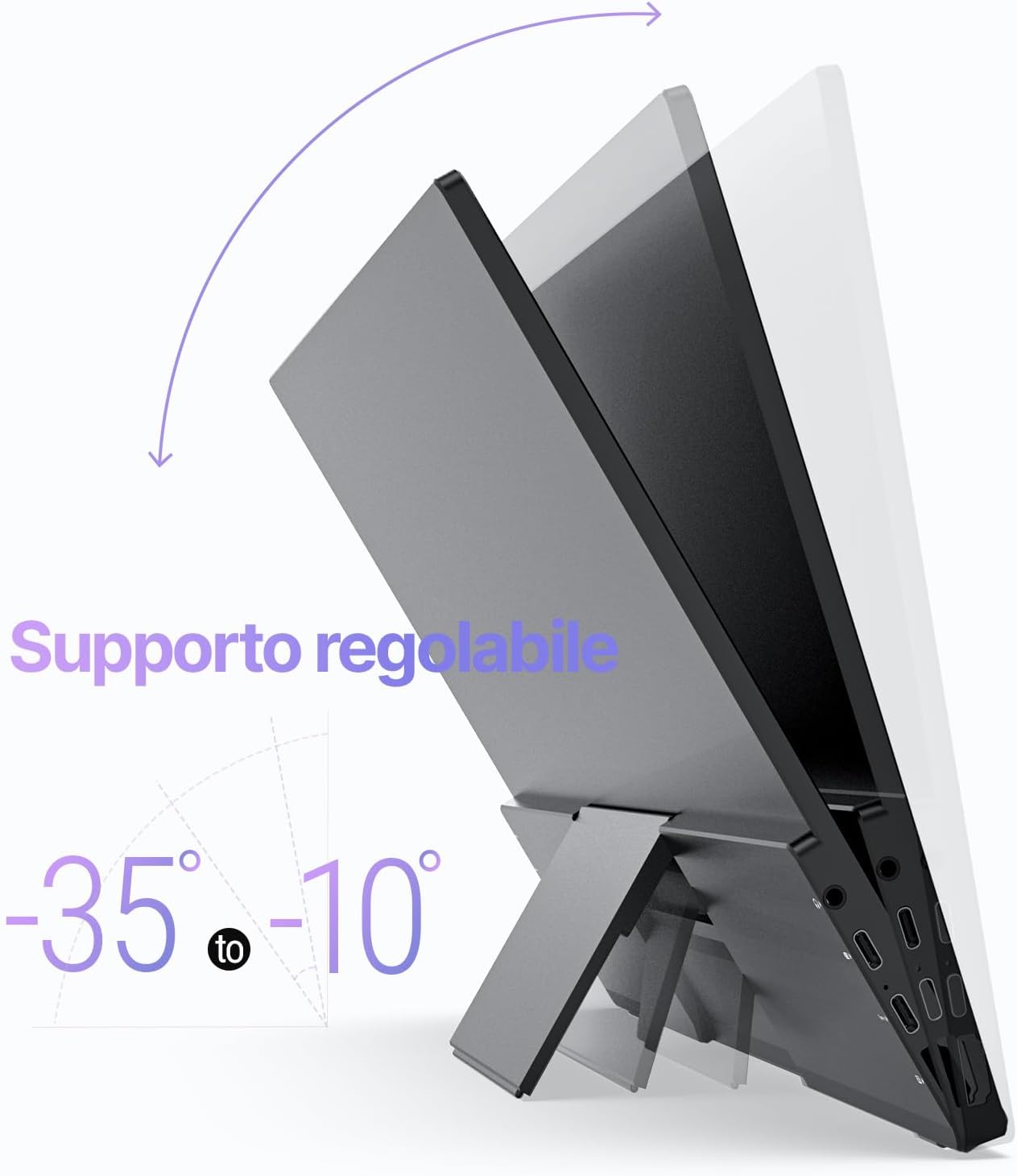
Figure 5: Adjustable Stand
Иштеп жатат
Дисплей орнотуулары
Use the Brightness/Up and Volume/Down keys on the side of the monitor to access and navigate the On-Screen Display (OSD) menu. Here you can adjust various settings such as brightness, contrast, color temperature, and input source.
Touch Screen Functionality (SF16T Model)
The SF16T model supports ten-point multi-touch and gesture controls across various operating systems including macOS, Windows 10/11, Android, and Linux. Ensure the USB-C connection is properly established for touch functionality.

Figure 6: Multi-Touch Support
Видео демонстрация
Watch this official video from MINIX Technology Limited for a visual guide on setting up and using your portable monitor, highlighting its key features like the built-in stand, multi-touch support, and USB-C connectivity.
Video 1: MINIX 16" Portable Touch Monitor Overview
Техникалык тейлөө
- Экранды тазалоо: Экранды жумшак, кургак, түксүз чүпүрөк менен акырын сүртүңүз. өжөр белгилери үчүн, бир аз гampen the cloth with water or a screen-specific cleaning solution (apply to cloth, not directly to screen).
- Тазалоо Casing: Сырткы бетин сүртүү үчүн жумшак, кургак чүпүрөктү колдонуңузasinг. Абразивдүү тазалагычтардан же эриткичтерден качыңыз.
- Сактагыч: When not in use, store the monitor in its provided sleeve case to protect it from dust and scratches. Keep it in a cool, dry place.
- Колдонуу: Мониторду ар дайым четинен кармаңыз. Экранга басым жасоодон алыс болуңуз.
Проблемаларды чечүү
| Көйгөй | Мүмкүн себеп | Чечим |
|---|---|---|
| Дисплей жок/"Сигнал жок" билдирүүсү | Incorrect input source selected; Loose cable connection; Insufficient power; Device not outputting signal. |
|
| Touch screen not responding (SF16T) | USB-C data cable not connected or not full-featured; Driver issue; OS incompatibility. |
|
| Жымыңдаган экран | Cable issue; Interference; Refresh rate mismatch. |
|
| Монитордун динамиктеринен аудио жок | Volume too low; Audio output not set to monitor; Cable issue. |
|
Техникалык шарттар
| Өзгөчөлүк | Деталь |
|---|---|
| Модель номери | SF16 |
| Screen Size | 16 дюйм |
| Резолюция | 1920 x 1200 Pixels (FHD 1200P) |
| Аспект катышы | 16:10 |
| Панел түрү | IPS |
| Жарыктык | 300 Candela (Nits) |
| Сенсордук экран | Yes (SF16T model, 10-point touch) |
| Байланыш | 2x Full-featured USB-C, 1x Standard HDMI, 1x USB 2.0, 1x 3.5mm Audio Jack |
| Өлчөмдөрү (L x W x Y) | 4.84 x 15.59 x 10.79 дюйм |
| Элемент Салмагы | 4.16 фунт |
| Screen Surface | Жылтырак |
| Көзгө кам көрүү өзгөчөлүктөрү | Flicker Free, Blue Light Filter |
Кепилдик жана колдоо
MINIX Technology Limited provides a limited warranty for this product. Please refer to the warranty card included in your package for specific terms and conditions. For technical support, troubleshooting assistance, or warranty claims, please contact MINIX customer service through their official webсайтка же продуктуну сатып алган сатуучуга.
You can visit the official MINIX Store on Amazon for more information and support: MINIX Store


