1. Продукт бүтүп калдыview
The CNBINGO Smart In-Wall Wi-Fi Digital Room Thermostat is designed to provide intelligent temperature control for your home. It is compatible with both water heating and electric floor heating systems. With Wi-Fi connectivity, you can manage your heating remotely via a smartphone application and integrate it with voice assistants like Alexa and Google Assistant for enhanced convenience. Please read this manual thoroughly before installation and operation to ensure safe and efficient use.

Image 1.1: The CNBINGO Smart Thermostat display alongside a smartphone demonstrating the remote control application.
2. Негизги өзгөчөлүктөрү
- Wi-Fi туташуусу: Easily control your thermostat from anywhere using the Smart Life app on your smartphone.
- Үн менен башкаруу: Compatible with Amazon Alexa and Google Assistant for hands-free temperature adjustments.
- Апталык программалоо: Customize heating schedules for 5/2 days, 6/1 days, or 7 days with up to 6 periods per day, optimizing energy consumption.
- Көп функциялуулугу: Features include temperature calibration, high/low temperature protection, child lock, frost protection, power-off data storage, and reset functions.
- Жалпы шайкештик: Supports water floor heating, electric floor heating, and boiler systems.

Image 2.1: The thermostat is compatible with three types of heating systems: water floor heating, electric floor heating, and boiler systems.
3. Орнотуу жана орнотуу
3.1 Коопсуздук чаралары
- Орнотууну баштоодон мурун, негизги автоматтык өчүргүчтүн кубаты өчүрүлгөнүн текшериңиз.
- Орнотуу квалификациялуу электрик тарабынан аткарылышы керек.
- Бардык жергиликтүү электр эрежелерин жана эрежелерин сактаңыз.
3.2 Продукциянын өлчөмдөрү жана орнотуусу
The thermostat is designed for in-wall mounting. Ensure your wall box meets the specified dimensions for proper installation.
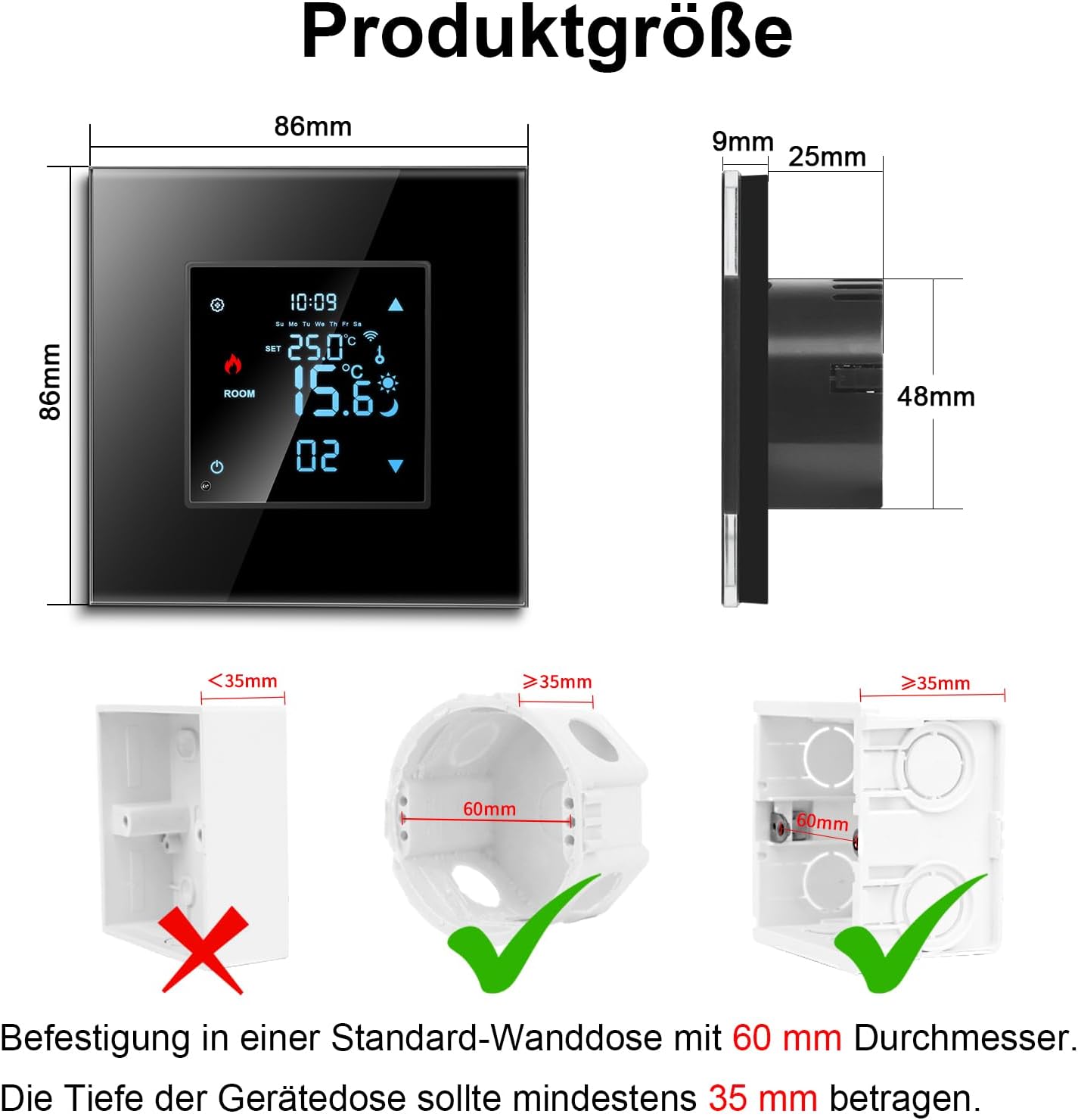
Image 3.1: Product dimensions are 86mm x 86mm. The thermostat requires a standard wall box with a 60mm diameter and a minimum depth of 35mm for secure mounting.
3.3 Электр байланыш схемалары
Connect the thermostat according to the appropriate wiring diagram for your heating system. The thermostat supports electric floor heating, water-gas heating, and water floor heating. An NTC floor sensor is included and should be used for accurate temperature readings, especially with floor heating systems.

Image 3.2: Detailed wiring diagrams for connecting the thermostat to electric floor heating, water-gas heating, and water floor heating systems. Ensure correct L (Live) and N (Neutral) connections, and proper sensor wiring.
3.4 Sensor Connection
For electric floor heating, the thermostat includes integrated sensors and supports an optional external floor sensor with a 3-meter cable length. This external sensor can be installed in the wall for precise floor temperature measurement.

Image 3.3: Illustration of the thermostat's integrated sensors and the connection point for an optional 3-meter external floor sensor, typically installed within the wall.
4. Иштөө нускамалары
4.1 Дисплейдин элементтери
The thermostat features a negative LCD screen with various indicators for easy monitoring and control.

Image 4.1: Labeled diagram of the thermostat's display, indicating Mode, Time, Up/Down buttons, Week, WiFi status, Lock, Floor Heating Mode, Sleeping Mode, Set Temperature, Heating On indicator, Room Temperature, and Power/Period controls.
4.2 Колдонмону башкаруу (Smart Life колдонмосу)
Connect your thermostat to the 2.4G Wi-Fi network to enable remote control via the Smart Life app. This allows you to turn devices on/off, create schedules, and share control with family members.
- Download the Smart Life app from your smartphone's app store.
- Каттоо же өз эсебиңизге кирүү.
- Follow the in-app instructions to add your thermostat to the network.
- Once connected, you can adjust settings, monitor temperature, and set schedules remotely.

Image 4.2: A user operating the thermostat remotely through the Smart Life application on their mobile phone, demonstrating convenience from any location.
4.3 Үн менен башкаруу
Integrate your thermostat with Amazon Alexa or Google Assistant for convenient voice commands.
- Ensure your thermostat is connected to the Smart Life app.
- Enable the Smart Life skill/action in your Alexa or Google Home app.
- Discover devices or link your Smart Life account.
- Use commands such as: "Alexa, set the room temperature to 22 degrees" or "Hey Google, what is the thermostat set to?"

Image 4.3: The thermostat supports voice control via Google Assistant and Amazon Alexa, allowing users to adjust settings with simple voice commands.
4.4 Апталык программалоо
Set up a personalized weekly heating schedule to maximize comfort and energy savings. The Smart Life app allows for 5/2 day, 6/1 day, or 7-day programming with up to 6 periods per day.

Image 4.4: The Smart Life app interface for setting up a 5+1+1 (5 weekdays + 1 Saturday + 1 Sunday) weekly program, allowing up to 6 distinct heating periods per day.
5. Техникалык тейлөө
- Тазалоо: Gently wipe the thermostat's glass panel with a soft, dry cloth. Avoid abrasive cleaners or solvents that could damage the surface.
- Үзгүлтүксүз текшерүүлөр: Periodically check the wiring connections to ensure they are secure. If you notice any loose connections or damage, consult a qualified electrician.
- Программалык камсыздоо жаңыртуулары: Keep the Smart Life app updated to the latest version to ensure optimal performance and access to new features.
6. Кыйынчылыктарды
- Термостат күйбөй жатат: Check the main circuit breaker and ensure all wiring connections are correct and secure.
- Wi-Fi байланышы жок: Ensure your Wi-Fi network is 2.4GHz. Restart your router and the thermostat. Verify your Wi-Fi password in the Smart Life app.
- Температуранын туура эмес көрсөткүчү: Check if the external floor sensor (if used) is properly connected and positioned. Perform temperature calibration if necessary (refer to app settings).
- Үн менен башкаруу иштебей жатат: Ensure the Smart Life skill/action is enabled in your Alexa/Google Home app and your accounts are linked. Check your internet connection.
- Heating not turning on/off: Verify your schedule settings in the app. Check the thermostat's mode (e.g., heating mode). Ensure the load capacity (16A) is not exceeded.
- Балдар кулпусу: If the screen is locked, refer to the app or on-device instructions to disable the child lock feature.
7. Продукттун спецификациялары
| Өзгөчөлүк | Спецификация |
|---|---|
| Өндүрүүчү | CNBINGO |
| Модель номери | 9eb92a34-7e38-434f-9bf4-e369f1f9ae80 |
| Өлчөмдөрү (L x W x Y) | 8.3 x 8.3 x 5.5 см |
| Салмагы | 200 грамм |
| Түс | Кара |
| Стиль | Заманбап |
| Форма | Узун |
| Power Source | AC |
| Тtage | 110-250В AC |
| Учурдагы жүк | Макс. 16A |
| Энергияны керектөө | <1 Вт |
| Тактык | ±0.5℃ |
| Дисплей түрү | Touch screen, Digital, Negative LCD |
| Монтаж түрү | Дубалга орнотуу |
| Колдонуу | Electric baseboard heating, Water heating |
| Байланыш технологиясы | Wi-Fi (2.4 ГГц) |
| Controller Type | App Control, Amazon Alexa, Google Assistant |
| Компоненттер камтылган | Монтаждоо жабдуулары |
8. Кепилдик жана колдоо
For warranty information, technical support, or any questions regarding your CNBINGO Smart Thermostat, please contact CNBINGO customer service. Refer to the product packaging or the official CNBINGO webбайланыш маалыматы үчүн сайт.
Онлайн ресурстар:
- зыярат кылыңыз CNBINGO Brand Store on Amazon кошумча продукт маалымат жана колдоо үчүн.


