Introduction
This manual provides essential information for the proper setup, operation, and maintenance of your Viper 7756V 2-Way LCD Replacement Remote Control. Please read these instructions carefully to ensure optimal performance and longevity of your device. This remote control is designed to replace an existing Viper 7756V remote and includes a soft silicone protective cover.
Пакеттин мазмуну
- Viper 7756V 2-Way LCD Replacement Remote Control
- Soft Silicone Protective Cover
Жайгашуу
1. Алыстан башкарууну жупташтыруу
The Viper 7756V remote control must be programmed to your vehicle's Viper security system. This process typically requires specific steps outlined in your vehicle's or Viper system's installation manual, or may require professional programming by an authorized dealer. Ensure your vehicle is in a safe, stationary location before attempting any programming procedures.
2. Installing the Protective Cover
To protect your remote control from wear and tear, install the provided soft silicone protective cover.
- Gently slide the remote control into the silicone cover, aligning the buttons and the LCD screen with the corresponding openings on the cover.
- Ensure the cover fits snugly around the remote control, providing full protection without obstructing any functions.
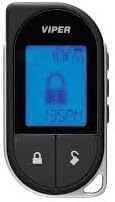
Image: Viper 7756V remote control with the black silicone protective cover installed.
Алыстан башкарууну иштетүү
The Viper 7756V features a 2-way communication system, providing visual and audible feedback on the remote's LCD screen regarding your vehicle's status.

Image: Viper 7756V 2-Way LCD Remote Control displaying the lock icon and current time.
Негизги функциялары:
- Кулпу баскычы: Press once to lock your vehicle's doors and arm the security system. The remote's LCD will display a lock icon and provide confirmation.
- Кулпуну ачуу баскычы: Press once to unlock your vehicle's doors and disarm the security system. The remote's LCD will display an unlock icon and provide confirmation.
- Remote Start Button (often a circular arrow icon): Press and hold for approximately 3 seconds to remotely start your vehicle. The remote's LCD will indicate 'REMOTE START' and confirm successful engine start.
- Trunk Release Button (often an open trunk icon): Press and hold for approximately 3 seconds to open your vehicle's trunk or hatch. The remote's LCD will indicate 'TRUNK OPEN' or similar.
- Auxiliary (AUX) Button: This button can be programmed for various additional functions depending on your Viper system's configuration (e.g., controlling power windows, sliding doors, or other accessories). Consult your system's manual for specific AUX button programming.
Алыстан башкарууну заряддоо
The Viper 7756V remote control features a rechargeable battery. When the battery level is low, the LCD screen will display a low battery indicator. To charge the remote:
- Locate the micro USB charging port on the side of the remote control.
- Connect a standard micro USB cable to the remote's charging port and the other end to a USB power source (e.g., car charger, computer USB port, or wall adapter).
- The remote's LCD will typically show a charging indicator. Charging time may vary.
- Once fully charged, the indicator will change, and you can disconnect the cable.
Техникалык тейлөө
- Тазалоо: Use a soft, dry cloth to clean the remote control and its LCD screen. Avoid using harsh chemicals or abrasive materials.
- Батареяга кам көрүү: To prolong battery life, avoid fully discharging the remote frequently. Recharge when the low battery indicator appears.
- Коргоочу капкак: Regularly check the silicone protective cover for any damage or wear. Replace if necessary to maintain protection.
- Сактагыч: Пультту күн нурунан жана экстремалдык температурадан алыс, салкын, кургак жерде сактаңыз.
Проблемаларды чечүү
- Алыстан жооп бербейт: Check the battery level and recharge if necessary. Ensure you are within range of your vehicle. If the issue persists, the remote may need to be re-paired with your system.
- Жупташтыруу маселелери: If the remote fails to pair, ensure you are following the correct programming procedure for your specific Viper system. Professional assistance may be required.
- LCD дисплей көйгөйлөрү: If the LCD is dim or unresponsive, try recharging the remote. If the problem continues, contact customer support.
- Кыскартылган диапазон: Ensure there are no obstructions between the remote and the vehicle. Low battery can also affect range.
Техникалык шарттар
- Модель номери: 7756V
- Байланыш технологиясы: Инфракызыл
- Колдоого алынган түзмөктөрдүн максималдуу саны: 1
- Шайкеш түзмөктөр: Viper [Brand] Device
- Элемент Салмагы: 2.64 унция
- Пакеттин өлчөмдөрү: 5.63 x 3.11 x 1.26 дюйм
- Өзгөчө өзгөчөлүгү: Эргономикалык дизайн
Кепилдик жана колдоо
For warranty information, technical support, or further assistance, please refer to the documentation provided with your original Viper security system or contact the manufacturer directly. Keep your purchase receipt for warranty claims.


