1. Киришүү
This manual provides detailed instructions for the installation, operation, and maintenance of your Jennov JS7015 5MP Dual-Band Wi-Fi Outdoor Security Camera. Please read this manual thoroughly before using the product to ensure correct usage and optimal performance.

Figure 1: Jennov JS7015 Outdoor Security Camera
The Jennov JS7015 is a 5-megapixel outdoor security camera featuring dual-band Wi-Fi connectivity (2.4GHz and 5GHz). It offers 360-degree viewing capabilities, PIR human detection, auto-tracking, 24/7 recording, and two-way audio for comprehensive outdoor surveillance.
2. Пакеттин мазмуну
Сураныч, алгандан кийин пакеттин мазмунун текшериңиз. Эгерде кандайдыр бир нерселер жок болсо же бузулса, кардарларды колдоо менен байланышыңыз.
- Jennov JS7015 5MP Dual-Band Wi-Fi Outdoor Security Camera
- Кубаттуу адаптер
- Монтаждоо бурамалар жана анкерлер
- Колдонуучунун Колдонмосу (бул документ)
3. Продукт бүтүп калдыview
Familiarize yourself with the camera's components.

Figure 2: Camera Pan and Tilt Mechanism
The camera features a motorized pan and tilt mechanism, allowing for a 355° horizontal rotation (pan) and a 60° vertical rotation (tilt). This enables comprehensive coverage of the surveillance area. The camera body houses the lens, infrared LEDs, white light LEDs, microphone, and speaker. Two external antennas provide enhanced Wi-Fi signal reception.
- Камера линзасы: Video foo тартатtage.
- Инфракызыл диоддор: Provide illumination for black and white night vision.
- Ак жарык диоддору: Provide illumination for color night vision and act as a spotlight.
- Микрофон: Эки тараптуу байланыш жана жаздыруу үчүн аудио жаздырат.
- Баяндамачы: Outputs audio for two-way communication and alarms.
- Антенналар: Wi-Fi туташуусу үчүн.
- Электр порту: Кубат адаптерине туташат.
- Калыбына келтирүү баскычы: Used to reset the camera to factory settings (usually located near the SD card slot or under a cover).
- SD карта уячасы: For local video storage (supports up to 128GB, not included).
4. Орнотуу колдонмосу
4.1 Физикалык орнотуу
The camera is designed for outdoor use and is IP66 waterproof. Choose a suitable location for mounting, ensuring a clear view of the area you wish to monitor and proximity to a power source.
- Бургулоочу позицияларды белгилөө: Use the mounting template (if provided) or the camera base to mark the screw holes on the wall.
- Бургулоо тешиктери: Drill holes at the marked positions. Insert wall anchors if mounting on masonry.
- Коопсуз камера: Attach the camera base to the wall using the provided screws.
- Бурчту тууралоо: Loosen the adjustment screws (if any) to position the camera for optimal coverage before tightening.

3-сүрөт: IP66 суу өткөрбөй турган дизайн
The camera is built with waterproof materials and has an IP66 rating, making it suitable for outdoor installation and resistant to dust and water jets.
4.2 Кубат туташтыруу
Берилген кубат адаптерин камеранын кубат портуна туташтырып, андан кийин аны розеткага сайыңыз. Камера күйүп, ишке киргизүү ыраатын баштайт.
4.3 Колдонмону жүктөп алуу жана каттоо эсебин каттоо
The Jennov JS7015 camera uses the EseeCloud application for remote access and control.
- Колдонмону жүктөп алуу: Издөө "EseeCloud" in your smartphone's app store (Google Play Store for Android or Apple App Store for iOS) and download the application.
- Каттоо эсеби: Open the EseeCloud app and follow the on-screen instructions to register a new account using your email address or phone number.
4.4 Камераны тиркемеге кошуу
Смартфонуңуз камераны туташтыра турган Wi-Fi тармагына (2.4 ГГц же 5 ГГц) туташып турганын текшериңиз.
- Колдонмону ачуу: Launch the EseeCloud app and log in.
- Түзмөк кошуу: Tap the "+" icon or "Add Device" option.
- Түзмөктүн түрүн тандоо: Choose "Wi-Fi Camera" or similar option.
- QR кодун сканерлөө: The app may prompt you to scan a QR code located on the camera or its packaging.
- Wi-Fi конфигурациясы: Follow the app's instructions to enter your Wi-Fi network name (SSID) and password. The camera supports both 2.4GHz and 5GHz Wi-Fi bands.
- Туташуу: The camera will attempt to connect to your Wi-Fi network. Once connected, it will appear in your device list within the app.
- Сырсөз коюу: Create a strong password for your camera for security purposes.
5. Иштөө нускамалары
5.1 Live View жана панорамалоо/кыйшайтуу башкаруусу
From the EseeCloud app, select your camera to access the live view.
- Тирүү жем: View real-time video from your camera.
- Панорама/Тилт: Use the directional controls within the app to remotely adjust the camera's horizontal (pan) and vertical (tilt) angles.
5.2 Auto Tracking
Камера өзүнүн тармагындагы кыймылдуу объекттерди автоматтык түрдө көзөмөлдөй алат view.

Figure 4: Auto Tracking in Action
Enable the auto-tracking feature in the app settings. The camera will then detect and follow moving targets until they leave the camera's view.
5.3 Motion Detection and Alarms
The camera features advanced PIR (Passive Infrared) human detection to minimize false alarms.

Figure 5: PIR Human Detection and Alarm Options
When a human thermal profile is detected, the camera can trigger various alarms.
- PIR аныктоо: Activates recording and sends notifications when a human is detected.
- Үн сигнализациясы: Configure the camera to emit a siren sound upon detection.
- Spotlight Alarm: The integrated spotlight can be activated to deter intruders.
- Эскертмелер: Receive instant alerts on your smartphone via the EseeCloud app.
5.4 Эки тараптуу аудио
Communicate directly with individuals near the camera using the built-in microphone and speaker.

6-сүрөт: Эки тараптуу аудио байланыш
Tap the microphone icon in the app to speak, and listen through the camera's speaker. This feature is useful for interacting with visitors or deterring unwanted guests.
5.5 Жазуу жана сактоо
The camera supports continuous 24/7 recording and offers flexible storage options.
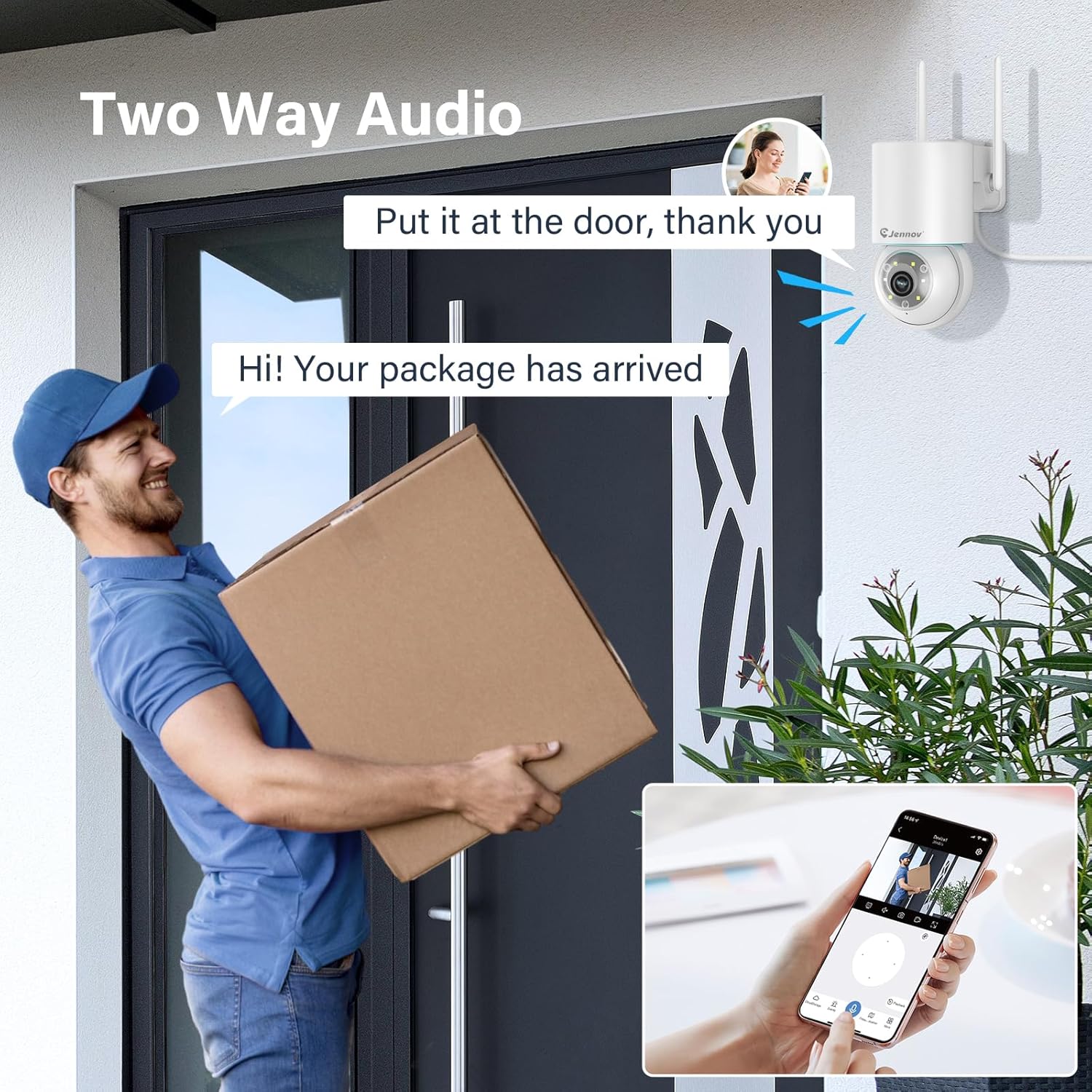
Figure 7: 24/7 Recording and Storage Options
Жазылган footage via the app's playback function.
- 24/7 жаздыруу: The camera can continuously record footage, ensuring no vital moments are missed.
- Жергиликтүү сактагыч: Insert a microSD card (up to 128GB, not included) into the camera's SD card slot for local storage.
- Булуттагы сактагыч: Optional cloud storage service is available, often with a free trial period (e.g., 7 days). This provides off-site backup of your recordings.
5.6 Түнкү көрүү режимдери
The camera offers three night vision modes for clear visibility in low-light conditions.

Figure 8: 5MP Color Night Vision
The camera provides clear night vision up to 65 feet (20 meters) with 5MP resolution.
- Толук түс режими: Utilizes white LEDs to provide full-color video at night.
- Кара жана ак режим: Uses infrared LEDs for traditional black and white night vision.
- Smart Mode: Automatically switches between black and white and full color based on detected motion or light conditions.
You can switch between these modes within the EseeCloud mobile application.
5.7 Customized Detection Area
Камеранын ичинде белгилүү бир аймактарды аныктаңыз view кыймылды аныктоо активдүү болушу керек болгон жерде.

Figure 9: Customized Detection Area Settings
This feature helps reduce unwanted alerts by focusing detection on critical zones. The app typically offers "Area mode" and "Cordon mode" for defining these zones.
6. Техникалык тейлөө
- Тазалоо: Сүрөттүн сапатын так сактоо үчүн камеранын линзасын жумшак, кургак чүпүрөк менен үзгүлтүксүз тазалап туруңуз. Күчтүү химиялык заттарды колдонбоңуз.
- Программалык камсыздоонун жаңыртуулары: Check the EseeCloud app periodically for available firmware updates. Keeping your camera's firmware updated ensures optimal performance and security.
- SD Card башкаруу: If using local storage, periodically check the SD card's status in the app. Format the card as needed to maintain recording efficiency.
- Электр камсыздоо: Ensure the power adapter and cable are free from damage and properly connected.
7. Кыйынчылыктарды
- Камера оффлайн:
- Wi-Fi сигналынын күчүн текшериңиз.
- Камера күйгүзүлгөнүн текшериңиз.
- Камераны жана Wi-Fi роутериңизди өчүрүп-күйгүзүңүз.
- If using 5GHz Wi-Fi, ensure your router supports it and the camera is connected to the correct band.
- Try re-adding the camera to the EseeCloud app.
- Сүрөттүн сапаты начар:
- Камера линзасын тазалаңыз.
- Ensure sufficient lighting, especially at night.
- Интернетке туташуу ылдамдыгын текшериңиз.
- Кыймылды аныктоо иштебей жатат:
- Verify motion detection settings in the app are enabled.
- аныктоо сезгичтигин тууралоо.
- Ensure no obstructions are blocking the camera's view.
- Check if detection areas are correctly configured.
- Эки тараптуу аудио көйгөйлөр:
- Ensure microphone and speaker permissions are granted to the EseeCloud app on your smartphone.
- Check volume settings on both the app and your phone.
- Ensure there are no physical obstructions blocking the camera's microphone or speaker.
- Cannot Access SD Card Recordings:
- SD карта туура салынганын текшериңиз.
- Check if the SD card is formatted correctly (usually FAT32).
- Verify that continuous recording or event recording to SD card is enabled in the app.
- The SD card might be full; consider formatting it or replacing it.
8. Техникалык шарттар
| Өзгөчөлүк | Спецификация |
|---|---|
| Модель номери | JS7015 |
| Бренд | Дженнов |
| Резолюция | 5 Megapixel (1920p video recording) |
| Пан / жантайтуу бурчу | Пан 355°, Тилт 60° |
| Түнкү көрүнүш | Color Night Vision, Black & White Night Vision, Smart Mode (up to 65ft/20m) |
| Wi-Fi туташуусу | Кош диапазондуу (2.4 ГГц / 5 ГГц) |
| Аудио | Эки тараптуу аудио (орнотулган микрофон жана динамик) |
| Motion Detection | PIR Human Detection, Auto Tracking |
| Сактагыч параметрлери | MicroSD картасы (128 ГБ чейин), Cloud Storage |
| Суу өткөрбөйт рейтинги | IP66 |
| Power Input | 5 вольт |
| Энергияны керектөө | 24 Ватт |
| Өлчөмдөрү (L x W x Y) | 12 x 8 x 16 см |
| Материал | Пластик |
| Монтаж түрү | Дубалга орнотуу |
| Шайкеш түзмөктөр | Смартфон, Планшет, Компьютер |
| Control App | EseeCloud |
9. Кепилдик жана колдоо
For warranty information and technical support, please refer to the warranty card included with your product or visit the official Jennov webсайт.
- Кардарларды тейлөө: Contact Jennov customer support for assistance with product issues, technical questions, or warranty claims.
- Онлайн ресурстар: Check the Jennov webКөп берилүүчү суроолор, жаңыртылган окуу куралдары жана программалык камсыздоону жүктөө үчүн сайт.


