Introduction
This user manual provides comprehensive instructions for the operation, maintenance, and troubleshooting of your Mycket Portable DAB/DAB+/FM Radio with Bluetooth. Please read this manual thoroughly before using the device to ensure proper functionality and to maximize your listening experience.

Figure 1: Mycket Portable DAB Radio. This image shows the radio's front panel, including the speaker grille on the left, the 2.4-inch color display on the right showing "BBC AsianNetwork" and DAB+ logo, and control buttons below the screen. An extendable antenna is visible at the top right.
Кутуда эмне бар
Upon unboxing your Mycket Portable DAB Radio, please ensure all the following items are present:
- 1 x Mycket Portable DAB Radio
- 1 x Micro USB заряддоо кабели
- 1 x Колдонуучунун колдонмосу (бул документ)
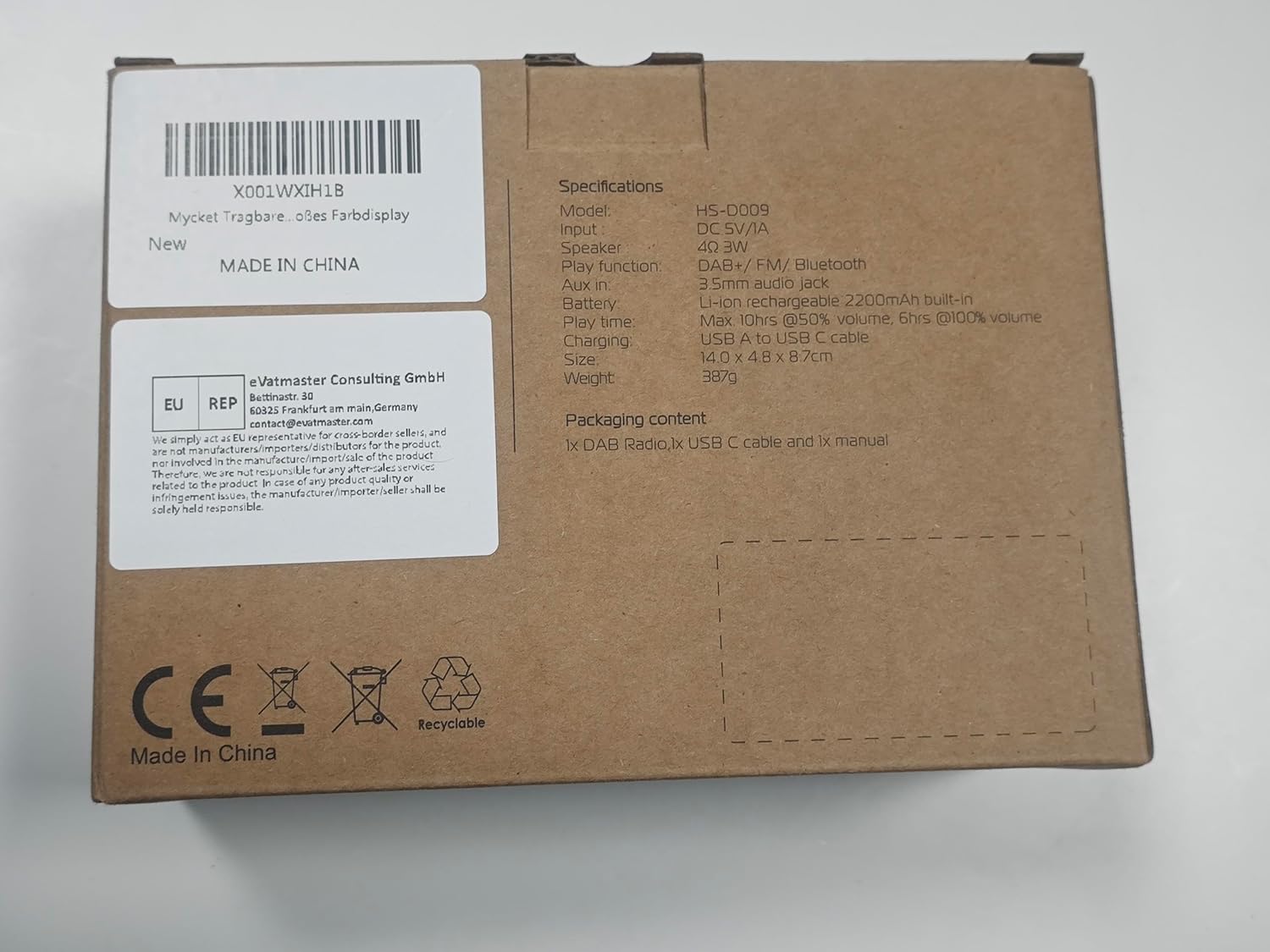
Figure 2: Packaging box for the Mycket Portable DAB Radio. The box lists specifications including model HS-D009, DC 5V/1A input, 3W speaker, DAB+/FM/Bluetooth functions, 3.5mm audio jack, 2200mAh lithium battery, 10+ hours play time at 50% volume, 6+ hours at 100% volume, USB-C charging, and dimensions of 14.0 x 4.0 x 8.7 cm. It also states "MADE IN CHINA" and includes CE and Recyclable symbols.
Продукт бүттүview
The Mycket Portable DAB Radio is a versatile audio device offering multiple listening options. It features DAB/DAB+ and FM radio reception, Bluetooth 5.0 connectivity, and a built-in rechargeable battery for portability. The device includes a 2.4-inch color display for easy navigation and information display.
Негизги өзгөчөлүктөрү:
- DAB/DAB+ and FM Radio with RDS
- Зымсыз аудио агым үчүн Bluetooth 5.0
- 2.4-inch Large Colour Display
- Built-in 2200mAh Rechargeable Lithium Battery (up to 12 hours playback)
- 40 Preset Stations (20 DAB, 20 FM)
- Dual Alarms and Sleep Timer Function
- 3.5 мм гарнитура уясы
- USB-C кубаттоо

Figure 3: Mycket Portable DAB Radio with its dimensions. The radio measures approximately 5.5 inches (13.9 cm) in length, 1.6 inches (4 cm) in width, and 3.1 inches (8 cm) in height. This compact size highlights its portability.
Жайгашуу
1. Баштапкы төлөм
Before first use, fully charge the radio. Connect the supplied Micro USB charging cable to the DC 5V port on the side of the radio and the other end to a USB power adapter (not included) or a computer USB port. The charging indicator on the display will show charging status. A full charge takes approximately 2.5 hours.
2. Күйгүзүү/өчүрүү
басып, кармап туруңуз Кубат/Режим радиону күйгүзүү же өчүрүү үчүн баскыч.
3. Антеннаны тууралоо
For optimal reception, fully extend and adjust the telescopic antenna. Position the antenna vertically for best results.
Иштөө нускамалары
Режим тандоо
басыңыз Mode button to switch between DAB, FM, and Bluetooth modes.
DAB/DAB+ радио операциясы
- Switch to DAB mode using the Mode баскычы.
- The radio will automatically perform a full scan for available DAB/DAB+ stations upon first use or if no stations are found.
- To manually initiate a full scan, press and hold the OK button, then navigate to "Full Scan" and confirm.
- колдонуу Сол оң arrow buttons to browse through the list of available stations.
- Басыңыз OK бекет тандоо.
- Станцияны алдын ала коюлган катары сактоо үчүн, баскычын басып, кармап туруңуз FAV button, then select a preset number (1-20) using the arrow buttons and press OK ырастоо үчүн.
- To recall a preset, briefly press the FAV баскычын басыңыз, андан кийин керектүү алдын ала коюлган номерди тандап, басыңыз OK. Alternatively, use the numbered preset buttons (1-4) for quick access.

Figure 4: The radio's screen showing "AUTO SCAN & 40 PRESET". This feature allows the radio to automatically find and save up to 40 stations (20 DAB and 20 FM) for easy access via the FAV button.
FM радиосунун иштеши
- колдонуп FM режимине которулуңуз Mode баскычы.
- FM станцияларын автоматтык түрдө издөө үчүн, баскычын басып кармап туруңуз OK баскычын басыңыз. Радио жеткиликтүү станцияларды сканерлеп, сактайт.
- Кол менен күүлдөө үчүн, баскычын кыска басыңыз Сол оң arrow buttons for fine-tuning, or press and hold for automatic scanning to the next strong station.
- To save an FM station as a preset, press and hold the FAV button, then select a preset number (1-20) and press OK ырастоо үчүн.
- To recall a preset, briefly press the FAV баскычын басыңыз, андан кийин керектүү алдын ала коюлган номерди тандап, басыңыз OK.
Bluetooth операциясы
- колдонуп, Bluetooth режимине которулуңуз Mode button. The display will show "Bluetooth Pairing" or similar.
- Мобилдик түзмөгүңүздө (смартфон, планшет ж.б.) Bluetooth иштетип, жеткиликтүү түзмөктөрдү издеңиз.
- Select "Mycket D009" from the list of devices.
- Once paired, the radio will confirm the connection, and you can now stream audio from your device to the radio.

Figure 5: The radio's screen displaying "BLUETOOTH 5.0" and an iPhone screen showing "Mycket D009" as a connected Bluetooth device. This illustrates the process of connecting a mobile device to the radio for audio streaming.
Үндү көзөмөлдөө
Rotate the large knob on the top of the radio clockwise to increase volume and counter-clockwise to decrease volume.
Наушник колдонуу
Connect standard 3.5mm headphones to the headphone jack on the side of the radio for private listening. The radio's speaker will automatically mute when headphones are connected.

Figure 6: A close-up of the Mycket Portable DAB Radio's side, highlighting the 3.5mm headphone jack. This port allows for personal listening without disturbing others.
Ойготкуч саат функциясы
The radio supports dual alarms. To set an alarm:
- басып, кармап туруңуз OK менюга кирүү үчүн баскычты басыңыз.
- Navigate to "System Settings" then "Alarm".
- Ойготкуч 1 же Ойготкуч 2 тандаңыз.
- Configure the alarm time, source (Buzzer, DAB, or FM), frequency (Once, Daily, Weekdays, Weekends), and volume.
- Басыңыз OK орнотууларды сактоо үчүн.

Figure 7: The radio's display showing the "Alarm" menu, with options for Alarm 1 and Alarm 2. This feature allows users to set two independent alarms for waking up or reminders.
Уйку таймери функциясы
Уйку таймери радиону белгиленген убакыттан кийин автоматтык түрдө өчүрүүгө мүмкүндүк берет.
- басып, кармап туруңуз OK менюга кирүү үчүн баскычты басыңыз.
- Navigate to "System Settings" then "Sleep".
- Select the desired sleep duration (e.g., 15, 30, 45, 60 minutes, or 1 hour 15 minutes).
- Басыңыз OK to activate the sleep timer.

Figure 8: The radio's display showing the "Sleep" menu with various time options (OFF, 15 minutes, 30 minutes, etc.). This function allows the radio to automatically power off after a specified duration, useful for falling asleep to music or radio.
Эквалайзер орнотуулары
The radio offers 8 basic equalizer settings to customize the audio output.
- басып, кармап туруңуз OK менюга кирүү үчүн баскычты басыңыз.
- Navigate to "System Settings" then "EQ".
- Select from options such as Classical, Jazz, Pop, etc.
- Басыңыз OK орнотууну колдонуу үчүн.

Figure 9: A diagram illustrating the internal structure of the Mycket Portable DAB Radio's Hi-Fi speaker. This visual emphasizes the speaker's design for providing deeper, richer, and clearer audio quality.
Техникалык тейлөө
Тазалоо
Wipe the radio with a soft, dry cloth. Do not use abrasive cleaners, waxes, or solvents as they may damage the surface. Avoid spraying liquids directly onto the radio.
Батареяга кам көрүү
The radio contains a built-in rechargeable lithium battery. To prolong battery life:
- Батареяны бат-баттан толук кубаттап калуудан алыс болуңуз.
- Charge the radio regularly, even if not in use, to maintain battery health.
- Радиону узак убакыт бою колдонбогон учурда салкын, кургак жерде сактаңыз.

Figure 10: The radio's screen displaying a full battery indicator and text indicating "PLAY MORE THAN 12 HOURS". This highlights the radio's long battery life of up to 12 hours on a single charge, powered by its 2200mAh rechargeable battery.
Проблемаларды чечүү
| Көйгөй | Мүмкүн себеп | Чечим |
|---|---|---|
| Кубат жок/Радио күйбөйт. | Батарея түгөнүп калды. | Connect the radio to a power source using the USB cable and allow it to charge for at least 30 minutes before attempting to power on. |
| DAB/FM кабыл алуусу начар. | Antenna not fully extended or positioned incorrectly. Weak signal in the area. | Fully extend the telescopic antenna and adjust its position. Try moving the radio to a different location, preferably near a window. Perform a full scan for stations. |
| Bluetooth жупташуу көйгөйлөрү. | Radio not in Bluetooth mode. Device too far from radio. Bluetooth not enabled on source device. | Ensure the radio is in Bluetooth mode. Keep the source device within 10 meters (33 feet) of the radio. Ensure Bluetooth is enabled on your source device and "Mycket D009" is selected. |
| Динамиктен үн жок. | Volume too low. Headphones connected. | Increase the volume using the top knob. Disconnect headphones if not intended for private listening. |
| Дисплей бош же тоңуп калган. | Системалык ката. | Locate the small "Reset" pinhole on the side of the radio (near the USB port). Use a thin object (like a paperclip) to gently press the reset button. This will restart the device without losing presets. |
Техникалык шарттар
| Модель номери | Portable DAB Radio (HS-D009) |
| Өлчөмдөрү (L x W x Y) | 13.9 x 4 x 8 см (5.5 x 1.6 x 3.1 дюйм) |
| Салмагы | 380 г |
| Power Source | Built-in 2200mAh Lithium Battery / DC 5V/1A via Micro USB |
| Батареянын иштөө мөөнөтү | 12 саатка чейин (50% көлөмдө) |
| Заряддоо убактысы | Болжол менен 2.5 саат |
| Дисплей | 2.4-inch TFT Colour Display |
| Tuner Technology | DAB/DAB+, FM |
| DAB/DAB+ жыштыгы | 174.928-239.20 MHz (Band III) |
| FM жыштыгы | 87.5-108 МГц (RDS менен) |
| Bluetooth версиясы | 5.0 |
| Аудио чыгаруу | Built-in Speaker, 3.5mm Headphone Jack |
| Алдын ала орнотуулар | 40 (20 DAB, 20 FM) |
Кепилдик жана колдоо
Mycket provides a 12-month warranty for this product from the date of purchase. This warranty covers manufacturing defects and material faults under normal use. It does not cover damage caused by misuse, accidents, unauthorized modifications, or normal wear and tear.
For technical support, warranty claims, or any inquiries, please contact Mycket customer service. Contact information can typically be found on the product packaging or the official Mycket website. Mycket aims to provide 24/7 customer service.

Figure 11: Mycket's commitment to customer satisfaction, highlighting a 12-month warranty and 24-hour customer support.


