Auckly 15W MagSafe Wireless Car Charger & Holder User Manual
Model: A28-YS | Brand: Auckly
Introduction
Thank you for choosing the Auckly 15W MagSafe Wireless Car Charger & Holder. This device is designed to provide convenient and fast wireless charging for your compatible smartphone while driving. Featuring strong magnetic attachment and versatile mounting options, it ensures your device stays secure and charged. Please read this manual carefully before use to ensure proper installation and operation.
Пакеттин мазмуну
- Auckly 15W MagSafe Wireless Car Charger
- Air Vent Clip Attachment
- Dashboard Mount with 3M Adhesive
- USB-C заряддоо кабели
- User Manual

Орнотуу жана орнотуу
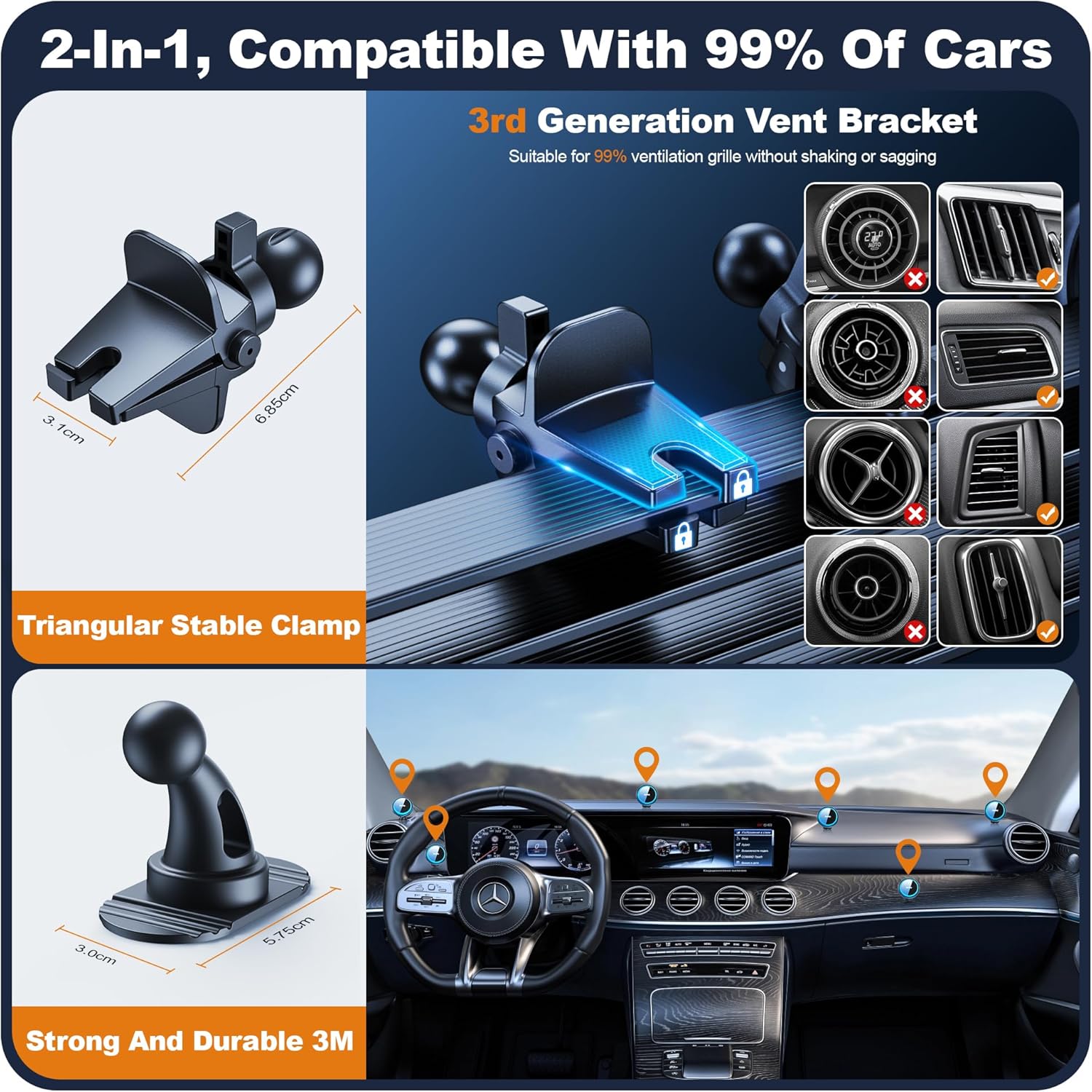
1. Air Vent Installation
- Attach the air vent clip to the back of the wireless charger by aligning the ball joint and tightening the screw collar.
- Locate a suitable air vent in your vehicle. Ensure the vent blades are horizontal and sturdy enough to support the charger and your phone.
- Firmly push the air vent clip onto the vent blade until it is securely hooked. The olecranon structure of the clip is designed to prevent loosening.
- Adjust the angle of the charger for optimal viewing.
2. Башкаруу тактасын орнотуу
- Attach the dashboard mount to the back of the wireless charger by aligning the ball joint and tightening the screw collar.
- Clean the desired dashboard surface thoroughly to ensure proper adhesion.
- Peel off the protective film from the 3M adhesive on the dashboard mount.
- Press the mount firmly onto the dashboard for at least 30 seconds. Allow the adhesive to cure for 24 hours before attaching your phone.
Иштөө нускамалары
1. Power Connection
Connect the provided USB-C charging cable to the charger and plug the other end into a compatible car charger adapter (not included). For optimal 15W fast charging, a QC or PD fast charging adapter with at least 18W output is required.
2. Телефонуңузду туташтыруу
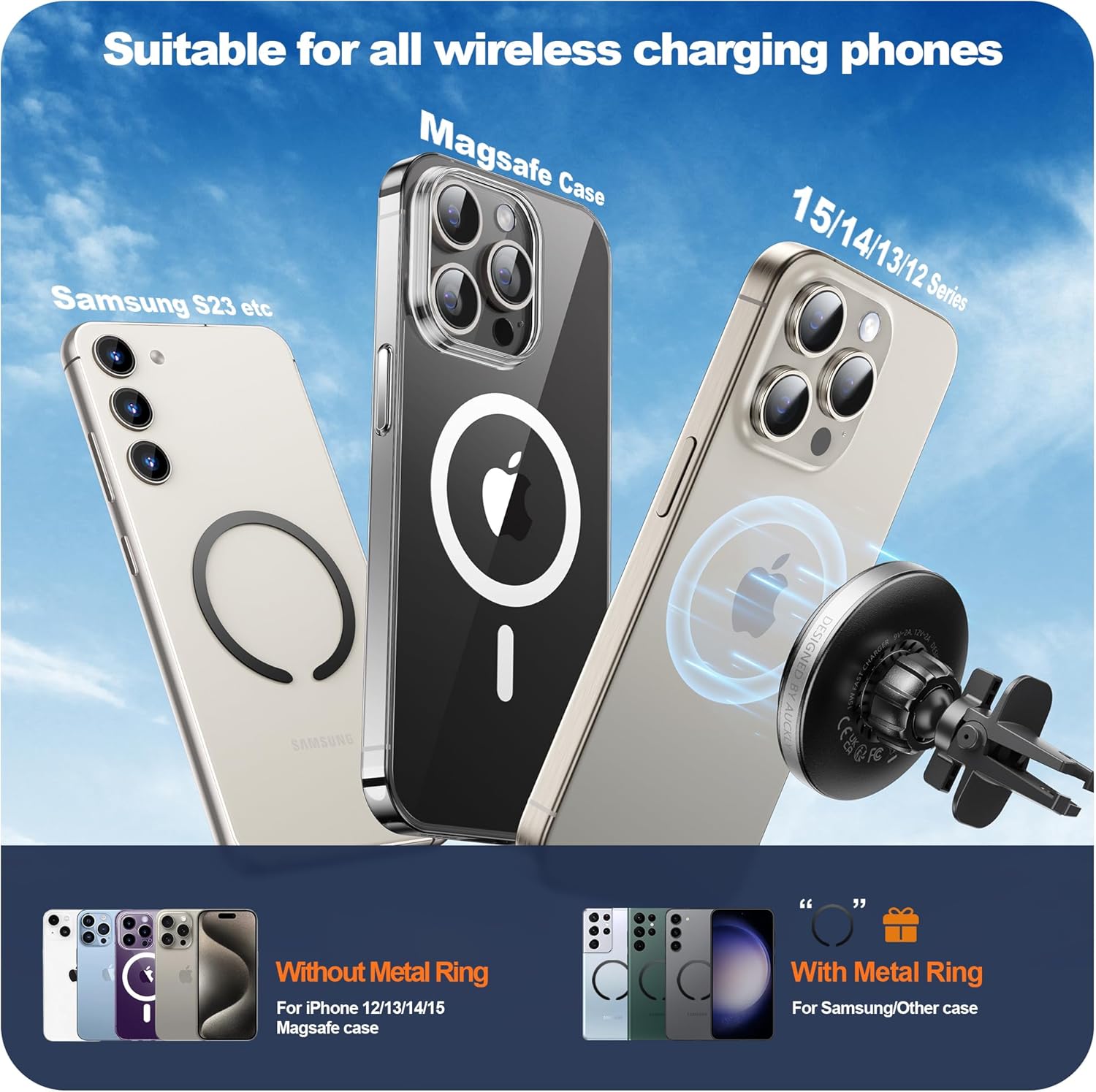
Once the charger is powered on, simply bring your MagSafe-compatible iPhone (iPhone 12 series and newer) close to the charging surface. The strong N52 magnets will automatically align and securely attach your phone. For other wireless charging phones, ensure they are placed centrally on the charging pad for proper alignment.

3. Аппаратыңызды заряддоо
Once your phone is correctly placed on the charger, wireless charging will begin automatically. The charger features an ambient light ring that illuminates to indicate charging status. The advanced internal components, including a Taiwan Sungyang GPM8FD3331B chip and upgraded PCB, ensure safe and efficient charging with reduced heat generation.

Шайкештик
This charger is designed for optimal performance with MagSafe-compatible iPhones and other wireless charging enabled smartphones. It supports:
- iPhone моделдери: iPhone 15/15 Pro/15 Pro Max/15 Plus, iPhone 14/14 Pro/14 Pro Max/14 Plus, iPhone 13/13 Pro/13 mini/13 Pro Max, iPhone 12/12 Pro/12 mini/12 Pro Max.
- Other Wireless Charging Phones: Compatible with Samsung Galaxy S23, S22, and other Qi-enabled smartphones.
- Телефон каптары: Works with bare metal phones or magnetic phone cases (thickness less than 7mm).
Коопсуздук маалыматы
Маанилүү эскертүүлөр:
- This charger supports an input of 9V=2A and a maximum output of 15W.
- Use only the cable included with this charger. Cables from Apple or other third-party cables may interfere with charging.
- This charger requires a compatible QC or PD fast charging adapter with at least 18W output.
- The charger must be plugged into a power source to charge devices.
Коопсуздук эскертүүлөрү:
- Do not expose this device to temperatures below 0°C (32°F) or above 60°C (140°F).
- Do not attempt to disassemble the device, expose it to fire, or submerge it in water to prevent damage.
- Always check if the device, cables, or other accessories are damaged before use. If damaged, do not use it.
- Do not attempt to disassemble or modify this device in any way, as this could cause serious damage and void the warranty.
- Do not expose this device to extremely hot, humid, or corrosive environments to prevent damage.
The charger incorporates 4 safety protection modes:
- Ашыкча температурадан коргоо
- Чет объектилерди аныктоо (FOD)
- Көлөмүtagд коргоо
- Күч коргоо
Техникалык шарттар
| Өзгөчөлүк | Деталь |
|---|---|
| Продукциянын өлчөмдөрү | 2.83 x 2.83 x 1.77 дюйм |
| Элемент Салмагы | 2.91 унция (82.6 грамм) |
| Модель номери | A28-YS |
| Бренд | Окли |
| Түс | 07 Silver |
| Материал | Aluminum, Plastic, Silicone, Tempered Glass, Stainless Steel |
| Power Source | Battery operated (requires external power via USB-C) |
| Магниттик күч | Max 17.3kg (using 17 N52 magnets, 4200GS±100GS) |
| Заряддоо чыгышы | 15 Вт (макс.) |
Проблемаларды чечүү
If you encounter any issues with your Auckly wireless car charger, please refer to the following common solutions:
- No Charging / Slow Charging:
- Ensure your phone is compatible with wireless charging.
- Check that there are no credit cards, metal plates, or other metallic accessories between your phone and the charger, as these can interfere with wireless charging.
- Verify that you are using the included USB-C cable and a compatible QC or PD fast charging adapter with at least 18W output.
- Unplug the charging cable from the power source and plug it back in to reset the connection.
- Ensure your phone is properly aligned on the charging pad.
- Phone Not Sticking Securely:
- For iPhones, ensure you are using a MagSafe-compatible phone or a magnetic phone case.
- Check that the phone case thickness is less than 7mm.
- Ensure the charger surface and your phone/case are clean and free of debris.
- Charger Loosening from Vent:
- Ensure the air vent clip is firmly pushed onto the vent blade and the screw collar is tightened.
- Verify that your car's air vent blades are suitable for the clip (refer to image 6 in the product listing for compatible vent types).
Техникалык тейлөө
To ensure the longevity and optimal performance of your Auckly wireless car charger, follow these maintenance guidelines:
- Тазалоо: Use a soft, dry cloth to wipe the surface of the charger. Do not use harsh chemicals, abrasive cleaners, or submerge the device in water.
- Сактагыч: Узак мөөнөткө колдонулбаганда, заряддагычты түз күндүн нурунан жана өтө температурадан алыс салкын, кургак жерде сактаңыз.
- Колдонуу: Кубаттоочу түзүлүштү түшүрүп албоо же катуу соккуга кабылбоо керек, анткени бул ички компоненттерге зыян келтириши мүмкүн.
Кепилдик жана колдоо
Auckly stands by the quality of its products. We offer a comprehensive warranty and dedicated customer support:
- 5-Year Experience: Auckly is a leading wireless charging brand with 5 years of experience.
- 5-Year Refund or Replacement: If you encounter any problems within 5 years of purchase, we will provide a refund or a high-quality service for replacing new products.
- Best Service: Our 32-person customer service team is available to solve after-sales problems quickly and efficiently.
For further assistance or to register your product, please visit our support page or scan the QR code below:


