Introduction
Thank you for choosing the Dolphin KaraokeBox 85R Portable Karaoke Machine. This versatile system combines powerful audio with a 14-inch tablet, offering voice modulation, HDMI output, Bluetooth, USB, SD, and FM radio capabilities. Designed for portability, it features a built-in rechargeable battery, trolley handle, and wheels, making it ideal for any event. This manual provides essential information for setup, operation, maintenance, and troubleshooting to ensure optimal performance and enjoyment of your device.
Коопсуздук маалыматы
- Аппаратты иштетүүдөн мурун бардык нускамаларды окуп чыгыңыз.
- Агрегатты суудан жана нымдан алыс кармаңыз.
- Желдетүүчү тешиктерди жаппаңыз.
- Өндүрүүчү белгилеген тиркемелерди/аксессуарларды гана колдонуңуз.
- Чагылган бороондо же узак убакыт бою колдонбогондо, розеткадан ажыратыңыз.
- Бардык тейлөөлөрдү квалификациялуу тейлөө кызматкерлерине тапшырыңыз.
- Батареяларды ашыкча ысыкка калтырбаңыз.
Пакеттин мазмуну
Сураныч, төмөнкү нерселер үчүн кутучаны белгилеңиз:
- Dolphin KaraokeBox 85R Unit
- Зымсыз микрофон
- Кубат адаптери/заряддоо кабели
- Колдонуучунун Колдонмосу (бул документ)
- Алыстан башкаруу (эгер камтылган болсо)
Продукт бүттүview
Familiarize yourself with the main components of your Dolphin KaraokeBox 85R.
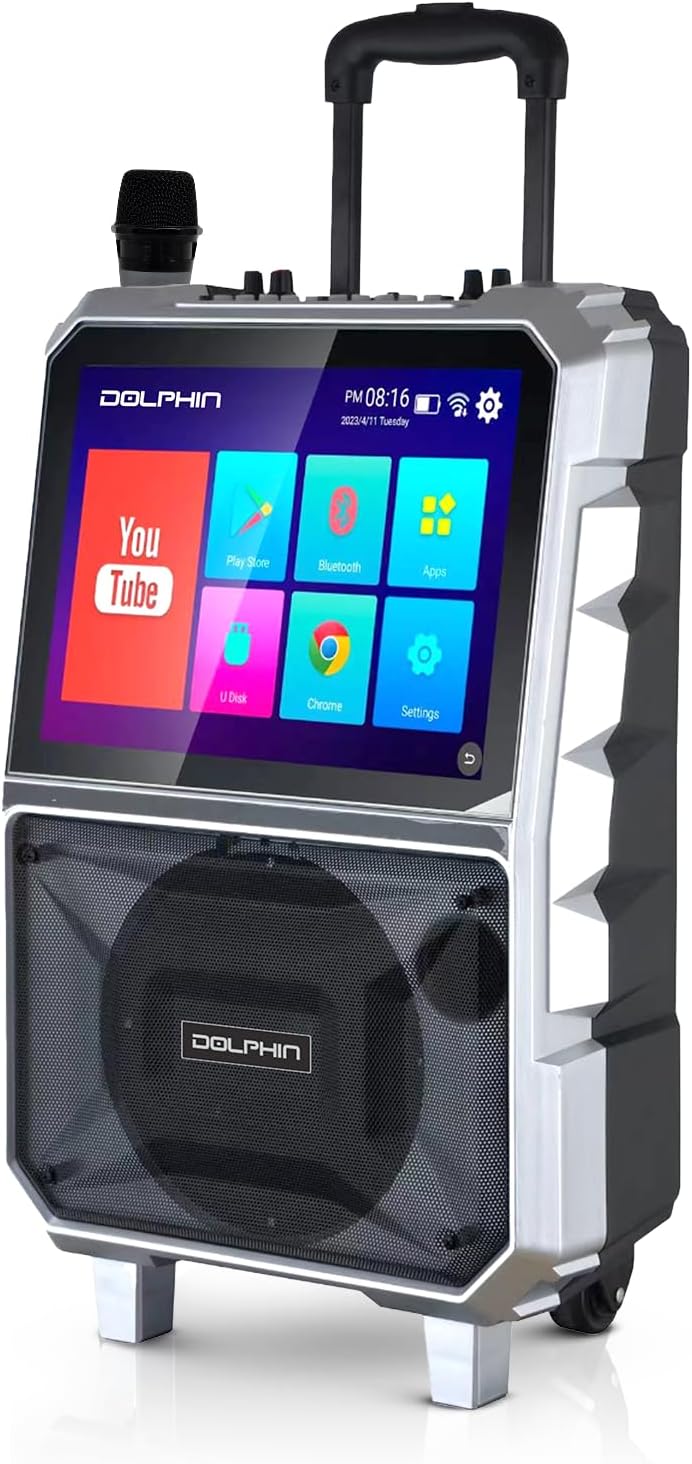
1-сүрөт: Фронт view of the Dolphin KaraokeBox 85R, showing the integrated 14-inch tablet display and the main speaker grille. A wireless microphone is visible on top.

2-сүрөт: Top control panel of the KaraokeBox 85R, featuring various knobs and ports for microphone inputs, volume control, echo, bass, treble, USB, and HDMI output.
Негизги компоненттер:
- 14-inch Touchscreen Tablet: Integrated display for accessing apps, media, and settings.
- 8 дюймдук Вуфер: Delivers powerful 100W RMS audio output.
- Башкаруу панели: Located on top, with knobs for volume, echo, bass, treble, and various input ports.
- Зымсыз микрофон: For vocal performances.
- Trolley Handle & Wheels: Жөнөкөй көчүрүү үчүн.
- HDMI чыгышы: Тышкы дисплейлерге туташуу үчүн.
- USB & SD Card Slots: Медиа ойнотуу үчүн.
Жайгашуу
1. Баштапкы заряддоо
Before first use, fully charge the built-in 5400mAh battery. Connect the provided power adapter to the charging port on the unit and plug it into a power outlet. The charging indicator light will show the charging status.
2. Күйгүзүү/өчүрүү
Locate the power switch on the control panel (refer to Figure 2). Flip the switch to the "ON" position to power on the unit. The tablet screen will light up. To power off, flip the switch to the "OFF" position.
3. Зымсыз микрофонду орнотуу
The included wireless microphone is pre-paired with the unit. Ensure the microphone has fresh batteries. Power on the microphone, and it should automatically connect to the KaraokeBox 85R.
Иштөө нускамалары
1. Tablet Operation and Connectivity
- Wi-Fi туташуусу: On the 14-inch touchscreen, navigate to "Settings" and select "Wi-Fi" to connect to your wireless network. A stable Wi-Fi connection is recommended for streaming content.
- Google аккаунтуна кирүү: For uninterrupted video loading and access to personalized content, log into your Google Account via the YouTube app or system settings.
- Bluetooth жупташууда: To connect external devices via Bluetooth, go to "Settings" on the tablet, select "Bluetooth," and pair with your desired device.
- HDMI чыгышы: Connect an HDMI cable from the HDMI output port on the KaraokeBox 85R to an external display (TV, projector) for a larger viewтажрыйбасы.
- USB/SD карта ойнотуу: Insert a USB drive or SD card into the respective slots on the control panel. Use the built-in media player app on the tablet to browse and play audio or video files.
- Android/iOS Mirroring: The unit supports mirroring functions for both Android and iOS devices. Refer to the tablet's mirroring app for specific instructions on connecting your smartphone or tablet.
2. Аудио башкаруу
- Негизги том: Adjust the main volume knob on the control panel to control the overall sound output.
- Микрофондун үнү: Use the dedicated microphone volume knob to adjust the level of the wireless microphone.
- Эхо: Turn the "Echo" knob to add or reduce reverberation to the microphone sound, enhancing vocal effects.
- Бас жана жогорку үн: Adjust the "Bass" and "Treble" knobs to fine-tune the low and high frequencies of the audio output to your preference.
- Үн модуляциясы: The KB-85R offers various voice modulation functions. Access these effects through the tablet interface or dedicated buttons on the control panel (if available), allowing for personalized vocal styles.
3. Portability Features
- Троллейбус туткасы: Extend the retractable trolley handle from the top of the unit for easy pulling.
- Дөңгөлөктөр: Utilize the built-in wheels at the base of the unit for effortless transportation across flat surfaces.

3-сүрөт: The Dolphin KaraokeBox 85R showcasing its convenient trolley handle and durable wheels for easy transport.
Техникалык тейлөө
- Тазалоо: Use a soft, dry cloth to clean the exterior of the unit. For the touchscreen, use a screen-specific cleaner and a microfiber cloth. Do not use abrasive cleaners or solvents.
- Батареяга кам көрүү: Батареянын иштөө мөөнөтүн узартуу үчүн, бат-баттан батарейканы толук зарядсыздандырбаңыз. Айрыкча узак мөөнөткө сактала турган болсо, аны үзгүлтүксүз толтуруңуз. Салкын, кургак жерде сактаңыз.
- Сактагыч: When not in use, store the KaraokeBox 85R in a dry, dust-free environment, away from direct sunlight and extreme temperatures.
Проблемаларды чечүү
| Көйгөй | Мүмкүн себеп | Чечим |
|---|---|---|
| Түзмөк күйбөйт. | Батарея түгөнүп калды; Кубат өчүргүч өчүрүлгөн. | Charge the unit; Ensure power switch is in the "ON" position. |
| Үн чыгышы жок. | Volume is too low; Input source not selected; Cables not connected properly. | Increase master volume; Select correct input source on tablet; Check all cable connections. |
| Микрофон иштебей жатат. | Microphone batteries are low/dead; Microphone not powered on; Microphone volume is low. | Replace microphone batteries; Power on microphone; Increase microphone volume. |
| Tablet screen unresponsive or slow. | Too many apps running in background; System error. | Close unnecessary apps; Restart the unit. |
| Wi-Fi туташуу маселелери. | Incorrect password; Out of range; Router issues. | Verify Wi-Fi password; Move closer to router; Restart router and unit. |
Техникалык шарттар
| Өзгөчөлүк | Деталь |
|---|---|
| Модел | KaraokeBox 85R |
| Продукциянын өлчөмдөрү | 10 x 20 x 25 дюйм |
| Элемент Салмагы | 22.3 фунт |
| Вуфердин өлчөмү | 8 дюйм |
| Power Output | 100 Ватт RMS |
| Планшеттин өлчөмү | 14 дюйм |
| Батарея | Built-in 5400mAh (12V) Rechargeable Battery |
| Байланыш | Bluetooth, Wi-Fi, HDMI Output, USB, SD, FM Radio |
| Өзгөчөлүктөр | Voice Modulation, Android/iOS Mirroring, Trolley Handle & Wheels |
| Түс | Кара |
| Өндүрүүчү | General Sound Co |
Кепилдик жана колдоо
For warranty information and technical support, please refer to the warranty card included with your product or visit the official Dolphin website. You may also contact customer service at the details provided on the product packaging or the manufacturer's webсайт.
Өндүрүүчү: General Sound Co
Бренд: Дельфин



