1. Киришүү
This manual provides essential information for the safe and efficient operation of your OUKITEL P5000PRO Portable Power Station. Please read this manual thoroughly before using the product and retain it for future reference.
The OUKITEL P5000PRO is a high-capacity portable power station designed to provide reliable power for various applications, including home backup, outdoor activities, and professional use. It features a 5120Wh LiFePO4 battery, 3600W AC output, and multiple charging options, including solar.
2. Коопсуздук нускамалары
Жалпы коопсуздук:
- Бөлүктү бөлбөөгө, оңдоп же өзгөртпөңүз.
- Аппаратты жылуулук булактарынан, түз күн нурунан жана тез күйүүчү материалдардан алыс кармаңыз.
- Агрегатты жамгырга же нымдуулукка дуушар кылбаңыз.
- Түпнуска же тастыкталган аксессуарларды гана колдонуңуз.
- Колдонуу жана кубаттоо учурунда туура желдетүүнү камсыз кылыңыз.
- Балдар жана үй жаныбарлары жетпеген жерде сактаңыз.
- Өрт чыккан учурда кургак порошок өрт өчүргүчтү колдонуңуз.
Батареянын коопсуздугу:
- The unit contains a LiFePO4 battery. Do not puncture, drop, or damage the battery.
- Do not charge or store the unit in extreme temperatures.
- If the battery leaks, avoid contact with skin and eyes. Rinse with water and seek medical attention.
3. Пакеттин мазмуну
Пакетиңизде бардык буюмдар бар экенин текшериңиз:
- 1x OUKITEL P5000PRO Portable Power Station
- 2x 400W Solar Panels (PV400)
- 1x AC заряддоо кабели
- 1x Car Charger (XT60 Car Charging Cable)
- 1x Solar Charging Cable (XT60-MC4 Solar Charging Cable)
- 1x Колдонуучунун колдонмосу
- 1x Safety Guide
Note: Due to the product's weight, the power station and solar panels may be delivered in separate packages.

Image: Contents of the OUKITEL P5000PRO package.
4. Продукт бүтүп калдыview
The OUKITEL P5000PRO is designed for ease of use and portability, featuring a robust build and intuitive interface.
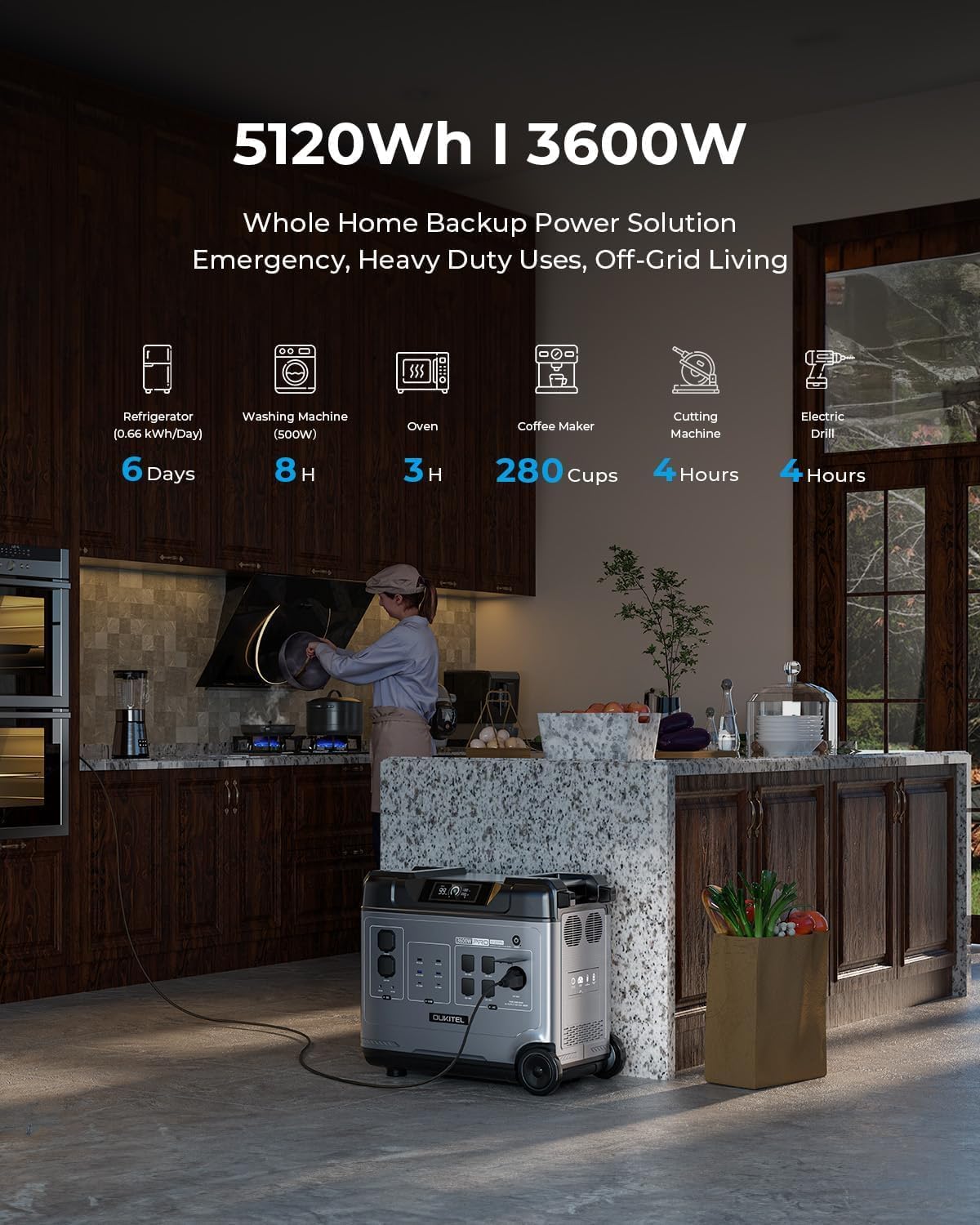
Image: Front panel of the OUKITEL P5000PRO, highlighting its multiple output ports and digital display.
4.1. Негизги өзгөчөлүктөрү
- Жогорку кубаттуулугу: 5120Wh LiFePO4 battery for extended power supply.
- Жогорку чыгаруу: 3600W Max AC output, capable of powering 99% of devices.
- Тез кубаттоо: Fully charged in 2 hours via home outlet (1800W).
- Күн кубаты: Supports up to 1000W solar input, full charge in 5 hours with 2x400W panels.
- UPS функциялары: Automatic switchover within 0.01s during power outages (max 1400W output in UPS mode).
- Узак өмүрү: LiFePO4 battery with over 5000+ charge cycles, offering a 10-year lifespan.
- Бир нече соода түйүндөрү: 15 outlets including 5x AC, 4x USB-A, 2x USB-C (100W), 2x DC, 1x cigarette lighter, and 1x airline outlet.
- Көчүрүү мүмкүнчүлүгү: Equipped with a high-quality tension bar and 2 removable wheels for easy transport.
- Камтылган сактагыч: Convenient storage space on top for cables and accessories.
5. Орнотуу
5.1. Алгачкы текшерүү
Upon receiving your OUKITEL P5000PRO, carefully inspect the packaging and the unit for any signs of damage. If any damage is found, do not operate the unit and contact customer support immediately.
5.2. Биринчи колдонуу
Before first use, it is recommended to fully charge the power station. This ensures optimal battery performance and calibration.
5.3. Блокту жайгаштыруу
Place the power station on a flat, stable surface. Ensure there is adequate ventilation around the unit to prevent overheating. Keep it away from direct sunlight, heat sources, and moisture.
6. Иштөө нускамалары
6.1. Күйгүзүү / Өчүрүү
- Түзмөктү күйгүзүү үчүн, дисплей күйгөнгө чейин негизги кубат баскычын бир нече секунд басып туруңуз.
- Түзмөктү өчүрүү үчүн, дисплей өчкөнгө чейин негизги кубат баскычын кайра басып, кармап туруңуз.
6.2. AC розеткаларын колдонуу
- Press the AC power button to activate the AC outlets. The AC indicator on the display will light up.
- Plug your AC devices into the available AC outlets.
- Түзмөктөрүңүздүн жалпы кубаттуулугу 3600 Вт ашпаганын текшериңиз.
- To turn off AC power, press the AC power button again.
6.3. Using USB Outlets
- The USB-A and USB-C ports are typically active when the unit is powered on.
- Connect your USB devices for charging. The USB-C ports support up to 100W Power Delivery.
6.4. Using DC Outlets
- Press the DC power button to activate the DC outlets (including the cigarette lighter port). The DC indicator will light up.
- Connect your DC devices.
- To turn off DC power, press the DC power button again.
6.5. UPS функциясы
The P5000PRO features an Uninterruptible Power Supply (UPS) function. When connected to a wall outlet and powering devices, if the grid power fails, the unit will automatically switch to battery power within 0.01 seconds. This prevents data loss or interruption for connected devices. The maximum output in UPS mode is 1400W.

Image: Illustration of the UPS function, demonstrating seamless power transition.
7. Заряддоо ыкмалары
The OUKITEL P5000PRO offers multiple charging options:
7.1. AC дубалды заряддоо
- AC кубаттоочу кабелди электр станциясындагы AC киргизүү портуна, андан кийин стандарттуу розеткага туташтырыңыз.
- The unit supports up to 1800W input, allowing a full charge in approximately 2 hours.
7.2. Күн кубаттоо
- Connect the solar charging cable (XT60-MC4) to the PV input port on the power station.
- Connect the MC4 connectors to your solar panels.
- The unit supports up to 1000W solar input. Using 2x400W solar panels, a full charge can be achieved in approximately 5 hours under ideal sunlight conditions.

Image: Instructions for connecting solar panels to the power station.
7.3. Унаа заряддоо
- Connect the car charger (XT60 Car Charging Cable) to the car charging port on the power station and to your vehicle's 12V cigarette lighter socket.
7.4. Комплекстүү заряддоо
- For the fastest charging, combine AC wall charging and solar charging simultaneously. This can achieve a full charge in approximately 2 hours (2800W combined input).

Image: Visual representation of various charging methods and their approximate times.
8. Техникалык тейлөө
8.1. Сактоо
- Агрегатты салкын, кургак жерде, тике күн нурунан жана экстремалдык температурадан алыс сактаңыз.
- Узак мөөнөткө сактоо үчүн, батареянын иштөө мөөнөтүн узартуу үчүн түзмөктү ар бир 3-6 ай сайын 50-80% га чейин кубаттап туруңуз.
8.2. Тазалоо
- Түзмөктүн сыртын тазалоо үчүн кургак, жумшак чүпүрөктү колдонуңуз.
- Абразивдүү тазалагычтарды колдонбоңуз же аппаратты сууга салбаңыз.
8.3. Батареяны башкаруу системасы (ББС)
The integrated BMS monitors battery conditions such as temperature and current, ensuring safe and efficient operation. This system helps protect the battery from overcharge, over-discharge, over-current, and short circuits.
9. Кыйынчылыктарды
| Көйгөй | Мүмкүн себеп | Чечим |
|---|---|---|
| Түзмөк күйбөйт. | Батарея түгөнүп калды; Кубат баскычы туура басылган жок. | Түзмөктү кубаттаңыз; Кубат баскычын бир нече секунд басып туруңуз. |
| AC розеткалары иштебейт. | AC output not activated; Overload protection triggered. | Press the AC power button; Reduce connected load, then restart AC output. |
| Slow charging via solar. | Insufficient sunlight; Panels not optimally angled; Incorrect connection. | Ensure panels are in direct sunlight and angled correctly; Check cable connections. |
| Бирдиктин ысып кетиши. | Начар желдетүү; ашыкча жүк. | Ensure clear airflow around the unit; Reduce connected load. |
Эгерде бул чечимдерди колдонуп көргөндөн кийин да көйгөй чечилбесе, OUKITEL кардарларды колдоо кызматына кайрылыңыз.
10. Техникалык шарттар
| Өзгөчөлүк | Деталь |
|---|---|
| Модель аты | P5000PRO |
| Батарея түрү | LiFePO4 |
| Кубаттуулугу | 5120Wh |
| AC чыгаруу күчү | 3600 Вт (макс.) |
| AC киргизүү күчү | 1800 Вт |
| Solar Input (MPPT) | 1000 Вт |
| UPSтин которулуу убактысы | 0.01с (10мс) |
| Өмүр | 5000+ cycles (to 80% capacity) / 10 years |
| AC розеткалары | 5 |
| USB-A порттору | 4 |
| USB-C порттору | 2 (100W PD each) |
| DC розеткалары | 2 |
| Тамеки күйгүзүүчү порт | 1 |
| Airline Outlet | 1 |
| Өлчөмдөрү (L x W x Y) | 21.6" x 11.4" x 18.9" |
| Салмагы | 114.4 фунт (52 кг) |
11. Кепилдик жана колдоо
The OUKITEL P5000PRO comes with an exclusive 5-year warranty (2 years standard + 3-year extended). For warranty claims or technical assistance, please contact OUKITEL customer service.
Кардарларды тейлөө:
- 24/7 Support Service
- Access to over 100 experts and engineers
For more information, visit the official OUKITEL website or refer to the contact details provided in your safety guide.

Image: OUKITEL customer support and warranty information.
12. Продукт боюнча видео көрсөтүү
Видео: Бүттүview of the OUKITEL P5000PRO Portable Power Station, demonstrating its features and portability. This video is provided by OUKITEL Official.


