1. Киришүү
Welcome to the user manual for your MAXCOM FW67 Titan Pro Smartwatch. This device is designed to enhance your daily life by providing convenient access to notifications, health monitoring, and fitness tracking features directly from your wrist. Please read this manual carefully to ensure proper use and to fully understand the capabilities of your new smartwatch.
2. Коопсуздук маалыматы
- Аппаратты ажыратууга, оңдоого же өзгөртүүгө аракет кылбаңыз. Бул кепилдикти жокко чыгарып, зыян келтириши мүмкүн.
- Аппаратты экстремалдык температурадан, түз күндүн нурунан жана ачык оттон алыс кармаңыз.
- Аппаратты катуу таасирлерге же титирөөгө жол бербеңиз.
- This device is water-resistant (IP69K rating), suitable for splashes and swimming. However, avoid hot water, steam, or prolonged submersion in deep water.
- Consult a medical professional before starting any new exercise regimen or if you have any health concerns. The health data provided by the smartwatch is for reference only and should not be used for medical diagnosis or treatment.
- Берилген заряддоо кабелин жана туура келген кубат адаптерин гана колдонуңуз.
3. Пакеттин мазмуну
Сураныч, пакетте төмөнкү нерселерди текшериңиз:
- MAXCOM FW67 Titan Pro Smartwatch (Orange)
- Заряддоо кабели
- User Manual
4. Түзмөк бүттүview
Familiarize yourself with the main components of your smartwatch.

4.1-сүрөт: Фронт view of the MAXCOM FW67 Titan Pro Smartwatch, displaying the main watch face with time, date, weather, battery level, and activity metrics like calories burned and step count.

4.2-сүрөт: Side view of the smartwatch, highlighting the 'POWER' button at the top and the 'BACK' button below it, both located on the right side of the watch casing.
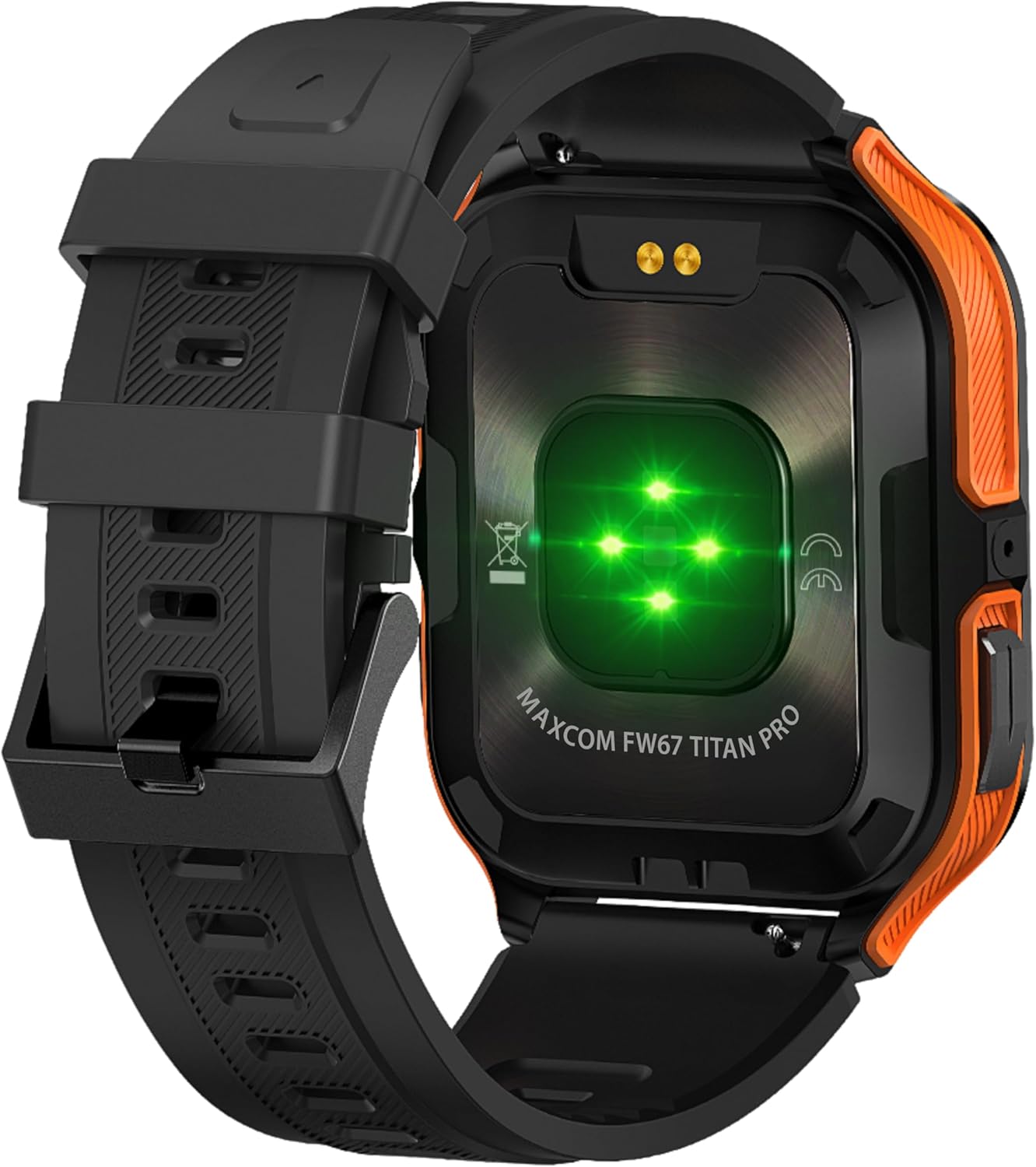
4.3-сүрөт: Арткы view of the smartwatch, showing the optical heart rate sensors (glowing green) and the magnetic charging pins. The model name 'MAXCOM FW67 TITAN PRO' is also visible.
5. Орнотуу
5.1. Баштапкы заряддоо
Биринчи жолу колдонуудан мурун, акылдуу саатыңызды толугу менен кубаттаңыз.
- Connect the charging cable to the magnetic charging pins on the back of the smartwatch. Ensure the pins align correctly.
- Plug the USB end of the charging cable into a compatible USB power adapter (e.g., 5V/1A) or a computer's USB port.
- Сааттын дисплейинде кубаттоо абалы көрсөтүлөт. Толук кубаттоо, адатта, болжол менен 2-3 саатты талап кылат.
5.2. Колдонмону орнотуу жана жупташтыруу
To unlock the full potential of your smartwatch, you need to pair it with your smartphone via the dedicated companion application.
- Колдонмону жүктөп алыңыз: Издөө the official MAXCOM smartwatch application (e.g., 'GloryFit' or similar, refer to packaging for exact app name) on the Google Play Store (for Android) or Apple App Store (for iOS). Install the app on your smartphone.
- Bluetooth иштетүү: Смартфонуңузда Bluetooth иштетилгенин текшериңиз.
- Колдонмону ачуу: Орнотулган колдонмону ишке киргизип, аккаунт түзүү же кирүү үчүн экрандагы көрсөтмөлөрдү аткарыңыз.
- Түзмөк кошуу: Within the app, navigate to the 'Device' or 'Add Device' section. The app will search for available smartwatches.
- Select Your Smartwatch: Select 'FW67 Titan Pro' from the list of discovered devices.
- Жупташтыруу ырастоо: Жупташтыруу өтүнүчү телефонуңузда да, акылдуу саатыңызда да пайда болушу мүмкүн. Эки түзмөктө тең жупташууну ырастаңыз.
- Толук орнотуу: Профессоруңузду орнотуу үчүн колдонмодогу калган көрсөтмөлөрдү аткарыңызfile, permissions, and preferences.
6. Акылдуу саатыңызды иштетүү
6.1. Негизги навигация
- Кубат баскычы: Press and hold to power on/off. Short press to wake the screen or return to the main watch face.
- Артка баскычы: Short press to go back to the previous screen or exit a function.
- Сенсордук экран жаңсоолор:
- Өйдө серпүү: Access quick settings/control center.
- Төмөн сүрүү: View эскертмелер.
- Солго/Оңго сүрүү: Navigate through widgets (e.g., activity, heart rate, weather).
- таптаңыз: Бир нерсени тандаңыз же менюга кириңиз.
6.2. Негизги өзгөчөлүктөрү

6.1-сүрөт: Акылдуу сааттын дисплейи көрсөтүлөтasing various health metrics including steps taken, calories burned, heart rate, blood oxygen saturation (SpO2), and blood pressure, along with battery status.
- Жүрөктүн кагышын көзөмөлдөө: The watch continuously monitors your heart rate. Access this feature from the main menu or by swiping to the heart rate widget.
- Активдүүлүккө көз салуу: Tracks steps, distance, and calories burned throughout the day. Set daily goals in the companion app.
- Уйкунун мониторинги: Automatically tracks your sleep patterns, including deep sleep, light sleep, and wake times. View колдонмодогу деталдуу талдоо.
- Спорт режимдери: Select from various sports modes (e.g., running, walking, cycling) to track specific workout data. Start a workout from the 'Sport' menu.
- Эскертмелер: Receive call, message, and app notifications directly on your wrist. Ensure notification permissions are granted in the companion app.
- Blood Oxygen (SpO2) & Blood Pressure: The watch can measure SpO2 and blood pressure. These measurements are for reference only and not for medical use.
- Аба ырайы: View current weather conditions after syncing with the app and granting location permissions.
- Музыкалык башкаруу: Смартфонуңузда музыканы ойнотууну түз сааттан башкарыңыз.
7. Техникалык тейлөө
- Тазалоо: Regularly clean your smartwatch and strap with a soft, dry, lint-free cloth. If necessary, use a slightly damp жумшак самын менен чүпүрөк, андан кийин жакшылап жууп, кургатуу.
- Химиялык заттардан алыс болуңуз: Катуу химиялык заттарды, тазалоочу эриткичтерди же күчтүү жуугучтарды колдонбоңуз, анткени алар сааттын сыртына жана пломбаларына зыян келтириши мүмкүн.
- Заряддоо порту: Keep the charging pins clean and dry to ensure proper charging.
- Сактагыч: When not in use for extended periods, store the smartwatch in a cool, dry place.
- Суу каршылык: While the watch is IP69K water-resistant, it is not recommended for diving or high-pressure water activities. Always dry the watch thoroughly after exposure to water.
8. Кыйынчылыктарды
Эгерде сиз акылдуу саатыңызда көйгөйлөргө туш болсоңуз, төмөнкү кеңири таралган көйгөйлөрдү жана чечимдерди караңыз:
| Көйгөй | Чечим |
|---|---|
| Акылдуу саат күйбөйт | Саат толук заряддалганын текшериңиз. Аны заряддагычка кеминде 30 мүнөт туташтырыңыз. |
| Смартфон менен жупташтыруу мүмкүн эмес | 1. Ensure Bluetooth is enabled on your phone. 2. Make sure the smartwatch is within range. 3. Restart both the smartwatch and your phone. 4. Clear Bluetooth cache on your phone. 5. Try pairing through the app, not directly via phone's Bluetooth settings. |
| Notifications are not received | 1. Check if the smartwatch is connected to the app. 2. Ensure notification permissions are granted for the app on your phone. 3. Verify that app notifications are enabled within the smartwatch app settings. 4. Disable 'Do Not Disturb' mode on both the watch and phone. |
| Туура эмес ден соолук маалыматы | 1. Ensure the watch is worn snugly on your wrist, not too loose or too tight. 2. Clean the sensors on the back of the watch. 3. Avoid excessive movement during measurements. 4. Remember that data is for reference and not medical diagnosis. |
| Батареянын иштөө мөөнөтү кыска | 1. Reduce screen brightness. 2. Limit continuous heart rate monitoring if not needed. 3. Turn off unnecessary notifications. 4. Ensure the watch is fully charged each time. |
9. Техникалык шарттар
Key technical specifications for the MAXCOM FW67 Titan Pro Smartwatch:
| Өзгөчөлүк | Спецификация |
|---|---|
| Бренд | MAXCOM |
| Модел | FW67 Titan Pro |
| Түс | Ачык күрөң |
| Операция системасы | Proprietary OS (compatible with Android/iOS) |
| Screen Size | 1.85 дюйм |
| Байланыш | Bluetooth |
| Өзгөчөлүктөр | Heart Rate Monitor, Notifications, SpO2, Blood Pressure, Activity Tracking |
| Шайкеш түзмөктөр | Смартфон |
| Батареянын курамы | Литий-ион |
| Батарея сыйымдуулугу | 380 мАч |
| GPS | GPS смартфон аркылуу |
| Форма | Төрт бурчтуу |
10. Кепилдик жана колдоо
Your MAXCOM FW67 Titan Pro Smartwatch comes with a standard manufacturer's warranty. Please refer to the warranty card included in your package for specific terms and conditions, including warranty duration and coverage details. For technical support, troubleshooting assistance beyond this manual, or warranty claims, please contact MAXCOM customer service through their official webсайт же продукт документациясында берилген байланыш маалыматы.


