1. Киришүү
Сатып алганыңыз үчүн рахматasing the Sharp Plasmacluster Humidifying Air Purifier, Model KC-35T7. This manual provides essential information for the safe and efficient operation, maintenance, and troubleshooting of your new appliance. Please read this manual thoroughly before use and keep it for future reference.
This advanced air purifier is designed to improve your indoor air quality by reducing harmful gases such as formaldehyde and other Volatile Organic Compounds (VOCs). It features a powerful purification function, integrated humidification, and a convenient display for humidity and temperature.
2. Коопсуздук маалыматы
Коопсуз эксплуатацияны камсыз кылуу жана буюмдун бузулушуна же өзүңүзгө жана башкаларга зыян келтирбөө үчүн төмөнкү коопсуздук чараларын сактаңыз:
- Always use the appliance with the correct voltage as specified on the rating label.
- Аба кирүүчү же чыгуучу желдеткич тешиктерин жаппаңыз.
- Do not insert fingers or objects into any openings.
- Unplug the appliance before cleaning, performing maintenance, or when not in use for extended periods.
- Do not operate the appliance near flammable gases or combustible materials.
- Keep the appliance away from water and moisture. Do not immerse the unit in water.
- Ensure the water tank is properly installed before operating the humidification function. Use only clean tap water in the water tank.
- Бул шайман физикалык, сезүү же акыл-эс жөндөмү начар же тажрыйбасы жана билими жок адамдар (анын ичинде балдар) үчүн, эгерде алардын коопсуздугуна жооптуу адам тарабынан көзөмөлсүз же шайманды колдонуу боюнча көрсөтмө болбосо, колдонууга арналбайт.
3. Бөлүктөрдү идентификациялоо
Familiarize yourself with the main components of your Sharp Plasmacluster Humidifying Air Purifier:

Сүрөт 3.1: Алдыңкы View Аба тазалагычтын. This image displays the main body of the Sharp KC-35T7 air purifier, highlighting the control panel at the top, the air intake grille, and the Plasmacluster logo. The unit is white with black accents on the sides.
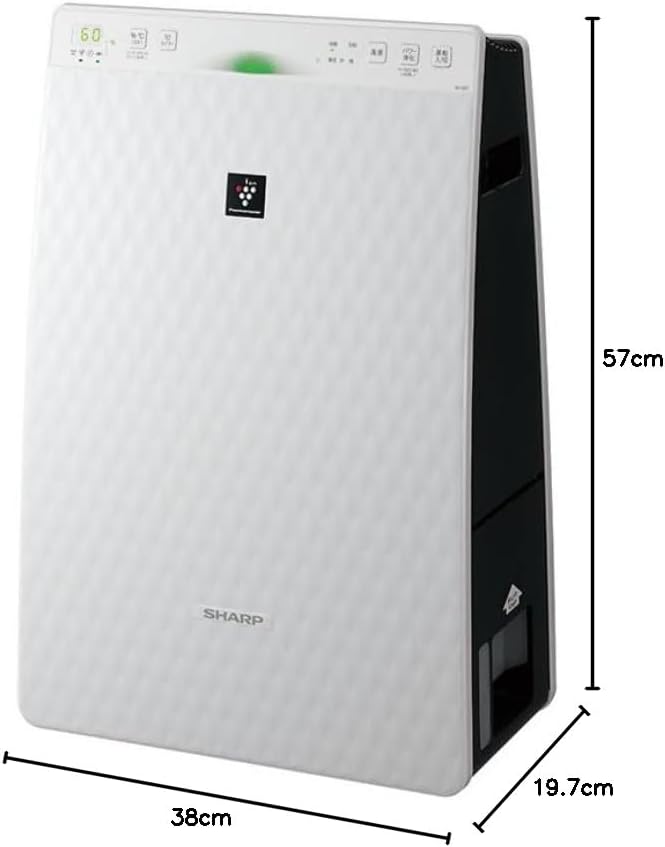
Figure 3.2: Air Purifier with Dimensions. Бул сүрөт перспективаны берет view of the Sharp KC-35T7, illustrating its approximate dimensions: 38 cm (width), 19.7 cm (depth), and 57 cm (height). These measurements are crucial for proper placement and space planning.
Негизги компоненттер:
- Башкаруу панели: Located on the top, with buttons for power, mode selection, fan speed, and display.
- Аба алуу: Located on the front and sides, where air is drawn into the unit.
- Аба чыгаруу: Located at the top, where purified and humidified air is released.
- Суу багы: Removable tank for humidification, typically located on the side or back.
- Чыпкалар: Internal filters (e.g., HEPA, deodorizing) for air purification.
4. Орнотуу
Follow these steps for the initial setup of your air purifier:
- Пакеттен чыгаруу: Carefully remove the air purifier from its packaging. Retain the packaging materials for future transport or storage.
- Чыпканы орнотуу: Open the rear panel of the unit. Remove all protective plastic bags from the filters (e.g., HEPA filter, deodorizing filter) and install them according to the markings inside the unit. Ensure they are securely in place. Close the rear panel.
- Fill Water Tank (for Humidification): Remove the water tank from the unit. Open the water tank cap and fill it with clean tap water up to the maximum fill line. Close the cap securely and reinsert the water tank into the unit until it clicks into place.
- Жайгашкан жери: Place the air purifier on a flat, stable surface, ensuring there is adequate space (at least 20 cm) around the air intake and outlet for optimal airflow. Avoid placing it directly against a wall or near heat sources.
- Кубат туташуу: Электр шнурын ылайыктуу электр розеткасына сайыңыз.
5. Иштөө нускамалары
Learn how to operate your Sharp Plasmacluster Humidifying Air Purifier:
Күйгүзүү/өчүрүү:
- басыңыз Күч башкаруу панелиндеги баскычты басып, түзмөктү күйгүзүңүз же өчүрүңүз.
Режим тандоо:
The unit typically offers several operating modes:
- Авто режим: The unit automatically adjusts fan speed and humidification based on detected air quality and humidity levels.
- Аба тазалоо режими: Operates solely as an air purifier.
- Humidification Mode: Operates with humidification function active.
- Plasmacluster Spot Mode: Concentrates Plasmacluster ions for targeted deodorization or purification.
басыңыз Mode button repeatedly to cycle through available modes.
Желдетүүчү ылдамдыкты жөндөө:
Adjust the fan speed to your preference:
- басыңыз Fan Speed button to select between Low, Medium, High, or Silent settings.
Humidity/Temperature Display:
The display shows current room humidity and temperature. This information helps you monitor your indoor environment and adjust settings as needed.
6. Техникалык тейлөө
Regular maintenance ensures optimal performance and extends the lifespan of your air purifier. Always unplug the unit before cleaning.
Фильтрди тазалоо жана алмаштыруу:
- Алдын ала чыпкалоо: Clean the pre-filter (mesh filter) regularly, approximately once a month, or more often if used in a dusty environment. Use a vacuum cleaner to remove dust or wash it with water and mild detergent. Ensure it is completely dry before reinstallation.
- HEPA чыпкасы: The HEPA filter cannot be washed. Replace it approximately every 2-5 years, depending on usage and air quality. Refer to the indicator light on the control panel for replacement timing.
- Жытты кетирүүчү фильтр: The deodorizing filter also cannot be washed. Replace it at the same interval as the HEPA filter.
Water Tank and Humidifying Filter Cleaning:
- Суу багы: Clean the water tank weekly to prevent mold and bacteria growth. Rinse with clean water and use a soft brush or cloth to remove any residue.
- Humidifying Filter/Tray: Clean the humidifying filter and tray monthly. Remove any mineral deposits or slime using a soft brush and a mild descaling solution (e.g., citric acid solution) if necessary. Rinse thoroughly with clean water and ensure all parts are dry before reassembly.
Тышкы тазалоо:
- Түзмөктүн сыртын жумшак, кургак чүпүрөк менен сүртүңүз. Өжөр тактар үчүн, жарнаманы колдонуңузamp кездемени жумшак жуугуч каражат менен сүртүңүз, андан кийин кургатып сүртүңүз. Абразивдүү тазалоочу каражаттарды же эриткичтерди колдонбоңуз.
7. Кыйынчылыктарды
Аба тазалагычыңызда көйгөйлөргө туш болсоңуз, төмөнкү жалпы көйгөйлөрдү жана чечимдерди караңыз:
| Көйгөй | Мүмкүн себеп | Чечим |
|---|---|---|
| Түзмөк күйбөйт. | Кубат шнуру бекем сайылган эмес. Розеткадан кубат жок. | Электр шнурунун туташуусун текшериңиз. Башка түзмөк менен розетка сынагы. |
| нымдаштыруу жок. | Water tank empty. Water tank not properly installed. Humidifying filter dirty. | Refill water tank. Reinstall water tank correctly. Clean humidifying filter. |
| Адаттан тышкаркы ызы -чуу. | Filters not properly installed. Foreign object in unit. | Check filter installation. Unplug and inspect for foreign objects. |
| Абанын начар тазаланышы. | Filters are dirty or clogged. Unit placed in an obstructed area. | Clean or replace filters. Ensure proper clearance around the unit. |
| Аппараттан жыт чыгып жатат. | Deodorizing filter saturated. Water tank/humidifying filter dirty. | Replace deodorizing filter. Clean water tank and humidifying filter. |
Бул чечимдерди колдонуу аракетинен кийин көйгөй чечилбесе, кардарларды колдоо кызматына кайрылыңыз.
8. Техникалык шарттар
Detailed technical specifications for the Sharp Plasmacluster Humidifying Air Purifier KC-35T7:
| Өзгөчөлүк | Спецификация |
|---|---|
| Бренд | Sharp |
| Модель номери | KC-35T7 |
| Түс | Ак |
| Продукциянын өлчөмдөрү (D x W x Y) | 19.7 см х 38 см х 57 см |
| Пакеттин өлчөмдөрү (L x W x Y) | 63 см х 43 см х 26 см |
| Пакет Салмагы | 7.88 кг |
| Башка функциялар | Humidification function, Plasmacluster technology, Humidity/Temperature display |
| Батареялар талап кылынат | Жок |
9. Кепилдик жана колдоо
Your Sharp Plasmacluster Humidifying Air Purifier is covered by a manufacturer's warranty. Please refer to the warranty card included in your product packaging for specific terms and conditions, including the warranty period and coverage details.
For technical assistance, service, or to inquire about replacement parts and filters, please contact Sharp customer support. Contact information can typically be found on the manufacturer's official webсайтында же сатып алуу дүмүрчөгүндө.
When contacting support, please have your product model number (KC-35T7) and serial number (if applicable) ready.


