1. Продукт бүтүп калдыview
The Inkbird ISV-101W is a WiFi-enabled sous vide immersion circulator designed for precise temperature control during cooking. It features 1000 watts of heating power and 3D water circulation for even heat distribution. Control and monitoring are available via a dedicated mobile application.

Figure 1: Inkbird ISV-101W Sous Vide Machine. This image shows the main unit of the sous vide circulator.
2. Коопсуздук маалыматы
- Always ensure the water level is between the MIN and MAX marks on the device.
- Do not immerse the top part of the device (control panel) in water.
- Use a heat-resistant container for cooking.
- Балдар жетпеген жерде сактаңыз.
- Unplug the device before cleaning or when not in use.
- Электр зымы же сайгычы бузулган болсо иштетпеңиз.
3. Продукциянын компоненттери
The Inkbird ISV-101W consists of the following main parts:
- Башкаруу панели: Digital display for temperature, time, and settings.
- Adjustment Knob/Buttons: For setting temperature and time manually.
- Immersion Tube: Contains the heating element and circulator.
- Water Level Markings (MIN/MAX): Indicates safe operating water levels.
- Жөнгө салынуучу Clamp: Secures the device to the side of a cooking container.

Figure 2: Key components of the Inkbird ISV-101W, including the gold-plated panel, dazzling knob, non-slip clamp, and hollow-carved design for water circulation.
4. Setup and Wi-Fi Connection
4.1 Баштапкы орнотуу
- Контейнерге тиркөө: Sous vide машинасын ысыкка чыдамдуу казандын же контейнердин капталына жөнгө салынуучу cl аркылуу бекем бекитиңизamp.
- Суу менен толтуруу: Fill the container with water, ensuring the water level is between the MIN and MAX marks on the immersion tube.
- Күйгүзүү: Plug the device into a power outlet. The display will light up.

Figure 3: The Inkbird ISV-101W securely clamped to a container with water, illustrating the 360° water circulation heating.
4.2 Wi-Fi Connection (Inkbird App)
The ISV-101W connects to your home 2.4GHz Wi-Fi network via the Inkbird Smart app for remote control and monitoring.
- Колдонмону жүктөп алуу: Download the "Inkbird Smart" app from your smartphone's app store.
- Катталуу/Кирүү: Каттоо эсебин түзүңүз же колдонмого кириңиз.
- Түзмөк кошуу: In the app, tap the "+" icon to add a new device. Select the ISV-101W from the list.
- Wi-Fi чоо-жайын киргизиңиз: Follow the on-screen instructions to connect the device to your 2.4GHz Wi-Fi network. Ensure your phone is also connected to the 2.4GHz network during setup.
- Жупташтыруу: The device will enter pairing mode (indicated by a flashing light or specific display icon). Confirm pairing in the app.

Figure 4: Step-by-step guide for connecting the Inkbird ISV-101W to the Inkbird Smart app via 2.4GHz Wi-Fi.

Figure 5: The Inkbird Smart app interface showing recipe selection, cooking time booking, and remote monitoring capabilities for the sous vide machine.
5. Иштөө нускамалары
5.1 Кол менен иштетүү
- Температураны коюу: Use the control knob or buttons on the device to set your desired cooking temperature.
- Убакытты коюу: Adjust the cooking time using the control knob or buttons.
- Даярдоону баштоо: Press the start button. The device will begin heating the water to the set temperature.
- Тамак-аш кошуу: Once the target temperature is reached, place your vacuum-sealed food into the water bath.

Figure 6: The informative TFT display showing Wi-Fi connection state, current temperature, target temperature, cooking state, and cooking time. It also displays quick-cook and menu settings.
5.2 Колдонмону башкаруу операциясы
- Select Recipe: Open the Inkbird Smart app. Choose from preset recipes or create custom settings.
- Орнотууларды тууралоо: Set the desired temperature, cooking time, and other preferences within the app.
- Schedule Cooking: Utilize the scheduling feature to start cooking at a specific time.
- Прогресс мониторинги: Monitor the cooking progress and receive notifications on your smartphone.

Figure 7: The Inkbird Smart app displaying various food categories (Beef, Poultry, Mutton, Pork, Seafood, Egg, Vegetable) and options for custom cooking or managing custom recipes.
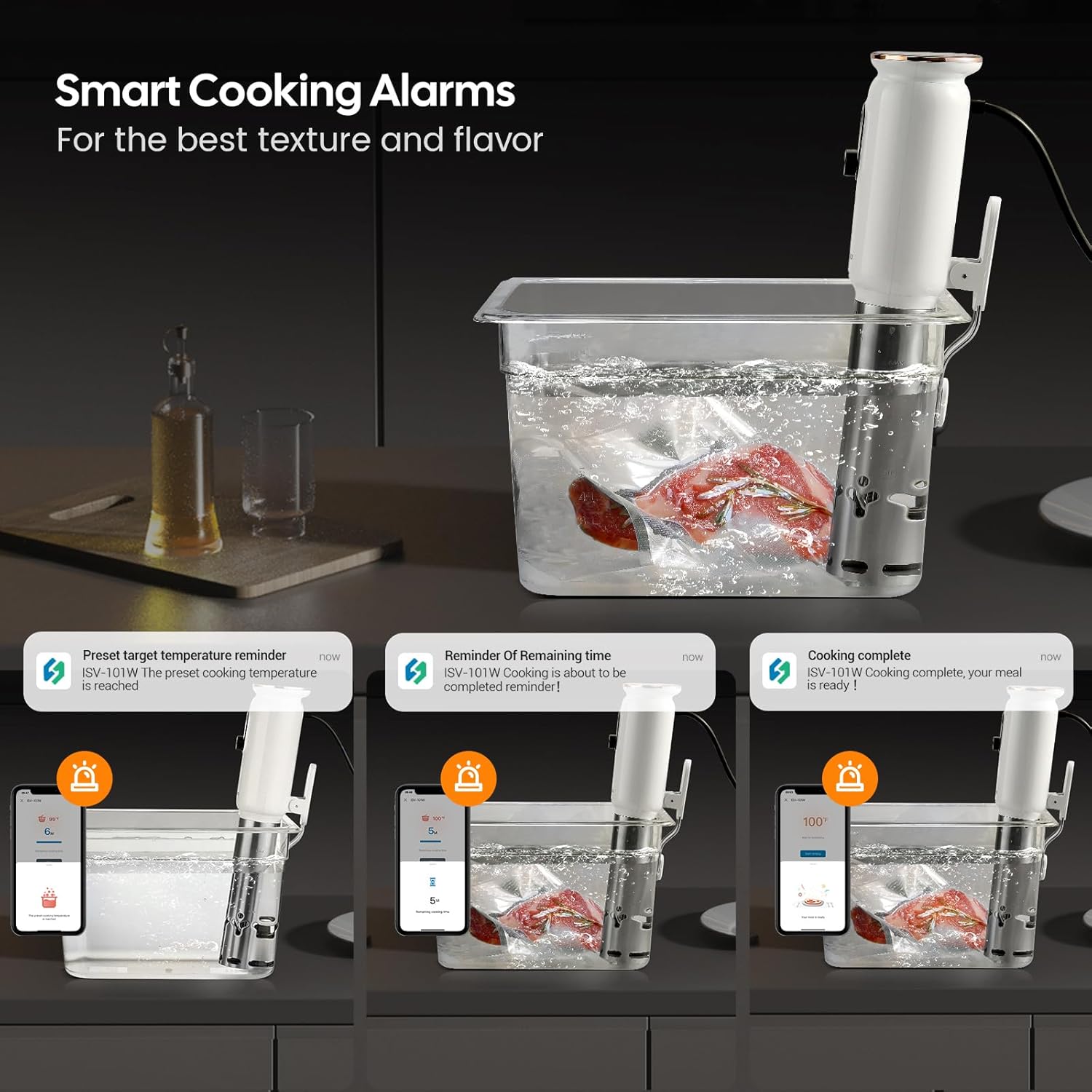
Figure 8: The Inkbird Smart app providing smart cooking alarms for target temperature reached, remaining time reminders, and cooking completion notifications.

Figure 9: The Inkbird Smart app interface demonstrating how to schedule cooking starts and set pre-reminders for cooking completion.
6. Техникалык тейлөө жана кам көрүү
- Тазалоо: Ар бир колдонгондон кийин, түзмөктү розеткадан сууруп, муздаганча күтүңүз. Сыртын аарчыңызamp cloth. The stainless steel immersion tube can be cleaned with a mild detergent and water. Ensure no water enters the top electrical components.
- Тазалоо: If mineral deposits build up on the heating element, fill a pot with water and add white vinegar (equal parts water and vinegar). Immerse the stainless steel part of the circulator (below the MAX line) and run the device at 60°C (140°F) for 30 minutes. Rinse thoroughly afterward.
- Сактагыч: Store the sous vide machine in a dry, cool place.

Figure 10: The Inkbird ISV-101W features an IPX7 waterproof rating, making it worry-free to use and easy to clean.
7. Кыйынчылыктарды
| Көйгөй | Мүмкүн себеп | Чечим |
|---|---|---|
| Түзмөк күйбөй жатат. | розеткага кошулбаган; электр розеткасынын маселеси. | Ensure the device is securely plugged into a working power outlet. Check the circuit breaker. |
| Water not heating or "pre-heating" stuck. | Water level too low/high; heating element issue; large volume of cold water. | Verify water level is between MIN and MAX. For large volumes, allow more time or start with warmer water. Contact support if the issue persists. |
| Wi-Fi туташуусу бузулду. | Incorrect Wi-Fi password; 5GHz network; device too far from router. | Ensure you are connecting to a 2.4GHz Wi-Fi network. Double-check the password. Move the device closer to the router. Reset the device and try pairing again. |
| Температураны туура эмес окуу. | Sensor calibration needed. | The app allows for temperature calibration. Refer to the app settings for calibration options. |
8. Техникалык шарттар
- Модель номери: ISV-101W
- Ватtage: 1000 ватт
- Тtage: 240 вольт
- Температура диапазону: 0-90°C (32-194°F)
- Дисплейдин тактыгы: 0.1°C (0.3°F)
- Убакытты орнотуу: Max. 99 hours and 59 minutes
- Продукциянын өлчөмдөрү: 2.37 x 2.37 x 16.12 дюйм
- Элемент Салмагы: 3.08 фунт
- Башкаруу ыкмасы: App / Manual

Figure 11: ашыкview of the Inkbird ISV-101W's accurate temperature control (0-90°C / 32-194°F) and timer settings (up to 99 hours 59 minutes), along with display accuracy and various doneness levels for meat.
9. Кепилдик жана колдоо
For warranty information, technical support, or service inquiries, please refer to the official Inkbird webсайтка же түздөн-түз кардарларды тейлөөгө кайрылыңыз. Кепилдик дооматтар үчүн сатып алуу дүмүрчөгүңүздү сактаңыз.
Байланыш маалыматы: Сураныч, келиңиз the Inkbird Store on Amazon for further details or to find contact information.
10. Продукт видеолору
Cooking with Inkbird Sous Vide
Видео 1: Кыскача алдын алаview video demonstrating the Inkbird Sous Vide machine in use, showing the device in a water bath with food. This video is a preview сатуучудан.
Sous Vide Cooking Process
Video 2: This video shows the sous vide machine cooking a roast, demonstrating the temperature stability over time. This video is a preview сатуучудан.
App Control and Cooking Workflow
Video 3: This video illustrates the full cooking process using the Inkbird app, from setting parameters to receiving completion reminders, and finishing the steak. This video is a preview сатуучудан.