1. Киришүү
This manual provides essential instructions for the safe and efficient operation of your Tera Level 2 J1772 48A Electric Vehicle (EV) Charger. Please read this manual thoroughly before installation and use, and retain it for future reference.
The Tera EV Charger is designed to provide reliable and fast charging for both J1772 compatible electric vehicles and Tesla vehicles (with the included adapter). It features adjustable current settings, scheduling options, and robust safety protections.
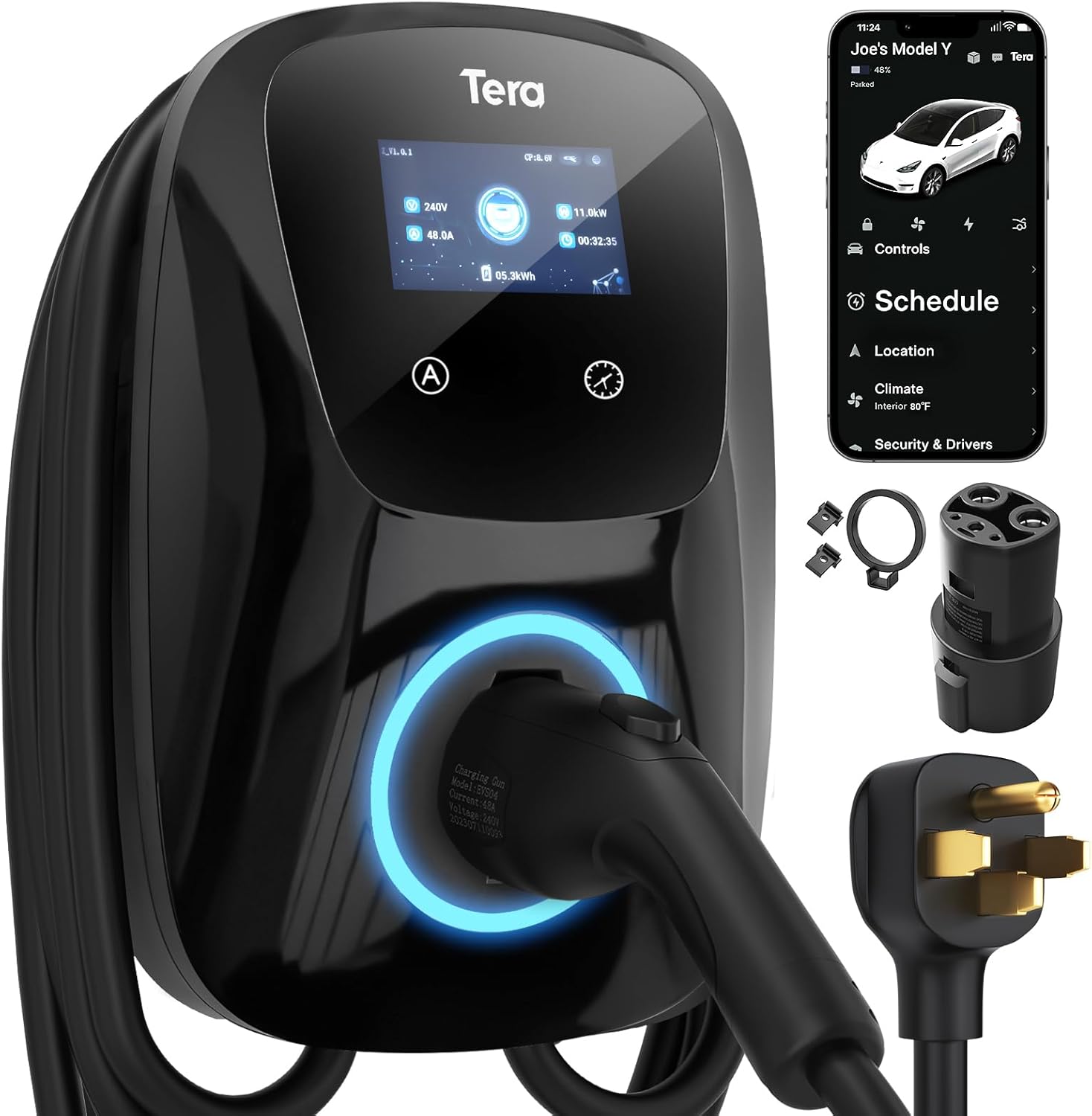
Image 1.1: Tera Level 2 EV Charger with included accessories.
2. Коопсуздук маалыматы
Травмалардын же зыяндын алдын алуу үчүн ар дайым төмөнкү коопсуздук эрежелерин сактаңыз:
- Кесиптик орнотуу: Орнотуу бардык жергиликтүү жана улуттук электр эрежелерине ылайык квалификациялуу электрик тарабынан жүргүзүлүшү керек.
- Негиздөө: Ensure the charger is properly grounded to prevent electrical shock.
- Суу жана ным: Do not operate the charger if it is visibly damaged or exposed to excessive moisture. While the unit is IP65 rated for outdoor use, avoid submerging it.
- Кабелдин бүтүндүгү: Regularly inspect the charging cable for any signs of wear, cuts, or damage. Do not use a damaged cable.
- Балдар жана үй жаныбарлары: Иштеп жаткан учурда балдарды жана үй жаныбарларын заряддоочу жерден алыс кармаңыз.
- Шашылыш токтотуу: Familiarize yourself with the location of your electrical panel's circuit breaker for the charger in case an emergency shutdown is required.
- Вентиляция: Иштеп жаткан учурда заряддагычтын айланасында жетиштүү вентиляцияны камсыз кылыңыз.
The Tera EV Charger is ETL Certified, indicating compliance with North American safety standards. This certification is equivalent to UL for home insurance requirements, signifying the manufacturer's commitment to high safety standards.

Image 2.1: ETL Certification and integrated safety protections.
3. Пакеттин мазмуну
Орнотууну улантуудан мурун пакетте бардык элементтер бар экенин текшериңиз:
- Tera Electric Vehicle Charger Unit
- Колдонуучунун Колдонмосу (бул документ)
- Монтаждоо плитасы
- Бурамалар топтому
- Куралдар (орнотуу үчүн)
- J1772 to Tesla Adapter with Lock
- Cable Holder for Tesla

Image 3.1: Contents of the Tera EV Charger package.
4. Орнотуу жана орнотуу
The Tera EV Charger is designed for wall-mounted installation. Follow these general steps:
- Жайгашкан жерди тандоо: Select a suitable location near your parking area, ensuring it is within reach of your vehicle's charging port and a dedicated 240V outlet (NEMA 14-50). The 25-foot cable provides flexibility.
- Плитаны орнотуу: Unscrew the mounting plate from the charger unit. Position the mounting plate on the wall at the desired height and mark the drilling points.
- Коопсуз монтаждоо плитасы: Drill pilot holes and securely fasten the mounting plate to the wall using the provided screws and anchors.
- Attach Charger Unit: Carefully align the charger unit with the mounted plate and slide it into place. Secure it with the anti-theft screw.
- Туташуу кубаты: Plug the charger's NEMA 14-50 plug into the dedicated 240V outlet.
- Кабелдик башкаруу: Use the provided cable holder to neatly store the charging cable when not in use.
For detailed electrical wiring and circuit breaker requirements, consult a certified electrician. The unit is IP65 rated, making it suitable for both indoor and outdoor installation, capable of withstanding temperatures from -22°F to 122°F.

Image 4.1: Installation steps for the Tera EV Charger.

Image 4.2: The charger's IP65 rating ensures durable performance in various weather conditions.
5. Иштөө нускамалары
The Tera EV Charger offers both manual and app-based control for charging sessions.
5.1. Баштапкы орнотуу жана заряддоо
Before plugging the charger into your vehicle, it is recommended to configure the desired current and schedule settings on the unit or via the app. Plugging it in first will activate a plug-and-play mode, which may not utilize scheduled settings.

Image 5.1: Configure settings before connecting to the vehicle.
5.2. Manual Current Adjustment and Scheduling
The charger unit features a touch screen interface for direct control:
- Учурдагы тууралоо: Use the 'A' button on the unit to cycle through available current settings (e.g., 24A, 32A, 40A, 48A). Select the appropriate amperage for your vehicle and electrical circuit.
- Графиктин жөндөөсү: Use the clock icon button to set a charging schedule, allowing you to define charging start times for up to 12 hours in advance.

Image 5.2: Touch screen controls for current and schedule.
5.3. App-Based Control and Scheduling
For enhanced convenience, the Tera EV Charger can be controlled via a dedicated mobile application. This allows for remote management of charging sessions:
- Кубаттоону баштоо/токтотуу: Initiate or terminate charging remotely.
- Токту тууралоо: Заряддоону өзгөртүңүз amperage from your mobile device.
- Заряддоо графиги: Set detailed charging schedules to optimize for off-peak electricity rates or specific departure times.
- Монитор заряддоо: View real-time charging status and energy consumption.

Image 5.3: App interface for remote charging control.

Image 5.4: Visual representation of scheduled charging for cost efficiency.
5.4. Connecting to Your Vehicle
- Ensure the charger is powered on and any desired settings (current, schedule) are configured.
- For Tesla vehicles, attach the J1772 to Tesla adapter to the charger's J1772 connector.
- Insert the charging connector (or adapter) firmly into your vehicle's charging port.
- The charger will begin the charging process according to your settings or immediately if in plug-and-play mode.
Эскертүү: Hybrid vehicles may automatically reduce charging current based on their maximum allowable current, regardless of the charger's setting.
6. Өзгөчөлүктөрү
- Жалпы шайкештик: Fully upgraded for seamless compatibility with all Tesla models (using the included adapter) and J1772 standard electric vehicles.
- Тез кубаттоо: Delivers up to 48A output, providing rapid Level 2 charging at approximately 46 miles of range per hour.
- Жөнгө салынуучу ток: Manually select charging current from 24A, 32A, 40A, or 48A to suit your vehicle's needs and home electrical capacity.
- Узартылган кабель узундугу: A 25-foot premium charging cable offers ample reach for convenient charging in various locations.
- Туруктуу жана аба ырайы: IP65 rated for water and dust resistance, ensuring reliable operation in diverse environmental conditions, from extreme cold (-22°F) to high heat (122°F).
- Комплекстүү коопсуздук: ETL certified with multiple protection features including overvoltage, undervolvoltage, overload, overtemperature, ground fault, earth leakage, and short circuit protection.

Image 6.1: High-speed Level 2 charging capabilities.

Image 6.2: The 25-foot cable provides extensive reach for charging.
7. Техникалык шарттар
| Спецификация | Нарк |
|---|---|
| Бренд | Тера |
| Модель номери | ZB04-U011K series |
| Ampөчүрүү | 48 Amps (Adjustable) |
| Output Voltage | 240 вольт (AC) |
| Ватtage | 11.5 кВт.саат |
| Кабелдин узундугу | 25 фут |
| Туташтыргыч түрү | J1772 (with Tesla adapter included) |
| Электр сайгыч | NEMA 14-50 |
| IP рейтинги | IP65 |
| Иштөө температурасы | -22°F – 122°F (-30°C – 50°C) |
| Сертификаттар | ETL, CE, TÜV, FCC |
| Элемент Салмагы | 20 фунт (болжол менен 9.1 кг) |
| Продукциянын өлчөмдөрү | 22 x 16 x 12 дюйм (болжол менен 56 x 41 x 30 см) |
8. Кыйынчылыктарды
If you encounter issues with your Tera EV Charger, consider the following common troubleshooting steps:
- Кубат жок: Check the circuit breaker for the outlet. Ensure the NEMA 14-50 plug is fully inserted.
- Кубаттоо башталбай жатат: Verify that the charging connector is securely plugged into the vehicle's port. Check the charger's display for error messages. Ensure the vehicle is ready to accept a charge.
- Жай кубаттоо: Confirm the current setting on the charger or app. Ensure your vehicle is not limiting the charging rate.
- Ката көрсөткүчтөрү: The charger features LED indicators to communicate status and errors. Refer to the table below for common indicator meanings.
| Индикатордун абалы | Мааниси |
|---|---|
| Blue (Always on) | Жанымда бол |
| Green (Always on) | Insert the Charger |
| Green (Flashes every 1S) | Заряддоо |
| Red (Always on) | CP Anormal |
| Red (Flashes every 1S) | Over/Under Voltage |
| Red (Flashes every 2S) | Жер жаракасы |
| Red (Flashes 3S ON, 3S OFF) | Ашыкча ток коргоо |
| Purple (Flashes every 1S) | Leaking Protection |
| Purple (Flashes every 2S) | Ашыкча температурадан коргоо |
| Purple (Flashes every 4S) | Адгезиядан коргоо |

Image 8.1: LED indicator light meanings for troubleshooting.
Эгер көйгөйлөр чечилбесе, кардарларды колдоо кызматына кайрылыңыз.
9. Техникалык тейлөө
Regular maintenance helps ensure the longevity and optimal performance of your EV charger:
- Тазалоо: Periodically wipe the charger unit and cable with a soft, damp кездеме. Катуу химиялык заттарды же абразивдүү тазалагычтарды колдонуудан алыс болуңуз.
- Кабелдик текшерүү: Routinely check the charging cable and connector for any signs of damage, fraying, or discoloration. Replace if damaged.
- Сактагыч: When not in use, store the charging cable neatly using the provided cable holder to prevent kinks or damage.
- Курчап турган чөйрөнү коргоо: While the unit is weatherproof, ensure it is not continuously exposed to extreme conditions beyond its operating limits.
10. Кепилдик жана колдоо
The Tera EV Charger comes with a 2 жылдык кепилдик, reflecting the manufacturer's commitment to quality and reliability. For warranty claims or technical assistance, please contact Tera customer support.
Байланыш маалыматы:
- Электрондук почта: cs@tera-innovation.com
- Webсайт: https://www.tera-innovation.com
- Телефон: +1 (626)438-1404

Image 10.1: Certifications and 2-year warranty information.


