1. Киришүү
The ORICO R40 External SSD is a high-performance portable storage device designed for rapid data transfer and reliable storage. It features compatibility with Thunderbolt 3, Thunderbolt 4, and USB4.0 interfaces, offering speeds up to 40Gbps. This manual provides instructions for the proper setup, operation, and maintenance of your ORICO R40 SSD.
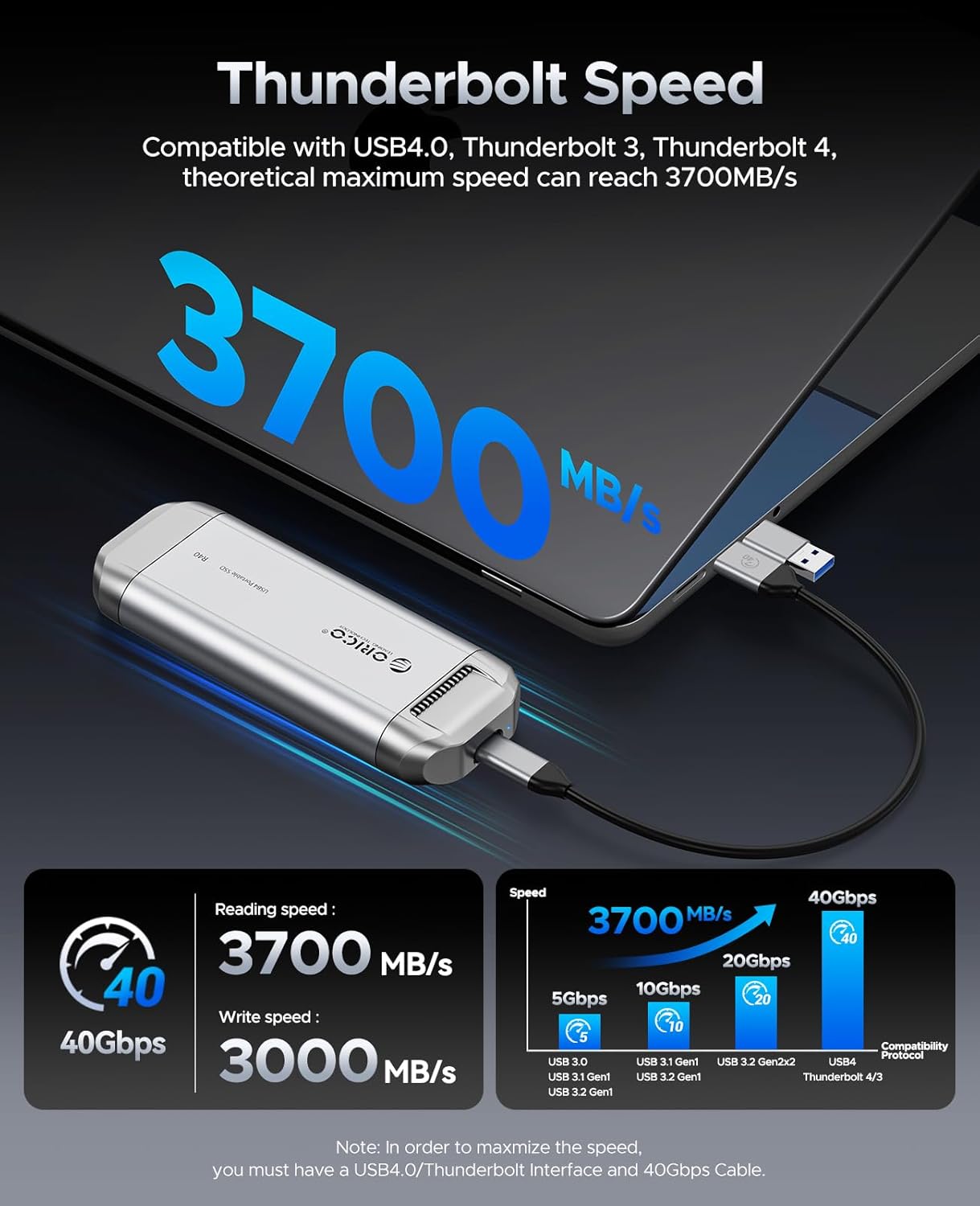
Image: The ORICO R40 External SSD, a compact and durable portable storage device.
2. Пакеттин мазмуну
Пакетте бардык буюмдар бар экенин текшериңиз:
- ORICO R40 External SSD (1TB, 2TB, or 4TB model)
- 2-in-1 USB-A and USB-C Cable
- Колдонуучунун Колдонмосу (бул документ)
3. Орнотуу нускамалары
3.1 SSD туташтыруу
- Locate the 2-in-1 USB-A and USB-C cable provided with your ORICO R40 SSD.
- Connect the USB-C end of the cable to the USB-C port on the ORICO R40 SSD.
- Connect the other end of the cable (USB-C or USB-A, depending on your device) to an available port on your computer, smartphone, tablet, or other compatible device.
- Ensure the connection is secure. The SSD should be recognized by your operating system automatically.

Image: The ORICO R40 SSD connected to a laptop, illustrating its broad compatibility with USB-A and USB-C devices.
3.2 Initializing and Formatting (If Required)
For new SSDs, or if the SSD is not recognized, you may need to initialize and format it. This process varies by operating system:
- Windows: Open Disk Management (Right-click "This PC" > "Manage" > "Disk Management"). Locate the ORICO R40 SSD, initialize it (GPT recommended for larger drives), and then create a new simple volume, formatting it with NTFS or exFAT.
- MacOS: Open Disk Utility (Applications > Utilities > Disk Utility). Select the ORICO R40 SSD, click "Erase," choose a name, format (APFS or Mac OS Extended (Journaled)), and scheme (GUID Partition Map).
- Linux: Use disk management tools like GParted or
fdisk/mkfscommands to partition and format the drive.
Note: Formatting an SSD will erase all data on it. Back up any important data before proceeding.
4. Иштөө нускамалары
4.1 Маалыматтарды өткөрүү
өткөрүп берүү үчүн files, simply drag and drop them to and from the ORICO R40 SSD, similar to any other external drive. For optimal performance, ensure your host device supports Thunderbolt 3/4 or USB4.0 and use the provided cable.

Image: A user editing video on a laptop, demonstrating the ORICO R40 SSD's capability for fast data transfer in professional workflows.
4.2 Speed and Performance
The ORICO R40 SSD is capable of theoretical maximum speeds of up to 3700MB/s (read) and 3000MB/s (write) when connected to a compatible Thunderbolt 3/4 or USB4.0 port with a 40Gbps cable. Actual speeds may vary based on your system configuration, file types, and operating environment.

Image: Illustration of the ORICO R40 SSD's Thunderbolt speed, showing up to 3700MB/s read and 3000MB/s write speeds.
4.3 Коопсуз алып салуу
Always safely eject the SSD from your operating system before physically disconnecting it to prevent data corruption. This is typically done by right-clicking the drive icon and selecting "Eject" (Windows) or dragging the drive icon to the Trash (macOS).
5. Техникалык тейлөө
5.1 Муздатуу системасы
The ORICO R40 SSD incorporates a built-in cooling fan and an aluminum alloy housing to maintain optimal operating temperatures during intensive use. Ensure that the ventilation openings are not obstructed to allow for proper airflow.

Сүрөт: Ички view of the ORICO R40 SSD highlighting the cooling fan and aluminum alloy shell for efficient heat dissipation.
5.2 Жалпы кам көрүү
- Keep the SSD clean and free from dust. Use a soft, dry cloth for cleaning.
- Avoid exposing the SSD to extreme temperatures, direct sunlight, or high humidity.
- While the device is designed to be durable, avoid dropping it or subjecting it to strong impacts.
6. Кыйынчылыктарды
6.1 SSD Not Recognized
- Кабель туташуусун текшерүү: Ensure the 2-in-1 USB-C cable is securely connected to both the SSD and your device. Try a different port on your device.
- Башка кабелди колдонуп көрүңүз: If available, test with another compatible USB4.0 or Thunderbolt cable to rule out a faulty cable.
- Дискти башкарууну (Windows) / Диск утилитасын (macOS) текшериңиз: Verify if the drive appears there. If it does, it might need initialization and formatting (refer to Section 3.2).
- Түзмөктү кайра иштетүү: Кээде компьютериңизди же түзмөгүңүздү жөнөкөй өчүрүп-күйгүзүү таануу көйгөйлөрүн чече алат.
- Шайкештик: Ensure your device's port supports the required bandwidth (Thunderbolt 3/4 or USB4.0 for optimal performance). Older USB standards may have limited compatibility or performance.
6.2 Жай өткөрүү ылдамдыгы
- Verify Port Type: For maximum speeds (up to 3700MB/s), your device must have a Thunderbolt 3, Thunderbolt 4, or USB4.0 port. Connecting to a standard USB 3.0/3.1/3.2 port will result in lower speeds.
- Берилген кабелди колдонуңуз: Always use the original 2-in-1 USB-C cable or another certified 40Gbps cable. Lower quality or incompatible cables can limit speed.
- Системдик жүктөө: Компьютериңиздеги CPUнын көп колдонулушу же башка фондук процесстер маалымат берүү ылдамдыгына таасир этиши мүмкүн.
- File Түрү жана өлчөмү: Көптөгөн майда которуулар files, адатта, бир нече чоң маалыматтарды өткөрүп берүүгө караганда жайыраак files.
- SSD Temperature: While the R40 has a cooling system, prolonged heavy use in a hot environment might lead to thermal throttling, reducing speeds. Ensure proper ventilation.
6.3 Overheating or Fan Noise
- Вентиляция: Ensure the SSD is placed on a hard, flat surface and that its ventilation grilles are not blocked.
- Кадимки операция: The built-in fan operates to keep the SSD cool during high-performance tasks. Some fan noise is normal. If the noise is excessive or unusual, contact support.
- Колдонулбаганда ажыратыңыз: If the fan noise or warmth is bothersome when the drive is idle, disconnect it from your device.
7. Техникалык шарттар
| Өзгөчөлүк | Деталь |
|---|---|
| Модел | R40 Series (R40-1TB, R40-2TB, R40-4TB) |
| Санариптик сактоо сыйымдуулугу | 1TB, 2TB, 4TB (depending on model) |
| Катуу диск интерфейси | Thunderbolt |
| Байланыш технологиясы | Thunderbolt, USB |
| Theoretical Max Read Speed | 3700 МБ/сек чейин |
| Theoretical Max Write Speed | 3000 МБ/сек чейин |
| Шайкештик | Thunderbolt 3, Thunderbolt 4, USB4.0, USB-C, USB-A (with included cable) |
| Материал | Алюминий эритмеси, ABS |
| Өзгөчөлүктөр | Portable, Built-in Cooling System |
| Элемент Салмагы | Болжол менен 3.17 унция (90 грамм) |
| Өлчөмдөр | Болжол менен 7.28 x 4.25 x 1.26 дюйм (18.5 x 10.8 x 3.2 см) |
8. Кепилдик жана колдоо
8.1 Кепилдик маалыматы
ORICO products typically come with a limited manufacturer's warranty. Please refer to the warranty card included in your product packaging or visit the official ORICO webаймагыңызга жана продукт моделиңизге тиешелүү кепилдик шарттары жана деталдуу шарттары үчүн сайтты караңыз. Кепилдик дооматтары үчүн сатып алганыңызды тастыктаган документти сактап коюңуз.
8.2 Кардарларды колдоо
For technical assistance, troubleshooting, or product inquiries, please contact ORICO customer support through their official website. You can usually find contact information, FAQs, and driver downloads on the support section of the ORICO webсайт.
Расмий ORICO Webсайт: www.oricotech.com


