1. Продукт бүтүп калдыview
The Lorex 4MP Pan & Tilt Indoor Smart Security Camera (Model: AZT2KIDPT-E) is a wireless 2K Wi-Fi camera designed for indoor surveillance. It features person detection, a privacy mode, two-way talk functionality, and smart home compatibility. With its 360° pan and tilt view, it offers comprehensive coverage for your indoor spaces. The camera includes a 16GB Micro SD card for local storage, eliminating the need for monthly fees.

Figure 1.1: Lorex 4MP Pan & Tilt Indoor Smart Security Camera, including its retail packaging and the bundled 16GB Micro SD card.
2. Эмнелер камтылган
Төмөндө тизмеленген бардык компоненттер пакетиңизде бар экенин текшериңиз:
- Ички Wi-Fi камерасы
- 16 ГБ MicroSD карта
- Power Cable & Adapter
- Mounting Bracket & Template
- Camera Mounting Kit & Quick Start Guide

Figure 2.1: Contents of the Lorex camera package, showing the camera, power supply, 16GB MicroSD card, mounting hardware, and quick start guide.
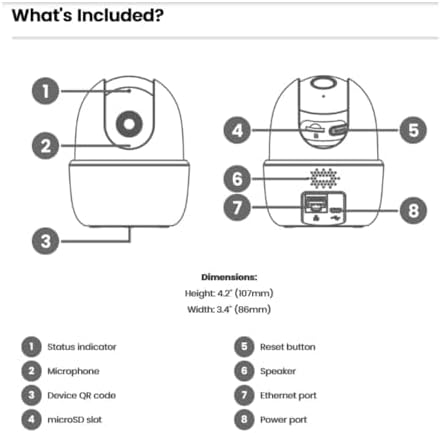
Figure 2.2: Detailed diagram of the camera's components and their functions, including ports and indicators.
3. Негизги өзгөчөлүктөрү
- Адамды аныктоо: Receive notifications when a person is detected, minimizing unnecessary alerts.
- Эки тараптуу сүйлөшүү: Communicate with individuals near the camera using the Lorex Home app.
- Панорама жана жантайтуу: The camera swivels horizontally and tilts vertically for expanded coverage. Digital zoom is available via the Lorex app. Night vision extends up to 32ft (10m).
- Smart Home Monitoring: Plug and Play setup with compatibility for Alexa and Google Assistant. Operates on 2.4 GHz Wi-Fi networks.
- Жергиликтүү сактагыч: Secure your footage with the included 16GB MicroSD card (upgradable to 256GB), with no monthly fees.

Figure 3.1: Visual comparison demonstrating the enhanced clarity and detail of 2K Quad HD resolution compared to 1080p.

Figure 3.2: The camera's pan and tilt feature allows for a 360° view, providing extensive coverage of your indoor environment.

Figure 3.3: Smart AI Motion Detection provides instant alerts, such as when a person is detected in the camera's view.

Figure 3.4: Enable Privacy Mode through the Lorex app to temporarily disable recording and live view for enhanced privacy.

Figure 3.5: The camera supports local storage via a MicroSD card, ensuring your footage is kept private and secure without recurring fees.

Figure 3.6: The 2-Way Talk feature allows for instant communication through the camera, enabling you to hear and speak to those on the other end.
4. Орнотуу колдонмосу
Follow these steps to set up your Lorex 4MP Pan & Tilt Indoor Smart Security Camera:
- Lorex Home тиркемесин жүктөп алыңыз: Издөө "Lorex Home" in your smartphone's app store (available for Android and iOS).
- Каттоо эсебин түзүү: Lorex Home колдонмосун ачып, жаңы аккаунт түзүү же бар аккаунтка кирүү үчүн экрандагы көрсөтмөлөрдү аткарыңыз.
- Камераны күйгүзүү: Connect the provided power cable and adapter to the camera and plug it into a power outlet. The camera will power on and initiate its startup sequence.
- Түзмөк кошуу: In the Lorex Home app, tap the '+' icon to add a new device. Select your camera model from the list.
- QR кодун сканерлөө: Use your phone's camera to scan the QR code located on the bottom of the camera (refer to Figure 2.2).
- Wi-Fi'га туташуу: Follow the app's prompts to connect the camera to your home Wi-Fi network. Ensure you are connecting to a 2.4 GHz Wi-Fi band.
- Mount the Camera (Optional): If desired, use the included mounting bracket and kit to securely install the camera in your preferred indoor location.
- Толук орнотуу: Once connected, the app will guide you through any final setup steps, including naming your camera and adjusting initial settings.
5. Иштөө нускамалары
Utilize the Lorex Home app to control and manage your camera:
- Live View: Access the live video feed from your camera anytime, anywhere.
- Панорамалоо жана кыйшайтуу башкаруусу: Камеранын багытын алыстан тууралоо үчүн колдонмодогу багыттоочу башкаруу элементтерин колдонуңуз viewing angle (360° pan and tilt).
- Digital Zoom: Pinch to zoom on the live view to get a closer look at details.
- Эки тараптуу сүйлөшүү: Tap the microphone icon in the app to speak through the camera's speaker and hear audio from the camera's microphone.
- Купуялык режими: Activate Privacy Mode via the app to temporarily disable video and audio recording for personal moments.
- Адамды аныктоо: Configure motion detection settings to specifically alert you when a person is detected.
- Жергиликтүү жаздыруу: Footage is automatically recorded to the installed 16GB MicroSD card upon event detection. You can review recorded events through the app's timeline.
- Түнкү көрүнүш: The camera automatically switches to night vision in low-light conditions, providing clear black and white video up to 32 feet.
Video 5.1: Demonstration of the Lorex W462 camera's panning capabilities, showcasing its wide field of view.
6. Техникалык тейлөө
To ensure optimal performance and longevity of your Lorex camera:
- Тазалоо: Камера линзасын жана корпусун жумшак, кургак чүпүрөк менен акырын сүртүңүз. Катуу химиялык заттарды же абразивдүү тазалоочу каражаттарды колдонуудан алыс болуңуз.
- Программалык камсыздоонун жаңыртуулары: Regularly check the Lorex Home app for available firmware updates. Updates often include performance improvements and security enhancements.
- MicroSD картасын башкаруу: Periodically check the storage status of your MicroSD card in the app. While the camera overwrites old footage, you may want to back up important recordings.
- Тармактын туруктуулугу: Ensure your Wi-Fi network is stable and provides a strong signal to the camera for consistent performance.
7. Кыйынчылыктарды
If you encounter issues with your Lorex camera, refer to the following common solutions:
| Көйгөй | Мүмкүн чечим |
|---|---|
| Камера Wi-Fi'га туташпай жатат: |
|
| Сүрөттүн сапаты начар: |
|
| Two-way talk echo or distortion: |
|
| Camera loses connectivity intermittently: |
|
For further assistance, visit the Lorex support webсайтка же кардарларды тейлөөгө кайрылыңыз.
8. Техникалык шарттар
| Өзгөчөлүк | Деталь |
|---|---|
| Бренд | lorex |
| Модель номери | AZT2KIDPT-E |
| Байланыш технологиясы | WiFi (2.4 GHz band only) |
| Видео тартуунун резолюциясы | 2K |
| Өзгөчөлүктөр | Adjustable, Night Vision, PTZ Control, Two-Way Audio, Person Detection |
| Каналдардын саны | 1 |
| Эстутум сактоо сыйымдуулугу | 16 GB (MicroSD card included, upgradable to 256GB) |
| Түс | Ак |
| Power Source | Электр зымдары |
| Элементтин өлчөмдөрү (L x W x Y) | 5 x 6 x 5 дюйм |
| Операциялык системанын шайкештиги | Android, iOS |
| Сунушталган Колдонуулар | Indoor |
| талаасы View | 125 ° (диагональ) |
| Түнкү көрүү диапазону | 32 футка (10 м) чейин |
| Frame Rate | 30 кадр/сек |
| Жазуу режими | Event, Manual |
| Оптикалык сенсор технологиясы | CMOS |
| Аппараттык интерфейс | 802.11 ac/b/g/n |
| Линзанын түрү | Оңдолду |
| Элемент Салмагы | 1.04 фунт |
9. Кепилдик жана колдоо
Кепилдик жана техникалык колдоо боюнча толук маалымат алуу үчүн, расмий Lorex сайтына кириңиз website or contact their customer service. You can find more resources and contact options at the Lorex Brand Store on Amazon.


