1. Киришүү
The Amazon Basics Thunderbolt4/USB4 Pro Docking Station is designed to expand the connectivity of your laptop, providing a single solution for multiple peripherals, external displays, and power delivery. This docking station is ideal for professionals and creators who require high-speed data transfer, advanced display capabilities, and efficient power management.
2. Коопсуздук маалыматы
- Ensure the docking station is placed on a stable, flat surface.
- Аппаратты сууга, нымдуулукка же экстремалдык температурага тийгизбеңиз.
- Берилген кубат адаптерин жана кабелдерин гана колдонуңуз.
- Keep ventilation openings clear to prevent overheating. When fully loaded, the docking station may reach 122°F/50°C, which is normal for such products.
- Аппаратты түшүрүүдөн же катуу таасирлерден сактаныңыз.
3. Пакеттин мазмуну
Пакетиңизде бардык буюмдар бар экенин текшериңиз:
- Thunderbolt 4 док станциясы
- Thunderbolt 4 кабели
- Кубаттуу адаптер
- Ыкчам орнотуу көрсөтмөлөрү
4. Продукт бүтүп калдыview
The Amazon Basics Thunderbolt4/USB4 Pro Docking Station offers a variety of ports to enhance your workstation setup.

4.1-сүрөт: Алдыңкы жана арткы View of the Docking Station with Port Labels. This image highlights the various input and output ports available on the docking station, including Thunderbolt 4, USB-A, HDMI, Ethernet, and the SD card slot.
Алдыңкы порттор:
- SD карта уячасы: For high-speed data transfer from SD cards.
- USB-A 3.2 (10Gbps): USB-A түзмөктөрүн туташтыруу үчүн.
- 3.5 мм аудио уячасы: Наушник же динамиктер үчүн.
- Thunderbolt 4/USB-C (To Host): The primary connection to your laptop, supporting 96W Power Delivery.
Арткы порттор:
- DC IN: Power input from the provided adapter.
- HDMI 2.1 Output: Supports up to 8K@30Hz display.
- 2x Thunderbolt 4/USB-C (40Gbps, 15W max charging, 4K@60Hz display): For connecting additional Thunderbolt devices or external displays.
- Ethernet RJ45 (Up to 2.5Gbps): For high-speed wired network connection.
- 2x USB-A 3.1: For connecting additional USB-A devices.
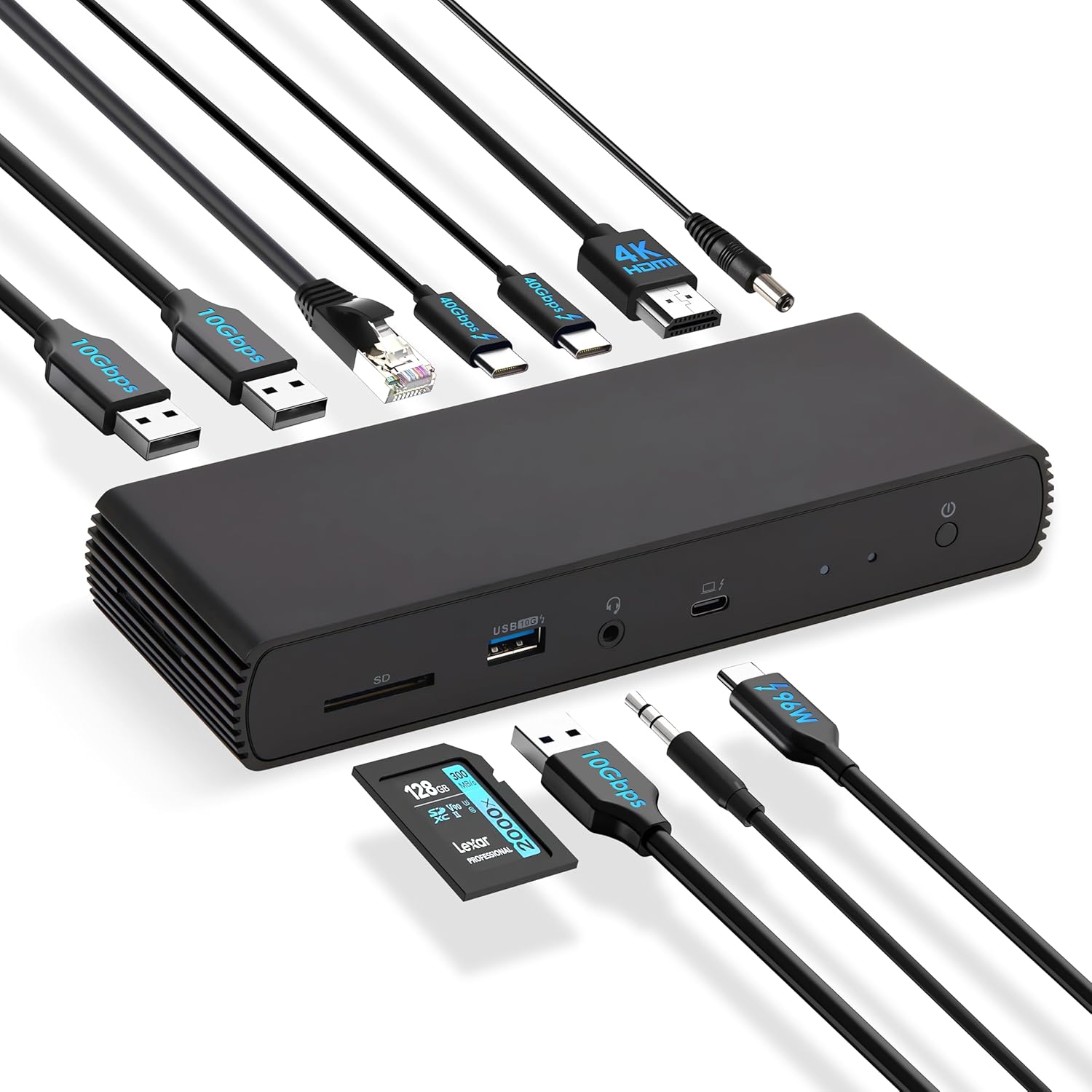
4.2-сүрөт: The docking station connected to various peripherals and a laptop, demonstrating its comprehensive connectivity options.
5. Орнотуу
Follow these steps to set up your Amazon Basics Thunderbolt4/USB4 Pro Docking Station:
- Туташуу кубаты: Connect the provided power adapter to the "DC IN" port on the rear of the docking station, then plug it into a wall outlet.
- Ноутбукка туташуу: Use the provided black Thunderbolt 4 cable to connect the "Thunderbolt 4/USB-C (To Host)" port on the front of the docking station to a Thunderbolt 4 port on your laptop.
- Туташуу дисплейлери:
- For a single 8K@30Hz display, connect your monitor to the HDMI 2.1 port.
- For dual 4K@60Hz displays, connect your monitors to the two Thunderbolt 4 USB-C ports on the rear.
- Эскертүү: Verify your laptop's Thunderbolt ports support dual 4K@60Hz output. Ensure your graphics card has the latest drivers. Confirm your monitors support 4K@60Hz display. Use high-quality Thunderbolt 4 or USB4 cables for connection (not included for monitors). Avoid connecting the HDMI port first to prevent resolution downgrade due to bandwidth limitations.
- Перифериялык түзүлүштөрдү туташтыруу: Connect your USB devices (keyboard, mouse, external drives), Ethernet cable, and audio devices to the corresponding ports on the docking station.
- Күйгүзүү: Press the power button on the docking station. Ensure the Green Power LED and Blue Thunderbolt LED turn on.
Видео 5.1: How to Use the Amazon Basics Thunderbolt4/USB4 Pro Docking Station. This video provides a visual guide to connecting the docking station, including power, displays, and peripherals, and demonstrates its functionality.
If the laptop fails to detect the docking station, please ensure that your Thunderbolt 4 cable is firmly connected and wait for 60 seconds to complete the setup.
6. Иштөө нускамалары
Once set up, the docking station provides seamless integration with your laptop for various functions:
- Дисплей кеңейтүүсү: Extend or mirror your laptop's display to up to two external monitors.
- Кубат жеткирүү: The docking station supports dynamic Power Delivery (PD) up to 96W to charge your connected laptop.
- Жогорку ылдамдыктагы маалыматтарды өткөрүп берүү: Utilize the Thunderbolt 4 ports for up to 40Gbps data transfer and USB-A 3.2 ports for 10Gbps data transfer.
- Тармакка туташуу: The Ethernet RJ45 port supports up to 2.5Gbps (approximately 300 Megabytes per sec) for stable and fast wired internet access.
- Аудио туташуу: Connect your headphones or speakers via the 3.5mm audio jack.

6.1-сүрөт: Dual 4K@60Hz Display Setup. This image illustrates a laptop connected to two external monitors, showcasing the docking station's capability to support extended desktop environments for increased productivity.

6.2-сүрөт: High-Speed Data Transfer. This image visually represents the rapid data transfer capabilities of the Thunderbolt 4 connection, emphasizing its efficiency for moving large fileс тез.
7. Шайкештик
This docking station is compatible with:
- Laptops running Windows 10 OS or later which have a Thunderbolt 4 port.
- Non-M1/M2 chip MacBooks running macOS 11 (Big Sur) or later.
It is backwards compatible with Thunderbolt 3 laptops, but with limited functionality (e.g., may not support dual display).
Төмөнкүлөр менен шайкеш келбейт:
- Linux or Chrome OS laptops.
- M1/M2 chip MacBooks running macOS 10.16 or earlier.

7.1-сүрөт: Шайкештик бүттүview. This chart provides a quick reference for supported operating systems and laptop types, ensuring users can confirm device compatibility.
8. Техникалык тейлөө
Док-станцияңыздын узак мөөнөттүү иштешин жана оптималдуу иштешин камсыз кылуу үчүн:
- Тазалоо: Док станциясынын сыртын тазалоо үчүн жумшак, кургак чүпүрөктү колдонуңуз. Суюк тазалоочу каражаттарды же аэрозольдорду колдонбоңуз.
- Вентиляция: Ensure the docking station has adequate airflow around it. Do not cover the ventilation holes.
- Сактагыч: Узак убакыт бою колдонулбаган учурда, док-станцияны салкын, кургак жерде, күндүн нуру түз тийбеген жерде сактаңыз.
9. Кыйынчылыктарды
Эгерде сиз док-станцияңыз менен көйгөйлөргө туш болсоңуз, төмөнкү кеңири таралган көйгөйлөрдү жана чечимдерди караңыз:
| Көйгөй | Мүмкүн себеп | Чечим |
|---|---|---|
| Дисплейде эч кандай сигнал чыкпайт же экран жымыңдайт. | Incorrect cable connection, outdated drivers, incompatible display settings, or bandwidth limitations. | Ensure all display cables are firmly connected. Update your laptop's graphics drivers. Verify your monitors support the desired resolution (e.g., 4K@60Hz). If using dual displays, ensure your laptop's Thunderbolt ports support dual 4K@60Hz output. Avoid connecting HDMI first if using multiple displays. |
| Laptop not charging or charging slowly. | Laptop power requirements exceed 96W, or incorrect connection. | Check your laptop manufacturer's power supply specifications. If requirements exceed 96W, the docking station may activate overload protection. Ensure the provided Thunderbolt 4 cable is used and connected to the correct upstream port. |
| Docking station not detected by laptop. | Loose Thunderbolt 4 cable connection. | Ensure the Thunderbolt 4 cable is firmly connected to both the docking station and your laptop. Wait for 60 seconds for the system to recognize the device. |
| Тармактын ылдамдыгы жай. | Thunderbolt bandwidth shared across devices. | Thunderbolt bandwidth is shared across devices. Display resolution and LAN speed may decrease with multiple high-bandwidth connections. Disconnect other high-bandwidth devices if maximum LAN speed is critical. |
10. Техникалык шарттар
| Өзгөчөлүк | Деталь |
|---|---|
| Бренд | Amazon негиздери |
| Модель номери | DBD1336 |
| Өлчөмдөрү (LxWxH) | 7.86 x 2.95 x 1.23 дюйм |
| Салмагы | 2.15 фунт |
| Түс | Кара |
| Аппараттык интерфейс | USB, Thunderbolt |
| Жалпы USB порттору | 3 (USB-A) + 2 (Thunderbolt 4/USB-C) |
| Жалпы HDMI порттору | 1 2.1 (HDMI XNUMX) |
| Power Delivery | 96 Вт чейин |
| Ethernet ылдамдыгы | 2.5Gbps |
| Дисплей колдоо | Dual 4K@60Hz (via TBT4) or Single 8K@30Hz (via HDMI 2.1) |
11. Кепилдик жана колдоо
This Amazon Basics product is covered by a limited warranty. For detailed warranty information, please refer to the Warranty (PDF) document provided with your product or visit the Amazon Basics support page.
For technical support, troubleshooting assistance, or to inquire about replacement parts, please visit the Amazon customer support website or contact their customer service directly. Have your product model number (DBD1336) and purchase information ready.
Колдонуучунун колдонмосу (PDF): Бул жерден жүктөп алыңыз
Колдонуучунун колдонмосу (PDF): Бул жерден жүктөп алыңыз
Кепилдик (PDF): Бул жерден жүктөп алыңыз


