1. Продукт бүтүп калдыview
The TobenONE USB-C Docking Station is a versatile 16-in-1 solution designed to expand the connectivity of your laptop. It allows for effortless connection of multiple devices through a single USB-C cable, streamlining your workspace.

Алдыңкы жана арткы view of the TobenONE USB-C Docking Station, showcasing анын компакттуу конструкциясы жана ар турдуу порттору.
This docking station features a comprehensive array of ports, including two HDMI ports, one USB-C display port, an Ethernet port, USB-C 3.2 and USB 3.2 (10 Gbps) ports, a USB-C 3.1 (PD 20W) port, two USB 3.0 ports, two USB 2.0 ports, a USB-C PD 3.0 port for host connection, SD/microSD card slots, and a 3.5mm Mic/Audio jack. It also includes a convenient power button.
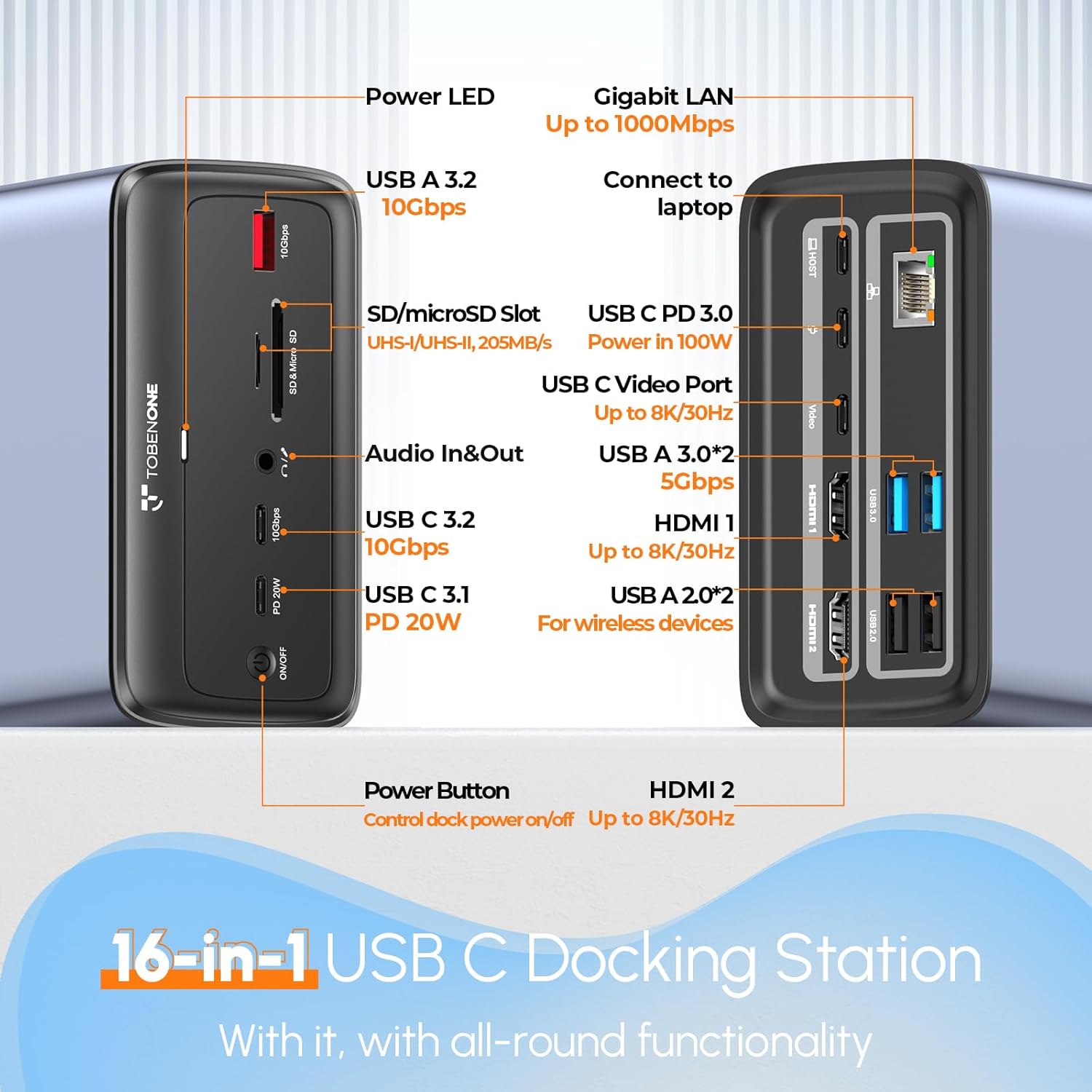
Detailed diagram of the TobenONE docking station's ports, including USB, HDMI, Ethernet, and power connections.
2. Пакеттин мазмуну
Пакетте бардык буюмдар бар экенин текшериңиз:
- 1 x TobenONE 16-in-1 USB-C Docking Station
- 1 x 100W GaN III Power Supply
- 1 x 3 фут USB-Cден USB-C кабелине
- 1 х Колдонуучунун колдонмосу (бул документ)
3. Орнотуу нускамалары
Follow these steps to set up your TobenONE USB-C Docking Station:
- Кубат булагына туташтыруу: Plug the independent 100W GaN III Charger into a power outlet. Connect the charger's USB-C cable to the 'USB C PD 3.0' port on the docking station. This provides power to the docking station and can charge your laptop up to 87W.
- Ноутбукка туташуу: Use the provided 3ft USB-C to USB-C cable to connect your laptop's full-featured USB-C/Thunderbolt 3/4 port to the 'USB C (Connect Host)' port on the docking station.
- Тышкы мониторлорду туташтыруу:
- For dual or triple display, connect your monitors to the HDMI 1, HDMI 2, and/or USB C Video Port on the docking station using appropriate cables (not included).
- Ensure your laptop's USB-C port supports DisplayPort Alternate Mode (DP Alt Mode) for video output.

Example setup showing a laptop connected to the docking station, extending display to two external monitors and one USB-C monitor.

Visual representation of a laptop connected to the docking station, supporting dual or triple 4K displays.
- Перифериялык түзүлүштөрдү туташтыруу: Plug your USB devices (keyboard, mouse, external drives, webcam, etc.) into the available USB-A (USB 3.2, USB 3.0, USB 2.0) and USB-C ports on the docking station.
- Тармакка туташуу: For a stable wired internet connection, connect an Ethernet cable from your router/modem to the RJ45 Gigabit Ethernet port on the docking station.
- Аудио туташуусу: Connect your headphones or microphone to the 3.5mm Mic/Audio jack.

Illustration of the 100W GaN III charger connected to the docking station and a laptop, demonstrating power delivery.
4. Док станциясын иштетүү
Once connected, the docking station operates on a plug-and-play basis for compatible systems. Your laptop should automatically detect the connected displays and peripherals.
Дисплей Конфигурациясы:
- Жалгыз монитор: Supports up to 8K@30Hz or 4K@120Hz (requires DP1.4 source from host).
- Кош мониторлор: Supports up to 4K@60Hz for both monitors.
- Triple Monitors: Supports dual HDMI up to 4K@60Hz and the USB-C display up to 4K@30Hz (requires DP1.4 source from host).
Adjust display settings (extend, duplicate, resolution) through your operating system's display settings.
USB маалыматтарды өткөрүү:
Док-станция маалыматтарды берүү үчүн ар кандай USB портторун сунуштайт:
- USB-C & USB-A 3.2 (10 Gbps): For high-speed data transfer of large files.
- USB 3.0 (5 Gbps): Standard high-speed data transfer.
- USB 2.0 (480 Mbps): Ideal for wireless keyboard/mouse receivers to minimize lag.

Diagram illustrating the high-speed data transfer capabilities of the docking station's USB 3.2 and USB-C 3.1 ports.
SD/TF карта уячалары:
The integrated SD4.0/TF 3.0 card slots allow for simultaneous access to files from various memory card types (Micro SD, Micro SDHC, Micro SDXC, SDHC, SDXC, RS-MMC, SD Card, MMC Micro) with speeds up to 205MB/s.

Жакын план view of the SD and MicroSD card slots, highlighting their simultaneous use for file мүмкүндүк алуу.
Gigabit Ethernet and Audio:
Enjoy a high-speed and stable wired network connection via the Gigabit Ethernet port. The 3.5mm audio jack supports both headset and microphone connections.

Image showing the Gigabit Ethernet port and 3.5mm audio jack, emphasizing stable wired connection and audio capabilities.
5. Шайкештик
This docking station is designed for optimal performance with specific operating systems and laptop port types:
- Fully compatible with Windows laptops (e.g., Dell Latitude 5570, Dell XPS 15, HP Spectre, Lenovo Yoga 920, Microsoft Surface Laptop 5, Surface Pro 7, ASUS Zephyrus M15) that feature a full-featured Type-C/Thunderbolt 3/4 port supporting USB-C DP Alternate Mode.
- Fully compatible with ChromeOS laptops with a full-featured Type-C/Thunderbolt 3/4 port.
- NOTE: This docking station is NOT COMPATIBLE with MacBook.

Compatibility chart detailing supported operating systems and display configurations.
Before purchase, please confirm that your Windows laptop has a full-featured USB-C port or Thunderbolt 3/4 which supports Power Delivery, DisplayPort, and Data transfer. You can check the specification manual provided by the manufacturer for the USB-C port on your laptop. If you cannot confirm, you may contact customer support.

Diagram explaining how to check laptop USB-C port functionality (Data only, Data+PD, Data+DP Alt, Data+PD+DP Alt, Thunderbolt).
6. Техникалык шарттар
| Өзгөчөлүк | Спецификация |
|---|---|
| Продукциянын өлчөмдөрү | 4.7 x 2.9 x 2.3 дюйм |
| Элемент Салмагы | 13.8 унция |
| Элемент моделинин номери | XYY-PD100CL |
| Түс | Grey-100W power adapter |
| Аппараттык интерфейс | Ethernet, HDMI, MicroSD, USB 3.0, USB 3.1 Type A, USB 3.1 Type C, USB Type C |
| Шайкеш түзмөктөр | Dell, HP, Surface, Asus, Acer, etc. Windows laptop and ChromeOS laptop |
| Жалпы USB порттору | 7 |
| Порттардын саны | 16 |
| Жалпы HDMI порттору | 2 |
| Ватtage (Электр энергиясын жеткирүү) | 87W (for laptop), 20W (for front USB-C port) |
7. Кыйынчылыктарды
If you encounter issues with your TobenONE docking station, please refer to the following common troubleshooting steps:
- Дисплей чыгышы жок:
- Ensure your laptop's USB-C port supports DisplayPort Alternate Mode (DP Alt Mode).
- Verify that all display cables (HDMI, USB-C) are securely connected to both the docking station and the monitors.
- Check your laptop's display settings to ensure the external monitors are detected and configured correctly (Extend, Duplicate).
- Ноутбугуңузду өчүрүп-күйгүзүп, док станциясын кайра туташтырып көрүңүз.
- Ноутбукка кубат жеткирүү жок:
- Confirm the 100W GaN III charger is properly connected to a live power outlet and the correct power input port on the docking station.
- Ensure your laptop's USB-C port supports Power Delivery (PD).
- Use the original USB-C cable provided with the docking station, as not all USB-C cables support PD.
- USB түзмөктөрү таанылбайт:
- USB түзмөгүн док станциясындагы башка USB портуна туташтырып көрүңүз.
- Ensure the docking station is receiving adequate power.
- If using a high-power device, ensure it has its own power source if required.
- Ethernet туташуу маселелери:
- Ethernet кабелинин док станциясына да, роутериңизге/модемиңизге да бекем туташтырылганын текшериңиз.
- Ноутбугуңуздун тармак жөндөөлөрүн текшериңиз.
8. Техникалык тейлөө
To ensure the longevity and optimal performance of your TobenONE USB-C Docking Station, follow these maintenance guidelines:
- Тазалоо: Use a soft, dry cloth to wipe the exterior of the docking station. Avoid using liquid cleaners or abrasive materials, which could damage the surface or internal components.
- Сактагыч: Колдонулбай турган учурда, док-станцияны салкын, кургак жерде, күндүн түз нурунан жана өтө жогорку температурадан алыс сактаңыз.
- Колдонуу: Түзмөктү этияттык менен колдонуңуз. Аны түшүрүп албоодон же катуу соккуга дуушар кылбоо керек, анткени бул ички зыянга алып келиши мүмкүн.
- Вентиляция: Ensure the docking station has adequate ventilation to prevent overheating, especially during prolonged use with multiple connected devices.
9. Кепилдик жана колдоо
The TobenONE USB-C Docking Station comes with a 24-month maintenance period from the date of purchase, ensuring reliable operation and support.
For technical assistance, troubleshooting, or warranty claims, please contact TobenONE customer service. TobenONE is committed to providing lifetime customer service.
Кардарларды тейлөө электрондук почтасы: support@tobenone.com
Please provide your product model number (XYY-PD100CL) and a detailed description of your issue when contacting support to facilitate a quicker resolution.


