1. Introduction and Overview
The Peavey FX 24 II is a professional 24-channel audio mixer console designed for live sound, studio recording, and various audio applications. It features a high-power dual DSP engine for enhanced digital effects, USB connectivity for recording and playback, 48V phantom power for condenser microphones, and comprehensive routing options including 6 auxiliary sends and 4 subgroups. This manual provides essential information for the safe and effective operation of your mixer.

Сүрөт 1.1: Алдыңкы view of the Peavey FX 24 II mixer, highlighting 20 microphone inputs and 48V phantom power capability.
2. Коопсуздук маалыматы
Please read and understand all safety instructions before operating the Peavey FX 24 II mixer. Retain this manual for future reference.
- Кубат булагы: Connect the unit only to the power supply type indicated on the unit. Ensure the power cord is not damaged or pinched.
- Вентиляция: Эч кандай желдетүүчү тешиктерди жаап албаңыз. Ашыкча ысып кетүүнүн алдын алуу үчүн аппараттын айланасында адекваттуу аба агымын камсыз кылыңыз.
- Суу жана ным: Агрегатты жамгырга же нымдуулукка дуушар кылбаңыз. Агрегаттын үстүнө суюктуктар толтурулган нерселерди койбоңуз.
- Тейлөө: Бул аппаратты өзүңүз тейлөөгө аракет кылбаңыз. Бардык тейлөөлөрдү квалификациялуу тейлөө кызматкерлерине тапшырыңыз.
- Тазалоо: Clean only with a dry cloth. Avoid using liquid cleaners.
3. Пакеттин мазмуну
Пакетте бардык буюмдар бар экенин текшериңиз:
- Peavey FX 24 II 24-Channel Professional Audio Mixer Console
- Электр кабели
- Колдонуучунун Колдонмосу (бул документ)
4. Орнотуу
4.1 Кубат туташтыруу
- Миксердин кубат которгучу OFF абалында экенин текшериңиз.
- Connect the provided power cord to the AC inlet on the rear panel of the mixer.
- Электр шнурунун экинчи учун ылайыктуу AC розеткага сайыңыз.
4.2 Аудио киргизүү байланыштары
The FX 24 II offers 24 XLR microphone inputs and line inputs for various audio sources.
- Микрофондор: Connect dynamic or condenser microphones to the XLR inputs (1-24). For condenser microphones, activate 48V phantom power as described in Section 5.2.
- Линиялык деңгээлдеги түзмөктөр: Connect instruments, keyboards, or other line-level devices to the 1/4-inch TRS/TS inputs. The mixer also features 2 stereo channels with dual mic/line inputs.
4.3 Аудио чыгаруу байланыштары
Connect your main speakers, monitors, or recording devices to the mixer's outputs.
- Негизги жыйынтыктар: Use the XLR or 1/4-inch outputs for connecting to your main PA system or powered speakers.
- Көмөкчү жөнөтүүлөр: Connect monitor speakers or external effects processors to the 6 Aux Send outputs.
- Subgroup Outputs: Utilize the 4 subgroup outputs for routing groups of channels to external devices or for sub-mixing.

Figure 4.1: Rear panel connections of the Peavey FX 24 II mixer.
4.4 USB Connection for Recording/Playback
The mixer supports USB 2.0 connectivity for digital audio streaming and recording.
- USB 2.0 "A" Port: Connect a memory stick (not included) to record directly or play back audio files.
- USB 2.0 "B" Port: Connect to your computer for streaming digital audio out or for multi-track recording.

Figure 4.2: USB and computer connectivity for the Peavey FX 24 II mixer.
5. Иштөө нускамалары
5.1 Каналды башкаруу
Each input channel features the following controls:
- УТУШ: Туташкан микрофон же линия деңгээлиндеги түзмөк үчүн киргизүү сезгичтигин тууралайт.
- EQ (эквалайзер): 3-band EQ with sweepable mid-frequency allows for precise tonal shaping.
- AUX жөнөтөт: Controls the amount of signal sent to each of the 6 auxiliary outputs.
- ПАН: Positions the channel's signal within the stereo field.
- Үнсүз: Каналдын үнүн басат.
- FADER: 100mm fader controls the channel's output level to the main mix and subgroups.
5.2 Phantom Power Activation
To power condenser microphones, activate the 48V phantom power:
- Ensure all channel faders are at their minimum position.
- Connect condenser microphones to the XLR inputs.
- табыңыз 48В ФАНТОМ КҮЧ switch (usually a global switch or per-channel, refer to the mixer's panel for exact location).
- Engage the switch. An indicator light will illuminate.
- Gradually raise the channel faders to the desired level.
Caution: Do not activate phantom power when dynamic microphones or non-phantom powered devices are connected, as this may cause damage.
5.3 Effects Processor Usage
The FX 24 II features a dual DSP engine with improved digital effects.
- Use the dedicated controls in the effects section to select and adjust various effects such as reverb, delay, chorus, etc.
- Apply effects to individual channels using the channel's FX send controls.

5.1-сүрөт: Жогорку view of the mixer, highlighting the effect program list and key features.
5.4 USB жаздыруу жана ойнотуу
- Recording to Memory Stick: Insert a USB memory stick into the USB 2.0 "A" port. Use the mixer's USB controls to initiate and manage recording.
- Playback from Memory Stick: Insert a USB memory stick with audio files. Use the mixer's USB controls to select and play back tracks.
- Computer Streaming/Recording: Connect the USB 2.0 "B" port to your computer. The mixer will function as an audio interface, allowing you to stream digital audio or record multiple tracks into your Digital Audio Workstation (DAW).
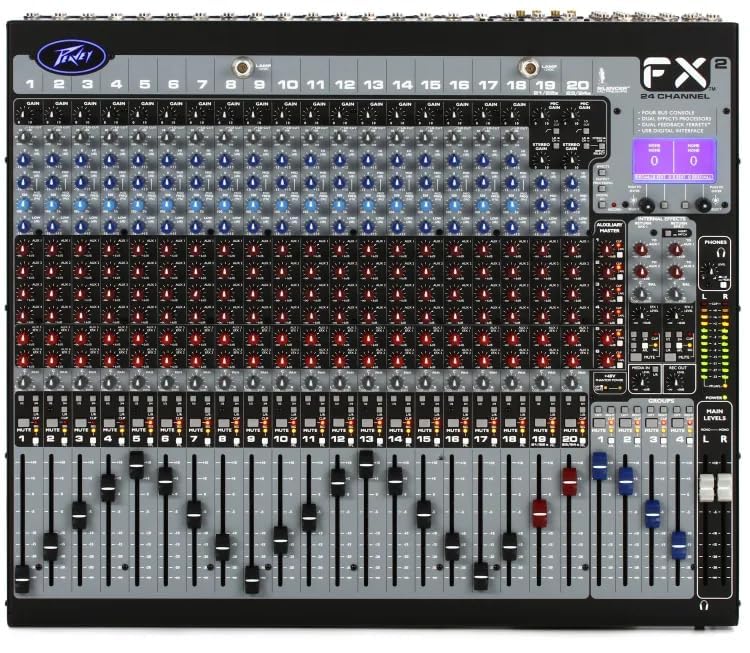
5.2-сүрөт: Детальдуу view of the mixer's control surface.
6. Техникалык тейлөө
Proper maintenance ensures the longevity and optimal performance of your Peavey FX 24 II mixer.
- Тазалоо: Regularly wipe the mixer's surface with a soft, dry, lint-free cloth. Do not use abrasive cleaners, solvents, or waxes.
- Чаңдан коргоо: When not in use, cover the mixer with a dust cover to prevent dust and debris from entering the controls and faders.
- Сактагыч: Миксерди күн нурунан жана экстремалдык температурадан алыс салкын, кургак жерде сактаңыз.
- Кабелдик башкаруу: Туташтыргычтарга жана портторго зыян келтирбөө үчүн бардык кабелдердин тыкан уюштурулганын жана чыңалуу астында эместигин текшериңиз.
7. Кыйынчылыктарды
If you encounter issues with your Peavey FX 24 II mixer, refer to the following common problems and solutions:
| Көйгөй | Мүмкүн себеп | Чечим |
|---|---|---|
| Үн чыгышы жок | Power not connected; Master fader down; Channel fader down; Mute engaged; Incorrect output connection. | Check power, raise master and channel faders, disengage mute, verify output cables. |
| Бурмаланган үн | Input gain too high; Output level too high; Damaged cable. | Reduce input gain and output levels, try a different cable. |
| Конденсатордук микрофон иштебей жатат | 48V phantom power not engaged; Faulty microphone or cable. | Engage 48V phantom power, test with another condenser mic or cable. |
| USB recording/playback issues | Incorrect USB port used; USB drive not formatted correctly; Driver issues (for computer connection). | Ensure correct USB port (A for stick, B for computer), format USB drive to FAT32, install necessary drivers for computer. |
Бул чечимдерди колдонуу аракетинен кийин көйгөй чечилбесе, кардарларды колдоо кызматына кайрылыңыз.
8. Техникалык шарттар
| Өзгөчөлүк | Деталь |
|---|---|
| Модель номери | Peavey FX 24 II |
| Каналдардын саны | 24 |
| Микрофон кириштери | 24 XLR inputs |
| фантомдук күч | 48V (for each channel input) |
| Aux жөнөтөт | 6 |
| Стерео киргизүү | 2 (with dual mic/line inputs) |
| Субгруппалар | 4 |
| Faders | 100мм |
| DSP Engine | High-power dual DSP with improved digital effects |
| EQ | 3-band with sweepable mid-frequency and variable low cut filters; 28-band GEQ/5-band PEQ (output processing) |
| USB туташуу | USB 2.0 "A" (record/playback from memory stick), USB 2.0 "B" (streaming digital out & computer recording) |
| Power Source | Электр зымдары |
| Пакеттин өлчөмдөрү | 54 x 52 x 29 см |
| Элемент Салмагы | 9.9 кг |
| Өндүрүүчү | Peavey Electronics Corporation |
| Келип чыккан өлкө | АКШ |
9. Кепилдик жана колдоо
Peavey products are designed for reliability and performance. For specific warranty information, please refer to the warranty card included with your product or visit the official Peavey webсайт.
Кардарларды колдоо:
For technical assistance, service, or parts, please contact:
- Өндүрүүчү: Peavey Electronics Corporation
- Indian Distributor/Service Partner: MX-MDR TECHNOLOGIES LIMITED
- Дарек: Plot 101, Sector 1, Gauraipada, Vasai (East), Palghar - 401208, Mumbai, INDIA.
- Электрондук почта: info@mdrelectronics.com / dipesh@mdrelectronics.com
- Байланыш номери: 9552529345 / 8805029016
- Webсайт: www.mdrelectronics.com


