1. Киришүү
This manual provides detailed instructions for the Hyperkin Pixel Art Bluetooth Controller, Miraculous Cat Noir Edition. Please read this manual thoroughly before using the product to ensure proper operation and to maximize your gaming experience. This controller is designed for use with multiple platforms, offering wireless connectivity and a comfortable, ergonomic design.
2. Продукт бүтүп калдыview
The Hyperkin Pixel Art Bluetooth Controller combines a retro aesthetic with modern functionality. It features a unique Miraculous Cat Noir design, wireless Bluetooth connectivity, and a built-in turbo function.
2.1 Негизги өзгөчөлүктөрү
- Зымсыз Bluetooth байланышы: Enjoy gaming freedom up to 30 feet away.
- Турбо функциясы: Activate rapid-fire action for enhanced gameplay.
- Retro Design with Modern Ergonomics: A classic look combined with comfortable handling for extended play sessions.
- Саякатка ыңгайлуу: Компакт дизайн жеңил көчүрүүгө мүмкүндүк берет.
- High-Quality Symmetrical Sticks: Designed for precision and responsiveness.
2.2 Controller Layout

Сүрөт 2.2.1: Фронт view of the Hyperkin Pixel Art Bluetooth Controller, Miraculous Cat Noir Edition. This image displays the D-pad, left and right analog sticks with paw print designs, A/B/X/Y buttons, Start/Select buttons, and the Cat Noir character art.

Сүрөт 2.2.2: Side view of the Hyperkin Pixel Art Bluetooth Controller, Miraculous Cat Noir Edition. This image shows the shoulder buttons (L1, R1) and triggers (L2, R2), along with the USB-C charging port and mode switch.

Сүрөт 2.2.3: Жакын план view emphasizing the controller's retro design combined with modern ergonomic features for comfortable handling.
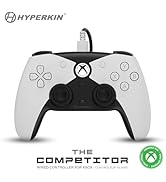
Сүрөт 2.2.4: Жакын план view showcasing the high-quality symmetrical analog sticks, designed for precise control during gameplay.
3. Орнотуу
3.1 Контроллерди заряддоо
The controller includes a built-in Lithium Polymer battery. To charge, connect the supplied Type-C cable to the controller's charging port and the other end to a USB power source (e.g., a computer USB port, a USB wall adapter). The LED indicator on the controller will show charging status and turn off when fully charged.
3.2 Bluetooth аркылуу жупташуу
To pair the controller with your device:
- Контроллер жетиштүү заряддалганын текшериңиз.
- Башкы бет баскычын басуу менен башкаруучуну күйгүзүңүз.
- Put the controller into pairing mode (refer to your device's specific instructions for Bluetooth pairing, as this may vary). Typically, this involves holding a small pairing button or a combination of buttons until the LED indicator flashes rapidly.
- On your device (Nintendo Switch, PC, Mac, Android, iOS, etc.), navigate to the Bluetooth settings.
- Издөө available devices and select "Hyperkin Pixel Art Controller" (or similar name) from the list.
- Once connected, the LED indicator on the controller will stabilize.
For Nintendo Switch, navigate to the 'Controllers' menu, then 'Change Grip/Order' to initiate pairing mode on the console.
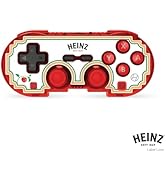
Сүрөт 3.2.1: Illustration of the controller connecting wirelessly via Bluetooth, indicating a range of up to 30 feet.
3.3 Зымдуу туташуу
The controller can also be used via a wired connection. Connect the Type-C cable from the controller to a compatible USB port on your device. This mode is often plug-and-play, requiring no additional pairing.
4. Иштөө нускамалары
4.1 Негизги башкаруу каражаттары
The controller features standard gaming buttons:
- D-под: Багыттуу киргизүү.
- Аналогдук таякчалар: Left and Right symmetrical sticks for precise movement and camera control.
- Аракет баскычтары (A, B, X, Y): Primary interaction buttons.
- Shoulder Buttons (L, R) and Triggers (ZL, ZR): Additional input buttons, typically for actions like aiming, firing, or menu navigation.
- Баштоо/Тандоо баскычтары: For in-game menus and options.
- Үй баскычы: Системанын башкы экранына кайтарат.
4.2 Турбо функциясы
The turbo function allows for rapid, repeated input of a button press without continuously pressing the button. To activate or deactivate turbo for a specific button:
- басып, кармап туруңуз Турбо баскычы.
- While holding the Turbo button, press the desired action button (e.g., A, B, X, Y, L, R, ZL, ZR) once to activate turbo for that button.
- Repeat the process (hold Turbo, press the same action button) to deactivate turbo for that button.
5. Шайкештик
The Hyperkin Pixel Art Bluetooth Controller is compatible with a wide range of gaming platforms:
- Nintendo Switch
- Nintendo Switch OLED Model
- Nintendo Switch Lite
- Windows 10/11 PC
- Mac
- Chromebook
- Android түзмөктөрү
- Apple iOS түзмөктөрү
- Steam
- Steam Deck
- ROG Ally
- Raspberry Pi
- Amazon Games/Amazon Luna
- Тесла
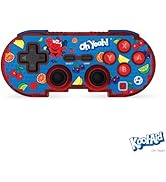
Сүрөт 5.1: Visual representation of the controller's broad compatibility across multiple gaming platforms and operating systems.
6. Техникалык тейлөө
Контроллериңиздин узак мөөнөттүү иштешин жана оптималдуу иштешин камсыз кылуу үчүн, төмөнкү техникалык тейлөө көрсөтмөлөрүн аткарыңыз:
- Тазалоо: Контроллерди сүртүү үчүн жумшак, кургак чүпүрөктү колдонуңуз. өжөр кир үчүн, бир аз гampчүпүрөктү суу менен. Катуу химиялык заттардан же абразивдүү тазалагычтардан алыс болуңуз.
- Сактагыч: Контроллерди түз күн нурунан жана экстремалдык температурадан алыс салкын, кургак жерде сактаңыз.
- Батареяга кам көрүү: Батареянын толук зарядын тез-тез кетирүүдөн алыс болуңуз. Батареянын иштөө мөөнөтүн сактоо үчүн, көпкө колдонулбаса да, контроллерди үзгүлтүксүз кубаттап туруңуз.
- Физикалык таасирлерден качыңыз: Do not drop or expose the controller to strong impacts, as this can damage internal components.
7. Кыйынчылыктарды
If you encounter issues with your Hyperkin Pixel Art Bluetooth Controller, refer to the following common problems and solutions:
| Көйгөй | Мүмкүн чечим |
|---|---|
| Контроллер күйбөйт. | Ensure the controller is charged. Connect it to a power source using the Type-C cable. |
| Контроллер Bluetooth аркылуу туташпайт. |
|
| Баскычтар жооп бербей жатат же кечигип басылып жатат. |
|
| USB charging port does not work. |
|
| Vibration is too strong or loud. | Some games or systems may offer an option to adjust or disable vibration feedback within their settings. Consult your game or system's options menu. |
8. Техникалык шарттар
| Өзгөчөлүк | Деталь |
|---|---|
| Модель номери | M01328-MTCN |
| Байланыш | Bluetooth (Wireless), USB Type-C (Wired) |
| Зымсыз диапазон | 30 метрге чейин |
| Батарея түрү | 1 Литий Полимердик батарейка (кошулган) |
| Пакеттин өлчөмдөрү | 7.4 x 5.2 x 2.4 дюйм |
| Элемент Салмагы | 9.9 унция |
| Өндүрүүчү | Гиперкин |
9. Кепилдик жана колдоо
This product is covered by the manufacturer's standard warranty. For specific warranty terms and conditions, please refer to the documentation included with your purchase or visit the official Hyperkin website. For technical support or further assistance, please contact Hyperkin customer service through their official channels.


