1. Киришүү
This manual provides comprehensive instructions for the proper setup, operation, and maintenance of the Sartorius GL2202i-2S Gold Scale. Adhering to these guidelines will ensure accurate and reliable performance of your precision weighing instrument.
2. Коопсуздук маалыматы
Жабдууга зыян келтирбөө жана жаракат алуунун алдын алуу үчүн төмөнкү коопсуздук чараларын сактаңыз:
- Operate the scale only in a stable, level environment free from excessive vibrations, drafts, and extreme temperature fluctuations.
- Do not expose the scale to corrosive chemicals or liquids.
- Ensure the power supply matches the specifications indicated on the device.
- Таразаны түшүрүүдөн же катуу соккулардан сактаныңыз.
- Only qualified personnel should perform repairs or internal adjustments.
3. Продукт бүтүп калдыview
The Sartorius GL2202i-2S is a precision gold scale designed for accurate weighing applications. Key components include the weighing pan, digital display, and control panel.
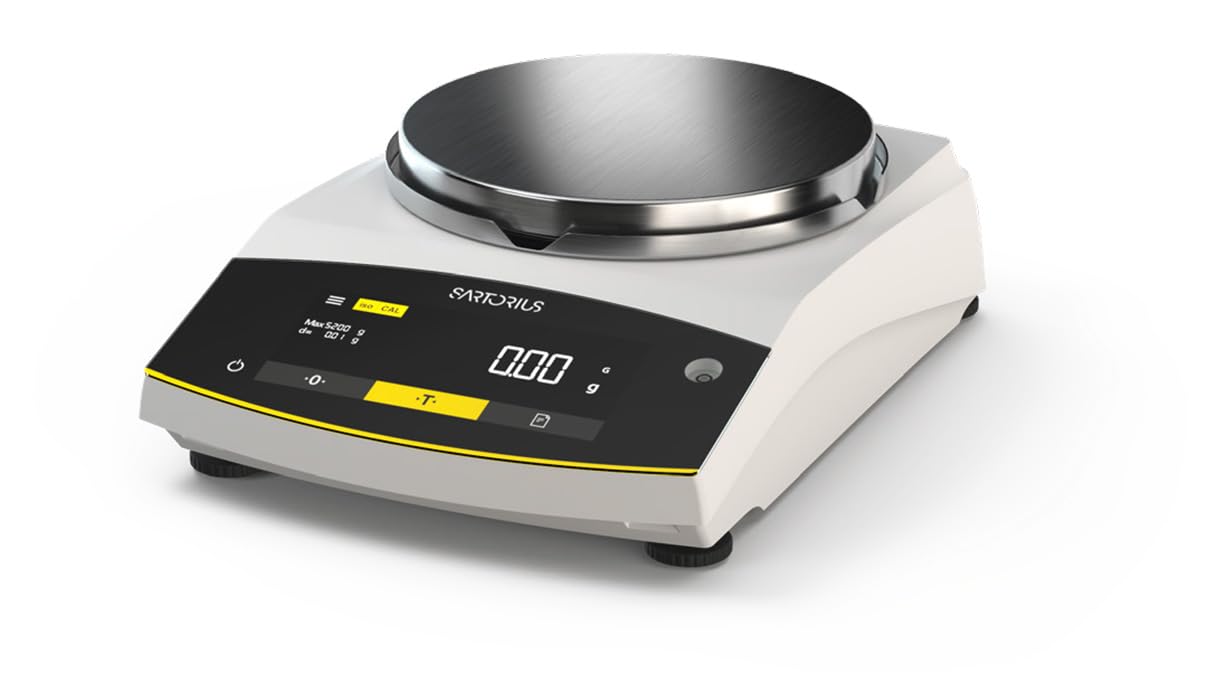
Figure 1: Sartorius GL2202i-2S Gold Scale. This image shows the scale's stainless steel weighing pan, the digital display, and the control buttons for operation.
Негизги компоненттер:
- Тараза казан: Таразалана турган буюмдарды коюу үчүн дат баспас болоттон жасалган платформа.
- Санариптик дисплей: Hybrid display (LED and touch technology) showing weight readings and operational status.
- Башкаруу панели: Buttons for power, tare, calibration, and menu navigation.
- Тегиздөө буттары: Adjustable feet to ensure the scale is perfectly level.
4. Орнотуу
4.1 Пакеттен чыгаруу
Carefully remove the scale and all accessories from the packaging. Retain the original packaging for future transport or storage.
4.2 Орнотуу
Place the scale on a firm, stable, and level surface. Avoid locations subject to:
- Direct sunlight or heat sources.
- Strong air currents (drafts from doors, windows, or air conditioning).
- Vibrations from machinery or heavy traffic.
- Rapid temperature changes.
4.3 Таразаны тегиздөө
Adjust the leveling feet located at the bottom of the scale until the air bubble in the level indicator (usually located near the display) is centered. This ensures accurate weighing results.
4.4 Кубат туташтыруу
Connect the provided power adapter to the scale's power input and then to a suitable electrical outlet. Allow the scale to warm up for at least 30 minutes after initial power-on for optimal stability.
5. Иштөө нускамалары
5.1 Күйгүзүү/өчүрүү
басыңыз Күч button (often marked with a circle and a vertical line) to turn the scale on or off. The display will show a self-test sequence before settling at zero.
5.2 Негизги тараза
- Ensure the display reads 0.00 г before placing any item on the pan.
- Таразага тартыла турган нерсени кылдаттык менен тараза казанынын ортосуна коюңуз.
- Көрсөткүчтүн турукташышын күтө туруңуз. Туруктуу көрсөткүч көрсөтүлөт.
- Буюмду көмөч казандан алып салыңыз.
5.3 Тара Функциясы
The tare function allows you to weigh items in a container by subtracting the container's weight.
- Place the empty container on the weighing pan.
- басыңыз Tare button (often marked with a 'T' or '->0<-'). The display will reset to 0.00 г.
- Таразага тартыла турган нерсени контейнерге кошуңуз. Дисплейде буюмдун таза салмагы көрсөтүлөт.
- Remove both the item and container from the pan.
6. Калибрлөө
The Sartorius GL2202i-2S features an automatic, built-in calibration and adjustment function. Regular calibration ensures the highest level of accuracy. Refer to the on-screen prompts or the scale's specific menu for initiating the automatic calibration process. Ensure the scale is stable and free from any load during calibration.
7. Техникалык тейлөө жана тазалоо
7.1 Тазалоо
To maintain the scale's performance and appearance:
- Тазалоодон мурун таразаны электр булагынан ажыратыңыз.
- Сырткы беттерин жумшак менен сүртүңүз, гamp кездеме жана жумшак жуугуч.
- Абразивдүү тазалоочу каражаттарды, эриткичтерди же катуу химиялык заттарды колдонбоңуз, анткени алар жасалгасына же ички компоненттерине зыян келтириши мүмкүн.
- Ensure no liquids enter the scale's housing or display area.
- The stainless steel weighing pan can be removed and cleaned separately with appropriate cleaning agents.
7.2 Сактоо
If storing the scale for an extended period, ensure it is clean, dry, and stored in its original packaging or a protective container in a stable environment.
8. Кыйынчылыктарды
Бул бөлүм сиз кабылышы мүмкүн болгон жалпы көйгөйлөрдү карайт. Бул жерде көрсөтүлбөгөн көйгөйлөр үчүн кардарларды колдоо бөлүмүнө кайрылыңыз.
| Көйгөй | Мүмкүн себеп | Чечим |
|---|---|---|
| Display shows "Err" or unstable readings. | Scale not level, vibrations, drafts, overload, or internal error. | Check leveling, move to a stable location, ensure no load exceeds capacity, restart the scale. |
| Scale does not power on. | Power cable disconnected, faulty outlet, or power adapter issue. | Verify power cable connection, try a different outlet, check power adapter. |
| Туура эмес окуулар. | Needs calibration, environmental factors, or dirty pan. | Perform calibration, ensure stable environment, clean weighing pan. |
9. Техникалык шарттар
- Модел: GL2202i-2S
- Бренд: Сарториус
- Capacity x Readability: 2200 гх 0.01 г
- Пан өлчөмү: 180 mm (Diameter)
- Салмагы: Болжол менен 12.00 фунт (5.44 кг)
- Дисплей түрү: Hybrid (LED and Touchscreen)
- Өзгөчө өзгөчөлүгү: Automatic, built-in calibration and adjustment function
- Түсү: Ак
10. Кепилдик жана колдоо
For warranty information, technical support, or service inquiries, please refer to the documentation provided with your purchase or contact Sartorius customer service directly. Keep your purchase receipt and model number readily available when contacting support.


