1. Киришүү
Thank you for choosing the Johgee 3 Zones Water Timer. This device is designed to automate your garden watering, providing convenience and efficiency. It features three independent programmable outlets, allowing you to manage different watering needs simultaneously. Please read this manual carefully before operation to ensure proper use and longevity of your product.

Figure 1: Johgee 3 Zones Water Timer Overview
2. Продукциянын өзгөчөлүктөрү
- 3 Independent Programmable Outlets: Control three separate watering zones from a single faucet.
- Automatic and Manual Watering Modes: Set precise schedules or initiate temporary watering without disrupting existing programs.
- Жамгырдын кечиктирүү функциясы: Pause watering schedules to conserve water during rainy periods.
- Child Safety Mode: Орнотууларды кокусунан өзгөртүүгө жол бербейт.
- Бышык жана суу өткөрбөй турган дизайн: IPX5 rated for outdoor use, featuring an upgraded aluminum alloy filter to prevent leaks.
- Окууга оңой дисплей: High-resolution screen with automatic sleep mode to save battery power.
- Батареянын узак иштөө мөөнөтү: Operates for approximately 6 months on 2 AA alkaline batteries.

Figure 2: Key Features of the Water Timer

Figure 3: Three Independent Programmable Outlets
3. Пакеттин мазмуну
- 1 x Johgee 3 Zones Water Timer (Model: FY#HCT-378)
- 1 x User Manual
Note: AA alkaline batteries are not included and must be purchased separately.
4. Орнотуу
4.1 Батареяны орнотуу
- Таймердин артындагы батарея бөлүкчөсүн табыңыз.
- Батареянын капкагын ачыңыз.
- Insert two (2) new 1.5V 'AA' alkaline batteries, ensuring correct polarity (+/-).
- Close the battery cover securely to maintain waterproof sealing.
Маанилүү: Use only new alkaline batteries. Rechargeable batteries may not provide sufficient voltagоптималдуу аткаруу үчүн e.
4.2 Таймерди туташтыруу
- Screw the timer onto your outdoor faucet (3/4" thread) by hand until it is snug. Do not overtighten.
- Connect your garden hoses or irrigation lines to the three independent outlets (A, B, C) at the bottom of the timer.

Figure 4: Battery Compartment and Drain Holes
4.3 Учурдагы убакытты орнотуу
Upon initial power-up or after battery replacement, the display will show the default time. Refer to the labeled diagram below for button functions.

Figure 5: Timer Display and Control Buttons
- басыңыз АЗЫР Убакытты орнотуу режимине өтүү үчүн баскычын басыңыз. Сааттын сандары күйүп-өчүп турат.
- колдонуу + or - саатты тууралоо үчүн баскычтар.
- Басыңыз OK саатты ырастап, мүнөт коюуга өтүү үчүн басыңыз.
- колдонуу + or - мүнөттү тууралоо үчүн баскычтар.
- Басыңыз OK to confirm the minute and save the current time.
5. Иштөө нускамалары
5.1 Automatic Watering Program
The timer allows for independent programming of each of the three zones (A, B, C).
- басыңыз A / B / C button to select the zone you wish to program (A, B, or C). The selected zone indicator will light up.
- Басыңыз OK to enter programming mode for the selected zone.
- Сугаруу узактыгын коюңуз (КАНЧА УЗАКТЫККА): The 'HOW LONG' value will flash. Use + or - to set the watering duration from 1 second to 59 seconds, or from 1 minute to 360 minutes. Press OK ырастоо үчүн.
- Сугаруу жыштыгын коюңуз (КАНЧАЛЫК ЖЫЙЫНТЫК): The 'HOW OFTEN' value will flash. Use + or - to set the frequency from 1 hour to 23 hours, or from 1 day to 15 days. Press OK ырастоо үчүн.
- Баштоо убактысын коюу (БАШТОО УБАКТЫСЫ): The 'START TIME' value will flash. Use + or - Сугаруу циклинин каалаган баштоо убактысын коюу үчүн басыңыз. OK to confirm and save the program for the selected zone.
- Repeat steps 1-5 for zones B and C if desired.
5.2 Кол менен сугаруу
Manual watering allows you to water immediately without interrupting your preset schedules.
- басыңыз A / B / C button to select the zone (A, B, C, or ALL) you wish to water manually.
- басыңыз OK button and hold for 3 seconds. The 'HOW LONG' value will flash.
- колдонуу + or - buttons to set the manual watering duration (from 1 second to 360 minutes).
- Басыңыз OK to start manual watering. The timer will automatically return to its scheduled program after the manual watering is complete.

6-сүрөт: Кол менен сугаруу жүрүп жатат
5.3 Жамгырдын кечиктирилиши режими
The rain delay function helps conserve water by pausing your watering schedule during rainy conditions.
- кармаңыз КЕЧИКТИРҮҮ button for 3 seconds. The rain delay symbol will flash on the screen.
- колдонуу + or - buttons to select the desired delay duration (e.g., 24 hours, 48 hours, 72 hours).
- Басыңыз OK to confirm the rain delay. The timer will pause all scheduled watering for the selected duration and resume automatically afterward.
- To cancel rain delay, hold the КЕЧИКТИРҮҮ баскычын кайра 3 секунд басыңыз.
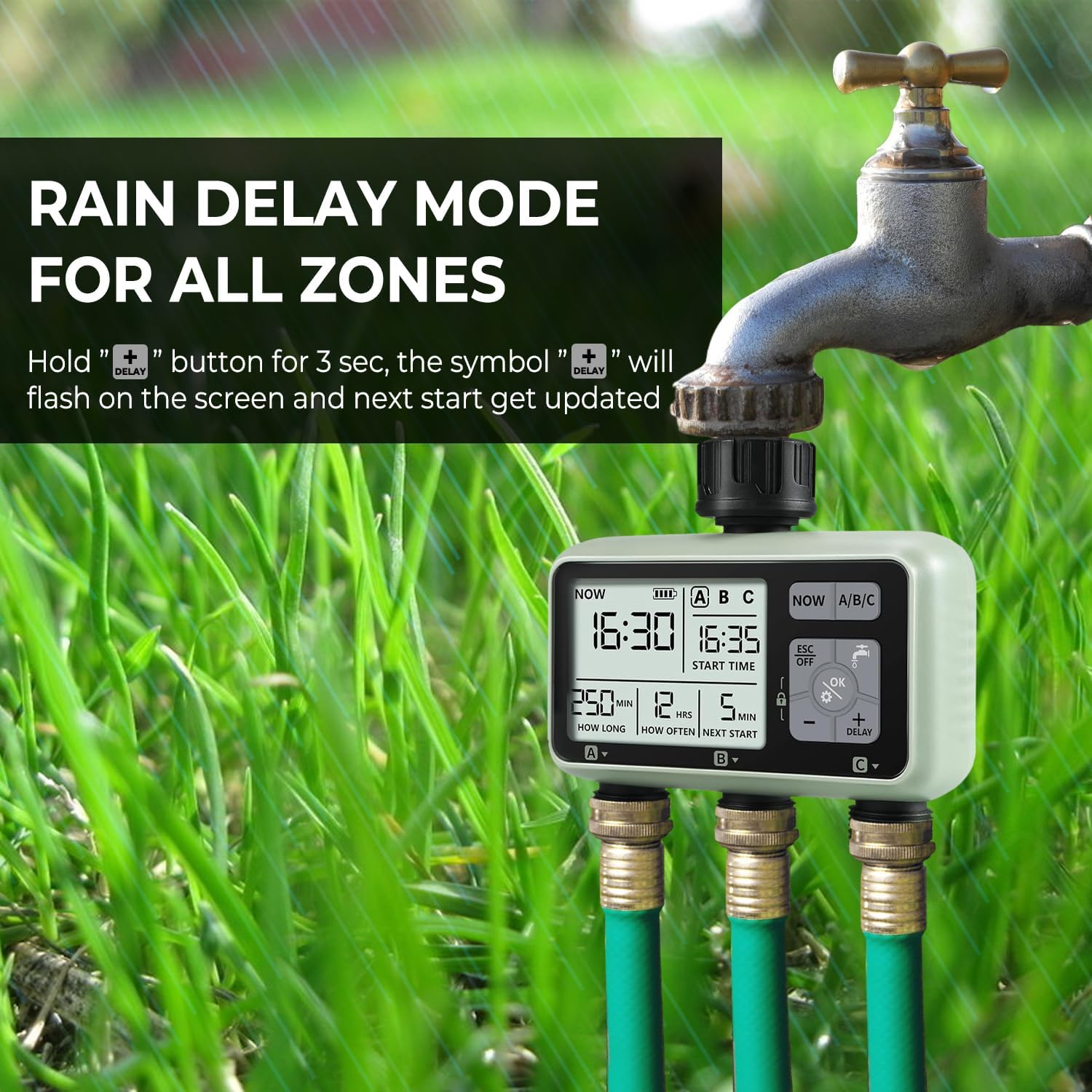
Figure 7: Rain Delay Mode Activated
5.4 Child Safety Mode
To prevent accidental changes to your watering programs, activate the child safety lock.
- To activate: Hold the OK баскычы жана - button simultaneously for 3 seconds. A lock icon will appear on the display.
- To deactivate: Hold the OK баскычы жана - button simultaneously for 3 seconds. The lock icon will disappear.
6. Техникалык тейлөө
6.1 Фильтрди тазалоо
The timer is equipped with an aluminum alloy filter to prevent debris from entering the unit. Periodically check and clean the filter to ensure optimal water flow and prevent blockages.
- Таймерди крандан бурап чыгарыңыз.
- Remove the filter screen from the inlet.
- Топтолгон калдыктарды кетирүү үчүн чыпканы агын суунун астында чайкаңыз.
- Таза чыпканы кайра салып, таймерди кранга кайра бекитиңиз.
Figure 8: Inlet Filter Screen
6.2 Батареяны алмаштыруу
When the battery indicator on the display shows low power, replace the batteries promptly to avoid interruption of watering schedules. Follow the battery installation steps in Section 4.1.
6.3 Кышкы сактоо
Before the first frost, disconnect the water timer from the faucet and drain any remaining water. Store the timer indoors in a dry, frost-free location to prevent damage from freezing temperatures.
7. Кыйынчылыктарды
| Көйгөй | Мүмкүн себеп | Чечим |
|---|---|---|
| Таймер күйбөй жатат/көрсөтүлбөйт | Өлүк же туура эмес орнотулган батарейкалар. | Replace with new 1.5V 'AA' alkaline batteries, ensuring correct polarity. |
| Розеткалардан суу агып чыкпайт | Faucet is off; low water pressure; clogged filter; timer not programmed or in manual mode. | Ensure faucet is fully open. Check water pressure. Clean the inlet filter (Section 6.1). Verify program settings or activate manual watering. |
| Timer not following schedule | Incorrect program settings; rain delay active; child lock active; low battery. | Review and adjust program settings (Section 5.1). Check if rain delay is active (Section 5.3). Deactivate child lock (Section 5.4). Replace batteries. |
| Туташуулардан суу агып жатат | Loose connections; worn washers; damaged threads. | Ensure all connections are tight. Check rubber washers for wear and replace if necessary. |
| Timer runs during rain | Rain delay not activated. | Manually activate the rain delay function when rain is expected (Section 5.3). This timer does not have an automatic rain sensor. |
8. Техникалык шарттар
| Өзгөчөлүк | Деталь |
|---|---|
| Модель номери | FY#HCT-378 |
| Материал | Акрилонитрил бутадиен стирол (ABS) |
| Ingress Protection | IPX5 (Суу өткөрбөйт) |
| Inlet & Outlet Thread | 3/4" |
| Иштөө температурасы | 1°C - 45°C (34°F - 113°F) |
| Иштөө басымы | 0.05 - 0.8 МПа |
| Электр камсыздоо | 2 x 1.5V 'AA' Alkaline Batteries |
| Сугаруу узактыгы | 1 sec to 59 sec, or 1 min to 360 min |
| Сугаруу жыштыгы | 1 hour to 23 hours, or 1 day to 15 days |
| Орнотуулардын саны | 3 independent programs |
| Screen Size | 2 дюйм |
| Элемент Салмагы | 300 г |

Сүрөт 9: Продукттун деталдуу мүнөздөмөлөрү
9. Кепилдик жана колдоо
Johgee products are manufactured to high-quality standards. This product comes with a standard manufacturer's warranty against defects in materials and workmanship. For specific warranty details, please refer to the product packaging or contact your retailer.
If you encounter any issues or have questions regarding your Johgee 3 Zones Water Timer, please contact the seller or manufacturer's customer support for assistance. Provide your model number (FY#HCT-378) and purchase details when seeking support.


